Usually, no. In workplace emails and most professional messages, use sentence case: capitalize the first word of each sentence, proper nouns, official names and established acronyms. All-lowercase prose can be acceptable in a deliberately informal team channel or when an organization has documented that style, but it is a risky default for clients, managers, applications, escalations and other formal communication.
What “professional” casing means at work
Professional writing is not defined by capitalization alone. Accuracy, useful information, respectful tone, organization and timely replies matter more. Casing is still part of the signal a reader receives: it helps people see where sentences begin, recognize names and scan headings or lists.


As an Amazon Associate I earn from qualifying purchases.
The default convention used by major public-sector, technical and business style guides is sentence case. That means the first word of a sentence is capitalized, proper nouns keep their official capitalization, and ordinary words remain lowercase. It is different from title case, where many words in a heading are capitalized, and from all caps, which can be difficult to read.
Do these 3 things before closing this tab:
1Fix the driver behind crashes, sound loss and screen glitches2Repair Windows errors before they cause bigger problems3Scan for outdated or missing drivers - takes under a minuteMicrosoft’s capitalization checklist, updated January 8, 2025, gives unusually direct advice: “Don’t use all lowercase as a design choice.” Its style guide says that everything is lowercase except the first word and proper nouns, and that the first word of a new sentence should always be capitalized. The OECD Style Guide, Fourth Edition, published August 25, 2025, likewise connects correct capitalization with clarity and consistency while warning that excessive capitalization distracts from readability.
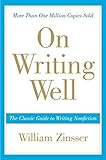
#1 Best Overall

- E-mails, memos and letters that get read—and get action
- Proposals, recommendations, and presentations that sell ideas
- Plans and reports that get things done
- Fund-raising and sales letters that produce results
- Resumes and letters that lead to interviews
Those documents establish a convention and a readability goal, not a universal penalty. There is no verified quantitative study establishing that a particular percentage of lowercase emails receive fewer replies or make a sender appear less competent. An employer, country, profession or team can set a different house style. If no such rule exists, sentence case is the safest professional baseline.
Why all-lowercase prose can be a poor default
It removes visual sentence boundaries
Capital letters at sentence starts are quick orientation points. In a paragraph, a reader can identify each new sentence without relying entirely on punctuation. Removing those signals makes dense text slower to scan, especially on a phone or when someone is reviewing a long thread under time pressure.
It hides names and official terms
Capitalization distinguishes a person, company, department, product, location or named event from an ordinary noun. In “the board approved the plan,” board is a general group. In “the Board approved the plan,” the capital may indicate a formally named body, depending on the organization’s rules. Lowercasing everything can make that distinction disappear and can make a recipient wonder whether a name was typed incorrectly.
Quick wins for a faster PC:
Repair Windows errors before they cause bigger problemsFix Now →Fix the driver behind crashes, sound loss and screen glitchesFind Drivers →It can look accidental
Readers have learned that standard business prose uses conventional capitalization. An unexplained lowercase message may therefore be interpreted as a rushed draft, a text-message habit or a failure to proofread, even when the writer intended a minimalist aesthetic. That interpretation is not inevitable, but it is an avoidable risk when the audience does not already know the writer’s style.
It conflicts with common accessibility practice
Readable structure benefits people using screen magnification, text-to-speech, mobile screens or quick visual scanning. The UK Government Commercial Agency says text casing can affect readability and defines sentence case as capitalizing the first letter of the first word while leaving other words lowercase except proper nouns. Google’s developer documentation similarly recommends standard American English capitalization and sentence case for titles, lists, captions, labels and table elements. These recommendations do not make every lowercase message inaccessible, but they support a predictable structure for a broad audience.
The sentence-case rules to use in work communication
Capitalize the first word of every sentence
Start a sentence with a capital letter after a period, question mark or exclamation mark. Apply the same rule after a colon when what follows is a complete sentence. Do not let a line break, bullet or emoji replace the capital at the start of a new sentence.
Correct: “The contract is ready. Please review section 4.”
Risky default: “the contract is ready. please review section 4.”
What’s actually slowing this PC down?
Pick the symptom - the matching free tool is one click away.
Capitalize proper nouns and official names
Use the documented form of people’s names, company names, teams, places, products, services, departments, conferences and named projects. If an organization officially writes its name in lowercase, preserve that styling when you refer to the name; capitalize the surrounding sentence normally. For example, an officially lowercase product name can appear after a capitalized sentence start without forcing the product itself into title case.
Keep ordinary words lowercase
Sentence case does not mean capitalizing every “important” noun. Words such as meeting, report, client, sales and quarter remain lowercase unless they are part of a formal name. Random internal capitals create a different readability problem and can make an email look like a slide title or a legal document.
Preserve acronyms, initialisms and technical forms
Use the established form required by your organization or the term’s official documentation: HR, API, Q4, SQL or a department’s approved abbreviation. Do not lowercase an acronym merely to make a message visually uniform. Conversely, do not invent capitals for an ordinary abbreviation that is conventionally written in lowercase.
Leave URLs and email addresses in their normal form
URLs and email addresses are commonly written in lowercase, and government writing guidance recommends keeping them that way in most cases. Copy an address exactly as supplied rather than applying sentence-case rules to it. A capitalized display label such as “Project portal” can introduce a lowercase URL on the next line.
The Tool Desk
Outbyte PC Repair FREERepair Windows errors before they cause bigger problemsFix Now →Outbyte Driver Updater FREEFix the driver behind crashes, sound loss and screen glitchesFind Drivers →Should email subject lines be sentence case?
Yes, sentence case is the strongest default for a subject line. It is readable in an inbox, aligns with modern digital style guidance and avoids the visual heaviness of title case. A subject is not a complete sentence in every case, but it still benefits from one clear initial capital and correctly styled names.
| Subject line | Assessment | Use when |
|---|---|---|
| Decision needed on Q4 hiring plan | Preferred default | No special house style is documented |
| decision needed on q4 hiring plan | Too casual for many workplaces | Only when an informal channel has explicitly adopted lowercase |
| Decision Needed on Q4 Hiring Plan | Possible house-style alternative | Your employer requires title case for subjects |
| Re: API access for Jordan Lee | Correct mixed convention | An email client supplies “Re:” and the subject contains an acronym and a name |
Make the subject specific rather than relying on capitalization to create urgency. “Review requested: vendor contract by Thursday” tells the recipient what action and deadline are involved; capitalizing every word does not.
How casing should change by channel and audience
The right choice depends on formality, audience, readability, house style and the chance that a casual visual signal will be mistaken for carelessness. The following is a practical default, not a universal law.
| Channel or audience | Recommended casing | Reason |
|---|---|---|
| Client or customer email | Sentence case | The relationship may be new, and the message represents the organization |
| Executive update or escalation | Sentence case | Fast scanning and unambiguous names or decisions matter |
| Job application or cover letter | Sentence case | It is formal, external communication where unexplained informality is risky |
| Support ticket or incident note | Sentence case, with approved acronyms | Clear handoffs and searchable names are more useful than a stylized look |
| Internal project email | Sentence case unless a documented house style says otherwise | Colleagues still need a predictable, accessible record |
| Close team chat | Team convention | Lowercase may be acceptable if everyone understands that it is intentional |
| Public documentation or help content | Sentence case and official names | Readers have different backgrounds, devices and accessibility needs |
Do not assume that an internal channel is automatically informal. A message may be copied into a ticket, forwarded to a client or used as an audit record. If that is plausible, write it in the same clear form you would use in an email.
How to make an all-lowercase email professional
Editing does not require rewriting the entire message. Work from the highest-impact signals to the smallest consistency checks.
Rank #3
- Confirm the audience and channel. If the recipient is external, senior, unfamiliar or part of a formal process, choose sentence case. If a team has a written lowercase convention, verify that it applies to this message and audience.
- Capitalize every sentence start. Search visually from the greeting through the sign-off. Check sentences after abbreviations, numbered items and quoted text as well as ordinary paragraphs.
- Restore proper nouns. Compare names of people, companies, teams, locations, products, services, departments and events with the official spelling in your directory or source document.
- Check acronyms and technical terms. Restore forms such as HR, API or Q4 when those are the approved forms. Do not capitalize a term merely because it sounds important.
- Review the subject line separately. Use sentence case and include the requested action, topic or deadline. Correct any lowercased names or acronyms.
- Inspect lists and headings. Give each bullet a consistent grammatical form. If a bullet is a full sentence, capitalize it and end it consistently; if it is a fragment, follow the team’s punctuation rule. Use sentence case for headings unless a documented style guide says otherwise.
- Preserve addresses and official lowercase names. Do not alter URLs or email addresses. Keep a brand or product’s official lowercase styling while capitalizing the rest of the sentence.
- Read the result aloud or use a preview. Look for run-on sentences, missing punctuation, unexplained abbreviations and names that still look inconsistent. Casing cannot repair unclear content, so make the requested action and deadline explicit.
Email anatomy: a professional casing pass
Greeting
Capitalize the person’s name exactly as they use it: “Hi Jordan,” or “Hello Dr. Patel,”. If you are unsure of a person’s preferred title or spelling, check the directory or prior correspondence instead of guessing. A lowercase greeting can make the opening look like a text message before the reader reaches the substantive content.
Opening sentence
State why you are writing and capitalize the first word: “I’m sending the revised project timeline.” Avoid opening with a lowercase fragment such as “quick question” unless your team has explicitly adopted that informal style.
Body paragraphs
Use short paragraphs for separate ideas. Capitalize sentence starts, names and acronyms, and keep ordinary nouns lowercase. If a paragraph contains several actions, convert them into a numbered list so the recipient can see the sequence.
Lists and headings
Use sentence case for headings such as “Next steps” and “Files for review.” Do not turn every word into a capitalized title unless the organization’s style guide requires title case. Consistency within one message is more important than decorative capitalization.
Sign-off
Capitalize the closing and the sender’s name: “Best,” followed by “Sam.” A lowercase sign-off is unlikely to cause misunderstanding by itself, but matching the rest of the message keeps the email intentional.
When all lowercase is acceptable
Lowercase is not forbidden. It can be a legitimate choice when the context makes the convention clear and the message will not be mistaken for a formal record.
- Personal texting: Friends may use lowercase as a shared voice or aesthetic.
- An explicitly informal team channel: A close group may agree that lowercase is part of its chat style.
- Officially lowercase names: Reproduce a person’s, product’s or organization’s documented styling rather than “correcting” it.
- Addresses and URLs: Keep email addresses and web addresses in their normal lowercase form.
- Interface or design constraints: A product interface may use lowercase labels as a deliberate visual system, provided the surrounding content remains understandable and the choice is documented.
These exceptions do not automatically transfer to every channel. A lowercase chat message copied into a customer email, board packet, application or incident report should be edited to the receiving context.
House style, culture and multilingual teams
Company guidance takes priority over a generic rule when it is current, accessible and consistently applied. Look for the organization’s writing guide, communications handbook, product-content rules or instructions from the person who owns the channel. If the guide requires title case for subjects, follow it; if it permits lowercase in a named chat, keep that exception local.
Rank #4
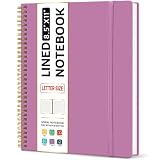
- Large Spiral Notebook: Measuring 8.5" x 11" with standard 7mm college-ruled lines, this large notebook offers ample space for detailed note-taking, journaling, and task management. Its spacious pages are perfect for capturing ideas, organizing thoughts, and managing projects—whether at work, school, or in your home office.
- Premium No-Bleeding Paper: Crafted with 100gsm smooth paper, our lined notebook ensures a luxurious writing experience without ink bleed-through. Ideal for gel pens, fountain pens, ballpoints, and highlighters. Each line flows evenly, allowing you to focus on creativity and organization without interruptions.
- Versatile for Multiple Uses: Designed for multiple purposes, Taja spiral notebook meets the needs of professionals, students, writers, and creatives alike. It’s ideal for taking meeting notes, class lectures, and project plans, or organizing Bible studies and brainstorming sessions. A perfect all-in-one tool for work and personal productivity.
- Customizable Pages & Table of Contents: Includes 4 table of contents pages to keep your notes organized and easy to reference. Contains 50 sheets/100 lined pages that allow you to write on both sides, each page allows you to customize page numbers and dates, making it the ultimate notebook for you.
- Practical Design for Long-Lasting Use: Built for long-lasting use, our journal notebook features a strong double-wire spiral binding for smooth page-turning and a lay-flat design for ease of writing. The elastic closure strap keeps your pages secure and tidy, waterproof plastic cover keep pages clean. Slim and lightweight, it fits seamlessly into briefcases, backpacks, or tote bags, making it the perfect companion for work, school, or travel.
When a team includes people working in different languages or countries, sentence case is usually easier to explain than an aesthetic preference. Ask which language and naming conventions apply, preserve official names exactly and avoid assuming that English capitalization rules map perfectly to another language. The practical goal is a shared, readable convention, not enforcing one country’s habits where they do not fit.
If no guide exists, document a small rule for the team: sentence case for email, tickets, documents and external messages; lowercase permitted only in a named informal chat; official names and acronyms preserved; URLs and email addresses copied exactly. A written rule prevents one person’s casual habit from becoming another person’s unexpected standard.
Independent reader supportYour contribution helps us test, update, and keep practical guides available for everyone.Common problems and fixes
“I want to sound friendly, not stiff.”
Friendliness comes from wording, not from removing capitals. Use a warm greeting, a concise explanation and a clear offer to help while retaining sentence case. “Hi Jordan, could you review the draft when you have a chance?” sounds approachable without making the reader decode lowercase sentences.
“Our startup uses lowercase everywhere.”
Separate the company’s visual identity from one-to-one communication. If the official brand name is lowercase, preserve that name. For external emails, contracts, support cases and formal records, ask whether the lowercase convention is actually required or merely used in marketing. When in doubt, choose the form that a recipient outside the company can scan immediately.
“The recipient writes in lowercase, so should I mirror them?”
Match warmth and brevity, not necessarily every mechanical choice. A colleague’s lowercase chat style is not evidence that a client, manager or shared document expects it. Keep sentence case in the message that creates the formal record unless the recipient has clearly requested another convention.
“Autocorrect changed a name.”
Run a final proper-noun check after using automatic capitalization. Autocorrect can capitalize an ordinary word that should be lowercase or lowercase an official name. Compare names and product terms against the source of record before sending.
“The email is already sent.”
Do not send a confusing correction solely because of casing. If the content is clear, leave it. For an important external message, send a concise follow-up only when a name, acronym or sentence boundary was genuinely ambiguous; otherwise use sentence case in the next communication.
PC Slower Than It Used to Be?
A free scan shows the junk files, broken settings and background clutter dragging Windows down - then fixes them in one click.Free scan · Windows 10 & 11Crashes, No Sound, or Screen Glitches?
Random freezes, missing sound and display glitches usually trace back to one bad driver. Find and replace yours safely.Free scan · under a minuteBefore-and-after examples
Client update
All lowercase: “hi jordan, i’m sending the revised project timeline. the design review is scheduled for thursday, and microsoft’s accessibility checklist is attached.”
Professional default: “Hi Jordan, I’m sending the revised project timeline. The design review is scheduled for Thursday, and Microsoft’s accessibility checklist is attached.”
The revised version restores sentence starts, the person’s name, the day name and the product name. It does not capitalize ordinary words such as project or design review.
Request with a deadline
All lowercase: “can you approve the api access request by friday? hr needs confirmation before the q4 onboarding session.”
Recommended Free Tools
Professional default: “Can you approve the API access request by Friday? HR needs confirmation before the Q4 onboarding session.”
The edit preserves the established forms API, HR and Q4 while making the request and deadline easy to scan.
Short internal chat
“i pushed the fix — can someone test?” may be acceptable in a close team’s explicitly lowercase chat. The same sentence in an incident record should be “I pushed the fix. Can someone test?” because the record may be read later by people outside that chat.
What style guidance does—and does not—prove
Official guidance from Microsoft, the OECD, the UK Government Commercial Agency, the U.S. General Services Administration, Google and Oregon’s Department of Administrative Services converges on sentence case, proper-noun capitalization and readability. EBSCO’s workplace-writing instruction describes all-lowercase writing as difficult to read and highly unprofessional in business contexts. Together, these sources support a strong convention for professional communication.
Free tools Windows power users keep installed
One-click scans. No signup required.
They do not prove that every lowercase email will be judged negatively, nor do they establish a universal effect on response rates, promotions or perceived competence. Workplace cultures differ, and a documented local exception can be perfectly professional. Treat sentence case as a risk-reducing default rather than a claim that capitalization determines the quality of a relationship.
A quick send checklist
- Is the audience external, senior, unfamiliar or part of a formal process? If yes, use sentence case.
- Does every sentence begin with a capital letter?
- Are people, companies, teams, places, products, departments and events written with their official capitalization?
- Are acronyms and initialisms in their approved forms?
- Is the subject line specific and in sentence case unless a house style says otherwise?
- Are headings and lists consistent and easy to scan?
- Did you leave URLs and email addresses in their normal form?
- Did you preserve an officially lowercase name without lowercasing the surrounding sentence?
- Could the message be copied into a ticket, document or client thread? If so, remove chat-only styling.
- Is the requested action, owner and deadline clear? Casing cannot substitute for those details.
The practical verdict
Use sentence case for work emails, client communication, applications, escalations, tickets and documents. Reserve all-lowercase prose for personal writing or a clearly documented informal convention, and keep official lowercase names, URLs and email addresses as they are. This approach follows the dominant guidance, protects readability and leaves room for a team’s deliberate exceptions without making casual styling the default.
Quick Recap
Product prices and availability are accurate as of the date/time indicated and are subject to change. Any price and availability information displayed on Amazon at the time of purchase will apply.

