Free tools Windows power users keep installed
One-click scans. No signup required.
For most filers choosing a system now, use IRIS. Its free Taxpayer Portal handles manual entry and CSV uploads for smaller batches, while IRIS Application to Application (A2A) supports software-driven, high-volume filing. FIRE remains usable during the current transition for some returns, but the IRS plans to retire it after January 1, 2027. Anyone filing tax-year 2026 information returns in the 2027 season should plan on IRIS.
The exact answer still depends on your tax year, form, volume and workflow. Tax-year 2025 returns processed in 2026 may be filed through either FIRE or IRIS under IRS working-group guidance. Form availability also differs by system and year, so verify your combination in the IRS form-year tables before transmitting.
As an Amazon Associate I earn from qualifying purchases.
IRIS vs. FIRE at a glance
| Filing situation | Best practical route | Why | Important check |
|---|---|---|---|
| Small or moderate batch; you can type data or prepare a CSV | IRIS Taxpayer Portal | Free, browser-based, no special software, and up to 100 returns at a time | Confirm the form and tax year are listed for the portal |
| Large batch, accounting-system integration or custom filing software | IRIS A2A | Designed for software transmissions of thousands of returns, with a 100 MB transmission limit | Obtain an A2A TCC, API Client ID and schema package, then pass Assurance Testing System tests |
| Tax-year 2025 returns processed in 2026 with an established FIRE workflow | FIRE or IRIS | IRS working-group guidance permits either system for this overlap | Do not assume the same choice remains available for tax year 2026 |
| Tax-year 2026 returns filed in the 2027 season or later | IRIS | The IRS says current FIRE users must transition and IRIS is planned as the only intake system after January 1, 2027 | Recheck IRS announcements and deadlines before filing |
| Form 1099-DA | IRIS | FIRE does not accept this form; IRIS lists it for tax year 2025 in processing year 2026 | Check the current IRIS form-year table |
The IRS describes the IRIS Taxpayer Portal as free and available to businesses of any size. Its A2A guidance covers software-based filing. FIRE details and retirement notices are on the IRS FIRE page.
Windows Errors? Fix Them Before They Spread
Repair common Windows errors and clear accumulated junk for a smoother, more stable PC - no reinstall needed.Free scan · no reinstallOutdated Drivers Are Slowing You Down
One free scan finds every outdated or missing driver and matches the right update for your exact hardware.Free scan · exact hardware matchWhy IRIS is the forward-looking choice
IRIS is not just another name for FIRE. It is the IRS platform intended to replace FIRE for electronic information-return intake. The IRS’s August 24, 2026 reminder says, “Current FIRE users must transition to IRIS to file tax year 2026 information returns during the 2027 filing season.” The planned end state is IRIS as the only information-return electronic filing system after January 1, 2027, including current-year, prior-year and correction returns.
#1 Best Overall

- IT IS A COMPLETE INCOME TAX FILING FORMS - Report payments FAST, RELIABLE and EASY way with our updated NEC Laser form kit! This kit has everything you need. You can report your rent, medical, royalties or contract payments. It has 9 of A, B copies. 17 of C copies, 3 of Transmittal 1096 - NEC forms.
- A GREAT VALUE KIT - We are adding EXTRA VALUE to your set of 1096 NEC forms for 2026, including in your order 3 FREE transmittal 1096 forms, offered as a UNIQUE BONUS! Get EVERYTHING you need for your tax filing needs in a tremendous value ALL-INCLUSIVE 2026 1099 NEC forms 2026
- DUAL LASER TAX FORMS SET - (4-Part state) for the year 2026 to meet the needs of 25 Individuals. It is designed in compliance with the government requirements and is valid, IRS approved form 1099 set.
- A GREAT COMPATIBILITY SET - This 2026 1099 NEC form kit is compatible with both Inkjet and Laser printers as well as Quickbooks software and it is an ALL-INCLUSIVE kit of Federal Copy A, Copy B, Copy C and 1096 NEC, everything you need for your peace of mind in reporting payments.
That future matters even if FIRE still works for a filing you are preparing today. Building a new FIRE-only process creates a second migration project when the system closes. Starting in IRIS lets you learn the account, authorization and data-validation steps before the mandatory transition. An existing FIRE process can remain practical for the permitted tax-year 2025 overlap, but it should be treated as a short-term exception rather than a long-term platform decision.
Transition dates can change, so check the IRS transition reminder and the live FIRE page before a deadline.
Choose between the two IRIS filing routes
IRIS Taxpayer Portal: manual entry or CSV
The Taxpayer Portal is the straightforward option when a person can review each return in a web interface or produce a correctly formatted CSV. The IRS says it supports manual entry and CSV upload, allows up to 100 returns at a time, lets you download payee copies and provides records of filed returns. It requires no special filing software.
Do these 3 things before closing this tab:
1Scan for outdated or missing drivers - takes under a minute2Clear out junk files and repair common Windows errors3Fix the driver behind crashes, sound loss and screen glitches- Best fit: a modest number of 1099s, occasional filing, or an organization without an integrated information-return application.
- Advantages: no software purchase, no custom API build and a browser workflow that can be used by businesses of any size.
- Limits: a 100-return batch is not the same as unlimited volume; repeated manual work can become error-prone as the number of payees grows.
- Before uploading: verify that the exact form, tax year and processing year are supported in the portal. IRIS availability is organized by year and method, not by a blanket promise that every 1099 variant is accepted.
A CSV can reduce typing, but it does not remove the need to validate taxpayer identification numbers, amounts, addresses, withholding and correction indicators. Keep the portal’s confirmation and downloaded records with your filing documentation.
IRIS A2A: software-to-IRS transmissions
A2A (Application to Application) is for a third-party product or software you develop that sends information returns directly to IRIS. IRS guidance describes transmissions of up to thousands of returns and a maximum file size of 100 MB per transmission. It is therefore the better architecture for recurring, high-volume filing or for a workflow that already stores payer and payee data in business software.
A2A is a technical implementation, not a faster version of portal data entry. The IRS lists several prerequisites:
- Apply for an IRIS A2A Transmitter Control Code (TCC).
- Obtain the API Client ID used by your application.
- Install the applicable IRIS schema package and build files that conform to it.
- Send successful transmissions through the IRS Assurance Testing System (ATS) before production filing.
- Configure your software to capture acknowledgments, accepted records, rejected records and correction workflows.
Ask your software provider specifically whether it supports IRIS A2A for the form and tax year you need. “Supports 1099s” is too broad: different form variants and years can have different availability and schema requirements.
When FIRE can still be used
FIRE is the existing IRS electronic filing system for many information returns, including many forms in the 1099 family. Unlike the portal route, the IRS says software is required for FIRE. FIRE does not accept Form 1099-DA.
Rank #2
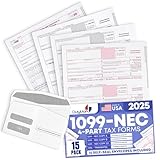
- Premium Value Pack: This comprehensive bundle includes 10 Forms of 4-part 1099 NEC tax forms updated for 2026, along with 3 1096 transmittal forms and 10 Security self-seal envelopes for secure mailing
- IRS & US Government Standard: These 1099 NEC tax forms meet all US Government and IRS requirements and standards, allowing you to file and mail your taxes with confidence and compliance
- Works With Tax Software: These forms are compatible with Quickbooks and TaxRight Software (Formerly Known as TFP) and other accounting and tax software, with printed words and fields that automatically align with the boxes of your preferred program
- Seamless Printing: These 1099 NEC tax forms are printed on high-quality paper that feeds smoothly through your inkjet or laser printers, minimizing paper jams and ink blots during your printing operations
- Small Business Tax Solution: Keep your offices running smoothly through tax season with a reliable supply of 1099 NEC tax forms for reporting payments made to non-employees and independent contractors
For tax-year 2025 returns processed in 2026, an IRS Working Group Q&A dated January 14, 2026 says filers may use either FIRE or IRIS. That is a specific overlap rule. It does not establish that both platforms will remain available for tax-year 2026 returns filed in the 2027 season.
If you already transmit through FIRE during the overlap, confirm that your software is still authorized for the filing, use the current IRS specifications and begin an IRIS transition in parallel. A FIRE Transmitter Control Code does not automatically give you IRIS access; the applications are distinct.
FIRE retirement dates you need on your calendar
| Date | IRS transition event | Practical consequence |
|---|---|---|
| November 1, 2026 | Last day to file test information returns through the FIRE Trading Partner Test System | Complete any remaining FIRE test transmissions before this date |
| November 9, 2026 | Last day to change existing Information Returns TCC applications | Submit required TCC changes before the cutoff |
| November 19, 2026, at 3 p.m. Eastern Time | Last day to file information returns through FIRE | Do not plan a FIRE production transmission after the stated time |
| After January 1, 2027 | IRS says IRIS will be the only information-return electronic filing system | Use IRIS for current-year, prior-year and correction filings, subject to current IRS instructions |
The dates come from the IRS’s August 24, 2026 reminder. They are time-sensitive; verify them again when scheduling your filing.
The Tool Desk
Outbyte Driver Updater FREEFix the driver behind crashes, sound loss and screen glitchesFind Drivers →Outbyte PC Repair FREEClear out junk files and repair common Windows errorsFree Scan →Do not confuse tax year with processing or filing year
IRS transition language uses more than one year, which can make a valid rule appear contradictory. A tax year identifies the payments or transactions being reported. A processing or filing year identifies when the return is transmitted and handled by the IRS.
- TY2025/PY2026: the January 14, 2026 working-group guidance permits either FIRE or IRIS for these returns.
- TY2026 filed during the 2027 season: the IRS says current FIRE users must move to IRIS, with IRIS planned as the sole intake system after January 1, 2027.
When checking eligibility, write down both values—for example, “Form 1099, tax year 2025, processing year 2026”—and match them to the IRS table. Never choose a system solely because it accepted a similarly named form in an earlier year.
Form coverage is not identical
There is no universal “all 1099s” answer. The IRS organizes IRIS support by tax year and filing method. For processing year 2026, the IRIS list includes Form 1099-DA among supported tax-year 2025 forms and lists a broader set of 1099 variants and other information returns. Some additional forms are marked as Taxpayer Portal only.
FIRE does not support Form 1099-DA. That makes IRIS the required choice for that form when the relevant tax-year table shows it available. For every other form, open the current IRIS form-year list and the IRS information-return filing page. Check all three fields:
- The exact form number and suffix.
- The tax year being reported.
- The available filing method—Taxpayer Portal, A2A or another listed route.
Prior-year and correction filings deserve the same check. Transition guidance has not guaranteed that every correction scenario will work identically when the original return was filed through FIRE. Follow the current IRS correction instructions for the original system and year.
Rank #3
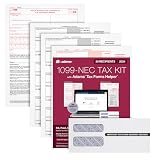
- Get the 3 up 1099 NEC forms you need to report nonemployee compensation for up to 30 recipients; includes 3-part 1099 NEC tax forms, peel and seal envelopes, 3 1096 summary reports & access to Helper
- Use Form 1099 NEC to report nonemployee compensation to the IRS and your recipients; the NEC is an IRS continuous-use form with a fill-in-the-year date field good for multiple tax years
- White 3-Part 1099 NEC forms print 3 to a page on 10 micro perforated sheets per copy with copies A, B, 1 & 2; includes scannable red ink copies required for paper filing; IRS has removed Copy-C
- Includes access to Adams Tax Forms Helper— with QuickBooks Online integration; fill forms faster, eFile and much more; share employee/recipient forms with PDF File Share; fees apply for PDF File Share
- Mail or eFile your 2024 1099-NEC to the IRS and furnish copies to your recipients by January 31, 2025; IRS eFile law! If you're filing 10 or more returns, you must eFile; easily eFile on the Helper
Understand the 10-return e-file mandate
The IRS generally requires electronic filing when a person must file 10 or more covered information returns in a calendar year. The count is aggregated across almost all covered information-return types; it is not a separate 10-return limit for each 1099 category. The former 250-returns-per-type threshold no longer describes the general rule.
If you have fewer than 10 covered returns, the IRS says you may generally file electronically or on paper, subject to form-specific and other applicable requirements. Voluntarily using IRIS can still be sensible because it provides electronic records and avoids building a paper process you will have to replace when your volume increases.
Read the current Topic 801 guidance for exceptions and covered-return details. Count all applicable information returns before deciding that a small number of one form keeps you below the threshold.
What’s actually slowing this PC down?
Pick the symptom - the matching free tool is one click away.
Get the right TCC before you start
An electronic filer needs a Transmitter Control Code. The IRS says a current application can take up to 45 days to process. Apply early enough to allow identity, authorization and testing steps, especially if you are moving from FIRE to A2A.
FIRE and IRIS TCC applications are separate. A FIRE TCC alone does not complete IRIS setup. Current FIRE users transitioning to the new platform should submit an IRIS TCC application and follow the IRS transition instructions. The IRS’s e-file information returns page links the current application and account requirements.
For A2A, plan additional time for the API Client ID, schema implementation and ATS transmissions. For the Taxpayer Portal, plan time to verify your account and prepare a clean CSV or manually entered batch before the filing deadline.
A practical decision process
- Identify the reporting year. Record the tax year and the processing or filing year.
- List every form. Include all information-return types, not only forms that begin with “1099.”
- Check the IRS form-year table. Confirm the form is accepted by the chosen IRIS method or by FIRE during the permitted overlap.
- Count the aggregate volume. Ten or more covered returns generally triggers e-filing; do not count each form type in isolation.
- Select the workflow. Choose the Taxpayer Portal for manual or CSV batches up to its stated 100-return capacity; choose A2A for integrated or high-volume software filing.
- Confirm credentials. Obtain the correct IRIS TCC and, for A2A, API Client ID, schemas and ATS approval.
- Schedule around the transition. If the return is TY2026 for the 2027 season, design for IRIS rather than starting a new FIRE process.
- Preserve evidence. Retain acknowledgments, accepted and rejected records, payee copies and correction details according to your recordkeeping policy.
How to file through the IRIS Taxpayer Portal
The IRS does not require special software for the portal. The exact screen labels can change, so use the current portal instructions, but the work normally follows this sequence:
- Confirm that your TCC and IRIS account are active.
- Open the Taxpayer Portal from the IRS IRIS information-return page.
- Select the applicable tax year and form type after checking the IRS availability table.
- Choose manual entry or prepare the portal’s required CSV structure.
- Enter or upload payer and recipient information, amounts, withholding and other required fields.
- Review validation messages and correct rejected rows before submission.
- Transmit the batch and save the IRS confirmation or acknowledgment.
- Download payee copies and retain the filed-return record.
Use the portal’s 100-return capacity as an operational limit, not a promise that every form can be mixed in one batch. If your data exceeds that capacity or needs recurring automation, evaluate A2A instead of splitting an unwieldy manual process.
Rank #4

- Premium Value Pack - Get more value for your money! This premium bundle includes 10 sets of 4-part 1099 NEC tax forms updated for 2026 . We've also included matching 10 standard self-seal envelopes.
- IRS & US Government Standard: Our 1099 NEC tax forms meet all US Government and IRS requirements and standards, allowing you to file and mail your taxes with ease and peace of mind
- Works With Tax Software: These forms are compatible with Quickbooks and TaxRight (Formerly TFP) accounting and tax software, with printed words and fields that automatically align with the boxes of your preferred program
- Seamless Printing: Our 1099 NEC tax forms are printed on high-quality paper that feeds smoothly through your inkjet or laser printers, preventing paper jams and ink blots from interrupting your operations
- Essential For Small Businesses: Keep your offices running smoothly through tax season with a reliable supply of our 1099 NEC tax forms for payments made to non-employees and independent contractors
How to prepare for IRIS A2A
- Map your data. Match each field in your accounting or payroll system to the current IRIS schema for the exact form and year.
- Apply for the A2A TCC. Allow up to 45 days for TCC processing according to the IRS.
- Configure authentication. Obtain the API Client ID and implement the IRS-required connection and security settings.
- Build validation and logging. Your software should identify malformed records before transmission and preserve the IRS response for every batch.
- Use ATS. Complete successful Assurance Testing System transmissions before sending production files.
- Respect transmission limits. Keep each transmission within the IRS-stated 100 MB limit, even if your total annual volume is much larger.
- Test exception paths. Include rejected records, corrected forms, voids and resubmissions in your internal test plan, then follow the current IRS instructions for the applicable scenario.
A2A can handle thousands of returns, but the IRS figure describes transmission capability, not a guarantee that your software, network or internal review process can safely process that volume in one run. Batch according to your controls and the schema’s current requirements.
Common mistakes and recovery steps
Starting a new FIRE workflow for TY2026
Problem: You invest in software or testing for a platform scheduled to retire. Fix: Design the process in IRIS now. Use FIRE only where the IRS still permits it during the overlap.
Assuming a FIRE TCC works in IRIS
Problem: The account or transmission is rejected because the credentials are for a different system. Fix: Apply for the appropriate IRIS TCC and complete the required portal or A2A setup.
Counting only one kind of 1099
Problem: You conclude that you are under the e-file threshold by counting each form type separately. Fix: Aggregate almost all covered information returns for the calendar year, as described in Topic 801.
Assuming every system accepts every 1099
Problem: A form is unavailable or rejected, especially Form 1099-DA in FIRE. Fix: Check the exact form, tax year and filing method in the current IRS tables before preparing the file.
Confusing tax year and processing year
Problem: You apply a TY2025/PY2026 overlap rule to a TY2026 filing. Fix: label both years in your calendar and verify the applicable transition notice.
Leaving corrections until after the shutdown
Problem: A correction involves a return originally transmitted through FIRE, but the platform is no longer available. Fix: Keep the original acknowledgment and follow the current IRS correction instructions for returns filed during the transition; do not assume an identical workflow without checking.
Quick wins for a faster PC:
Repair Windows errors before they cause bigger problemsFix Now →Scan for outdated or missing drivers - takes under a minuteDriver Scan →Bottom line for different filers
- Occasional or smaller-volume filer: Start with the free IRIS Taxpayer Portal, using manual entry or CSV, after confirming your form and year.
- High-volume or integrated filer: Use IRIS A2A and begin TCC, API, schema and ATS work well before production.
- Existing FIRE filer handling TY2025/PY2026: FIRE or IRIS is allowed under the stated overlap, but use the time to migrate.
- TY2026 filer in the 2027 season: Plan for IRIS; the IRS’s stated transition requires current FIRE users to move.
- 1099-DA filer: Use IRIS, because FIRE does not support that form.
Recheck the IRS system status, form-year table and deadline notices immediately before transmitting. The platform decision is becoming simpler—IRIS is the destination—but the correct route within IRIS still depends on your volume, software and exact return.
Quick Recap
Product prices and availability are accurate as of the date/time indicated and are subject to change. Any price and availability information displayed on Amazon at the time of purchase will apply.

