Quick wins for a faster PC:
Fix the driver behind crashes, sound loss and screen glitchesFind Drivers →Repair Windows errors before they cause bigger problemsFix Now →Scan for outdated or missing drivers - takes under a minuteDriver Scan →India ki shopping websites par infinite-scroll results ko baad mein dekhne ka sabse bharosemand tareeqa hai har pasand aaye product ka alag page kholkar use retailer ki wishlist, kisi cross-store wishlist tool, ya apni URL list mein save karna. Amazon.in ke liye Amazon Lists ek native option hai. Puri scrolling feed ko ek click mein capture karne ka bharosa na karein: yahan diye gaye tools product ya link save karne ki baat karte hain, har infinite-scroll result ko archive karne ki nahin.
Infinite-scroll feed aur saved products mein farq
Infinite scroll mein naye results tab load hote rehte hain jab aap neeche scroll karte hain. Isliye sirf search-results page ka bookmark rakhna kaafi nahin ho sakta: baad mein wahi query kholne par products ka order ya loaded results badal sakte hain. Agar kisi product ko dobara dhoondhna hai, uska individual product URL save karein. Agar poori feed ka record chahiye, to yeh alag kaam hai—neeche diye gaye wishlist tools ke liye aisa all-results capture documented nahin hai.
As an Amazon Associate I earn from qualifying purchases.
Product ko save karne ka seedha workflow
- Search results scroll karte hue jis item mein dilchaspi ho, uska product page kholen.
- Product ko retailer ki apni wishlist ya list mein add karein, agar woh option maujood ho.
- Agar alag-alag stores ke products ek jagah rakhne hain, to cross-store wishlist extension ya link-paste service dekhein; install se pehle site compatibility, permissions aur privacy details check karein.
- Fallback ke taur par product URL browser bookmarks ya apni note/list mein paste karke rakhein. URL ke saath chhota note, jaise size ya rang, likh dena baad mein pehchanne mein madad karta hai.
Yeh product-level saving workflow hai, kisi ek button se har loaded ya future-loaded result collect karne ki guarantee nahin. Amazon India ki Lists guidance Lists ko baad mein kharidne ke liye items organize karne ka tareeqa batati hai.
Kaunsa saving option chunna chahiye?
| Option | Listing ya provider kya kehta hai | Kab upyogi ho sakta hai |
|---|---|---|
| Amazon Lists | Amazon India ke mutabik lists items organize kar sakti hain, default taur par private hoti hain aur share ki ja sakti hain. Amazon Shopping app listed products par offers ki notifications de sakti hai. (Amazon India) | Jab aapko Amazon.in ke andar hi products rakhne hon ya list share karni ho. |
| BucketLinks | Chrome listing one-click save aur title, price, image aur URL capture karne ka dawa karti hai; major shopping sites support karne ki baat bhi hai. (Chrome Web Store listing) | Cross-store list chahiye to apni target site par support aur permissions pehle jaanchein. |
| Wish Catcher | Chrome listing Amazon, Flipkart, eBay, Myntra aur anya stores se saving ka zikr karti hai. (Chrome Web Store listing) | Site coverage, organization/search options, permissions aur export ya backup ki maujooda sthiti verify karne ke baad. |
| ShopCart | Listing ise Amazon product-list extension batati hai, amazon.in support aur JSON import/export ke saath. (Chrome Web Store listing) | Amazon ke liye list portability chahiye; ise universal Indian-store solution na samjhein. |
| WishList.com | Service product link paste karke save karne aur browser extension ka option batati hai. (WishList.com) | Jab aap manual URL entry ko extension se zyada seedha rakhna chahte hon. |
| Save to WishFlow | Mozilla listing Android Firefox extension ke roop mein Amazon, Flipkart aur Myntra ka naam deti hai; requested website access aur data categories bhi dikhati hai. (Mozilla Add-ons listing) | Mobile Firefox par use karne se pehle listed access, data handling aur privacy policy padh lein. |
Yeh descriptions un services ya marketplace listings ke apne claims hain, independent compatibility test nahin. Extensions ki site support aur permissions badal sakti hain; install karne se pehle live listing dobara dekhein.
#1 Best Overall

- Full HD IPS Display with Wide Viewing Angles: Enjoy crisp and detailed visuals on a 22” (21.5” viewable) Full HD 1920 x 1080 IPS display, delivering accurate colors and 178°/178° wide viewing angles for consistent image quality from almost any angle.
- Smooth Performance with 120Hz & 1ms MPRT: Experience smooth motion with an overclockable 120Hz refresh rate and 1ms MPRT response time, reducing motion blur and delivering sharp visuals for fast-paced content and casual gaming.
- Adaptive-Sync for Tear-Free Gaming: Adaptive-Sync technology ensures fluid, artifact-free performance at varying frame rates, helping eliminate screen tearing and stuttering for smoother gameplay.
- Eye Comfort for Everyday Work: Designed for long working hours with LowBlue Mode, Flicker-Free technology, and EasyRead mode, helping reduce eye strain and provide a more comfortable, paper-like reading experience.
- Ultra Slim Bezel & Flexible Setup: The Ultra Slim Bezel design creates a modern, seamless look ideal for multi-monitor setups. VESA mount compatibility (100x100mm) and HDMI connectivity provide easy and flexible installation.
Extension install karne se pehle kya check karein
- Target website: listing mein naam hone ke bawajood apne specific store aur product pages par current support verify karein.
- Permissions: samjhein extension kaunse websites ka data padh ya badal sakta hai. Sirf zaroori permissions dena behtar hai.
- Data handling: privacy policy mein dekhein ki saved URLs, product details ya account data kahan store hota hai aur kya sync hota hai.
- Backup/export: agar collection important hai, export/import ya doosri copy ka tareeqa pehle pata karein. ShopCart ki listing JSON import/export ka zikr karti hai, lekin uska scope Amazon-focused hai.
- Mobile use: phone par browser-extension support desktop se alag ho sakta hai. WishFlow ki Mozilla listing Android Firefox ka naam leti hai; apne browser version aur current listing ko check karein.
Or skip the browser setup
Agar aapko shopping result ya product page ka visual record chahiye, ScreenshotNeo ek website screenshot API hai. Yeh wishlist ka replacement nahin: screenshot URL ko baad mein kholne layak product list mein tabdeel nahin karta. Yeh individual page ka image ya PDF capture karta hai.
cURL se product URL ka screenshot lein (API docs):
curl -G "https://api.screenshotneo.com/v1/shot" -d access_key=YOUR_API_KEY --data-urlencode url=https://www.amazon.in -o shot.webpCookie banners, popups aur chat widgets shot se pehle remove kiye jaate hain; bot checks, blank pages aur failed loads ke liye charge nahin lagta. AI agents ke liye MCP server bhi hai. Free plan mein har mahine 1,000 screenshots hain, card ki zaroorat nahin; paid plans $5 mein 3,000 screenshots se shuru hote hain. Free account banayein: 1,000 screenshots har mahine, bina card ke.
Agar saved item dobara nahin mil raha
- Wishlist mein product nahin dikhta: confirm karein ki save karte waqt individual product page khula tha aur sahi account/list select ki thi.
- Extension details capture nahin karta: product URL ko khud copy karke bookmark ya link-paste list mein rakhein; automatic title/price/image capture har site par guaranteed nahin.
- Feed ke baaki items chahiye: unhe scroll karke alag-alag save karein. Listed tools ka documented kaam har infinite-scroll card ko ek baar mein archive karna nahin hai.
- Extension access zyada lagta hai: permissions aur data policy padhkar hi aage badhein; asuvidha ho to extension ke bajaay manual URL saving use karein.
Frequently Asked Questions
Kya infinite-scroll results ko bina ek-ek product khole save kar sakte hain?
Is article mein diye gaye sources aisa reliable all-results capture establish nahin karte. Product-level saving ya URL paste documented tareeqe hain.
Rank #2

- [Portable Monitor Laptop] InnoView laptop screen extender is no need of app and drivers! 15.6 in is a more suitable size for traveling or remote work. Suitable for traveler, student, gamer, engineer, and white-collar worker to connect HP laptop, Lenovo laptop, Dell laptop, Asus laptop, Macbook, iPhone, game console, tablet, PS, Xbox, etc. The laptop screen can expand the viewing area and be more efficient when playing games, working, meeting and studying
- [Plug and Play] The travel monitor for laptop provides 2 full-function Type-C ports and 1 HDMI port to connect most devices. Only one USB-C cable is needed to connect the external display to computer, and it supports power pass-through reverse charging. Note: Your device should support Thunderbolt 3.0/4.0 or USB 3.1 Type-C DP ALT-MODE. If not, you can connect via HDMI and power cable(NOT INCLUDE IN THE PACKAGE)
- [IPS FHD USB C Monitor] 15.6 inch portable screen with a resolution of 1920*1080P, made of A+ IPS screen, supports 178° full viewing angle, can present accurate and vivid colors. Combined with HDR, images and videos present realistic colors and amazing details. Low blue light can effectively reduce blue light radiation damage, no flicker, eye protection, making it easier for you to work and perform multiple tasks at the same time
- [Versatile Cover and Stand] Equipped with a scratch-resistant smart protective cover made of durable PU leather, it can also be used as a stand when working. Two grooves are used to adjust the angle and fix the external monitor. It can also provide all-round protection for the 1080p monitor when going out or traveling, suitable for putting in a backpack to avoid squeezing. Optional landscape and portrait modes, save more desktop space
- [Worry-free Purchase] Since the output power of each device is different, the screen may flicker or restart. You can power the laptop monitor to solve it. Provide a 30-day return policy and 18-month warranty (excluding external force damage). If you have any concerns, please let us know (displayed on the back of the monitor)
Kya ShopCart Flipkart ya Myntra ke liye bhi hai?
Uski listing Amazon products, amazon.in support aur JSON import/export ko describe karti hai; ise universal multi-store tool nahin maana jana chahiye.
Quick Recap
Best Value

- 99% sRGB: With 99% sRGB, this monitor offers a wider color gamut than most conventional monitors, giving deeper colors and defining features.
- Multiple Ports: Two HDMI ports and one VGA port provide up to 100HZ refresh rate, refining picture clarity in all action-packed gaming sequences and graphic design projects. Audio In and a Headphone Jack provide diverse audio options.
- Built in Speakers: Perfectly suited to work & gaming settings, built-in speakers deliver robust & smooth audio while saving space on your desk.
- Blue Light Shift: Blue Light Shift reduces blue light, allowing you to comfortably work, watch, or play applications without straining your eyes.
- FPS-RTS Game Modes: FPS and RTS are Sceptre's custom set display settings built for an enhanced gaming experience. FPS (First Person Shooter), RTS (Real-Time Strategy)
Rank #4
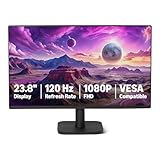
- VIBRANT DISPLAY: 23.8" IPS panel with 1920x1080 FHD resolution, 16.7 million colors, 1500:1 contrast ratio and 99% sRGB coverage for stunning visuals
- SMOOTH PERFORMANCE: 120Hz refresh rate with Adaptive Sync technology reduces lag and motion blur. Note: To achieve the maximum 120Hz refresh rate, ensure graphics card and drivers support 120Hz output, use an HDMI or DisplayPort connector with a certified 120Hz-capable cable, and configure the refresh rate to 120Hz in your system's Advanced Display Settings.
- EYE COMFORT: LowBlue Light and Flicker-Free technology for improved viewing comfort
- SEAMLESS DESIGN: 4-sided narrow bezel design enhances viewing area and enables clean multi-monitor setups
- COMPLETE CONNECTIVITY: HDMI 1.4, DisplayPort 1.2, and 3.5mm audio-out port with built-in 2W x2 speakers for comprehensive audio-visual experience
Rank #3

- Vivid Color with Full HD Resolution - The LG 24" IPS monitor with Full HD (1920 x 1080) resolution delivers sharp, vibrant visuals from virtually any angle. Whether you're tackling tasks, browsing the web, or managing your inbox, this monitor helps you stay clear, focused, and productive.
- Virtually Borderless. Visually Seamless. - The ultra-slim bezels and 3-side virtually borderless design creates a clean, modern look that keeps your focus where it belongs—on the screen. The sleek stand and base adds a floating feel, perfect for dual setups or a clutter-free workspace.
- Experience Smooth Motion with 120Hz - With a fast 120Hz refresh rate, you’ll experience smoother frame transitions. Whether you're working or gaming, enjoy more fluid visuals with less screen stutter and motion blur.
- 1ms Motion Blur Reduction for Crisp Gameplay - 1ms Motion Blur Reduction(MBR) keeps fast-paced gameplay sharp by minimizing blur and ghosting. Whether you're tracking enemies or racing to the finish, every frame stays crisp—giving you the edge when it matters most.
- Work, Create and Game in Bold Color - With HDR10 support and up to 99% sRGB color gamut coverage, this LG Monitor delivers rich, vivid color across a wide spectrum—ideal for immersive gaming, creative projects, and everyday productivity.
Product prices and availability are accurate as of the date/time indicated and are subject to change. Any price and availability information displayed on Amazon at the time of purchase will apply.

