To update an Xbox Series X or Series S, connect the console to the internet, press the Xbox button, then open Profile & system > Settings > System > Updates. Select the available update and follow the on-screen instructions. If an online update cannot complete, use Microsoft’s Perform an offline system update recovery procedure with a USB drive.
Update your Xbox Series X or Series S online
- Connect the console to a working internet connection.
- Press the Xbox button on the controller to open the Guide.
- Choose Profile & system > Settings > System > Updates.
- Review the update option shown on the screen and follow the prompts to download and install it.
- Leave the console powered and connected while the update is applied. The console may restart during installation.
That menu is where Xbox identifies the current update when it is available. An update will not necessarily appear on every console at the same time: availability can depend on Microsoft’s rollout schedule and the console’s software channel.
As an Amazon Associate I earn from qualifying purchases.
If no update appears
- Confirm that the console is connected to the internet and that other online Xbox features work.
- Open the Updates screen again after the connection is restored.
- Do not assume that a missing prompt means the console is broken; Microsoft can release updates in stages.
What to do when an update is stuck or fails
Check the network first
A failed download or installation can result from a lost or unstable connection. Re-establish the console’s network connection, then return to Settings > System > Updates and try again.
Recommended Free Tools
Use Microsoft’s offline recovery procedure
If the console cannot reach or complete the normal online update, consult Microsoft Support’s Perform an offline system update instructions. This recovery method uses a USB flash drive to transfer the system update to the console.
#1 Best Overall

- Compatible with: Sony PS5 / PS5 Slim / PS5 Pro / PS4 / PS4 Slim / PS3 Slim/ PS3 Super Slim ; Xbox Series S, Xbox Series X, Xbox One S, Xbox One X
- UL Listed / Safety: this power cord are Tested, Approved, and Certified by UL to ensure safety for you and your device. UL testing is authorized by OSHA - US Federal Agency, this certification provides peace of mind that this power cord meets rigorous safety standards for electrical products
- Power Cord Type: Non Polarized 2 Prong C7 Figure 8 Power Cord, 125V 7A, 18 AWG (American wire gauge)
- Durable & Sturdy: built with pure copper wire / heavy-duty flame-retardant cable Jacket, resistant to bending and daily wear for long-lasting use
- Wide Compatibility: works with most Game Consoles, TVs, Printers, Speakers and Other Devices that use the same 2-prong figure-8 power connector
Microsoft’s current support instructions should control the USB’s required capacity, file system, downloaded package and file preparation. Those details can change, so do not rely on an older walkthrough or assume that a particular drive will work. A USB drive is unnecessary for an ordinary online update.
Do not treat a factory reset as the default fix
The standard update path does not require a factory reset. Use Microsoft’s recovery guidance for the specific error or startup condition shown on your console, and do not erase the console merely because an update takes longer than expected.
Rank #2

- FOR 2-PRONG DEVICES: Works with most TVs, monitors, printers, and other devices that require a 2-pin power connector
- COMPATIBILITY: compatible with PS3, PS3 Slim, PS4, PS4 Slim, PS5, Xbox One S, Xbox One X, Xbox Series S, Xbox Series X, Apple TV, many printer, consumer electronics, and power brick models
- FEATURES: High Quality 2 Prong 10ft AC Power Cord, universal power cable is perfect for bedroom, living room office and home use.
- PACKAGE INCLUDE: 1 x High Quality 10ft AC 2 Prong Power Cord
Online update versus offline system update
| Method | When to use it | What you need |
|---|---|---|
| Online update | The console can connect to Xbox services and open the Updates screen | An internet connection and the console’s built-in Settings menu |
| Offline system update | The normal update cannot be downloaded or completed | A USB flash drive prepared exactly as described in Microsoft’s current support instructions |
Public updates and Xbox Insider previews
Xbox Insider release notes use the same Guide > Profile & system > Settings > System > Updates path for preview builds. Insider updates are distributed by ring and can have timing or mandatory-installation rules that differ from public releases. Being offered an Insider build does not establish that the same build is generally available to every Xbox owner.
Free tools Windows power users keep installed
One-click scans. No signup required.
How long does an Xbox update take?
There is no single reliable duration or download size for every Series X or Series S update. Timing depends on the update package, internet connection and installation state, so avoid treating a fixed time as a requirement. If progress stops and the console reports an error, follow the network checks and Microsoft’s offline-update guidance rather than repeatedly interrupting the installation.
Quick Recap
Best Value
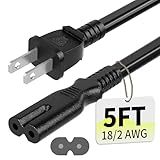
- Specifications: 5 feet tv power cord, non polarized 2 prong figure 8 power Cord (C7 to NEMA 1-15P ), 7A, 18AWG, 125V, NISPT-2, ETL listed
- Compatible: This ac power cable is fit for Sony PS5 / PS4 Slim / PS4/PS3 Slim/ PS3 Super Slim/Microsoft Xbox One S/Xbox One X/ Xbox Series X/Xbox Series S and other electronic devices such as TVs, printers, speakers, monitors, etc
- ETL Listed / Safety: This PS5 power cord is constructed with 100% pure copper and a flexible PVC jacket, providing high conductivity and minimal power loss
- Compatibility Note: To ensure compatibility, please verify that the connector matches your device's power port as illustrated in the product images
- Power Your Devices with the Perfect Reach: Select from multiple lengths to find your ideal match; this cord ensures safe, stable power for your game console, sound bar, speaker system and more
Rank #4

- 3ft is a convenient length for your game console setups, reducing cord clutter and keeping your desk tidy
- Compatible with: Xbox One S, Xbox One X, Xbox Series X, Xbox Series S ; Sony PS5 / PS5 Slim / PS5 Pro / PS4 / PS4 Slim / PS3 Slim/ PS3 Super Slim
- UL Listed / Safety: this power cord are Tested, Approved and Certified by UL to ensure safety for you and your connected devices
- Wide Compatibility: works with most Speakers, TVs, Printers and Other Devices that use the same 2-prong figure-8 power connector
- Power Cord Type: Non Polarized 2 Prong IEC C7 Figure 8 Power Cord, 125V 7A, 18 AWG (American wire gauge)
Rank #3

- ETL Certified for Peace of Mind: This power cord features a pure copper core for stable power delivery, dependable durability, and safe daily use—ideal for home, office, and outdoor applications
- Wide Compatibility: Compatible with Sony PS5, PS5 Slim, PS4, PS4 Slim, PS3 Slim, and PS3 Super Slim consoles. Also fit for Xbox Original, Xbox One S, Xbox One X, Xbox Series S, Xbox Series X, and other devices with a matching power port, such as TVs, printers, speakers, and monitors
- Please Check Before Purchase: Not compatible with Sony PS1, PS2, original PS3 Fat, PS4 Pro, Xbox One Fat, or Xbox 360 Core/Pro/Elite/Slim/E models
- Power Cord Type: Non-Polarized 2-Prong Figure 8 Power Cord (IEC 60320 C7 to NEMA 1-15P), 18 AWG, rated for 125V AC, 7A Max
- Multiple Length Options: Choose the length that fits your setup. Please check the product images to confirm the connector type before purchase. Contact us with any questions
Quick checklist
- Internet connection working.
- Guide opened with the Xbox button.
- Profile & system > Settings > System > Updates selected.
- On-screen update instructions followed without powering off during installation.
- Microsoft’s current offline-update instructions used only when the online method cannot complete.
Product prices and availability are accurate as of the date/time indicated and are subject to change. Any price and availability information displayed on Amazon at the time of purchase will apply.

