What’s actually slowing this PC down?
Pick the symptom - the matching free tool is one click away.
On many VIZIO sound bars, press BASS on the remote, then press Next to raise the level. That sequence is documented for models including the M213ad-K8 and SB3830-C6M, but it is not universal. Check your sound bar’s model number and manual before following button instructions.
1. Identify your VIZIO sound bar model
Find the model number on the product label or in the documentation that came with the sound bar. Remote layouts and bass controls vary, so the title alone is not enough to identify the right buttons.
As an Amazon Associate I earn from qualifying purchases.
Use the manual for your exact model if its remote does not match the controls described below.
Recommended Free Tools
2. Raise bass with a BASS button
If your remote has a dedicated BASS button, start audio at a comfortable volume, press BASS, then use Next to increase the level. Press Previous to decrease it.
#1 Best Overall

- Flexible surround sound, Dolby Atmos and powerful sound all around
On the M213ad-K8, VIZIO says the LED indicators move to the right as the bass level increases and to the left as it decreases. Its manual also says lowering Bass Level to its lowest setting reduces both bass and subwoofer levels on the bar. The official SB3830-C6M quick-start guide documents the same BASS plus Previous/Next control pattern. VIZIO SB3830-C6M quick-start guide
3. If there is no BASS button, check the level or setup menu
Some VIZIO remotes use Level, Setup or Effect controls instead of a dedicated bass button. Follow your model’s manual to find and adjust the bass or subwoofer item. VIZIO describes those controls for the D51-H remote, which is listed for the V51-H6, M51a-H6 and select sound bar models. VIZIO D51-H remote information
Rank #2

- 【𝐈𝐦𝐩𝐚𝐜𝐭𝐟𝐮𝐥 𝐕𝐨𝐥𝐮𝐦𝐞 𝐁𝐨𝐨𝐬𝐭】: Elevate faint sounds to vibrant with automatic loudness boost. Experience immersive sound through 4 versatile placements—horizontal for distortion-free audio, vertical for room-filling sound, tabletop for vibrant clarity, or wall mount for 360° cinematic magic. Transforms your room into a personal theater.
- 【𝐄𝐩𝐢𝐜 𝐂𝐢𝐧𝐞𝐦𝐚 𝐀𝐮𝐝𝐢𝐨】: Powered by 4 high-performance drivers, 80W powerful sound output, it provide richer details, like soft whisper or subtle croon, whether deep thunder or sonorous roar, turn flat audioto vivid, adding weight to music, making the virtual game experience immersive.
- 【𝐓𝐚𝐢𝐥𝐨𝐫𝐞𝐝 𝐒𝐨𝐮𝐧𝐝】: Fine-tune your listening experience with 3 dynamic equalizer modes—movie, music, and news. Enjoy rich, cinematic audio, luxurious melodies, and crystal-clear dialogue, tailored to enhance every scene and soundtrack. Spreading the audio evenly throughout a room, ensures that everyone, regardless of seating position, experiences the full range of sound.
- 【𝐄𝐟𝐟𝐨𝐫𝐭𝐥𝐞𝐬𝐬 𝐔𝐬𝐞】: Enjoy seamless setup with cutting-edge Bluetooth 5.0 or reliable ARC, OPT, and AUX connections. In ARC mode, control your soundbar with ease using your TV remote, guided by our easy-to-follow instructions and video tutorials.
- 【𝐄𝐱𝐜𝐞𝐩𝐭𝐢𝐨𝐧𝐚𝐥 𝐒𝐮𝐩𝐩𝐨𝐫𝐭】: Your satisfaction is our top priority. Enjoy peace of mind with our 18-month warranty and 24/7 online tech support. Our 60-day hassle-free replacement policy, with top-tier assistance whenever you need it.
Do not assume every sound bar has a separate subwoofer-volume setting. The M213ad-K8 uses a Bass Level adjustment that also affects subwoofer levels; the older RS65B2 manual, by contrast, documents a separate menu item named Subwoofer for adjusting subwoofer volume. VIZIO RS65B2 manual
4. Check whether a mode is reducing bass
On the M213ad-K8, VIZIO says Night Mode reduces bass frequencies for a quieter environment. If bass sounds unexpectedly restrained, check whether that mode is active. The manual says Night Mode will be off the next time the sound bar is turned on. VIZIO M213ad-K8 user manual
Rank #3
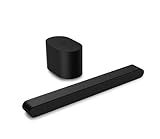
- Small but mighty The included compact wireless subwoofer ensures commanding bass for it’s room-friendly size, delivering frequences that reach down to 50Hz. Never miss a word. Not even a whisper. Hear every word with clarity thanks to the ClearDialog feature which optimizes the sound of voices on-screen. Simplified setup and control Unlock the highest-quality audio formats like Dolby Atmos and DTS:X with the simplicity of a single HDMI eARC connection. This one-cable connection also enables you to control the soundbar with your TV remote, reducing clutter and ensuring seamless device integration.
5. Adjust placement if the bass still feels weak
Room layout and subwoofer position can change how much bass you hear. VIZIO’s V21x setup guidance suggests moving the subwoofer toward a corner for more bass; the result depends on the room and placement. Try small position changes and listen from your usual seat. VIZIO V21x setup guidance
Independent reader supportYour contribution helps us test, update, and keep practical guides available for everyone.When the remote needs replacing
Only consider a replacement remote after confirming it is compatible with your exact sound bar. VIZIO lists the D51-H for the V51-H6, M51a-H6 and select models; its D512-H remote page describes bass, height, dialogue and surround controls and lists compatibility with the M512-H6 and select models. Check the compatibility information before choosing either remote. VIZIO D512-H remote information
Rank #4

- Amp up your audio - Fire TV Soundbar enhances TV audio with dual speakers for fuller sound, clearer dialogue, and deeper bass—all in a compact design.
- Immersive sound - Enjoy a three-dimensional virtual surround sound experience with DTS Virtual:X and more detail with Dolby Audio.
- Easy setup - Just plug in the included HDMI cable to the HDMI eARC/ARC port on your TV to instantly enjoy audio that's always in sync.
- Compact design - With a length of 24“ and a height of just 2.5", Fire TV Soundbar fits most entertainment consoles and TV stands.
- Stream audio with Bluetooth - Connect your phone or tablet via Bluetooth to fill the room with your favorite music.
Optional external subwoofer setup is model-specific
The SB3830-C6M quick-start guide gives a separate procedure for connecting an optional external subwoofer: set bass to the center position before connection, adjust the external subwoofer’s gain and phase, then use the BASS control for output. This is guidance for that model’s setup, not a general instruction for all VIZIO sound bars.
Free tools Windows power users keep installed
One-click scans. No signup required.
Quick Recap
Product prices and availability are accurate as of the date/time indicated and are subject to change. Any price and availability information displayed on Amazon at the time of purchase will apply.

