Quick wins for a faster PC:
Clear out junk files and repair common Windows errorsFree Scan →Fix the driver behind crashes, sound loss and screen glitchesFind Drivers →For a Windows PC, Samsung’s Galaxy Book Smart Switch is the documented way to move selected files and settings to a new Galaxy Book 6. Install it on both computers, connect them over the same network or with a USB cable, then send from the old PC and receive on the Galaxy Book 6. Samsung lists system settings, documents and Microsoft Store apps as transferable; it does not promise a complete copy of every program, account or preference.
Check that your old computer is supported
Samsung says Galaxy Book Smart Switch can transfer data only from a Windows PC. Its US support guide describes use with a new Galaxy Book from 2021 or later. If your old computer is a Mac, the cited Samsung instructions do not establish Smart Switch as a supported migration route.
As an Amazon Associate I earn from qualifying purchases.
Samsung names three transfer categories: system settings, documents and Microsoft Store apps. You can select categories and choose particular documents or folders. The guide does not promise that desktop programs, logins, software licenses, browser profiles or a full disk image will transfer. Plan to reinstall or sign in to other software separately, following that software’s own instructions.
Outdated Drivers Are Slowing You Down
One free scan finds every outdated or missing driver and matches the right update for your exact hardware.Free scan · exact hardware matchWindows Errors? Fix Them Before They Spread
Repair common Windows errors and clear accumulated junk for a smoother, more stable PC - no reinstall needed.Free scan · no reinstallSamsung Galaxy Book Smart Switch guide
Choose a connection
Samsung documents two ways to connect the computers:
#1 Best Overall
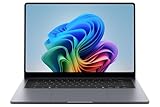
- BIG POWER: Create without compromise on a powerhouse laptop for AI and productivity with the Galaxy Book6 Ultra
- UNCOMPROMISED CREATIVE POWER FOR YOU: With a dedicated NVIDIA GeForce RTX 5070 graphics card this powerful PC elevates every frame, shot and render of GPU intensive projects like 3D animations and AI generated videos
- DYNAMIC AMOLED 2X DISPLAY: With the power to show rich and vibrant colors and a refresh rate of up to 120Hz, all your creative projects come alive in vivid clarity
- SIX SPEAKERS: Tuned with Dolby ATMOS, the six-speaker system is a first for Galaxy PC computers
- SLIM & LIGHT LAPTOP: Experience a premium two-tone keyboard, a slimmer hinge and a lightweight, symmetrical frame that's easy to carry
- Same network: Connect both computers to the same network using Wi-Fi or Ethernet.
- USB cable: Use a cable if a shared network is unavailable. Samsung’s guide does not specify a connector type or cable standard.
Galaxy Book 6 ports vary by model and market. For example, one specific 14-inch UK Galaxy Book6 Core 5 configuration lists two USB-C ports and one USB 3.2 port; that configuration is not a universal specification. Check the ports on your exact model before buying a cable or external storage device. Samsung’s UK specification for that model and its Galaxy Book6 lineup announcement note model and market variation.
Transfer data with Galaxy Book Smart Switch
- Install and open Galaxy Book Smart Switch on the old Windows PC and the Galaxy Book 6.
- Connect the computers to the same Wi-Fi or Ethernet network, or connect them with a USB cable.
- Choose the transfer roles: select Send data on the old PC and Receive data on the Galaxy Book 6.
- Allow the connection when prompted.
- Choose what to transfer. Select the available categories and, where offered, the specific documents or folders. You can optionally change the destination storage location.
- Select Transfer to begin. Follow the prompts to finish on both computers.
Samsung’s UK Smart Switch instructions also describe the send-and-receive workflow.
Rank #2

- ⚡Intel Core Ultra 7 | AI Performance for Every Task - Powered by the latest Intel Core Ultra 7 Series processor with an advanced NPU, this Samsung Galaxy Book6 Copilot+ PC delivers responsive AI-enhanced performance for work, school, and creativity. Easily multitask across spreadsheets, video meetings, web browsing, content creation, and everyday productivity with Windows 11 and Microsoft Copilot.
- ⚡16" FHD+ IPS Touchscreen | Bigger View, Smoother Experience - The expansive 16-inch 1920×1200 Full HD+ IPS touchscreen provides crisp visuals, vibrant colors, and extra vertical workspace for spreadsheets, presentations, streaming, and browsing. The responsive touch display combined with a 120Hz refresh rate creates smoother scrolling, easier navigation, and a more natural interactive experience.
- ⚡16GB RAM + 1TB SSD | More Space, Faster Workflow - Upgraded with 16GB high-speed memory and a spacious 1TB PCIe SSD, this business laptop offers smooth multitasking, faster application launches, and generous storage for documents, photos, videos, projects, and software. Enjoy quicker boot times while keeping your important files organized without worrying about running out of space.
- ⚡Lightweight Design | Built for Work Anywhere – Designed for professionals, students, and remote workers, this Windows 11 laptop combines a slim, lightweight design with long battery life and Super Fast Charging support. Intel Graphics, Wi-Fi, Bluetooth, an HD webcam, multiple USB ports, and HDMI provide the connectivity and flexibility you need for business, online learning, travel, and everyday productivity.
- ⚡Galaxy Ecosystem Integretion - Experience seamless cross-device connectivity between your laptop, phone, and tablet; perfect for remote work and hybrid office professionals needing an integrated digital workspace.
When manual file copying makes more sense
If you only need personal files, you can copy them manually to an external SSD and then copy them onto the new laptop. This is a file-copy option, not a substitute for Smart Switch: it does not migrate system settings or installed Microsoft Store apps. An external SSD is optional, not a Samsung requirement or endorsement.
Free tools Windows power users keep installed
One-click scans. No signup required.
For software and accounts that are outside Smart Switch’s stated scope, use the relevant developer’s installer and account-recovery or sign-in process. Do not assume that copying a program folder will move its installation, license or settings correctly.
Quick Recap
Rank #3
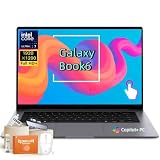
- Powerful Intel Core Ultra 7 processor with Intel Graphics and Copilot+ PC: 2026 Samsung Galaxy Book6 laptop, powered by Intel Core Ultra 7 355 processor with integrated AI engine, 12MB L3 cache, and Intel Graphics. Handles demanding workflows, data analysis, and Copilot+ PC AI features. Advanced hybrid architecture keeps it cool and responsive for thin-and-light business performance.
- 16” FHD+ LED Touchscreen, 120Hz Refresh, 350 Nits Brightness: Present and collaborate with stunning clarity on a 1920x1200 IPS touch display. The 120Hz refresh rate makes scrolling, inking, and navigation exceptionally fluid, while 350 nits of brightness keep documents and visuals readable in varied lighting. The responsive touchscreen turns this 2026 Galaxy Book6 into an interactive business tool for annotations, design reviews, and client presentations.
- 16GB LPDDR5X Memory and 512GB SSD with Dual M.2 Expansion: Stay productive through resource-heavy multitasking with 16GB of ultra-fast LPDDR5X RAM and a 512GB solid-state drive that boots applications in seconds. This Samsung Galaxy laptop includes two M.2 slots, offering easy storage expansion for growing project archives, business reports, and large multimedia files, ensuring your device adapts to evolving workloads.
- Up to 24-Hour Battery and Ultra-Slim Aluminum Design: Remain unplugged throughout extended workdays and business trips with up to 24 hours of battery life. Super Fast Charging 2.0 provides up to a 33% charge in just 30 minutes via the 45W adapter. Encased in a sleek aluminum body, this Samsung Galaxy Book6 measures just 0.66 inches thin and weighs only 4.06 pounds, with a backlit keyboard that supports late-night productivity wherever you go.
- Connected Galaxy Ecosystem and AI Productivity Tools, Windows 11 Pro: Maximize efficiency with seamless cross-device integration through Phone Link, Quick Share, Multi Control, Second Screen, and Storage Share. Built-in AI Select lets you trace any on-screen image, text, or QR code for instant search, translation, or conversion. With Windows 11 Pro, Wi-Fi AX, USB-C, USB-A, and HDMI, this Samsung Galaxy laptop delivers the secure, fully connected environment modern business professionals demand.
Product prices and availability are accurate as of the date/time indicated and are subject to change. Any price and availability information displayed on Amazon at the time of purchase will apply.

