Use Vivo EasyShare’s Phone Clone feature to move selected data from your old Android phone or iPhone to the Vivo V80. The old phone displays a QR code, which you scan with the V80; Vivo says Phone Clone transfers data without using mobile data. If the V80 is already in use, review the selection carefully: Vivo warns that data for the same apps on the receiving phone can be overwritten.
Before you start
- Install or locate EasyShare on both phones. If the old phone is an iPhone, install EasyShare on the iPhone before beginning.
- Keep both devices nearby and charged. Connecting them to chargers is sensible if you expect the transfer to take a while, though Vivo does not list it as a requirement.
- If you have already set up the V80, check what is on it before proceeding: Vivo warns that same-app data on the receiving phone may be overwritten.
Transfer data with EasyShare Phone Clone
- Open EasyShare > Phone Clone on both phones.
- On the old phone, choose Old phone. It will generate a QR code.
- On the V80, choose New phone and identify the old device as an Android phone or an iPhone.
- Use the V80 to scan the QR code shown on the old phone.
- On the old phone, select the data you want to move and start cloning. Keep the phones nearby while the transfer runs.
- When it finishes, check the items you selected on the V80. Install any apps that did not install automatically before erasing or resetting the old phone.
Vivo’s manual describes Phone Clone as a way to migrate data “without consuming any data.” Its privacy notice says the basic device-clone and file-transfer functions connect through the device hotspot. That describes a local transfer path, not a reason to assume that no data is processed: Vivo lists categories such as contacts, SMS, calendar, images, video, audio, applications, settings, call records, notes, and files among the content handled for transfer or backup.
As an Amazon Associate I earn from qualifying purchases.
If your old phone is an iPhone
Install EasyShare on the iPhone before opening Phone Clone. Then follow the same QR-code process: set the iPhone as the old phone, set the V80 as the new phone, and scan the code with the V80. Vivo’s instructions do not guarantee that every iPhone app, account, or app-specific item will migrate, so check the V80 rather than assuming it is an identical copy.
Recommended Free Tools
Why an app or item may be missing
Apps did not install
Vivo says permission restrictions can prevent transferred apps from installing automatically. Its guidance is to install them manually from Files > Apps. Review the transferred app files and install only what you need.
#1 Best Overall

- Magnetic Phone Case Compatible with VIvo IQOO Z11S / V80 Lite 5G
- 【Built-in Magnetic Sheet for Secure Snap-On Charging】Embedded magnetic ring aligns perfectly with magnetic wireless chargers and car mounts—stays firmly attached, no slipping or frequent adjustments
- 【PU Leather Texture + Soft TPU Bumper】Elegant leather-like back offers a comfortable, anti-slip grip and refined look, while the flexible TPU edges absorb shocks and make installation effortless without scratching your device
- 【Raised Camera & Screen Protection】Reinforced raised bezels around the camera lenses and screen keep them lifted off flat surfaces, guarding against daily scratches, dust, and minor bumps. Precision cutouts preserve full button and port access
- 【Slim, Lightweight & Drop-Resistant】Streamlined profile stays pocket-friendly; four-corner cushioning and full-edge TPU frame help buffer everyday drops and bumps
Existing app data changed
Vivo warns that data for the same apps on the receiving phone will be overwritten after file transfer. If the V80 contains data you need, do not start until you have checked the selection and protected anything important.
Phone Clone is not available
Menu labels and software configuration can vary by V80 build and region. The Vivo specification page referenced here is for India and lists OriginOS 7 and Android 17; the cited operation manual is a general Vivo manual, not a V80-specific guide for every region. Follow the labels displayed on your device, and contact local Vivo support if Phone Clone is missing.
Rank #2

- High Transparency Screen Protector Glass protection glass film tempered glass screen protector for Vivo V80 Lite 5G (6.83 Inches).
- for Vivo V80 Lite 5G Tempered Glass Protection Film Made of ultra-thin high quality tempered glass, 9H Hardness, wear-resistant, anti-shock, and completely protects your phone from fingerprint, dust, damage and falls.
- for Vivo V80 Lite 5G Tempered Glass Ultra-clear Glass Screen Protector, offer you incredible vision. Ultra-high sensitivity touch screen, makes your phone run smoothly and fast.
- High sensitivity and high definition, anti-cracking, anti-fingerprint and anti-sweat coating, perfect HD definition, maximum tactile accuracy, no distortion.
- Screen Protector for Vivo V80 Lite 5G, Easy to install, Perfectly suited without professional tools.
If phone-to-phone cloning is not an option
Vivo’s older EU manual describes using EasyShare on a PC connected to a phone by USB or Wi-Fi for backup and restore. That guide is not a current, V80-specific procedure, so check Vivo’s current EasyShare instructions for your region before relying on it as a fallback.
Free tools Windows power users keep installed
One-click scans. No signup required.
Check the V80 before wiping the old phone
Open the V80 and verify the contacts, messages, photos, videos, and other data you chose to transfer. Test any important files and install apps that were not added automatically. Keep the old phone intact until you have confirmed that you can access what you need on the V80.
Quick Recap
Best Value
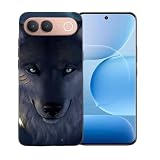
- Premium TPU Material: Flexible, rubber -like shock resistant TPU Case for Vivo V80 Lite (6,83") ,Provide all-round protection to your phone.
- Cover for Vivo V80 Lite ,【Lightweight & Scratch-proof】The thin, slim case ensures lightweight portability. It’s cute, nice to the touch and its raised edges keep screen and camera lifted to prevent surface scratches.
- Case for Vivo V80 Lite,【Precise Cutouts】 : Precise charging cutout fits the volume buttons, side button, and curves of your device without adding bulk,supports wireless charging.
- Cover for Vivo V80 Lite, Preserve the natural and naked look without losing fashion.They do not rub off, or become blurred over time.
- Phone Cover for Vivo V80 Lite,[Textured Interior Design] Dotted Texture interior design keeps your Phone's form and color, to help prevent the air bubbles at the back of your phone.
Rank #4
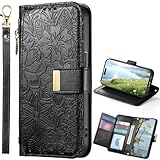
- vivo V80 5G: This Zipper wallet phone case is Compatibility for vivo V80 5G. Magnetic + Stand + Card Holder + Zipper Wallet Case + Wrist Strap
- Wallet Phone Case:This Zipper vivo V80 5G case includes 6 card slots, 1 zippered coin pocket, and 1 bill compartment. Comes with a detachable wrist strap for extra convenience
- All-in-One Functional Wallet Cover:Combines a wallet and a protective phone case into one compact design. This vivo V80 5G Zipper case features magnetic snap closure for security. No need to carry a separate wallet
- Kickstand Case: The vivo V80 5G case With built-in kickstand, convenient for watching movie or chatting video. Combined with full-body protection, it safeguards your phone against drops, scratches, and daily impacts
- Shockproof TPU Inner Shell: The vivo V80 5G cover crafted with soft PU leather and reinforced stitching. The inner TPU case offers easy installation and protects your device from scratches. The case stays firmly attached to the wallet with enhanced adhesion
Rank #3

- vivo V80: This Zipper wallet phone case is Compatibility for vivo V80. Magnetic + Stand + Card Holder + Zipper Wallet Case + Wrist Strap
- Wallet Phone Case:This Zipper vivo V80 case includes 6 card slots, 1 zippered coin pocket, and 1 bill compartment. Comes with a detachable wrist strap for extra convenience
- All-in-One Functional Wallet Cover:Combines a wallet and a protective phone case into one compact design. This vivo V80 Zipper case features magnetic snap closure for security. No need to carry a separate wallet
- Kickstand Case: The vivo V80 case With built-in kickstand, convenient for watching movie or chatting video. Combined with full-body protection, it safeguards your phone against drops, scratches, and daily impacts
- Shockproof TPU Inner Shell: The vivo V80 cover crafted with soft PU leather and reinforced stitching. The inner TPU case offers easy installation and protects your device from scratches. The case stays firmly attached to the wallet with enhanced adhesion
Product prices and availability are accurate as of the date/time indicated and are subject to change. Any price and availability information displayed on Amazon at the time of purchase will apply.

