The most dependable book tracker is a single list with four fields: title and author, a status, and the date you finished. Add a start date, format, rating, progress, tags, or notes only when those details help you choose your next book or remember what you thought. Keep the same records in an app, spreadsheet, or paper notebook, and update them at predictable moments.
Use an app when you want search, progress logs, challenges, barcode entry, or charts. Use a spreadsheet when you want flexible columns and a copy you control. Use paper when handwriting makes you more likely to record books. You can combine them, but designate one place as the master list so your read and want-to-read statuses do not drift apart.
As an Amazon Associate I earn from qualifying purchases.
Start with a small, consistent record
A tracker becomes useful when it answers two questions quickly: “What have I finished?” and “What should I read next?” Record the same core information for every title rather than creating elaborate entries for a few books and abandoning the system. The following fields cover most readers’ needs.
| Field | What to record | When it matters |
|---|---|---|
| Title | Book title, including a subtitle when it distinguishes editions | Always |
| Author | Author or primary creator | Always; it prevents confusion between books with similar titles |
| Edition identifier | ISBN or edition information | When translations, revised editions, formats, or multiple volumes differ |
| Status | Want to read, currently reading, read, or did not finish | Always; this is the list’s central organizing field |
| Date finished | The date you completed the book | Every completed book |
| Date started | The date you began | Useful for reading history, year-end reviews, and long books |
| Format | Print, ebook, audiobook, or another format | Useful when you borrow, buy, or switch formats |
| Rating | Your chosen scale, such as one to five stars | Only if ratings help you select future books |
| Progress | Page, percentage, chapter, or listening position | For a currently reading title or a book you pause |
| Note | One or two sentences about the book or your reaction | When you want to remember why it mattered |
| Reread date | Date you began a reread | When the same title may appear in your history more than once |
Do not create separate “finished” and “want to read” databases unless you have a strong reason. A status field in one list lets you search, sort, and move a title without re-entering it. If a particular service uses separate shelves, treat those shelves as views of the same record and check which one is authoritative.
#1 Best Overall

- Organize Review and Track Your Reading Progress : Whether you read regularly or less frequently, it's impossible to remember every detail of every story. This guided reading journal is an effective tool to help you keep track of all the books you read and store comprehensive reading notes, organize your thoughts, ideas and opinions and use this information to inspire your own writing projects.
- Features Thoughtful and Multifunctional Design: holds up to 75 book reviews, plenty of room for ideas and quotes, prompted questions that can be used as book club guides; reading challenges that can motivate you to accomplish goals set at the beginning of the year;numbered pages and navigation pages for easy flipping through a book review; write your own reading wish list and keep track of books you've borrowed or lent...
- Looking for the perfect gift for those passionate about books and avid readers? Look no further! We offer a variety of colors and materials for book journal covers, making it an excellent choice for them. Whether you prefer rose gold, green, linen, or any other color, we have multiple options to cater to readers with different tastes. This reading journal is not only a beautiful book companion but also an ideal way to document your reading journey.
- Durable and High-Quality: This book log journal features an elegant and durable linen hardcover, measuring 5.2x7.7 inches, with FSC certified 100gsm sustainably sourced thick paper. It includes 3 colored ribbon bookmarks, a pen loop, an elastic closure for easy storage, and a pocket for loose papers or bills.
- Guarantee and Refund: Our book journal is the perfect place to transform the love for literature into words.If you encounter any quality issues with our LoveBook Reader's Log or are not completely satisfied with it for any other reason, we will provide you with a replacement or refund. Please contact us through Amazon email, and we will assist you with the refund process.
Choose the tracking method you will actually maintain
No service is established as best for every reader. Choose according to capture effort, control of your data, desired detail, and whether statistics motivate you or make logging feel like homework.
| Method | Useful capabilities | Trade-offs to consider |
|---|---|---|
| Reading-tracker app | Searchable lists, statuses, reading dates, progress entries, tags, goals, challenges, journals, and visual summaries, depending on the service | Features and export options vary; you must follow the service’s account, privacy, and import rules |
| Spreadsheet | Flexible columns, sorting, filtering, formulas, local copies, and easy editing | You enter and maintain the structure yourself; imports may require column changes |
| Paper journal | Fast handwriting, room for reflections, and no account or device required | Search, backup, and sorting are manual; consistency matters more than decoration |
When an app is the right fit
Pick an app if you want to find a title by author or tag, record reading sessions, see annual totals, or update progress from a phone. StoryGraph’s help documentation describes read, currently-reading, to-read, owned, and did-not-finish lists. It also documents adding a book manually by title, author, or ISBN, setting statuses and dates, and importing from Goodreads. Its App Store listing describes charts, annual goals, tags, barcode scanning, and a reading journal. These are service descriptions, not independent performance tests, so confirm that the features and platforms you need are available when you create your account.
When a spreadsheet is better
A spreadsheet is a strong default if you want a durable copy that you can inspect and reorganize. It works offline in many spreadsheet programs, supports custom columns, and can be edited to match another service’s import template. It also lets you keep fields that an app does not expose, such as a library branch, purchase location, or a personal sequence number. Make a backup before changing columns or importing data elsewhere.
Free tools Windows power users keep installed
One-click scans. No signup required.
When paper is enough
A notebook is appropriate when writing by hand is the habit that keeps you recording. Reserve one page or row for each title and use a fixed shorthand for status and dates. A plain reading journal notebook is optional; no particular product, price, quality, or current availability is established here. The useful choice is the format you can update after a reading session without turning the log into a second project.
Build your tracker in one sitting
Set up the smallest useful version first. You can add detail later without losing the history.
- Choose one master location. Select an app, spreadsheet, or notebook. If you use more than one tool, decide which one contains the official status and finish date.
- Create four statuses. Use “want to read,” “currently reading,” “read,” and “did not finish.” If you prefer a shorter system, keep the first three and record abandoned books in a note; a separate did-not-finish status is helpful when you want to avoid accidentally restarting a book.
- Add the core identity fields. Enter title and author. Add an ISBN or edition when the exact translation, revision, or volume matters.
- Import your existing list carefully. If you already have a list, copy it into the master location rather than typing every title again. Keep the original export untouched until you have checked the result.
- Record dates at the right moments. Add a start date when you begin if you care about reading history. Add a finish date immediately when you complete a book. Do not invent a date for an older book; leave it blank or mark it as an approximate date in a note.
- Add optional detail selectively. Record format, rating, progress, tags, or a short note only when each field will change a future decision or preserve a memory.
- Test retrieval. Search for one finished title, filter for currently reading, and sort your want-to-read list. Fix confusing labels before adding hundreds of records.
- Set a maintenance cue. Update the tracker when you finish a book, start a new one, or return a loan. A weekly reminder can help, but the habit should take a minute or two.
Using reading-tracker apps without losing control
StoryGraph-style setup
StoryGraph’s documented workflow allows manual entry by title, author, or ISBN, followed by a status and dates. Its lists include read, currently reading, to-read, owned, and did-not-finish. Progress entries and challenges can add detail for readers who enjoy seeing how a year develops. If you import from Goodreads or another spreadsheet, match the destination’s required columns and review the resulting dates, ratings, reviews, and shelves instead of assuming every field transferred perfectly.
Rank #2

- Sturdy Construction: Our Lined Spiral Journal Notebook is built to last with a sturdy metal twin-wire binding and a tough hardcover. The water-resistant cover shields your notes from damage, while the double-wire design allows for easy folding and flat laying.
- High-Quality Paper: Crafted from 100 GSM thick, ink-friendly paper, our notebook prevents ink bleed-through and ghosting. It accommodates various pens, including ballpoint, gel, and fountain pens. Each page features a day header for effortless date tracking.
- Organized and Functional Design: With 140 lined pages and a 6-page blank table of contents, our notebook offers ample space for note-taking and easy referencing. An inner pocket keeps miscellaneous items secure, and an elastic closure band ensures the notebook stays closed when not in use.
- Versatile Usage: Suitable for office, school, and home environments, our notebook is perfect for journaling, note-taking, drawing, goal setting, Bible, and planning. It's a thoughtful present for friends, family, classmates, and colleagues.
- Medium-Sized Portability: Measuring 5.7 inches x 7.9 inches, our medium notebook strikes the perfect balance between portability and functionality. Its sturdy construction and aesthetic design make it an ideal companion for all your writing endeavors.
Use tags for decisions you make repeatedly, such as “short,” “borrow,” “research,” or “next in series.” Keep the tag vocabulary small. Ten useful tags are easier to filter than dozens of one-off labels.
What’s actually slowing this PC down?
Pick the symptom - the matching free tool is one click away.
Goodreads’ did-not-finish history
Goodreads announced a Did Not Finish shelf on March 13, 2026. The announcement describes recording progress before setting a book aside and retaining reading history when moving a title between shelves. This is useful if you want to distinguish an abandoned book from one you have not started. Treat the feature as an announced service capability and check the current interface before relying on a particular control.
A separate Goodreads announcement dated July 14, 2025 says the Want to Read list can appear in Amazon Your Books for US customers who have linked their accounts. That connection is limited to linked US accounts in the cited announcement; do not assume it is available in every country or for every account.
Bookshelf-style features
Bookshelf describes barcode entry, custom shelves, reading sessions, and importing CSV or spreadsheet exports from Goodreads, StoryGraph, or Bookmory. These are vendor-stated features. Verify the current app version, supported file format, and any account requirements before moving your catalog. Barcode scanning can reduce capture effort, but manually check the edition when a scan returns a different translation or format.
Design a spreadsheet that stays useful
Create one row per edition or reading event, depending on what you want to measure. One row per title is simplest. Use a separate reread date or a second reading-history sheet if you need to preserve multiple completion dates without duplicating the book’s identity.
Recommended columns
- Title and Author for identification.
- ISBN or Edition when editions affect your notes or citations.
- Status with a consistent set of four values.
- Date Started and Date Finished in one date format, such as YYYY-MM-DD.
- Format for print, ebook, audiobook, or another form.
- Progress as a page, percentage, chapter, or listening position.
- Rating using one scale throughout the sheet.
- Tags separated by commas if your spreadsheet’s search can handle them.
- Notes for a brief reaction, quotation reference, or next action.
- Reread Date if a later reading should remain visible.
Use data validation for Status and Format so spelling differences do not split your filters. Freeze the header row, turn on filters, and sort a copy when experimenting. Keep dates as actual date values rather than text if you want chronological sorting. Export a dated backup before a large cleanup or migration.
Rank #3

- ORGANIZE AND TRACK YOUR READING - This reading journal allows you to easily track and review every book you read, including the title, author, genre, your thoughts ideas, and opinions.
- FEATURES - Book journal holds up to 75 book reviews, plenty of room for ideas and quotes, prompted questions that can be used as book club guides. You can keep all your reading notes in one place.Write your own reading wish list, keeping track of books you've borrowed or lent to others.
- SUPERIOR QUALITY - Book review journal with sturdy and flexible cover to protect the inner pages well. 100gsm white premium acid-free thick paper to reduce ink leakage, erase fraying and shade issues.
- SUITABLE SIZE - The reading tracker journal size of 5.8" x 8.3". It's easy to carry and has large enough writing space to help you plan and organize your read. This reading journal will easily withstand every time use.
- PERFECT FOR BOOK LOVERS - Whether you're an avid reader or just starting out, our book journal is the ideal gift for book lovers. This is a perfect tool to help you track your reading progress. With a feature like the Reading Wish list, you'll know which books to add to your collection.
Keep a paper log quick enough to use
Draw the same fields on every page: title, author, status, started, finished, rating, and note. Use symbols such as “W,” “C,” “R,” and “DNF” if they are explained on the inside cover. Leave a small margin for a progress mark when a book is paused. At the end of each month, scan the pages for titles still marked currently reading and update them; otherwise a paper log can quietly become a list of intentions rather than a record of reading.
If you want search or backup later, photograph or transcribe completed pages into a spreadsheet. Do this at a natural checkpoint, such as the end of a month, rather than after every entry. Keep the notebook as the primary record until the digital copy has been checked.
Preserve library notes and borrowing history
Libby’s Reading Journey can export notes, highlights, bookmarks, and circulation activity for a title as a table or spreadsheet, including after the loan is returned. This is valuable for preserving annotations and the context of a library loan. The documented export is not described as a complete universal catalog of every read and want-to-read title, so keep a separate status list if you need that broader history.
PC Slower Than It Used to Be?
A free scan shows the junk files, broken settings and background clutter dragging Windows down - then fixes them in one click.Free scan · Windows 10 & 11Crashes, No Sound, or Screen Glitches?
Random freezes, missing sound and display glitches usually trace back to one bad driver. Find and replace yours safely.Free scan · under a minuteExport before deleting an account, changing a library setup, or moving to another tracker. Open the exported file, confirm that the title and annotation fields are readable, and store a backup in a location you control. Borrowing activity can contain more detail than your main tracker needs; copy only the fields that help you remember the book.
Move between trackers without losing dates or notes
- List what must survive. Decide whether title, author, ISBN, statuses, start and finish dates, ratings, reviews, tags, progress, and notes are all required.
- Export from the old service. Use its account or library export control and save the original file with the export date in the filename.
- Read the new service’s template. Import requirements may specify exact column names, date formats, status labels, or one row per book.
- Make a working copy. Change the copy to match the destination template. Never overwrite the original export.
- Normalize values. Convert “finished,” “complete,” and “read” to the one status value your new tracker expects. Standardize dates and remove duplicate rows.
- Import a small sample. Test several books: a finished title with a date, a currently reading title with progress, a did-not-finish title, and a book with notes or a rating.
- Compare the result. Check counts, statuses, dates, ratings, reviews, shelves, and notes. Look for shifted columns, lost leading zeroes in ISBNs, and dates interpreted in the wrong month/day order.
- Import the full file and retain both copies. Keep the original export and the cleaned file until you have used the new tracker for a few weeks.
StoryGraph documents Goodreads imports and spreadsheet migration, including modifying a spreadsheet from another source to match its import format. Bookshelf states that it reads CSV or spreadsheet exports from Goodreads, StoryGraph, and Bookmory. Those workflows can reduce re-entry, but they do not guarantee that every field maps identically.
Make the system private enough for your habits
Decide what you want to share before enabling social features. A public reading list can reveal interests, professional research, health information, or gift plans. Review each service’s current privacy policy and account settings, and check whether notes, reviews, owned books, goals, or activity feeds are visible separately. In a spreadsheet, protect the file with the storage account’s access controls and avoid sharing an unrestricted link.
Rank #4
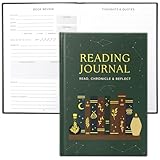
- Uplift Your Reading Experience: The all-in-one reading journals for book lovers help you to get the most out of your reading with dedicated sections for wish lists, book club readings, completed books, a reading tracker, book reviews, borrowed titles & much more
- Premium Finish & Features: ZICOTOs’ book journal reading log boasts a durable casebound binding and sturdy hardcover. With two ribbons to mark your place and an index to navigate 172 pages of comprehensive content, it's the perfect journal for organized note-taking
- Beautifully Designed to Inspire Your Reading: Featuring a modern dark green hardcover with mystic design and gold foil accents, the reading journals are chic book accessories for reading lovers. A fabulous reading journal to stay organized & inspired with every turn of the page
- Convenient & Ready For Epic Reading Adventures: Sized at 5.9x8.34”, the aesthetic journal is great for note-taking on the go. Whether at book club meetings, on travels or cozy at home, the book journal for book lovers keeps track of your book lists, reflections & ideas
- Ultimate Gifts for Book Lovers: Simply fantastic gifts for avid or beginning readers, whether they're into motivational literature, romantic novels or thrilling mysteries. Thoughtful book lovers gifts that will be cherished and fully enjoyed
Privacy is also a portability issue. A tool that makes entry easy but provides no practical export can make a later move harder. Check whether you can download your list, which fields are included, and whether dates and notes remain usable outside the service.
Quick wins for a faster PC:
Scan for outdated or missing drivers - takes under a minuteDriver Scan →Repair Windows errors before they cause bigger problemsFix Now →Fix the driver behind crashes, sound loss and screen glitchesFind Drivers →Use statistics and goals as optional feedback
Charts, annual goals, challenges, and reading journals can motivate some readers. They can also make a relaxing activity feel like a quota. Start without a target, then add one only if a specific number helps you choose or finish books. A goal should not pressure you to rate every title, log every session, or keep a book you no longer want to read. The did-not-finish status is a valid outcome, not a data failure.
Troubleshoot common tracking problems
“My want-to-read list is too large to use.”
Add a short-term queue tag such as “next three” or sort by the date added. Keep the full list as a memory aid, but choose a small active queue. Remove books that no longer interest you instead of preserving an ever-growing obligation.
“I forget to update the tracker.”
Attach the update to an existing event: mark a book read when you return it, finish the final chapter, or close the audiobook. If you miss a date, record the completion month or an approximate date in a note rather than guessing a precise day.
“The same title appears more than once.”
Compare author, ISBN, language, format, and series number. Merge duplicate entries only after preserving edition-specific notes. If you reread books, keep one identity record and add separate reread dates or history rows.
The Tool Desk
Outbyte PC Repair FREEClear out junk files and repair common Windows errorsFree Scan →Outbyte Driver Updater FREEFix the driver behind crashes, sound loss and screen glitchesFind Drivers →“An import lost my dates or notes.”
Stop making edits in the destination. Compare the imported sample with the original export, inspect the destination template’s required labels, and repeat the conversion on a working copy. If the destination cannot accept a field, retain it in your spreadsheet backup.
Best Value

- Easy to Carry Size: Measuring about 5.5 x 8.3 inches, this notebook offers a good balance between writing space and portability. It fits easily into most bags, backpacks, or totes, making it convenient for daily use or travel.
- Hardcover Design: The sturdy cover helps protect the pages inside and keeps the notebook looking neat with regular use. Its simple appearance suits both work and casual settings.
- Gift-Friendly Choice: A useful option for occasions like Mother’s Day, Father’s Day, graduations, or office use. Suitable for friends, coworkers, or family members who enjoy writing, planning, or staying organized.
- Smooth Lined Pages: The lined pages provide a clean structure for writing and feel comfortable with pens or pencils. Works well for notes, journaling, to-do lists, or light sketches.
- Spiral Binding for Flexibility: The spiral binding allows the notebook to lay flat or fold back on itself, making it easier to write in different situations, whether at a desk or on the go.
“A barcode selected the wrong edition.”
Verify title, author, language, publication year, and format. Correct the record manually and retain the ISBN of the edition you actually used. Barcode entry saves typing but does not remove the need for an edition check.
“I borrowed a book and want to preserve my annotations.”
Use Libby’s Reading Journey export for the title before or after returning the loan. Store the resulting table with your other backups, then copy a concise note or link to the corresponding record in your main tracker.
A practical decision framework
Score each option against the questions below before committing to it:
- Capture effort: Is manual entry acceptable, or do barcode scanning and quick progress updates matter?
- Portability: Can you export the fields you care about, and can a future service import them?
- Tracking depth: Do you need only statuses and finish dates, or also rereads, sessions, progress, goals, and challenges?
- Organization: Will tags, shelves, search, and filters help you make decisions?
- Privacy and sharing: Which activity, notes, owned books, and goals should remain private?
- Motivation: Do charts and reminders encourage reading, or do they make logging feel like administrative work?
If you are unsure, begin with a spreadsheet containing title, author, status, date finished, and notes. After a month, you will know which fields you actually use. You can then import the cleaned list into an app, copy it into a notebook, or keep the spreadsheet as your permanent master.
Keep the habit sustainable
Update the status when you start, finish, or abandon a book. Add the finish date at completion, and write one sentence only when you have something you will want to remember. Review the currently reading list monthly and the want-to-read list whenever you need a next choice. Make a backup on the schedule appropriate to your tool, especially before imports, account changes, or major reorganizations.
The winning system is not the one with the most charts or fields. It is the one that reliably tells you what you have read, what you want to read, and why a title is in either list without making reading feel like paperwork.
Quick Recap
Product prices and availability are accurate as of the date/time indicated and are subject to change. Any price and availability information displayed on Amazon at the time of purchase will apply.

