Do these 3 things before closing this tab:
1Scan for outdated or missing drivers - takes under a minute2Clear out junk files and repair common Windows errors3Fix the driver behind crashes, sound loss and screen glitchesMicrosoft’s best starting point for children is MakeCode. It lets beginners program with visual blocks, then move to JavaScript or Python when they are ready. Families can choose a physical-making route with a BBC micro:bit, a game-design route with MakeCode Arcade, or an immersive route through Minecraft Education.
For a structured path, Microsoft lists a free 14-week micro:bit course for ages 9–15. Minecraft Education provides a separate progression from Hour of Code to MakeCode Blocks and then Python, supported by hundreds of lesson plans. The right choice depends on your child’s age, whether they want to build physical projects or game worlds, and whether you have access to Minecraft Education through a school or local license.
As an Amazon Associate I earn from qualifying purchases.
Choose the Microsoft coding route that fits your child
There is no single Microsoft programming app for every learner. MakeCode is the common beginner platform, but the project context changes the experience.
| Route | What children make | Programming modes | Best fit |
|---|---|---|---|
| MakeCode with BBC micro:bit | Interactive devices, sensors and small inventions | Blocks, with a path toward JavaScript or Python concepts | Children who enjoy hands-on building and seeing code affect a physical object |
| MakeCode Arcade | Playable 2D games | Block-based game logic and text-code transition | Children motivated by characters, levels, scores and immediate visual feedback |
| Minecraft Education | Code-driven builds, animations and in-game projects | Blocks, JavaScript and Python | Children already interested in Minecraft or collaborative world-building |
All three routes develop computational thinking, creativity and collaboration. Start with one environment rather than installing several at once; a successful first project matters more than covering every feature.
#1 Best Overall

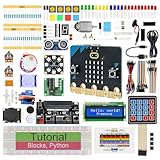
- Microbit controller V2.21 is included!onboard comes with BLE, accelerometer, electronic compass, three buttons, 5 x 5 LED dot matrix, mainly used for teens' programming education.
- Specially designed this starter kit includes commonly used resistors, LEDs, sensors, LED segment display and more to get you started with 18 interesting projects at least.
- We have detailed tutorials (including an introduction, wiring diagram, test code, driver installation, Example Projects...... Step by step to explain how to use on our wiki page.
- Each sensor is packaged individually and then held in a beautiful plastic box with compartments, it must be the best kit for you, your friends, and electric newbies or hobbyists.
- All boards are well-packed after function, voltage and current testing. The kit is well packaged, with each item packed separately.
What MakeCode teaches beginners
MakeCode uses colored blocks that snap together, so a child can experiment with sequence, events, variables, loops and conditions without first memorizing punctuation. The editor gives immediate feedback: a game reacts, a device displays an output, or a Minecraft world changes.
Blocks first, text later
When a child understands a block program, they can inspect an equivalent text version and see how the same idea is expressed in JavaScript or Python. This makes the transition concrete. Instead of presenting text syntax as a separate subject, you can ask the child to change one block, observe the result, and then compare the generated code.
Use projects to introduce concepts
- Sequence: place instructions in the order they should run.
- Events: trigger an action when a button is pressed, a game event occurs or a Minecraft condition is met.
- Variables: store a score, counter or state such as “door open.”
- Iteration: repeat an action with a loop instead of copying it many times.
- Conditionals: make a decision with an if/else rule.
- Debugging: isolate one instruction, predict what it should do, and test the result.
Ask the child to explain the program in plain language before adding more features. That habit reveals whether they understand the logic rather than merely dragging blocks until something works.
Minecraft Education: a staged path from blocks to Python
Minecraft Education is a game-based learning platform with coding support, educator training modules and a lesson library containing hundreds of plans. Its computer-science materials recommend a progression that avoids an abrupt jump into text programming.
- Begin with Hour of Code. Short, guided activities introduce computational ideas in a familiar Minecraft setting.
- Move to MakeCode Blocks. Children automate actions and build projects while still using visual programming.
- Transition to Python. Once loops, variables, events and conditions make sense in blocks, the same ideas can be written as text.
The progression is aligned to Computer Science Teachers Association (CSTA) standards in the relevant course materials. That alignment is useful for schools and for parents who want a clear learning target, but it does not require formal grading at home.
A practical first Minecraft session
- Open a lesson designed for beginners and let the child complete the instructions without taking over the keyboard.
- Ask for a prediction before each run: “What do you think this command will change?”
- Have the child alter one value, such as a repeat count or movement distance, and run the program again.
- Invite an independent modification: a new structure, animation or rule that was not in the instructions.
- Save the world and have the child describe the problem they solved and the bug they encountered.
This sequence turns a game session into a programming cycle: predict, run, inspect, change and explain.
The Tool Desk
Outbyte PC Repair FREERepair Windows errors before they cause bigger problemsFix Now →Outbyte Driver Updater FREEFix the driver behind crashes, sound loss and screen glitchesFind Drivers →The free 14-week micro:bit course for ages 9–15
Microsoft MakeCode lists a free, 14-week introductory computer-science course for students ages 9–15. It uses the BBC micro:bit and introduces binary numbers, variables, iteration and conditionals through making projects.
Rank #2

- Includes the BBC Microbit V2.2 which has new speaker sensor, Built-in 25 LEDs, 2 buttons, motion sensor, buzzer, light sensor, temperature sensor, compass, radio and Bluetooth wireless features make it easy to get you started with more fun projects.
- This is an easy to use electronic board that is very versatile and can be coded many different ways. It can be integrated with other coding tools and on many platforms.
- Coding is easy with online block gui, javascript and python. Compiles to hex file, which you then copy to microbit (looks like a drive to pc)
- Box contains: 1 micro:bit v2.2, 1 USB cable, 1 battery holder, 2 AAA batteries, user guide
- Free tutorials and project ideas available on the micro:bit website. The instructions are easy to follow for a beginner to learn to code with it.
Projects children encounter
The listed projects include a micro:pet, a board game and a fidget cube. These are useful because each gives code a physical purpose. A variable can represent a score, a button can start an action, and a loop can keep a display or behavior running.
How to use the course at home
- Set aside one regular session each week, allowing extra time for building and testing.
- Read the lesson objective aloud and ask the child to predict the device’s behavior.
- Build the smallest working version before decorating or adding extra features.
- Keep a short log of the concept used, the bug found and the change that fixed it.
- At the end of each project, ask the child to demonstrate it and suggest one improvement.
The course is free as curriculum material, but the physical projects require a BBC micro:bit board or starter kit. Microsoft’s course description does not establish a universal kit price, so check the current cost and contents with the retailer or school supplying the board.
What hardware and software children need
For MakeCode Arcade
A computer with a modern web browser is generally sufficient for creating and testing Arcade games. A physical game controller is optional; begin with keyboard controls so the child can concentrate on game logic.
Free tools Windows power users keep installed
One-click scans. No signup required.
For Minecraft Education
You need a supported device capable of running Minecraft Education and an eligible account or license. Access rules and pricing can vary by school, district and region, so confirm local eligibility before planning a long course. If a school provides the account, ask whether children can use it at home and whether worlds can be saved or shared between devices.
For a micro:bit course
The essential purchase is a BBC micro:bit board. A starter kit can simplify a first project by bundling a USB cable, battery holder and beginner-friendly components, but the exact contents differ by kit. The MakeCode course itself is designed around the board rather than a particular commercial bundle.
- Computer with a compatible browser and USB connection
- BBC micro:bit board
- USB cable for programming and power
- Battery pack when the project must operate away from the computer
- Optional accessories chosen for a specific project
Supervise wiring and battery use. Disconnect power before changing components, and avoid letting a child troubleshoot a loose connection by repeatedly plugging and unplugging a powered circuit.
Structured Microsoft courses beyond the first projects
MakeCode for Minecraft
Microsoft describes an entry-level MakeCode for Minecraft course that is available online and as a OneNote notebook. Each lesson combines an unplugged exercise, guided coding and an independent project. The projects are mapped to CSTA standards, giving educators a way to connect a creative activity with a defined computer-science objective.
Quick wins for a faster PC:
Scan for outdated or missing drivers - takes under a minuteDriver Scan →Repair Windows errors before they cause bigger problemsFix Now →Fix the driver behind crashes, sound loss and screen glitchesFind Drivers →Rank #3
- micro:bit V2: Latest version official board, a pocket-sized device allows you to get hands-on with coding and digital making
- 2 Sets of Codes: Block-based visual programming language code and Text-based Python code
- 316-Page Detailed Tutorial: Provides step-by-step guide with basic electronics and components knowledge (The download link can be found on the product box) (No paper tutorial)
- 44 Projects from Simple to Complex: Each project has schematics, wiring diagrams, complete code and detailed explanations
- 225 Items in Total: This kit includes the common components, modules and sensors available for the board
Use the unplugged activity first. It lets a child reason about an algorithm away from the screen, reducing the chance that they will guess by trial and error. During guided coding, pause after each major command. Reserve the independent project for a personal idea, such as an automated farm, a patterned structure or an animation.
Computing with Minecraft
The MakeCode course catalog describes Computing with Minecraft as 20 hours of instruction covering loops, debugging, building structures and animations. It is a better fit when a child wants a longer sequence than a one-off activity and can commit to multiple sessions.
Coding in Minecraft
The catalog also lists Coding in Minecraft as a computer-science credential program with supporting curriculum. A credential pathway is most relevant to a classroom, club or organized program that needs a defined progression and evidence of completion. For a family learning casually, the individual lessons may be more practical than pursuing a credential.
PC Slower Than It Used to Be?
A free scan shows the junk files, broken settings and background clutter dragging Windows down - then fixes them in one click.Free scan · Windows 10 & 11Outdated Drivers Are Slowing You Down
One free scan finds every outdated or missing driver and matches the right update for your exact hardware.Free scan · exact hardware matchA family plan for the first eight sessions
The following plan works with either MakeCode Arcade or Minecraft and can be adapted for a micro:bit.
- Session 1 — Explore: complete a short beginner activity and identify an event, an action and a repeat.
- Session 2 — Change: alter one number or rule and predict the result before running the program.
- Session 3 — Variables: add a score, counter or stored state.
- Session 4 — Conditions: create a meaningful if/else decision, such as winning after reaching a target.
- Session 5 — Loops: replace repeated blocks with a loop and compare the two versions.
- Session 6 — Debug: introduce a small error, then practice finding it systematically.
- Session 7 — Independent build: let the child choose the theme and requirements.
- Session 8 — Explain and extend: demonstrate the project, document the code and add one feature based on feedback.
Keep sessions short enough to end with a working result. If a child is stuck, reduce the problem to one visible behavior rather than supplying the finished code.
Independent reader supportYour contribution helps us test, update, and keep practical guides available for everyone.How to tell whether a child is progressing
Progress is not measured by how quickly a child reaches Python. Look for increasingly independent reasoning.
- The child can predict what a change will do before running the program.
- They can name the event, data, loop or condition involved.
- They test one change at a time instead of changing everything at once.
- They can describe a bug and the evidence that led to the fix.
- They can modify an example into something personal.
- They can explain the program to another person without reading every block aloud.
For school or club use, map projects to the stated CSTA objectives and keep a screenshot, saved world or short demonstration as evidence. At home, a child’s explanation and ability to extend a project are usually more informative than a worksheet score.
Recommended Free Tools
Rank #4

- BBC Micro:bit Development Board V2.2 is included! New micro:bit with sound.
- Battery holder with On-Off switch to power the micro bit which is very convenient for controlling.
- Micro:bit is a great platform to start, you code visually via the block editor which is a way to learn JavaScript basics using blocks of code.
- Connection Diagram, Sample Code, Using Method and User Guide are provided on our wiki page.
- It has an led matrix, compass, accelerometer and a microphone, which makes it easy to reprogram as a smartwatch, logging platform, gesture controller, or an external speaker for audio.
Common problems and practical fixes
“My child only wants to play.”
Make the play the specification. Ask for a game with a particular rule, an automated build or a device that reacts to a button. The child still chooses the theme, while the coding requirement supplies a concrete goal.
“Blocks feel too easy.”
Add a constraint: limited commands, a target time, a scoring system or a requirement to explain each variable. Then show the generated JavaScript or Python and ask the child to identify the matching loop or condition.
“Text code is frustrating.”
Return to a working block program, change one element, and compare the block and text versions. Do not require a full rewrite immediately. The objective is to connect familiar logic with syntax gradually.
“The project will not run.”
Check the smallest possible program first. Confirm that the correct device or world is selected, that the board is connected, and that the child has not changed several blocks at once. Rebuild the last known working version, then reintroduce changes one by one.
“We cannot access Minecraft Education.”
Use MakeCode Arcade for a browser-based game route or the micro:bit curriculum if you can obtain the board. If Minecraft is supplied by a school, ask its administrator about account eligibility, home access and device support rather than assuming a personal license will work.
Which Microsoft option should you choose?
| If your priority is… | Start with… | Why |
|---|---|---|
| Physical inventions | BBC micro:bit and the 14-week course | The course is explicitly designed for ages 9–15 and teaches core concepts through hardware projects. |
| Fast visual results | MakeCode Arcade | Children can create playable games while learning events, variables, loops and conditions. |
| Minecraft motivation | Minecraft Education’s Hour of Code progression | It begins with blocks and provides a route toward Python inside a familiar world. |
| Standards-based instruction | MakeCode for Minecraft or Computing with Minecraft | The materials include structured lessons, independent projects and CSTA-aligned objectives. |
Begin with the route that matches the child’s strongest motivation, then transfer concepts between environments. A loop learned in an Arcade game is still a loop in Minecraft or on a micro:bit; changing the project context helps the idea stick.
Quick Recap
Product prices and availability are accurate as of the date/time indicated and are subject to change. Any price and availability information displayed on Amazon at the time of purchase will apply.

