Use the built-in scrolling capture. On an iPhone, take a screenshot, open its preview, and tap Full Page. On Android 12 or later, take a screenshot and tap Capture more on a supported scrollable screen. These controls create one tall image or a PDF instead of a stack of separate screen captures.
The exact control depends on your phone, operating-system version, app and whether the content is a supported scrolling view. The steps below cover Apple’s current iPhone guide and Google’s Android and Pixel instructions, then explain what to do when the option is missing.
What a multi-page screenshot actually is
A normal screenshot records only the pixels currently visible on your display. A scrolling, full-page or long screenshot continues down a webpage or document and saves the selected content as one file. The phone has to be able to scroll the target view and the app must expose that view to the system capture tool.
“Across multiple pages” can mean a long webpage, a document with several pages, an email thread or another screen that extends below the viewport. It does not automatically mean every app can be captured from top to bottom. A nested scroll area, a protected screen or an app that does not support the platform capture interface can prevent the extended option from appearing.
Quick wins for a faster PC:
Clear out junk files and repair common Windows errorsFree Scan →Scan for outdated or missing drivers - takes under a minuteDriver Scan →Repair Windows errors before they cause bigger problemsFix Now →#1 Best Overall

- 【4KHDMI Video Capture Board】 This HDMI video capture card is an HDMI capture that allows you to easily save HDMI output video on your computer or smartphone. The maximum resolution that can be input from cameras, game consoles, etc. is up to 4K (3840 x 2160)/60Hz, and the maximum resolution that can be output to a computer or smartphone is 1080P (1920 x 1080)/60Hz. By connecting between a PC and a smartphone, game console, or video camera, anyone can easily record high quality video and still images using capture software such as OBS. Ideal for live streaming & game play.
- 【USB/Type-C 2-in-1 Interface】 This product has an adapter that can convert USB Type C connector to USB-A connector, thus supporting both USBA and USBC outputs. Compatible with a wide range of laptops, tablets, and smartphones. This product is compatible with a wide range of laptops, tablets, and smartphones, making it possible to live stream to a variety of devices.
- 【Nylon Braided Cable】 This HDMI capture board adopts highly durable nylon braided cable, which effectively prevents disconnection due to prolonged use and ensures stable signal transmission. The total length of the product is 23cm.
- 【Widely Compatible】 USB3.0 transmission is stable and performance is excellent; USB3.0 high-speed transmission port allows real-time recording of HDMI input device screen to video editing applications such as Twitch, YouTube, OBS Studio, and Potaplayers. Compatible with Windows, Linux, and Android OS. (Compatible with Windows, Linux, Android OS (not compatible with MacOS iOS)
- 【Compact & Portable】 Aluminum alloy construction provides excellent heat dissipation and protects the chips inside to avoid short circuits and poor connections. The compact design weighs only 30g, making it easy to carry and connect to a variety of devices. We offer a 12-month quality warranty. If you have any questions about our products, please feel free to contact us by e-mail.
Take a full-page screenshot on an iPhone
Apple’s iOS 27 iPhone User Guide documents the following workflow, with a Safari webpage as its example.
- Capture the screen. Quickly press and release the Side button and Volume Up together. On an iPhone with a Home button, press the Side button and Home button together.
- Open the preview. Tap the thumbnail that appears briefly in the lower-left corner.
- Choose the extended capture. Tap Full Page at the top of the preview. If the tab is absent, the current app or view does not offer Apple’s full-page capture there.
- Set the boundaries. Drag the crop handles or use the page preview to include exactly the content you need. Markup tools can add drawings, text or a signature.
- Save in the needed format. Use the share or save controls. Apple’s support material describes saving a full-page capture as an image in Photos or as a PDF in Files; the labels and destination can vary with the iOS version and app. See the Apple iPhone screenshot guide for the save choices shown in Apple’s instructions.
When iPhone Full Page is useful
- Safari pages: capture an article, receipt or terms page in one artifact instead of stitching screenshots.
- Documents and messages: use the option only when the app presents the content as a supported scrollable page.
- Image versus PDF: choose an image when you need a tall picture for reference; choose PDF when the content is naturally paginated or must be shared as a document.
Take a scrolling screenshot on Android
Google’s Android screenshot instructions limit this workflow to Android 12 and later and “most screens that allow scrolling.” Manufacturers can change button layouts and menus, so the wording may differ on a particular handset.
- Open the target. Position the webpage, document or other scrollable screen at the point where you want the capture to begin.
- Take a screenshot. The standard Android shortcut is Power + Volume Down. On some phones, press and hold Power, then tap Screenshot.
- Open the expanded tool. In the screenshot controls at the bottom, tap Capture more.
- Select the range. Drag the crop guidelines or handles downward until they cover the pages or content you want. Keep the top edge at the desired starting point.
- Save or share. Confirm the crop, then use the phone’s save and share controls. The resulting file type and destination are controlled by the manufacturer’s screenshot app.
If Capture more does not appear, the screen may not be a supported scrolling view, the app may block extended capture, or the phone may be running an older Android release. Google does not promise the feature for every app or every scrollable region.
Google Pixel instructions
Google Pixel’s official help page gives the same Android 12-and-later sequence:
Free tools Windows power users keep installed
One-click scans. No signup required.
Rank #2
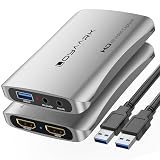
- 4K HD Gaming Capture Card:The gaming video capture card is designed with a high-end smart chip and a stylish and compact aluminum alloy case. Supports up to 4K@60fps HDMI input, plug and play, allowing the device to immediately use streaming media such as OBS. Ideal for live streaming, game broadcasting, video recording, conference rooms and more.
- 3.5mm Microphone and Audio I/O Port: You can connect your audio video capture device to a headset using the 3.5mm audio output port, or you can connect your video capture device with a 3.5mm microphone so you can easily stream and record voice through the port.
- HD 4K 60fps Signal Loop Output:This HD capture card for Nintendo Switch2 outputs up to 4K@60fps resolution and streams 2K@30fbs 1080p@60fps video signals through a USB 3.0 port. It delivers excellent image quality that's clean, crisp, and free of frame lag. You can record specific moments of your video game adventures to your heart's content.
- Plug and Play: Once plugged in, the capture card is automatically recognized. You can use third-party software to capture or stream HD gaming video sources. Capture cards for streaming are very effective for recording gameplay.
- WIDE COMPATIBILITY: The 4K PC capture card works with Windows 7/8/10, Mac OS X 10.9 or later, Linux and many other systems. Compatible with PS4, PS5, Nintendo Switch2, Camera, Webcame, DSLR, Live Streaming on Twitch/Youtube/OBS/Potplayer/VLC for easier gaming.
- Press Power + Volume Down (or use Power, then Screenshot).
- Tap Capture more.
- Move the crop guidelines to include the required content.
- Save or share the finished capture.
Pixel’s qualification is important: this works on Android 12 and later and on most screens that support scrolling, not necessarily every app, browser tab or embedded panel.
Which output should you choose?
| Need | Best choice | Reason |
|---|---|---|
| A single visual reference | Tall image | Easy to view in a gallery or attach to a ticket; crop it before saving if the capture includes excess content. |
| A document or several formal pages | Preserves a document-style file that is easier to print, search or share. On iPhone, PDF is an available full-page save route in Apple’s instructions. | |
| Only part of a long page | Adjusted crop | Set the start and end handles rather than capturing the entire scroll range. |
| Unsupported app or nested panel | Separate screenshots | Capture each visible section, or use the app’s own export command if it has one. |
A full-page capture is not the same as taking many ordinary screenshots and combining them. The extended tool scrolls and assembles the selected view, while a manual sequence can leave overlaps, gaps or changed content between shots.
Why the full-page control may be missing
The operating system is too old
Android’s documented requirement is Android 12 or later. Update the phone if the manufacturer offers an update, then test again. iPhone’s available controls depend on the iOS version and the app; the current Apple guide describes the Full Page control, but interface details can change.
The app or view is not supported
Try the main webpage or document view rather than a scrolling panel inside another screen. A chat pane, spreadsheet canvas, PDF viewer or custom app control may scroll visually without exposing a capture range to the system.
Recommended Free Tools
Rank #3

- Game 4K Capture Card: Seamlessly captures and streams gameplay from Nintendo Switch 2 and iPhone or later devices, supporting real-time streaming or recording at 4K 60Hz resolution. Fully compatible with Twitch and YouTube platforms, and supports streaming via OBS Studio and Streamlabs.
- Low-latency capture cards support real-time gaming: Experience seamless game streaming and recording via Twitch, YouTube, and OBS with minimal delay. Enjoy synchronized audio and video for an immersive gaming and viewing experience.
- 4K HD Game Capture Card: Featuring a high-end intelligent chip design paired with a sleek, compact aluminum alloy casing. Supports HDMI recording up to 4K@60fps with plug-and-play functionality, enabling direct use with streaming software like OBS. Ideal for live streaming, game recording, video capture, conference rooms, and similar scenarios.
- Ideal for Streamers & Gamers Capture and recBroad Compatibility: Supports Windows 7/8/10, Mac OS X 10.9 and later, Linux, and other systems. Compatible with Nintendo Switch 2/iPhone 15 Pro and newer models. Supports live streaming on platforms like Twitch/YouTube/OBS/Potplayer/VLC for a seamless gaming experience.ord your gameplay, live streams, tutorials, and video conferences with professional-grade quality.
- Complete Live Streaming Solution with Reliable Support The package includes everything you need: a One-Line-Through capture card and user manual. We offer a 24-month warranty and friendly customer service, empowering you to confidently embark on your live streaming journey.
You captured the wrong layer
Close menus, keyboards and floating dialogs, return to the content you want, and take a fresh screenshot. On Android, the expanded controls appear immediately after capture; on iPhone, tap the preview before it disappears.
The content is protected or changes while scrolling
Some apps restrict screenshots for privacy or security. A live feed, lazy-loaded page or animated panel can also change while the phone assembles the capture. Use the app’s export or print function when available, or save a sequence of ordinary screenshots and label their order.
The saved file is too large or hard to read
Long images can be awkward to open and share. Crop to the relevant range, select PDF when the iPhone offers it, or divide the material into logical sections. Keep the original if you may need to prove the complete context later.
A practical checklist before you capture
- Identify the phone model and operating-system version.
- Confirm whether the target is a webpage, document, email, app screen or nested scroll area.
- Scroll to the intended starting position and wait for visible content to finish loading.
- Decide whether the recipient needs an image, PDF or a series of ordinary screenshots.
- Check free storage; a very long image can be much larger than a normal screenshot.
- Review the result from top to bottom before deleting the source screen, especially if the page contains private information.
Or skip the browser setup
If you need repeatable captures of webpages rather than a one-off phone screenshot, ScreenshotNeo is a website screenshot API and MCP server. It loads a URL and returns a PNG, JPEG, WebP or PDF. Before capture it accepts the cookie or consent banner like a visitor and removes more than 60 known consent platforms, newsletter popups and chat widgets; each cleanup step can be disabled. Bot checks, CAPTCHAs, blank pages, timeouts, failed loads and cache hits cost nothing, and the response identifies the result with X-Page-Verdict and X-Billed headers.
Windows Errors? Fix Them Before They Spread
Repair common Windows errors and clear accumulated junk for a smoother, more stable PC - no reinstall needed.Free scan · no reinstallCrashes, No Sound, or Screen Glitches?
Random freezes, missing sound and display glitches usually trace back to one bad driver. Find and replace yours safely.Free scan · under a minuteUse the API documentation at screenshotneo.com/docs/ for authentication and options. This cURL request saves a WebP capture:
Rank #4
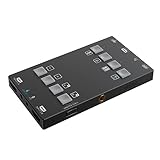
- H2U capture card Supports 4K60Hzlnput, uncompressed1080p 60 capture and 1080p 60 HDMITMloopout(PGM out)
- 6 Screen Mode Configurations internal tv tuner & video capture cards EASILY ADJUST THE DISPLAY SETTINGS WITH BUILT-IN BUTTONS,ENABLING PIP (PICTURE-IN-PICTURE),AS WELL AS PBP(PICTURE-BY-PICTURE)MODE
- usb video capture card 3 individual mixable audio channels andvolume indicators simplify streaming forany occasion.
- Standard uvc (Universal Video Class) protocolallows the device to work automatically withthe system-supplied driver.
- The H2U is compatible across a wide range of streaming software, devices, and platforms including OBS ,XSplit, CameraFi,QuickTime, and more.*For more information,please see the list in the Compatibility tab.
curl -G "https://api.screenshotneo.com/v1/shot" -d access_key=YOUR_API_KEY --data-urlencode url=https://stripe.com -o shot.webpThe same request in Python:
import requests
r = requests.get("https://api.screenshotneo.com/v1/shot", params={"access_key": "YOUR_API_KEY", "url": "https://stripe.com"}, timeout=90)
open("shot.webp", "wb").write(r.content)
And in Node.js:
const q = new URLSearchParams({ access_key: 'YOUR_API_KEY', url: 'https://stripe.com' });
const res = await fetch(`https://api.screenshotneo.com/v1/shot?${q}`);
Options for production captures
ScreenshotNeo supports full-page captures with lazy images loaded, a single element selected by CSS selector, dark mode, 12 device presets or any viewport, retina scale, PDF paper size, margins, landscape mode and page ranges. You can provide custom CSS and JavaScript, click an element before capture, hide selectors, wait for a selector, delay or network idle, and block ads, trackers, requests or resource types. Custom headers, cookies, user agents, Authorization, timezone and geolocation are available, as are transparent backgrounds, image resizing, a chosen cache TTL, signed links for public <img> tags, asynchronous jobs with signed webhooks, bulk capture of up to 100 URLs per call, a usage API and an OpenAPI specification. Parameter names used by other screenshot APIs also work, which can simplify migration.
For AI workflows, its MCP server exposes take_screenshot, get_page_info and capture_pdf to Claude, Cursor and other MCP clients.
Plans and billing
| Plan | Allowance | Price |
|---|---|---|
| Free | 1,000 shots/month | $0; no card |
| Starter | 3,000 shots | $5 |
| Growth | 15,000 shots | $15 |
| Pro | 60,000 shots | $39 |
| Scale | 250,000 shots | $99 |
| Business | 1,000,000 shots | $249 |
Yearly billing gives two months free, and every feature is included on every plan. Clean shots are the only billed captures, so a failed load or bot-check response does not consume a paid shot.
Start with 1,000 free screenshots a month—no card required.
Best Value

- 🎮 Record Games in HD on Fire Tablet
- 🎥 Smooth Game Screen Recorder for Gameplay
- 🔊 Record Video with Sound and Mic Commentary
- 📱 Background Video Recorder for Tablets
- 💾 Save Game Videos Automatically
Frequently Asked Questions
Can I capture a page that scrolls inside another page?
Possibly, but support depends on how the app exposes that nested scroll area. If Full Page or Capture more is absent, use the app’s export feature or capture separate sections.
Does a scrolling screenshot include everything below the current position?
It includes the range you select in the expanded capture tool. Review the start and end handles before saving.
Why is my long screenshot blurry or difficult to share?
A tall image may be large and scaled by messaging or gallery software. Crop it, choose PDF where available, or send the original file rather than a compressed preview.
The Tool Desk
Outbyte Driver Updater FREEScan for outdated or missing drivers - takes under a minuteDriver Scan →Outbyte PC Repair FREERepair Windows errors before they cause bigger problemsFix Now →Quick Recap
Product prices and availability are accurate as of the date/time indicated and are subject to change. Any price and availability information displayed on Amazon at the time of purchase will apply.




