Quick wins for a faster PC:
Repair Windows errors before they cause bigger problemsFix Now →Scan for outdated or missing drivers - takes under a minuteDriver Scan →Clear out junk files and repair common Windows errorsFree Scan →Pokémon Winds and Pokémon Waves are officially announced for Nintendo Switch 2 in 2027, but that does not make every leak or post about them genuine. Treat a detail as confirmed only when Nintendo, The Pokémon Company, or another identifiable first-party channel publishes that exact detail. Never sign in or download a file to “unlock” a leak.
What is officially confirmed about Pokémon Winds and Waves?
Nintendo announced Pokémon Winds and Pokémon Waves for Nintendo Switch 2 with a 2027 release window. The official description names an open world, windswept islands, a vast ocean, and Pokémon living in distinct ecosystems. Those statements confirm only those details—not alleged story events, maps, mechanics, Pokémon, or a specific launch date that the announcement does not mention.
As an Amazon Associate I earn from qualifying purchases.
Nintendo’s May 8, 2026 product schedule also lists both games for 2027 and says titles and launch timing may change. So 2027 is a window, not a firm release date. Check the Nintendo announcement, the Nintendo UK game page, and the Nintendo product schedule dated May 8, 2026 for first-party information.
Free tools Windows power users keep installed
One-click scans. No signup required.
A rumor getting one detail right—or later matching an official announcement—does not prove its other claims. Assess each claim on its own evidence.
#1 Best Overall

- The next evolution of Nintendo Switch
- One system, three play modes: TV, Tabletop, and Handheld
- Larger, vivid, 7.9” LCD touch screen with support for HDR and up to 120 fps
- Dock that supports 4K when connected to a compatible TV*
- GameChat** lets you voice chat, share your game screen, and connect via video chat as you play
How to verify a supposed leak
- Go to the source yourself. Open Nintendo’s official site or The Pokémon Company’s official news pages by typing the address or using a trusted bookmark. A search result, fan account, reposted screenshot, or video can point you toward a claim, but it does not establish that claim as official.
- Compare the exact detail. Check whether a first-party page actually says what the post claims. Confirmation of the games, setting, or release window does not also confirm an alleged feature, character, map, story event, or date.
- Check who published it and when. Look for an identifiable publisher, a dated announcement, and an official URL. If you cannot find a first-party source for the specific claim, treat it as unconfirmed—not as a real leak.
- Do not authenticate an email by its sender line. Nintendo warned in a 2024 notice that scammers can spoof Nintendo email addresses and use links to direct people to fraudulent sites. A familiar-looking sender name or address is not proof that a message is genuine. Read Nintendo’s notice about suspicious emails spoofing its addresses.
- Never provide account details to access a leak. A page asking you to sign in, “verify” your account, claim early access, or download a supposed leak is a warning sign. Close it and navigate independently to Nintendo’s official site or account page instead of following its link.
Secure your Nintendo Account
Use a passkey on a personal device
Nintendo says a passkey is created specifically for your Nintendo Account and cannot be guessed or used on other sites, which helps guard against phishing. Nintendo advises against setting up a passkey on a shared device. See Nintendo’s passkey instructions.
Or turn on 2-Step Verification
With 2-Step Verification, signing in requires a time-sensitive code as well as your account email or sign-in ID and password. Save the backup codes somewhere secure; Nintendo says they can be used if your authenticator is unavailable. Follow Nintendo’s 2-Step Verification instructions.
Rank #2

- 6.2” LCD screen
- Three play modes: TV, tabletop, and handheld
- Local co-op, online, and local wireless multiplayer
- Detachable Joy-Con controllers
- Nintendo Switch is the home of Mario & friends
Keep access to your registered email
Nintendo uses the address on the account for security and account messages, including password resets and identity verification. Losing access to that mailbox can make account recovery more difficult. See Nintendo’s account information.
If you entered your password on a suspicious page
- Go to Nintendo’s account website independently and change your password promptly. Nintendo specifically recommends changing it if you entered Nintendo Account credentials on a site linked from a spoofed email.
- Enable a passkey or 2-Step Verification if you have not already done so.
- If you still see unauthorized activity or cannot access the account, reach Nintendo account support through an independently opened official site—not the suspicious message. Nintendo also advises contacting your email provider if suspicious mail continues.
Nintendo’s password-change advice appears in its 2024 security notice.
Quick Recap
Best Value

- This pre-owned product is not Apple certified, but has been professionally inspected, tested and cleaned by Amazon-qualified suppliers.
- 6.2” LCD screen.
- Three play modes: TV, tabletop, and handheld
- Local co-op, online, and local wireless multiplayer
- Detachable Joy-Con controllers
Rank #4

- Play your way with the Nintendo Switch gaming system. Whether you’re at home or on the go, solo or with friends, the Nintendo Switch system is designed to fit your life. Dock your Nintendo Switch to enjoy HD gaming on your TV. Heading out? Just undock your console and keep playing in handheld mode
- This model includes battery life of approximately 4.5 - 9 hours.
- The battery life will depend on the games you play. For instance, the battery will last approximately 5.5 hours for The Legend of Zelda: Breath of the Wild (games sold separately)
- Model number HAC 001( 01)
Rank #3
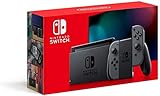
- Play your way with the Nintendo Switch gaming system. Whether you’re at home or on the go, solo or with friends, the Nintendo Switch system is designed to fit your life. Dock your Nintendo Switch to enjoy HD gaming on your TV. Heading out? Just undock your console and keep playing in handheld mode
- This model includes battery life of approximately 4.5 to 9 hours
- The battery life will depend on the games you play. For instance, the battery will last approximately 5.5 hours for The Legend of Zelda: Breath of the Wild (games sold separately)
- Model number HAC 001(01)
Product prices and availability are accurate as of the date/time indicated and are subject to change. Any price and availability information displayed on Amazon at the time of purchase will apply.
Independent reader supportYour contribution helps us test, update, and keep practical guides available for everyone.
