To show Hindi lyrics during a 24/7 YouTube music stream, create a video with the lyrics visibly composed over the music, then send that video to YouTube using an encoder or a cloud streaming service. YouTube’s live-streaming help documents encoder workflows, but not a built-in lyric overlay or a Hindi-script setup recipe. Test the text and timing on real playback—and clear rights to both the recording and lyrics before broadcasting.
Choose how the lyrics will appear
Lyrics are part of the stream’s picture. You can compose them into a visual scene while producing a live stream, or render them into a video before streaming it. The second approach is useful for a continuous music stream: once the lyrics are part of the video, the stream does not depend on a live text operator changing lines at the right moment.
As an Amazon Associate I earn from qualifying purchases.
Live composition with an encoder
YouTube supports encoder-based streaming, in which production software sends a composed audio-and-video output to YouTube Live. You can place Hindi text in the scene using the software you choose, but YouTube’s documentation does not specify how a particular third-party application adds text. Confirm the application supports your intended layout, Hindi text, and timing before relying on it for a long-running broadcast. YouTube’s overview of streaming methods and eligibility is at Get started with live streaming.
The Tool Desk
Outbyte PC Repair FREERepair Windows errors before they cause bigger problemsFix Now →Outbyte Driver Updater FREEFix the driver behind crashes, sound loss and screen glitchesFind Drivers →Pre-rendered video with lyrics
Create or edit a video so each lyric line appears at the intended time, then stream that finished video. This makes the text part of the picture rather than a separate live overlay. For a 24/7 playlist, prepare and review each video in advance, including transitions between songs, so a lyric card or line from one track does not remain on screen over the next track.
#1 Best Overall

- 【7" HD LYRICS DISPLAY & WIFI】Say goodbye to small phone screens; our all-in-one karaoke machine features a built-in 7-inch high-definition screen for clear lyrics display. Connect via WiFi 6.0 or Bluetooth 5.3 to access unlimited songs from YouTube and Spotify for an immersive singing experience.No need for extra phones or devices, enjoy professional karaoke experience at home.
- 【ULTRALIGHT & 60% MORE COMPACT】 Unlike bulky traditional PA systems, this smart karaoke player is 60% smaller and ultra-lightweight at only 60.17 oz. Lightweight with carry handle for easy portability, makes it perfect for on-the-go fun, audio mixer, from backyard BBQs to car karaoke and outdoor camping,great gift for adults and kids.
- 【2 RECHARGEABLE WIRELESS MICS & 5 Fun Sound Modes】 Includes 2 professional wireless microphones with an effective range of 50 feet, ideal for duets and group interactions. 60W powerful sound. Features 5 fun sound modes—Pop, Karaoke, Baby Voice, Monster Voice, and Original—to spice up every family gathering.
- 【NON-STOP PLAYTIME & FAST CHARGE】 Equipped with a high-capacity battery providing 6-8 hours of regular use and 150 days of standby. Supports Type-C fast charging (full charge in 2 hours) and charging while in use, so your party never has to stop due to low power,perfect for home parties, outdoor gatherings, camping and travel.
- 【VERSATILE CONNECTIVITY & GIFT IDEA】 Fully supports WiFi, Bluetooth, USB, TF card, and Aux inputs for maximum compatibility,easily connects to TV, phone, PC and other devices. Powered mixers. It's an unique gift for adults, kids, family, parents and friends! Its impressive functionalities and stunning features make it a standout gift for Valentine's Day, birthday, Christmas, Easter, Halloween, Thanksgiving, holidays, or any special occasion. Not only does it promise hours of entertainment,but also it brings people together,creating unforgettable memories.
Clear the music and lyric rights before broadcasting
Showing a song on a continuous live stream involves more than being able to play the recording privately. YouTube’s Livestream terms and conditions say the stream provider represents that they have the necessary rights for live content worldwide, including music licensing rights from artists, labels, publishers, and other royalty participants. The permissions needed depend on the specific recording, composition, lyrics, territories, and agreements; these general platform rules do not determine whether a particular song is cleared.
- Identify the sound recording and the underlying musical composition, and establish that your permissions cover the intended live broadcast and territories.
- Check rights for the lyric text as well as the music. Permission to use a recording does not by itself establish permission to display its lyrics.
- Keep licenses and rights-holder correspondence accessible while the stream runs.
- If a rights holder uses Content ID, ask whether it can allowlist your channel. YouTube warns that a licensed third-party stream may still be interrupted if the channel has not been allowlisted.
YouTube says live streams are scanned for matches to third-party content and that continued use of matched content can lead to interruption or termination. See Copyright issues with live streams. A license may be necessary but does not guarantee that automated live-stream checks will not interrupt the broadcast.
Rank #2

- YOUR BEST KARAOKE CHOICE: The Ikarao Shell S3 karaoke machine for adults features a built-in screen, lyrics display, and karaoke system. Its latest AI vocal remover lets you turn any song into a backing track with a single tap—no need to search for karaoke versions. Paired with Autotune pitch correction and echo effects, your voice will sound like a star singer. The 80W karaoke speaker delivers powerful sound. A foldable handle and 7-hour battery let you take karaoke fun from indoors to outdoors
- EASIER SINGING, SUPERIOR VOCALS: The Ikarao Shell S3 karaoke machine with 2 wireless microphones features an advanced DSP chip and smart sound algorithms that dynamically optimize vocals while suppressing noise and howling, delivering studio-quality sound. The portable karaoke machine with 7 built-in sound effects and EQ adjustments adds fun to your party. Whether you're a karaoke host, DJ, venue manager, or wedding planner, the Shell S3 Bluetooth karaoke machine is your perfect smart audio assistant
- DESIGNED FOR KARAOKE: The Ikarao Shell S3 karaoke machine with lyrics display comes with 6-month KaraFun Prime, offering access to 50,000+ songs with 400 new tracks added monthly. KaraFun built-in color-changing lyrics, custom key & tempo, customization of the song, vocal match, remote control, and offline sync. The karaoke machine with screen makes it easy to follow lyrics, perfect for family fun, camping, parties, road trips, vocal practice, park events, street shows, and live performances
- MORE BALANCED, NATURAL SOUND: The 80W loud karaoke speaker fully unleashes deep, clear sound, filling any room with powerful music. Advanced bass and treble separation technology keeps the sound balanced, reduces noise, and eliminates echo at any volume or frequency, making every beat as clear and powerful as a live performance. It serves as both Bluetooth speaker and PA system during the day, and turns into a karaoke machine at night—perfect for singing and having fun with your family
- GIFTS FOR EVERYONE: This professional karaoke machine is portable, featuring the latest Bluetooth 5.4 and WiFi connectivity, and is as easy to use as a smartphone—perfect for all age groups. The main unit measures 7.25 x 7.10 x 4.90 inches and weighs 4.71 lb (2,135 g). Package dimensions are 9.05 x 8.90 x 7.85 inches, and package gross weight is 5.60 lb (2,541 g). It makes a perfect gift for parents, kids, partners, or friends
Do not treat these as live-stream permission
- A song being available in YouTube Music, a lyric website, or a personal purchase does not by itself show that you have rebroadcast and lyric-display rights.
- YouTube says Creator Music licensing and revenue sharing apply to long-form videos; it does not currently support licensing live content. See Understand Creator Music usage details and the Creator Music FAQ.
- A “free” label alone does not establish that music is safe to use. YouTube’s guidance is at Tips to find safe music.
Prepare and test the Hindi lyric presentation
There is no single font, size, or synchronization method prescribed by YouTube for Hindi lyrics. Check the complete video or scene in the software and on the devices viewers are likely to use before making it part of a continuous stream.
- Use the exact lyric text you have permission to display. Check spelling, punctuation, line breaks, and any alternate spellings against an authorized text source; do not assume automatic transcription is accurate.
- Check Hindi rendering. Test representative characters, vowel marks, conjuncts, and punctuation. Look for missing glyphs, broken shaping, unexpected font fallback, or lines that wrap in the wrong place.
- Check readability. Preview the text over the actual background. Use sufficient contrast and keep important text away from the edges, where different screens or playback layouts can make it harder to see.
- Check timing and transitions. Compare lyric changes with the authorized recording from start to finish. Look for lines that appear too early, linger too long, or carry across a track boundary.
- Watch on desktop and mobile playback. A layout that looks clear in the production preview may become cramped or difficult to read on a smaller screen.
These are practical production checks, not settings guaranteed by YouTube. The platform’s published live-stream material does not prescribe a Hindi font or a lyric synchronization workflow.
Rank #3

- 【7" HD LYRICS DISPLAY & WIFI】Say goodbye to small phone screens; our all-in-one karaoke machine features a built-in 7-inch high-definition screen for clear lyrics display. Connect via WiFi 6.0 or Bluetooth 5.3 to access unlimited songs from YouTube and Spotify for an immersive singing experience.No need for extra phones or devices, enjoy professional karaoke experience at home.
- 【ULTRALIGHT & 60% MORE COMPACT】 Unlike bulky traditional PA systems, this smart karaoke player is 60% smaller and ultra-lightweight at only 60.17 oz. Lightweight with carry handle for easy portability, makes it perfect for on-the-go fun, audio mixer, from backyard BBQs to car karaoke and outdoor camping,great gift for adults and kids.
- 【2 RECHARGEABLE WIRELESS MICS & 5 FUN SOUND MODES】 Includes 2 professional wireless microphones with an effective range of 50 feet, 60W Stereo Sound,ideal for duets and group interactions. Features 5 fun sound modes—Pop, Karaoke, Baby Voice, Monster Voice, and Original—to spice up every family gathering.
- 【NON-STOP PLAYTIME & FAST CHARGE】 Equipped with a high-capacity battery providing 6-8 hours of regular use and 150 days of standby. Supports Type-C fast charging (full charge in 2 hours) and charging while in use, so your party never has to stop due to low power,perfect for home parties, outdoor gatherings, camping and travel.
- 【VERSATILE CONNECTIVITY & GIFT IDEA】 Fully supports WiFi, Bluetooth, USB, TF card, and Aux inputs for maximum compatibility,easily connects to TV, phone, PC and other devices. Powered mixers. It's an unique gift for adults, kids, family, parents and friends! Its impressive functionalities and stunning features make it a standout gift for Valentine's Day, birthday, Christmas, Easter, Halloween, Thanksgiving, holidays, or any special occasion. Not only does it promise hours of entertainment,but also it brings people together,creating unforgettable memories.
Set up the YouTube stream and encoder
- Confirm live access. In YouTube Studio, check that your channel can stream live. YouTube says the channel must be verified and must not have had live-stream restrictions in the preceding 90 days. See YouTube’s live-streaming eligibility guidance; the stated 90-day rule is a platform requirement, not a performance statistic.
- Choose the encoder method. For a designed lyric-and-music presentation, use an encoder workflow that can send your composed scene or prepared video to YouTube Live. YouTube lists encoder streaming among its available methods; it does not mandate a particular third-party program for lyric overlays.
- Configure the output using YouTube’s current guidance. Match your encoder’s video and audio output to the source and connection you can reliably sustain. YouTube recommends RTMP or RTMPS for encoder streams and publishes supported encoder settings, bitrates, resolutions, and keyframe guidance at Choose live encoder settings, bitrates, and resolutions. Check that page for the settings appropriate to your selected resolution and frame rate rather than guessing values.
- Connect using the stream key privately. Enter the YouTube stream key in the encoder’s streaming configuration. Treat it like a password: do not show it in the lyric scene, publish it, or share it with anyone who should not be able to broadcast to the channel. If it is exposed, replace it through YouTube’s controls before streaming again.
- Start a test transmission and check the preview. Confirm the intended event is accessible, the correct video and audio are arriving, and the lyrics are legible. Do not assume that a locally correct preview guarantees the same result after the stream reaches YouTube.
Plan for continuous operation
A 24/7 broadcast needs a plan for monitoring, interruption, and recovery; a successful short test does not prove a system will run indefinitely. YouTube recommends preparing the encoder in advance, starting it before the scheduled event, checking the Live Control Room preview and event accessibility, confirming local archive files are growing, and monitoring audio and video quality. Its guidance is at YouTube live streaming tips.
- Decide who will notice a stopped or degraded stream and what they will do to restore it.
- Check that any local recording or archive is actually being written, if you rely on one for recovery or review.
- Test any failover or restart method before the continuous stream depends on it.
- Recheck audio, picture, lyric alignment, and stream accessibility after changes to the playlist or production setup.
YouTube’s documentation does not guarantee that a particular computer, connection, encoder, or workflow can remain uninterrupted around the clock. Treat continuity as an operational responsibility and monitor the stream.
Rank #4
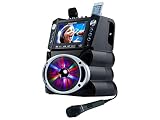
- 35W Peak Digital Power Amplifier (25W RMS) (Best with Polaroid 9V Batteries)
- 7" TFT Digital Color Screen
- Record Voice and Music Mix and Instant Playback LED Lightings that Synchronize and Flash with the Rhythm of Music
- Remote Control. Universal cradle can accommodate personal device like smart phones, tablets, pads, mp3 players and more
- Upgraded Panasonic mic cartridges which produce better sound quality
Or let it run in the cloud
If you have rendered the lyrics into your authorized video files, StreamNeo can loop uploaded videos to a YouTube channel from the cloud. It does not create live lyrics from a camera or compose a lyric overlay: prepare the finished video with lyrics first.
- Upload the video or build a playlist from your prepared recordings.
- Add your YouTube stream key once.
- Go live; StreamNeo loops the uploaded video from its cloud service.
Nothing has to stay on at home. The uploaded video streams at its original quality up to 4K 60fps for one flat price per slot, without re-encoding or quality tiers. StreamNeo automatically recovers if YouTube drops the stream. The first day is free with no card, and the monthly option is $9.99 per month. Start the free StreamNeo day.
Quick Recap
Best Value

- Immersive 3D Surround Sound | The Ultimate Party Speaker: The PPMIC MS75 professional karaoke machine is designed with a dedicated 6.5" woofer and a 2" tweeter. This dual-driver setup can deliver up to 200W of power, producing clear, balanced audio with distinct vocals and rich bass that easily fills a room—perfect for family gatherings and parties. Experience good separation between voice and music, ensuring the singer remains the clear focus.
- Duo-Power Diaphragms + Premium Leather: Engineered with larger sound chambers and illuminated dual silicone drivers, this karaoke machine projects 360° sound waves with 25% noise reduction. The hand-stitched leather wrap absorbs 20% acoustic resonance while enhancing bass depth. Its durable leather ensures long-lasting performance, complemented by exceptional sound quality and a luxurious touch—making it an ideal choice for music lovers.
- Feature-Rich Wireless Karaoke System: This professional karaoke machine includes multiple sound modes. Use the "MIC Mode" button to engage pitch correction assistance, which can help tune vocals. Adjust the “Echo” knob on the control panel to add reverb effects to the microphone, from a subtle room ambiance to a more pronounced hall sound, allowing you to customize your vocal performance easily.
- Instant TV Karaoke System Setup: The MS75 is designed for easy setup. Connect it to your TV via the included AUX cable or via Bluetooth (if your TV supports it), pair the wireless microphones, and start singing. It’s a straightforward home karaoke system that requires no technical expertise. (Compatible with most TVs featuring a 3.5mm audio output or Bluetooth audio output.)
- Long-Lasting Battery for Portability: This portable karaoke machine features a large 6000 mAh rechargeable battery, providing extended playtime for singing sessions. It's ideal for weekend family use, indoor parties, or outdoor gatherings where an outlet isn't nearby. Bluetooth 5.3 ensures a stable connection to your music source.
Product prices and availability are accurate as of the date/time indicated and are subject to change. Any price and availability information displayed on Amazon at the time of purchase will apply.

