Do these 3 things before closing this tab:
1Fix the driver behind crashes, sound loss and screen glitches2Repair Windows errors before they cause bigger problems3Scan for outdated or missing drivers - takes under a minuteThis guide covers the unofficial D2R VR community project for Diablo II: Resurrected, not an official Blizzard mode and not UEVR. It adds top-down, third-person, floor-scale mixed-reality and an experimental first-person view. The documented setup is offline single-player only: do not inject it into online play, because the project warns that doing so can result in an account ban. For the headset experience you need a PC-compatible VR headset with tracked motion controllers, the specified D2R build and loader, ReShade with Generic Depth, and BodyWalk with FlatVR and Game Link.
What D2R VR actually is
D2R VR is a community modification that presents Diablo II: Resurrected through several VR views and translates tracked-controller input into either a gamepad-style layout or first-person gestures. It is not a Blizzard product. The project README states: “This project is not made, endorsed or supported by Blizzard Entertainment.” It is also separate from UEVR, so UEVR-specific settings should not be assumed to work here.
As an Amazon Associate I earn from qualifying purchases.
The project is intended for offline, single-player use. Treat that limitation as a safety requirement, not a suggestion. The README warns that injecting code online can get an account banned. Do not test the mod in multiplayer, on a connected character, or in any mode where an anti-cheat response could affect your account.
Free tools Windows power users keep installed
One-click scans. No signup required.
There are four views. F1 is top-down, F2 is third-person, F3 is a floor-scale mixed-reality presentation, and F4 is first person. The author describes F4 as an early preview rather than a finished way to play. Weapon position and aim can be wrong for many weapons, so first-person combat is experimental even after installation.
#1 Best Overall

- Advanced motion sensing and light tracking technology
- Easily accessible trigger and face buttons
- Immersive vibration feedback
- Rechargeable batteries provide long hours of play
Check compatibility before installing
The README names a specific tested combination rather than promising compatibility with every current game update:
| Component | Documented requirement | What to verify |
|---|---|---|
| Game | Diablo II: Resurrected build 3.3.93787 | Your installed build matches, or you accept that another build may need address changes. |
| Loader | D2RLoader 1.3.1 | Launch through the loader expected by the project. |
| Depth and stereo support | ReShade with add-on support and the Generic Depth add-on enabled | ReShade must be installed with add-ons allowed; Generic Depth must be available to the game. |
| Headset bridge | BodyWalk 1.78 or later, with FlatVR and the Game Link plug-in | These components are required for the documented headset path. |
| Hardware | PC-compatible VR headset with tracked motion controllers | Confirm your headset runtime and PC can provide positional tracking and controller input. |
The README says a different game build requires its addresses to be checked and that the plug-in reports this in its log. Therefore, a successful installation on build 3.3.93787 is not evidence that a newer or older build will work. Recheck the project README and installer for current version notes immediately before setup; community mappings and addresses can change.
Install the documented software stack
- Prepare the game. Install Diablo II: Resurrected on the PC where the loader and VR software will run. Confirm the game version shown by your launcher or installation is 3.3.93787 if you want to stay within the README’s stated combination.
- Install D2RLoader 1.3.1. Use the loader version named by the project. Do not assume that a similarly named loader or a newer build has the same addresses.
- Install ReShade with add-on support. Enable the Generic Depth add-on. The depth data is part of the stereo/VR pipeline described by the project; installing ordinary ReShade without add-on support does not satisfy this requirement.
- Install BodyWalk 1.78 or later. Add the FlatVR component and the Game Link plug-in. The project’s ready installer can install the required pieces and includes free BodyWalk Lite when BodyWalk is not already present, according to the README.
- Connect and configure the headset. Start the headset runtime and make sure both tracked controllers are visible before launching the game. The mod’s VR mappings depend on tracked-controller input.
- Launch from the project entry point. Use the D2R VR settings application or shortcut specified by the README, rather than starting the game through an unrelated shortcut. If the installer has changed since the documented version, follow its current prompts and keep a record of the selected game directory.
- Keep the first test offline. Load an offline, single-player character. Do not connect to online services while checking whether the view, tracking, or gestures work.
If the installer reports that addresses cannot be found, stop rather than guessing. Check the game build, D2RLoader version and the project’s current compatibility notes. A mismatch can produce a launch failure or partially working controls that look like a mapping problem.
Set the project’s recommended video options
In Options > Video in Diablo II: Resurrected, the README lists these values. They are the author’s stereo-rendering configuration guidance, not independently measured performance results or a guaranteed cure for nausea.
Rank #2

- Charges two PlayStation Move Motion Controllers
- Compact design for storage with four non-slip feet
- AC Power adapter plugs into any wall outlet
| Setting | Project guidance | Reason or qualification |
|---|---|---|
| Vertical Sync | Off | The author says the mod draws the eyes in turn and that VSync halves the frames each eye receives. |
| Framerate cap | 180 | The README annotates this as 90 frames per eye. It is a configuration value, not a population statistic or benchmark. |
| Anti-aliasing | FXAA or MSAA | Do not use TAA for this setup; the author says TAA combines earlier frames and mixes the two eyes. |
| Ambient Occlusion Quality | Medium | This is the listed balance for the mod’s configuration. |
| NVIDIA DLSS | On or off | The README says both modes work in stereo, so choose according to your image quality and performance needs. |
For FlatVR, the project describes making the game window square or placing it on a square virtual monitor. In FlatVR, adjust the screen’s size, distance and curve until the image sits comfortably in your field of view. Those are display-layout controls, not motion-sickness treatments; changing them cannot compensate for severe discomfort caused by camera movement.
Choose a view before mapping controls
| View | Perspective | Input style | Practical status |
|---|---|---|---|
| F1 | Top-down | BodyWalk presents the controllers as an Xbox-style gamepad. | Uses the documented gamepad mapping. |
| F2 | Third person | Gamepad-style controller mapping through BodyWalk. | Camera distance and movement feel differ from F1; comfort is individual. |
| F3 | Floor-scale mixed reality | Gamepad-style controller mapping through BodyWalk. | Requires the headset and FlatVR/Game Link path. |
| F4 | First person | Pointing, gestures and Strike Zone actions. | Early preview. Weapon placement and aim may be incorrect for many weapons. |
Start with the view in which the world feels most stable to you. There is no tested universal comfort ranking among F1, F2, F3 and F4. F4 may feel more immersive, but it also adds hand aiming, swinging and camera-motion variables while the author is still calling it a preview.
Use the F1–F3 gamepad mapping
For the first three views, BodyWalk turns the VR controllers into an Xbox-style gamepad. The project documents these inputs:
| Gamepad action | VR controller input |
|---|---|
| Left stick / movement | Move with the left stick. |
| D-pad directions | Hold the left grip and move the left stick in the desired direction. |
| Map | Click the left stick. |
| Menu | Hold the left stick down. |
| Recenter (“ahead” direction) | Hold the right stick down. |
The remaining actions follow the game’s own gamepad layout. Do not infer a different button from another VR title or from a controller model’s printed labels. If an action is missing, open the BodyWalk mapping screen and compare it with the game’s gamepad layout rather than changing several bindings at once.
Rank #3
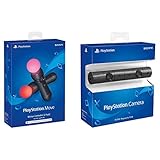
- Enable the most exciting and immersive gaming experiences in compatible PlayStation VR games
- Advanced motion sensing and light tracking technology
- Precise and intuitive aiming for compatible PlayStation VR shooter games
- Broadcast yourself in play with PlayStation Camera and Become a community sensation by adding a picture-in-picture video of yourself in gameplay livestreams.
- When combined with the DUALSHOCK 4 wireless controller's light bar, the evolutionary 3D depth-sensing technology in the PlayStation Camera enables precise player tracking.
Configure the F4 first-person preview
F4 is the view most likely to match a search for “Diablo II in first person with touch controls,” but it is also the least mature. The project README says:
“F4 is an early look, not a finished way to play the game: the weapons are not calibrated yet, so how a weapon sits in the hands and where it aims may be off for many of them.”
Use D2R VR Settings’ Weapon Adjust as a manual interim correction when a weapon sits too high, low or far from the hand. Expect to repeat that adjustment for different weapon types; it is not evidence that every weapon has been calibrated.
The Tool Desk
Outbyte PC Repair FREEClear out junk files and repair common Windows errorsFree Scan →Outbyte Driver Updater FREEFix the driver behind crashes, sound loss and screen glitchesFind Drivers →| Action | Documented input | Configuration note |
|---|---|---|
| Potions | Reach to the belt. | The gesture is configured in BodyWalk Mapping. |
| Bows, crossbows, fireballs and other spells | Press the right trigger. | The shot follows the pointing hand. |
| Swords, axes and other melee weapons | Swing inside the configured Strike Zone. | Set the Strike Zone in BodyWalk Mapping; the README does not define one universal size. |
| Inventory | Hold the left stick down. | This is the same hold action used for the menu in the gamepad table, so use the active view’s documented behavior. |
| Map | Click the left stick. | Keep the click distinct from holding the stick down. |
| Swap weapon sets | Click the right stick. | Do this deliberately to avoid an accidental swap during movement. |
| Recenter | Hold the right stick down. | The author describes this as resetting the center or “ahead” direction. |
If spells fire in an unexpected direction, first check which hand is pointing and whether the headset view is centered. If melee attacks do not register, inspect the Strike Zone mapping and your swing path. Neither symptom proves that the mod is broken: the README explicitly warns that first-person weapon calibration is incomplete.
Rank #4

- Charge the controller and automatically pair with the PS4 system via a USB cable
- 1 Move Controller and 1 USB Cable
Reduce motion sickness without overpromising
Meta’s developer comfort guidance states that “Motion sickness can occur when there is a mismatch between what the user sees and how they move.” That principle is especially relevant when a game moves the virtual camera while your body remains still. Comfort varies by person and by implementation, so use the following as a cautious process rather than a guaranteed remedy.
Begin with the least demanding view
Try F1 or F2 before F4 if first-person motion feels disorienting. F1 keeps the action in a top-down perspective; F2 changes the camera relationship without requiring hand-aimed weapons. F3 adds a floor-scale presentation that may feel natural to some players and strange to others. Move to F4 only after you can play briefly without symptoms.
Keep movement and turns deliberate
Use modest movement and avoid rapid, repeated direction changes if they trigger discomfort. General VR guidance identifies sudden acceleration, fast direction changes and unnatural camera motion as common problems. Do not treat the 180 cap, 90-frames-per-eye annotation or the README’s video settings as a medically validated comfort preset; they are the project author’s rendering instructions.
Quick wins for a faster PC:
Repair Windows errors before they cause bigger problemsFix Now →Scan for outdated or missing drivers - takes under a minuteDriver Scan →Clear out junk files and repair common Windows errorsFree Scan →Try comfort options only where they exist
Some headset runtimes or companion software expose snap turning, teleportation or a vignette that narrows peripheral vision during movement. You can test one option at a time if your own software provides it. The D2R VR README does not document these as built-in mod options, so their presence, labels and behavior depend on your headset and runtime. Teleportation can itself be disorienting for some people, while continuous slide locomotion can cause sickness for others.
Best Value

- Original Motion Controllers for Pico 4 All-In-One 3D VR Glasses Virtual Reality Headset Left/ Right Handles For Metaverse & Stream Gaming 100% original brand new controllers are in retail box. 100% original brand new chargers and cables are in bulk packing.
Recenter before the view drifts
In all four documented controller tables, holding the right stick down recenters the view so that the direction you are looking becomes “ahead.” Recenter while standing or sitting in a stable position, before starting movement. If the horizon or play area feels rotated, stop and recenter instead of trying to compensate with increasingly awkward body posture.
Stop at the first warning signs
When nausea, sweating, headache, eye strain or disorientation begins, pause the game and remove the headset. Do not push through symptoms in the hope that a fixed exposure schedule will guarantee acclimation; no such outcome is established for this project. Resume only if you feel normal, and shorten the next session if symptoms return.
Do not import UEVR settings into D2R VR
UEVR documentation separately says: “Enable ‘Decoupled Pitch’ under the VR options. This flattens the view rotation to keep the horizon level (removes roll), which can help reduce motion sickness.” That instruction belongs to UEVR’s own options. The D2R VR README does not state that D2R VR exposes or supports Decoupled Pitch, so do not search for it as though it were a required D2R setting.
What’s actually slowing this PC down?
Pick the symptom - the matching free tool is one click away.
UEVR also documents an AFR mode in which each eye is rendered on alternating frames and warns that it causes eye desynchronization and usually nausea. That is a UEVR-specific caution, not evidence that D2R VR uses UEVR or AFR. Keep the two projects’ settings and warnings separate.
Troubleshoot the common failure points
The game launches but the headset view is absent
- Confirm that the headset runtime is running and both tracked controllers are visible before launching.
- Start through the D2R VR settings app or shortcut specified by the project, not a normal game shortcut.
- Verify that BodyWalk, FlatVR and Game Link are installed and that ReShade has add-on support with Generic Depth enabled.
The loader reports missing addresses or the game fails after an update
- Check that the game is build 3.3.93787 and D2RLoader is 1.3.1, the combination named by the README.
- Read the plug-in log for the address-check result.
- Do not force a different build to run. Recheck the project’s current README and installer for updated addresses or supported versions.
Controls work in F1–F3 but not in F4
- Open BodyWalk Mapping and confirm the potion gestures and Strike Zone are configured.
- Test the documented stick clicks and holds separately; a click and a hold are different actions.
- Remember that F4 is an early preview. A missing or inaccurate weapon response may be a project limitation rather than a headset fault.
The weapon aims beside the pointing hand
Use Weapon Adjust in D2R VR Settings as the project’s documented interim correction. Recenter first, then adjust one weapon type at a time. The README warns that many weapons are not calibrated, so do not assume one correction fixes every bow, spell or melee weapon.
Motion feels uncomfortable even after changing settings
Return to a more stable view, slow your movement and turning, and stop when symptoms begin. Check whether your headset software offers snap turning, teleportation or a vignette, but do not assume those controls are supplied by D2R VR itself. If discomfort persists, remove the headset and discontinue the session.
Hardware and purchasing expectations
The honest hardware category is a PC-compatible VR headset with tracked motion controllers. The project does not establish support for a particular headset model, runtime, graphics card or cable arrangement, and no headset-specific testing is documented here. Before buying or configuring hardware, verify compatibility among your headset runtime, PC, controller tracking and the current D2R VR installer. BodyWalk is a material part of the documented software path; the README says its ready installer includes free BodyWalk Lite for users who do not already have BodyWalk.
Outdated Drivers Are Slowing You Down
One free scan finds every outdated or missing driver and matches the right update for your exact hardware.Free scan · exact hardware matchWindows Errors? Fix Them Before They Spread
Repair common Windows errors and clear accumulated junk for a smoother, more stable PC - no reinstall needed.Free scan · no reinstallQuick Recap
Pre-launch checklist
- Use an offline, single-player character only.
- Confirm the game and loader versions against the current project README.
- Install ReShade with add-on support and enable Generic Depth.
- Install BodyWalk 1.78 or later with FlatVR and Game Link.
- Connect a tracked-controller headset and start the required runtime.
- Set VSync Off, cap 180 (90 per eye), FXAA or MSAA, Ambient Occlusion Medium, and DLSS according to the project’s guidance.
- Choose F1, F2 or F3 for an initial comfort test; treat F4 as an experimental preview.
- Verify recenter, map, menu and movement before attempting gestures or melee strikes.
- Stop immediately if motion-sickness symptoms start.
Product prices and availability are accurate as of the date/time indicated and are subject to change. Any price and availability information displayed on Amazon at the time of purchase will apply.

