To set up a four-screen portable monitor, first confirm that your laptop supports the number of external displays the kit requires and that the connection port carries video. Then connect power and video, assemble the panels as the manufacturer directs, and arrange them in your operating system’s display settings. A USB-C-shaped socket alone does not guarantee video output.
Check compatibility before connecting
Identify your exact laptop model and operating system, then check its supported number of external displays at the resolution and refresh rate you intend to use. Also confirm that the specific port you plan to use supports video output, and whether the monitor maker requires a driver. These details vary by laptop and monitor; a four-panel kit will not necessarily work as four independent displays on every computer.
As an Amazon Associate I earn from qualifying purchases.
How can I tell if my USB-C port supports video?
Check the laptop maker’s specifications or support documentation for video output on that specific USB-C port. The connector’s shape is not enough to establish support. For an example of a monitor maker’s connection guidance, ASUS notes video-capability requirements and alternate connection guidance for its ZenScreen MB16AHG. If your laptop’s USB-C port does not carry video, use another connection route only if your monitor model supports it, and follow its separate power requirements.
Check display limits on a Mac
Apple says the number of external displays a Mac can use at once depends on its model and the resolution and refresh rate of each display. Its current MacBook Pro display-limit table, for example, lists up to four simultaneous external displays for M4 Max models and up to two for M4 and M4 Pro models, subject to the conditions in the table. Those examples are specific to the listed models, not a general rule for all Macs. Use Apple’s external-display connection guidance to plan ports and connections.
#1 Best Overall
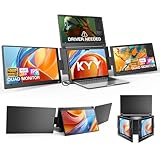
- Quad Monitor for Laptop Productivity - Triple screen laptop extender allows programmers, financial analysts, and sellers to manage manage multiple applications and workflows for code, spreadsheets, and data analysis, charts, dashboards, and communication at once. Wide Compatibility Portable Monitor for modern 12–17.3” laptops running macOS, Windows, Linux(ONLY ubuntu), or Android (driver needed), ideal for cross-platform work professionals.
- Clean, Professional Desk Anywhere - ONE USBC-C cable connect 4Screens, create a full multi-screen workstation at home, in the office, or while traveling, without external monitor stands or complex setups. Supports extended and mirrored display modes, allowing flexible screen layouts for development, financial analysis, or cross-border operations.
- Auto Screen Smart Rotation - TOP screen auto-rotates when folded backward, while adjustable screens up to 360° improve face-to-face viewing across multiple tasks, allowing simultaneous viewing of multiple applications, documents, or data streams—no manual configuration needed.
- Stable Laptop Screen Extender with Alloy Setup - Unlike clip-on designs, the built-in integrated aluminum alloy stand avoids hanging weight on laptop screens, laptop screen stress of screen damage, and improves structural stability while offering a more solid working base. Providing a more secure and reliable alternative to clip-on extenders.
- Eye Comfort Laptop Monitor Extender - Low blue light technology and high 400 nits brightness help reduce eye strain with clear, comfortable viewing multiple tools, dashboards, office, trading environments and documents simultaneously for long sessions of professional work.
Connect and assemble the monitor
For the Lepow modular four-screen kit, the manufacturer’s user guide lists a 65W power adapter and Type-C cables, and specifies this connection sequence:
- Connect the adapter to the monitor’s Type-C power port.
- Check that the laptop’s intended port supports video, then connect the laptop and monitor with the Type-C-to-Type-C cable.
- Join the panels using their magnetic connectors.
- Turn off the monitor before adjusting or removing the magnetic connectors. Lepow’s guide says: “Always turn off the power before adjusting or removing the magnetic connectors.”
The guide recommends using the original 65W adapter. It lists the adapter and cables as included, so they are not automatically separate purchases. Follow the instructions for your specific kit if its power ports, cables, assembly, or driver requirements differ.
Rank #2

- Boost Your Productivity with Quad Monitor Setup: Suitable for remote workers, college students, programmers, teachers, graphic designers, accountants, and software developers, this triple-screen laptop extender supports both extended and mirror display modes, lets you simultaneously view code, charts, dashboards, and communication tools on one expanded workspace
- Enhanced Aspect Ratio for Productivity: 16:10 aspect ratio delivers a tangible upgrade for productivity and creative workflows
- Eye Comfort Technology: Low blue light tech cuts eye strain during marathon sessions
- Wide Compatibility: Compatible with MacBooks 2019 or later (include M1 M2 M3 M4 M5 chipset), Windows 10 or 11
- Lightweight and Portable Design: 4.84 lbs lightweight construction provides the ultimate balance of versatility and portability
Choose a display mode and arrange the screens
After the panels connect, open the operating system’s display settings. Choose an extended desktop if you want separate workspace across displays, or mirroring if you want the same content repeated. Arrange the display diagrams to match the panels’ physical positions so that moving the pointer between screens feels natural.
Recommended Free Tools
On a Mac, Apple documents these controls under System Settings > Displays; see its instructions to extend or mirror the desktop and arrange displays. Windows steps and any driver installation depend on the laptop and monitor model, so use the instructions for that exact combination rather than assuming one setup path applies to every kit.
Rank #3

- [ Quad-Screen Productivity ]: Adds three portable monitor to your laptop, creating a 4-screen workstation. Ideal for programmers, analysts, traders, and remote teams running code, spreadsheets, dashboards, and communications side-by-side. Supports extended and mirrored modes for flexible layouts.
- [ One USB-C Cable ]: One full‑function USB‑C cable transmits video and power to all three laptop screen extender at the same time. Eliminate bulky docking stations and messy tangled cords. Simply plug into your laptop’s USB‑C port, and you get a ready‑to‑use 4‑screen workstation in seconds.
- [ Auto-Rotation + 360° Adjustable Screens ]: Fold the top screen backward and it rotates automatically—no manual settings. Side screens rotate 360° for collaboration, portrait coding, or document reading. The built-in kickstand locks firmly, keeping your triple laptop screen extender stable on any flat surface.
- [ All-Aluminum Stand ]: Unlike clip-on designs that stress your laptop hinge and screen, the X90G triple monitor for laptop features an integrated aluminum alloy stand that supports the entire setup independently. Protects your laptop while providing a rock-solid base.
- [ Wide Compatibility – Works with Your Devices ]: Compatible with macOS, Windows, Linux (Ubuntu), and Android—fits 12"–17" laptops. Please note: driver installation is required for each operating system before first use.
Choose a kit that fits your laptop
Purpose-built modular quad monitors are one option, but compare manufacturer specifications against your laptop before choosing. Lepow describes its 18.5-inch modular quad monitor setup; RIITEK also lists an 18.5-inch quad portable monitor. These are manufacturer product descriptions, not independent performance assessments.
- Confirm that your laptop and operating system support the needed external-display count.
- Check driver requirements and the monitor’s supported connection and power methods.
- Compare panel count, size, resolution, refresh rate, and configuration flexibility.
- Check what cables, adapter, and stand are included, along with packed dimensions, weight, warranty, and support.
If a supplied video cable is missing or unsuitable, a replacement must support video from the laptop’s port. Replace the power adapter only with one that meets the monitor maker’s specifications.
Rank #4

- 2026 Innovative 4K Touch Portable Monitor: The innovative 4K touchscreen combines ultra clear 4K resolution with responsive 10-point touch, all within a frameless ultra-thin frame. This is the first product to bring desktop level clarity and finger precision control into a mobile workspace, redefining the way you interact with high-definition content anywhere
- 4K-125% sRGB True Color Immersion: The 4K UHD (3840x2160) ultra-high resolution of this laptop monitor has excellent accuracy and consistency, with each color tone precisely tuned from the darkest black to the most vivid highlights, creating a profound "immersive" experience - whether you're exploring the vast gaming world or editing high-resolution photos, it takes you to the core of content
- 2000:1 High Contrast Ratio: White is 2000 times brighter than the darkest black, and this portable screen turns every scene into a dramatic visual masterpiece. Shadows reveal hidden details, highlights burst with luminous intensity, and colors gain unparalleled dimensions, immersing oneself in more realistic, rich, and lifelike images
- Plug & Play, Widely Compatible: Instantly connect to laptops, phones, tablets, and gaming consoles through USB-C. No drivers, no settings - just plug in anywhere and enjoy the stunning second screen. If you use a MINI HDMI port for connection, you will need to connect a power supply and USB-A to USB-C for touch functionality
- Lightweight and Powerful Travel Portable Monitor: A lightweight and powerful travel monitor turns any travel destination into an efficient workspace - with vibrant colors, responsive touch, and lightweight portability. Your ultimate mobile studio, preparing for your next trip
Troubleshoot a blank or unstable panel
Why is one monitor showing no signal?
Start by checking that the laptop supports the display configuration and that the connected port carries video. Then verify the required driver, reseat the video cable and magnetic connectors, and confirm that the correct power adapter is connected. For the Lepow modular kit, the maker recommends its original 65W adapter and checking cables and connectors if screens flicker or go black. A new cable alone will not resolve an incompatible port or a laptop display limit.
What’s actually slowing this PC down?
Pick the symptom - the matching free tool is one click away.
Quick Recap
Best Value

- Triple Screen Productivity Boost: Transform your laptop into a quad-screen workstation with this triple laptop monitor extender. Perfect for programmers, financial analysts, traders, and remote professionals who need multiple windows for coding, spreadsheets, dashboards, meetings, and data analysis at the same time.
- One USB-C Connection for 4 Screens: With just one USB-C cable, you can connect the entire triple monitor setup. Easily expand your workspace anywhere—home office, workspace, or travel—without complex setup or external monitor stands.
- Smart Auto-Rotation Top Display: The top screen automatically rotates when folded backward, providing flexible viewing angles. Adjustable side screens rotate up to 360°, allowing easy screen sharing, multitasking, or face-to-face collaboration.
- Stable Aluminum Alloy Stand Design: Unlike clip-on extenders that stress your laptop screen, this monitor extender features a built-in aluminum alloy stand for improved stability and durability. It protects your laptop while providing a secure and professional workstation setup.
- 15.6'' FHD IPS Display for Eye Comfort: Each 15.6'' 1080P IPS portable monitor delivers sharp text, clear charts, and accurate colors at 60Hz refresh rate. With 400 nits brightness and low blue light technology, it reduces eye strain during long working sessions.
Product prices and availability are accurate as of the date/time indicated and are subject to change. Any price and availability information displayed on Amazon at the time of purchase will apply.

