Secure a connected factory by first mapping every device and dependency, then removing avoidable internet exposure, separating operational technology (OT) from business IT, governing remote maintenance as a temporary exception, maintaining devices with risk-based change control, and monitoring industrial traffic for deviations. Finish with rehearsed response and recovery procedures that protect both production and safety. The sequence matters: changing a firewall rule or installing a patch without understanding process dependencies can create the outage or unsafe condition you are trying to prevent.
Why connected-factory security is an operations problem
Industrial IoT (IIoT) extends sensors, programmable logic controllers (PLCs), supervisory control and data acquisition (SCADA) systems, human-machine interfaces (HMIs), gateways and engineering workstations into networks that may also touch corporate systems or the public internet. A compromise can therefore affect more than confidential data: it can stop a line, corrupt a recipe, damage equipment, or create a safety hazard. Availability and deterministic control often matter as much as confidentiality.
As an Amazon Associate I earn from qualifying purchases.
The Cybersecurity and Infrastructure Security Agency (CISA) describes the exposure problem plainly: “Many organizations unknowingly leave common vulnerabilities and weaknesses exposed to the internet, making them easy targets for exploitation.” Its Internet Exposure Reduction Guidance, published June 4, 2025, applies the warning to control systems, IIoT, SCADA and remote-access technologies.
Use impact analysis before making a defensive change. Identify which functions must continue, which can be stopped safely, how long a process can be unavailable, and who is authorized to approve isolation or shutdown. That decision context should drive every technical control below.
#1 Best Overall
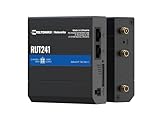
- Reliable 4G LTE Connectivity – Stay connected with high-speed LTE Cat 4 for fast and stable internet access, ensuring seamless communication for industrial, IoT, and remote applications.
- Dual Ethernet & Wireless Support – Features one LAN and one WAN Ethernet port along with a 2.4GHz WiFi hotspot, making it perfect for flexible networking solutions.
- Remote Management System (RMS) Compatible – Easily monitor, configure, and update devices remotely using Teltonika's RMS platform for hassle-free network management.
- Advanced Security & VPN Features – Secure your network with built-in firewall, OpenVPN, IPsec, PPTP, and WireGuard VPN support, ensuring encrypted and protected communication.
- Compact & Rugged Design – Industrial-grade durability with a compact form factor, designed to withstand harsh environments in manufacturing, transportation, and automation sectors.
1. Build an inventory and dependency map before changing the network
You cannot protect an asset that is unknown, misidentified or connected through an undocumented path. Create a maintained inventory rather than a one-time spreadsheet. CISA’s ICS/OT monitoring considerations specifically call for an up-to-date inventory of critical assets.
Record the equipment that can change a process
- PLCs, remote terminal units, safety controllers, drives and industrial robots.
- HMIs, SCADA servers, historians, engineering workstations and operator consoles.
- Sensors, actuators, industrial gateways, protocol converters, wireless bridges and building-management interfaces.
- Firewalls, switches, cellular routers, VPN concentrators, jump hosts and vendor-maintenance appliances.
- Connections to enterprise identity, manufacturing-execution, cloud analytics, backup and safety systems.
Capture ownership and technical state
For each item, record its site and zone, process owner, manufacturer, model, firmware or software version, support status, physical location, administrator accounts, backup method and business or safety function. Note whether it is safety-related, whether a replacement exists, and which team can authorize a change. Unsupported equipment deserves an explicit risk decision rather than an assumption that it is harmless because it is old.
Map communications and dependencies
Document source and destination, protocol, port, direction, frequency and purpose for each required flow. Include temporary maintenance links and one-way data exports, not only permanent connections. Draw the path from a sensor or controller through switches and gateways to an HMI, historian or enterprise service. This map is the baseline for firewall rules, monitoring alerts and recovery decisions; imposing a boundary before mapping dependencies can interrupt a process.
PC Slower Than It Used to Be?
A free scan shows the junk files, broken settings and background clutter dragging Windows down - then fixes them in one click.Free scan · Windows 10 & 11Outdated Drivers Are Slowing You Down
One free scan finds every outdated or missing driver and matches the right update for your exact hardware.Free scan · exact hardware match2. Remove unnecessary internet exposure
Control devices should not be directly reachable from the public internet. Review external scanning results, firewall policies, cloud dashboards, cellular modems and vendor tunnels to find exposed addresses and services. Disable services that are not required, remove default accounts and credentials, and block inbound access at the boundary.
If a service genuinely must be reachable, apply layered safeguards rather than treating exposure as permanent permission:
- Keep the supported operating system, application and appliance firmware current.
- Replace equipment or software that is no longer supported when the risk and process window permit.
- Place access behind a monitored jump host or equivalent controlled gateway instead of publishing the controller or HMI itself.
- Monitor both ingress and egress traffic so an abused system cannot communicate freely after access is obtained.
- Enable multifactor authentication (MFA) where the product and operating process support it.
These measures are the exposure-reduction actions CISA lists for systems that cannot be removed from external reachability. Internet exposure should be treated as an exception with an owner, an expiration or review date, and evidence that the compensating controls work.
3. Segment OT, enterprise IT and safety functions deliberately
Segmentation is a set of enforced boundaries, not a label in a network diagram. Put control systems behind firewalls and separate them from office networks and the public internet. Define the communications that are required for each process and deny everything else. CISA’s ICS Recommended Practices and its manufacturing advisories emphasize isolation and filtering at zone boundaries.
The Tool Desk
Outbyte Driver Updater FREEScan for outdated or missing drivers - takes under a minuteDriver Scan →Outbyte PC Repair FREERepair Windows errors before they cause bigger problemsFix Now →Use zones that reflect how the plant operates
| Zone or boundary | Typical contents | Security objective |
|---|---|---|
| Enterprise IT | Office endpoints, identity services, email and general business applications | Prevent routine business traffic from reaching controllers; allow only documented services to an intermediary zone. |
| Industrial DMZ or perimeter network | Historian replicas, file-transfer services, remote-access gateway and update staging | Broker necessary exchanges without creating a direct IT-to-control path. |
| Operations control | SCADA servers, HMIs, engineering workstations and control-network services | Limit access to the systems that supervise or program production. |
| Cell or area zones | PLCs, drives, robots, sensors and local switches for a line or process | Contain a compromise or misconfiguration to the smallest practical process area. |
| Safety-related systems | Safety instrumented or protective functions, where architecturally separate | Preserve the independence and availability required by the site’s safety design. |
The exact arrangement depends on the plant, protocol behavior, safety architecture and availability requirements. A firewall rule should state the approved source, destination, service, direction and owner. Review rules after equipment changes and remove temporary exceptions. Advisory-specific port numbers, such as those in CISA’s Rockwell Automation MicroLogix 1100 advisory, apply to that product and context; do not copy them as universal rules for another installation.
Rank #2

- High-performance wired and wireless networking – Industrial Ethernet router featuring dual-band Wi-Fi 5 (802.11ac) and 4 Gigabit Ethernet ports for fast, reliable connectivity across business, industrial, and IoT applications.
- Advanced routing capabilities – Supports static and dynamic routing protocols, VLANs, load balancing, and network segmentation, making it ideal for complex enterprise and industrial network deployments.
- Enterprise-grade security and VPN support – Includes firewall protection, access control, and multiple VPN services including OpenVPN, IPsec, WireGuard, L2TP, and ZeroTier for secure remote access and data transmission.
- Built for industrial environments – Rugged aluminum housing and industrial-grade design provide dependable operation in manufacturing, transportation, energy, and other demanding deployment scenarios.
- Remote management and monitoring – Fully compatible with Teltonika RMS (Remote Management System) for centralized device monitoring, configuration, firmware updates, troubleshooting, and fleet-wide management.
Further separation inside OT may be warranted for high-consequence processes, laboratories, contractors or safety functions. Use qualified OT and safety engineers when a boundary could alter timing, failover or protective behavior. NIST SP 800-82 and ISA/IEC 62443 are relevant reference families identified by CISA, but their full control catalogs and edition-specific requirements should be consulted for a formal program.
4. Treat remote maintenance as a managed exception
Remote access is useful for diagnostics and vendor support, but an always-on tunnel or shared account turns a third party’s endpoint into a standing path to production. Require an approved business need, a named person or team, the specific assets involved and a start and end time.
Design the access path
- Terminate the connection at a controlled gateway or jump host in the appropriate intermediary zone, not at a PLC, HMI or engineering workstation exposed to the internet.
- Allow only the destinations and protocols required for the approved task; prohibit broad network discovery and lateral movement.
- Require managed, supported endpoints with current security controls. Disable dormant vendor accounts and revoke credentials when a contract or task ends.
- Use MFA where possible, record authentication and session activity, and make the logs available to the team responsible for OT monitoring.
- Have operations confirm the maintenance window, observe the work when the process warrants it, and verify the equipment state before closing access.
VPN technology can be part of this design, but it is not a complete security boundary. CISA notes that VPNs can contain vulnerabilities, must be kept current and are only as secure as the devices connected through them. A VPN that grants an unmanaged laptop broad access defeats the purpose of segmentation.
Do these 3 things before closing this tab:
1Scan for outdated or missing drivers - takes under a minute2Clear out junk files and repair common Windows errors3Fix the driver behind crashes, sound loss and screen glitches5. Maintain devices with risk-based change control
Patch management in a factory is an engineering decision, not a blanket instruction to install every update immediately. Track vendor advisories, support dates, firmware dependencies and the operational effect of restarting a device. Prioritize an exposed, exploitable controller or gateway over an isolated asset with no reachable attack path, while still documenting the residual risk of the latter.
Use a safe update workflow
- Identify the affected assets and their role in production or safety.
- Check the manufacturer’s release notes, prerequisites, recovery method and available mitigations.
- Test the update in a representative environment or spare system when feasible, including communications, failover, recipes and alarm behavior.
- Obtain approval from operations, engineering and safety stakeholders for the maintenance window and rollback plan.
- Back up configurations and verify that the backup can be restored before changing firmware or software.
- Deploy in a controlled sequence, validate process behavior, and record the result and any exceptions.
When a patch cannot be applied, do not mark the asset “accepted” without controls. Reduce its reachable paths, remove unnecessary services, place it behind an appropriate boundary, increase monitoring and apply the manufacturer’s mitigation where available. Record who accepted the risk, why the patch is deferred and when the decision will be reviewed. CISA’s recommended practices emphasize impact analysis and risk-informed deployment.
6. Monitor industrial traffic, not just corporate endpoints
Traditional endpoint alerts rarely explain whether a PLC is receiving an unexpected programming command or whether a historian is suddenly contacting a controller zone. Select monitoring that understands the industrial protocols and timing used at the site. CISA’s monitoring guidance recommends asset discovery, normal-traffic baselines and ICS-aware analysis.
Establish a baseline
Learn which devices normally communicate, which services they use, when engineering changes occur and what traffic crosses each zone boundary. Include legitimate seasonal or batch variations so that an alert is meaningful rather than constant noise. Compare the observed inventory with the authoritative asset register and investigate unknown devices.
Alert on changes with operational context
- New devices, unexpected protocols or connections between zones that have no documented purpose.
- Configuration, logic, firmware or set-point changes outside an approved maintenance window.
- New listening services, unnecessary ports, failed authentication bursts or unusual remote sessions.
- Traffic patterns that suggest scanning, command misuse, data staging or attempts to move from IT into OT.
- Loss of a critical controller, gateway or monitoring sensor, including silence that could indicate tampering.
Route alerts to people who understand both security and process consequences. A technically suspicious event may be a scheduled engineering action; conversely, a small change in a safety or control network may require immediate escalation. Retain logs and relevant packet or protocol metadata according to the site’s evidence and privacy requirements, and synchronize time sources so events can be reconstructed.
Rank #3

- 【Excellent performance】The Mini computer Onboard Inter Celeron N2940 processor, FCBGA1170 quad-core and four-thread, 1.83 GHz master Frequency, 2 MB cache, TDP 7.5W processor.
- 【4*LAN I210 Network】 On-board INTER I210 Gigabit Ethernet card with 4-port design ,and can be used for Industrial automation, medical care, logistics and transportation, warehousing, electronic education and other fields.
- 【Storage+Memory】1*MSATA slot, 1*MSATA slot,Support 1*DDR3 204 pin SO-DIMM slot (memory support voltage 1.35V),DDR3 1333 SODIMM memory slot, up to 8GB,with HDMI + VGA outputs support dual displays for office or home.
- 【Efficient Memory, Ready to Use】Supports DDR3L low-power memory, ensuring smooth and stable operation of systems without the need for additional upgrade troubles.
- 【Packaging content+warranty 】 1x mini computer, 1x power adapter, 1x power cable. We provide lifelong technical support and 12 months of satisfactory service. If there are any problems, please feel free to contact us at any time.
7. Close physical and removable-media paths
Network segmentation cannot stop someone who can plug a laptop into a switch, open a controller cabinet or insert a removable drive into an engineering workstation. Apply site-appropriate physical access controls, keep controller cabinets locked where feasible, and limit programming equipment to authorized personnel. Maintain a checkout or approval process for portable engineering devices.
Scan removable media before it enters an isolated network, use dedicated transfer procedures and prevent uncontrolled use of personal USB devices. CISA advisories include these measures because malware and unauthorized configuration changes can arrive through a maintenance visit even when the plant has no internet exposure.
8. Prepare response and recovery before an incident
A response plan for OT must answer questions that a generic IT playbook often leaves open: who can isolate a cell, who can approve a production stop, what constitutes a safe shutdown, and how operators continue if digital control is unavailable.
Quick wins for a faster PC:
Scan for outdated or missing drivers - takes under a minuteDriver Scan →Repair Windows errors before they cause bigger problemsFix Now →Fix the driver behind crashes, sound loss and screen glitchesFind Drivers →Define decision roles
- Name the incident commander, OT engineering lead, safety authority, plant manager, IT/security lead and communications contact.
- Specify who may disconnect a link, disable remote access, stop a line or move to manual operation.
- Define escalation thresholds for loss of view, loss of control, suspected manipulation and safety-system impact.
Preserve the ability to recover
Keep current network diagrams, inventories, controller logic, HMI projects, recipes, licenses and configuration backups. Store secure offline or otherwise isolated copies so ransomware cannot encrypt every recovery source. CISA’s #StopRansomware Guide provides broader preparation and recovery practices that should be adapted to the plant’s operating constraints.
Practice degraded operation
Exercise manual, local-control or fallback procedures for critical functions. A drill should verify that operators can recognize an unsafe state, maintain essential control, communicate without the normal network and restore systems in a safe order. After an exercise or event, capture lessons, update diagrams and revise access, backup and monitoring controls rather than treating the report as a filing exercise.
Independent reader supportYour contribution helps us test, update, and keep practical guides available for everyone.9. Put the controls into an operating cycle
Security decays when it is treated as a project with an end date. Use the following sequence as a repeatable governance cycle:
- Discover: reconcile passive monitoring, engineering records and physical inspection to update the asset and dependency map.
- Assess: rank assets by exposure, exploitability, process consequence, safety relevance and recovery difficulty.
- Design: choose boundaries, allowed flows, maintenance paths and monitoring coverage for the highest risks first.
- Authorize: document the operational impact, rollback plan, owner and approval before a change.
- Implement: deploy the control in a maintenance window and verify that production and safety behavior remain correct.
- Observe: review firewall exceptions, remote sessions, alerts, unsupported assets and backup results on a defined schedule.
- Improve: close obsolete access, replace unsupported equipment where justified, and update response procedures after changes or exercises.
How to evaluate a firewall, gateway or monitoring approach
When comparing implementation options, evaluate the control against the plant’s process rather than choosing by feature count. The following questions turn CISA’s recommendations into a practical selection framework.
What’s actually slowing this PC down?
Pick the symptom - the matching free tool is one click away.
| Evaluation axis | Questions to answer |
|---|---|
| Operational and safety impact | Can the control be introduced without disrupting timing, availability or an independent safety function? What is the safe state if it fails? |
| Boundary strength | Does it enforce the intended zone separation and permit only documented flows, or does it merely report traffic? |
| Industrial compatibility | Can it understand the site’s protocols, legacy devices, multicast or timing requirements without altering control behavior? |
| Remote-access governance | Does it support named authorization, MFA, endpoint restrictions, time limits, session logging and rapid revocation? |
| Visibility and response | Can it discover assets, baseline normal traffic, identify anomalous flows and feed the people and procedures that handle incidents? |
| Lifecycle support | Are security updates, advisories, spares, documentation and support timelines available for the expected service life? |
| Failure behavior | What happens to production and safe operation when the device, link, power supply or management service fails? |
An industrial Ethernet firewall may be appropriate at a zone boundary, but its suitability depends on protocol handling, throughput, redundancy, environmental rating, failure mode and support. Validate those requirements with qualified OT engineering staff; a generic office firewall is not automatically suitable for a control network.
Rank #4

- Processor Performance: Powered by an AMD A4 Micro-6400T processor with 4 cores, 4 threads and speeds up to 1.6GHz, this mini PC is designed for light computing tasks such as digital display and compatible terminal applications
- Comprehensive Connectivity: Features 4x RS232 COMs, 7x USB ports (1x USB-C + 2x USB3.0 + 4x USB2.0), 1x HDMI, 1x VGA, 1x Gigabit LAN, 1x SPK-out and 1x MIC-in ports for everyday tasks and business applications
- Memory and Storage Configuration: Includes 4GB RAM and 64GB mSATA SSD with 1x SO-DIMM DDR3 slot and 1x mSATA slot, supports up to 512GB expansion. Note: 2.5-inch disk expansions are not supported
- Fanless Low-Power Design: Features a finned aluminum alloy metal case that dissipates heat through passive cooling, eliminating cooling-fan noise for quiet operation in counters, desks and workspaces. Compact size: 106.4 159.8 32.5 mm (approx. 4.19 6.29 1.28 inches)
- Dual Display Support: HDMI and VGA outputs enable dual monitor setup in extended or duplicate mode, with resolutions up to 1920 1080 at 60Hz per output for enhanced productivity and multitasking capabilities
Common mistakes and the corrective action
“The equipment is proprietary, so it is safe.”
Proprietary protocols and older operating systems can still be exposed through gateways, engineering stations or remote services. Inventory the actual paths and enforce boundaries instead of relying on obscurity.
“The VPN is the security plan.”
A tunnel can authenticate a connection while still granting too much reach or carrying risk from an unmanaged endpoint. Terminate it at a controlled gateway, restrict destinations, require current endpoints and log the session.
“Patch everything during the next maintenance window.”
Unvalidated updates can break drivers, recipes, timing or failover. Test representative systems, involve operations and safety, back up configurations and document compensating controls when deferral is necessary.
Free tools Windows power users keep installed
One-click scans. No signup required.
“Monitoring means collecting logs.”
Logs without an asset baseline or industrial-protocol context produce noise. Establish expected devices and flows, alert on meaningful deviations and assign response ownership.
“The diagram is in the project folder.”
Undated diagrams become dangerous after a line expansion or vendor change. Reconcile documentation with observed traffic and physical inspection, and make an owner responsible for keeping it current.
“We will decide during the incident.”
Unplanned isolation or shutdown can worsen a hazardous condition. Define authority, safe-state criteria, fallback operation, evidence handling and restoration order, then rehearse them.
What a secure connected factory looks like
The target is not a perfectly isolated plant that cannot be maintained. It is a plant where every connection has a purpose, an owner, a boundary and a review date; where exposure is minimized; where updates and remote work are controlled around production realities; and where monitoring can distinguish an approved engineering action from an attack. CISA’s guidance provides the foundation, but the final design must be validated against the site’s process, safety case, equipment support status and recovery capabilities.
Quick Recap
Product prices and availability are accurate as of the date/time indicated and are subject to change. Any price and availability information displayed on Amazon at the time of purchase will apply.

