Yes—a mini PC can run a YouTube podcast stream if it can encode your planned scenes and your internet connection can sustain the upload. A practical starting point is OBS Studio, a verified YouTube channel, and a simple 720p30 or 1080p30 scene. Configure the stream key, test the full setup, then check YouTube’s preview before going live. The exact settings depend on the mini PC, scene complexity, and upload stability at your location; there is no universal mini PC specification that guarantees reliable streaming.
What you need for a YouTube podcast stream
- A mini PC running a supported operating system and a current version of OBS Studio.
- A YouTube channel eligible to livestream.
- A microphone connected to the mini PC; add headphones for monitoring and a webcam if the host will appear on camera.
- A stable internet connection with enough upload capacity for the complete stream bitrate, plus headroom.
For a solo audio-led show, start with a microphone and a static cover image or title card. If you have multiple speakers or XLR microphones, a mixer or audio interface may be appropriate, but it is not required for every podcast. Connect cameras and audio devices using supported ports and drivers. YouTube’s encoder setup guide describes common equipment such as webcams, microphones, and headsets, as well as more involved multi-microphone and mixer setups: YouTube encoder setup.
As an Amazon Associate I earn from qualifying purchases.
Check that your mini PC can handle the show
OBS can run on many systems, but its baseline requirements do not guarantee that a computer can stream or record successfully. CPU demand varies with the encoder, resolution, frame rate, and scene complexity. OBS documents these qualifications in its system requirements.
- Check whether the mini PC’s integrated graphics supports an OBS hardware encoder, such as Intel Quick Sync on supported Intel graphics, and whether that encoder supports your chosen codec. Hardware encoding can reduce CPU load, but capabilities and image quality vary by generation.
- Begin with a simple scene: microphone, static artwork, and optionally one camera. Add browser sources, animated overlays, extra cameras, or local recording only after the simpler setup passes a realistic test.
- Use OBS’s Auto-Configuration Wizard as a starting point; it considers hardware and network conditions, but you still need to test the resulting settings with your actual show.
- Check that OBS sees the intended microphone and that its audio meter responds when you speak. Confirm any camera or capture device appears correctly before creating the live event.
A wired Ethernet connection is a sensible option when available, but it is not a YouTube requirement. Whichever connection you use, test it where and when you expect to broadcast, with other people and devices using the network as they will during the show.
#1 Best Overall

- CONDENSER MICROPHONE: High sensitivity, low noise, and low distortion with a large 14mm diaphragm and clear sound pickup
- FOR STREAMING & MORE: 360° rotation adjustable stand mic is ideal to track your voice in real-time conference, online streaming, podcasting, music recording, solo vocals or instruments and more
- CARDIOID PICKUP PATTERN: Cardioid pickup pattern microphone effectively isolates background noise, ensuring clear and clean sound for recording and broadcasting
- ONE TAP SILENT MODE: Stylish design USB microphone built-in convenient one-tap mute function that syncs with your laptop or PC. Compatible with Windows OS 7, XP, 8, 10 or higher, Mac OS 10.10 or higher, streaming and broadcasting applications
- PLUG AND PLAY: Easy to use with no additional drivers required and connect with USB data transfer cable; it can be detached and installed on tripods, boom arm or microphone stands that with a standard 5/8 inch thread
Choose OBS settings for your mini PC and connection
YouTube’s encoder guidance, checked on October 4, 2026, recommends H.264, H.265, or AV1 video over RTMP or RTMPS, constant bitrate (CBR), frame rates up to 60 fps, and a keyframe interval of two seconds (not more than four seconds). For stereo audio, its guidance is 44.1 kHz and 128 kbps, using AAC or MP3. Use RTMPS when your encoder supports it; YouTube describes it as an encrypted extension to RTMP. See YouTube’s encoder settings and bitrate guidance.
| Starting output | YouTube-recommended H.264 video bitrate | When it may fit |
|---|---|---|
| 720p at 30 fps | 6 Mbps | A lighter starting option for a spoken-word show or a mini PC and connection that should avoid a heavier video workload. |
| 1080p at 30 fps | 10 Mbps | A higher-resolution option if the mini PC remains stable and the available upload capacity has room for the full stream bitrate. |
These are YouTube’s recommended video bitrates, not guarantees that a specific mini PC or connection will sustain the stream. The total bitrate includes audio as well as video. For a podcast, 30 fps and a lower resolution may reduce workload compared with a more demanding scene; test your actual setup instead of assuming a universal minimum. YouTube’s full table should be checked if you select another resolution, frame rate, or codec.
Rank #2

- 【AMD Ryzen 4300U True 4-Core CPU: Outperforms N95 & i3-10110U】KAMRUI P2 Mini PC is equipped with true 4-core AMD Ryzen 4300U processor built on advanced 7nm Zen2 architecture,This means you get consistent, unthrottled performance for hours on end, whether you’re running multiple browser tabs, streaming 4K content, or managing virtual machines. Compare that to Intel N95 (4 efficiency cores that throttle under load) or Intel i3-10110U (only 2 cores total), and the difference is night and day: The KAMRUI P2 AMD Ryzen 4300U (28W) is 40% faster than the Intel i3-10110U and 25% faster than the Intel N95 in multi-core tasks, ensuring smooth, lag-free performance even during heavy workloads.
- 【Integrated AMD Radeon Graphics: 2.5X Stronger for Tri 4K】The KAMRUI P2 AMD 4300U Mini PC have unlocked the full potential of the built-in AMD Radeon Vega 5 graphics with 28W power delivery, making it 2.5 times stronger than the Intel UHD graphics found in the N95 and i3-10110U. This means you can enjoy Tri 4K@60Hz displays without a single stutter, perfect for productivity setups, home theaters, or even light photo/video editing and casual gaming. While the Intel N95/i3-10110U struggle to run a single 4K display without lag, The KAMRUI AMD 4300U Mini PC handles Tri 4K effortlessly, turning your workspace into a high-efficiency hub or your living room into a premium entertainment center.
- 【Large Storage Capacity, Easy Expansion】KAMRUI Pinova P2 mini computers is equipped with 16GB LPDDR4 for faster multitasking and smooth application switching. 512GB M.2 SSD ensures fast startup, fast file transfers and plenty of storage space,eliminating slow loading times and ensuring fast responsiveness. the two storage slots (1x M.2 2280 SATA/NVMe PCIe3.0 slot, 1x M.2 2280 SATA slot) can be combined to provide up to 4TB of total storage(Not included). This gives you enough space for all your projects, media and data.
- 【4K Triple Display】KAMRUI Pinova P2 4300U mini desktop computers is equipped with HDMI2.0 ×1 +DP1.4 ×1+USB3.2 Gen2 Type-C ×1 interfaces for faster transmission, Triple 4K@60Hz Display, KAMRUI P2 mini computer is ideal for visual home entertainment, home office, conference rooms, etc. USB3.2 Gen2 Type-A port ×2 with a transfer speed of up to 10 Gbps (21 times faster than USB 2.0) for efficient data transfer. Ideal for seamless multitasking between spreadsheets, browsers and presentations, or for an immersive entertainment experience.
- 【USB3.2 Gen2 Type-C 10Gbps, Versatile connectivity】KAMRUI P2 mini desktop pc fast and versatile connectivity! The USB3.2 Gen2 Type-C port offers a data transfer rate of 10Gbps and simultaneously supports DisplayPort 1.4 video output. The P2 AMD Ryzen 4300U Mini PC is complemented by Gigabit LAN, WiFi and Bluetooth, so nothing stands in the way of a productive working environment.
Measure upload capacity before the broadcast
Download speed is not the relevant figure for sending your show to YouTube. The available upload capacity must cover the stream’s total bitrate. YouTube recommends leaving 20% headroom and notes that a shared home or office connection can reduce the capacity available to your stream. Test the connection at the broadcast location and time, with the planned settings and normal network use in place. YouTube’s advice is in its streaming tips.
The Tool Desk
Outbyte Driver Updater FREEFix the driver behind crashes, sound loss and screen glitchesFind Drivers →Outbyte PC Repair FREEClear out junk files and repair common Windows errorsFree Scan →For example, a 6 Mbps video setting needs more than 6 Mbps of available upload because audio and headroom also matter. Do not treat a speed-test result taken under different network conditions as proof that the stream will be stable. If you send more than one simultaneous outgoing stream, account for their combined bitrate; the setup here assumes one YouTube destination.
Rank #3
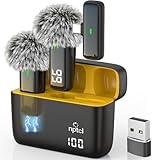
- Crystal Clear Sound: This usb type c wireless lavalier microphone is built with DPS chips to reduce unpleasant background noise and windscreen cover to avoid plosives, so the recording sound is crisp. The clip on microphones always offer excellent sound quality and provide optimal recording experience
- Long-lasting Charging Case: The usb type c lapel mics work up to 24 hour with rechargeable charging case, last for 6 hours per microphone on a full charge. The number on the lav mics and chargeing case tell you how much battery they have left
- 70 Ft Long Range Recording: The maximum effective distance of this cordless lav mic usbc reaches up to 70 feet. These tiny mics come in handy when you have to stand far away from you phones to record. These lapel microphones also enjoy steady and low latency recording, providing optimal experience for long distance recording
- Compatible with USB & USB C Devices and iPhone: Our upgraded dual wireless lavalier microphones are compatible with Android Phones, iPhone 15/16, iPad(USB-C), Type c iPhone, Macbook and more. With USB adapter, you can use the mic with laptop, computer, Pc. You can hold the mini lav mic by hand or clip the lapel mic to your shirt. The NPTCL wireless lavalier mics are suitale for video recording, podcasting, vlogging, tiktok, youtube, instagram, facebook and more. Upgrade your recording experience with the NPTCL Wireless Android Lapel Microphone today!
- Plug and Play & Auto Pairing: This tiny clip on microphone for android is easy to use, simply plugging it in your phones and you can instantly start using it because this small mic with auto sync is able to connect automatically with no app and bluetooth needed
Connect OBS to YouTube Live
- Confirm channel eligibility. Your channel must be verified and must not have had a live-streaming restriction in the previous 90 days. Check YouTube’s live-streaming eligibility guidance.
- Create or schedule the event. In YouTube Studio, choose Create → Go Live. Use the Stream tab for a new stream or Manage to schedule one. Scheduling can create an upcoming watch page and reminders. YouTube advises preparing the stream at least two hours ahead of the event.
- Copy the server URL and stream key. In the stream setup, copy the YouTube stream URL and key. Treat the key as a credential: it tells your encoder where to send the feed and allows YouTube to accept it. Do not share or publish it.
- Enter them in OBS. Open Settings → Stream in OBS, select the YouTube service or a compatible custom service as appropriate, and enter the stream key and server details. Choose RTMPS if it is offered and supported in your setup.
- Set output and audio. Configure the resolution, frame rate, bitrate, codec, keyframe interval, and audio settings you intend to test. OBS’s Auto-Configuration Wizard can provide a starting point, not a substitute for an end-to-end rehearsal.
- Start the encoder and inspect YouTube’s preview. Start streaming in OBS, then wait for the feed to appear in YouTube Live Control Room. Check picture, microphone level, and sound before selecting Go live in YouTube when that workflow is shown.
YouTube explains the stream setup and key workflow in its Create a live stream with an encoder instructions.
Rehearse and monitor the podcast
YouTube advises starting the encoder at least 15 minutes before the event. Run a test with audio and movement similar to the real show, and check the preview in Live Control Room before going live. During the broadcast, watch YouTube’s stream health messages and listen for audio problems. The preparation guidance is in YouTube streaming tips and YouTube live-streaming best practices.
Rank #4
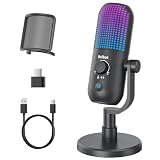
- Elevated Clarity with Noise Reduction & Monitoring : This upgraded desktop microphone brings professional studio-like sound quality to your everyday space. With a simple press of the one-touch noise cancellation button, it effectively filters out ambient distractions, keeping your voice pure, clear, and in focus. It also supports true zero-latency monitoring, providing real-time feedback of your own voice so you can feel more confident and at ease with every recording. Widely compatible with PCs, laptops, and desktops, it serves as both a reliable work tool and a sensitive podcasting companion. Pure, undistorted sound quality delivers your most authentic voice.
- 7 Customizable RGB Lighting Modes for Your Mini Microphone : Built-in RGB lights add personalized flair to your desktop. Choose from seven colors—red, blue, purple, cyan, yellow, white, green—each with a soft breathing glow. Match the lighting to your theme or mood, or turn it off with one press for a distraction-free setup.Operation is simple: hold 3 seconds to power on/off; tap to cycle colors—first 7 taps are solid modes, the 8th activates a 7-color breathing cycle.This PC gaming mic delivers exceptional audio while elevating your space's aesthetics—whether you want vibrant energy or calm elegance, it fits right in.
- Effortless Mute & Finely-Tuned Volume Control :Instantly mute your gaming mic with a simple, elegant touch on the sensor. The integrated LED indicator clearly displays mute status—red for muted, blue for active—so you’re always in control. On the base, a precisely engineered rotary gain knob allows you to make subtle adjustments to input volume, helping you find your perfect audio sweet spot whether you're speaking softly or celebrating loudly. This microphone pc ensures your voice is consistently clear and balanced, providing a truly reliable usb microphone for pc that supports every moment of your audio journey.
- Effortless Setup, Universal Compatibility: Experience true plug-and-play simplicity with this external microphone for computer—no drivers required for immediate use. It is fully compatible with a wide range of devices including Windows and Mac computers, PlayStation 4 and 5, laptops, Android phones (via a Type-C adapter), and desktop PCs. Simply connect via USB to embark on crystal-clear recording, seamless communication, or dynamic streaming. A quick, kind note: this streaming mic is not compatible with Xbox consoles.
- Complete and Considerate Kit — The Thoughtful Gift for Every Voice: This comprehensive gaming microphone set is designed for instant creativity. It includes a generous 1.8-meter USB-C cable, a durable metal pop filter for crisp audio, and a versatile OTG adapter for seamless use with both computers and mobile devices. The robust yet stylish stand offers stable, flexible positioning. Combining studio-grade performance with exceptional ease of use, this microphone for gaming is a truly considerate gift for anyone embarking on their streaming, gaming, or podcasting journey.
- Confirm the correct microphone is selected and its OBS meter responds; listen through headphones for clipping, background noise, or an unintended audio source.
- Check the cover art or camera, scenes, transitions, and guest audio, if any.
- Verify that the public watch page is accessible, including on a phone.
- If recording locally, confirm OBS is writing the file and check the resulting recording or archive rather than assuming it was saved correctly.
- After ending the stream in YouTube, stop the encoder in OBS.
YouTube states that streams under 12 hours are automatically archived; check the current behavior in Studio before relying on archive retention. Its archive guidance also recommends verifying local archive files.
Recommended Free Tools
Copyright and channel-policy checks
Before using music, clips, images, or guest material, make sure you have the rights or permission needed for a live broadcast. A podcast being live does not make copyrighted material safe to use. Review YouTube’s current rules and any notices in Studio before the event; restrictions or claims can affect a stream. Avoid assuming that material available online is cleared for rebroadcast.
Best Value

- 【New Model Lavalier Wireless Microphone】: utilizes state-of-the-art Series V 2.4GHz digital transmission and proprietary , it delivers crystal-clear, incredibly stable audio with a range of up to 20m. True wireless is not restricted, it automatically pairs when turned on, no other operation is required, easy to operate, and can be used immediately, enjoying wireless freedom
- 【Noise Reduction small Microphone】: The upgraded wireless clip-on microphone is equipped with a Lighting connector and a USB-C. Compatible with both iPhone iOS and Android smartphones and tablets, and Windows and Mac computers, (Note: Please turn on the "OTG" function of your USB C device before pairing)
- 【mini mic Long Working Time and Rechargeable】A single lavalier microphone can work 6 hours when fully charged . It means you can use two microphones for up to 12 hours. You also can use the wireless microphone for Android iphone when charging your device—no need to worry about battery life.wireless mic
- 【application scenario】 Mini microphone for iphone adopts a unique lapel clip detachable design, the microphone can be switched left and right to wear position, lapel microphones are compatible with iPhone15/ iPhone16 series, android phones, and also compatible with iPad air 5, laptops, microphone can be used for podcasting, video blogging, teaching interviews, online meetings, live streaming, as well as social media platforms such as YouTube and TikTok,lavalier microphone wireless,clip on microphone wireless,tiny microphone,clip on microphone,wireless microphone for iphone
- 【Warmly tips wireless mic】2*Wireless Lavalier Microphone,1*Mic Receiver,1* USB C Charging Cable,1* Lightning Adapter, 1* Microphone User Manual,1*USB-A Adaptor,2*Windproof Hairball,4*Sponge Head, Please read the user manual and charge the wireless lavalier mic before using it for the first time. if you have any questions about our lapel microphone, Please feel free to contact us
For a recurring show, make each episode meaningfully original and useful to viewers, and review YouTube’s current channel monetization policies separately if monetization is a goal. Technical ability to stream does not by itself establish eligibility for monetization.
Troubleshoot common problems
| Symptom | Likely cause | What to check |
|---|---|---|
| YouTube does not receive the stream | Incorrect server URL or key, or the encoder is not sending a supported feed. | Re-copy the current URL and key from the event in Studio, check OBS’s stream settings, and confirm the encoder is started. Keep the key private. |
| Stream health reports instability or viewers see buffering | Available upload is insufficient or fluctuating, including because other users share the connection. | Measure upload capacity under show-time conditions, preserve YouTube’s recommended 20% headroom, and reduce the stream bitrate or resolution if needed. |
| OBS struggles, drops frames, or the picture is poor | The chosen encoder, resolution, frame rate, or scene exceeds what the mini PC can sustain. | Simplify the scene, use 30 fps or a lower resolution, try a supported hardware encoder, and test again with the full show setup. |
| No microphone audio or the wrong sound is heard | OBS is using the wrong input, a device is disconnected, or levels/routing are incorrect. | Select the intended input, watch the OBS meter while speaking, and monitor a rehearsal through headphones and YouTube preview. |
| The event is not available to start | The channel has not completed verification or has a live-streaming restriction. | Check channel eligibility and Studio notices before scheduling the next attempt. |
| A local recording is missing or unusable | Recording was not enabled or the output was not checked. | Confirm OBS’s recording status and file location during rehearsal, then play back a test recording. |
Or let it run in the cloud
If you want a pre-recorded podcast episode to keep looping as a YouTube live stream without leaving the mini PC on, StreamNeo runs the uploaded video from the cloud. Upload the recording or build a playlist, add your YouTube stream key once, and go live. It streams the uploaded video—not a live camera feed—and sends to YouTube only.
- Nothing has to stay on at home; the stream runs from the cloud.
- Any quality up to 4K 60 fps as uploaded, at one flat price per slot, with no re-encode or quality tiers.
- Automatic recovery if YouTube drops the stream.
- The first day is free with no card (one free day per account).
Monthly: $9.99 per month. Start your free StreamNeo day.
Do these 3 things before closing this tab:
1Repair Windows errors before they cause bigger problems2Scan for outdated or missing drivers - takes under a minute3Clear out junk files and repair common Windows errorsQuick Recap
Product prices and availability are accurate as of the date/time indicated and are subject to change. Any price and availability information displayed on Amazon at the time of purchase will apply.

