Report a family member’s death through UIDAI’s “Reporting of Death of a Family Member” service on myAadhaar, if it is available for the State or Union Territory where the death was registered. Have the death certificate, the deceased person’s Aadhaar number and Death Registration Number ready. UIDAI checks the submitted information before deciding whether to deactivate the Aadhaar; filing a report does not mean deactivation is immediate or guaranteed.
What to prepare before reporting a death
- Death certificate: Obtain it from the authority that registered the death. UIDAI recommends getting the certificate before submitting a report.
- Deceased person’s Aadhaar number.
- Death Registration Number associated with the registered death.
- Reporter authentication and demographic details: The family member submitting the report must authenticate and provide the requested details.
UIDAI’s announcement does not set out a complete upload checklist or say that proof of relationship is always required. Check the live myAadhaar form for any additional requirements. Do not assume that the older household-record process described in UIDAI’s data update policy is the current portal checklist.
As an Amazon Associate I earn from qualifying purchases.
How to report a family member’s death on myAadhaar
- Obtain the death certificate from the death-registering authority.
- Check service availability for the relevant State or UT. Open myAadhaar and look for “Reporting of Death of a Family Member.” Confirm that the service covers the place where the death was registered before proceeding.
- Authenticate as the reporting family member and complete the portal’s requested information, including the deceased person’s Aadhaar number, Death Registration Number and demographic details.
- Submit the report and allow time for verification. UIDAI validates the information against its records and death-registration information, then decides whether to deactivate the Aadhaar number.
Availability depends on the State or UT
The service’s coverage has expanded over time, but dated figures should not be mistaken for a current state-by-state availability list. UIDAI reported coverage in 24 States/UTs when the service launched on 9 June 2025; a government announcement on 26 November 2025 reported 25 States/UTs, with integration of the remaining jurisdictions underway. Those figures do not establish coverage for any particular State or UT on 11 October 2026. Check the live myAadhaar service for current availability.
Family reporting is not the only way UIDAI may identify a deceased Aadhaar holder. In November 2025, the government said UIDAI had also sourced deceased-person data from the Registrar General of India, States/UTs, the Public Distribution System and the National Social Assistance Program, and was exploring additional institutional sources.
#1 Best Overall

- MFS110 L1 USB Fingerprint Scanner
- Support Window, Android and Lenux
- 1 Year RD Service Registration included from mantra
- USB with Type C connector available for using in Type C supporting devices
- Scratch free Sensor Surface,Auto Finger Detection
A report does not automatically deactivate the Aadhaar
UIDAI’s launch announcement explains that it takes action only after validation, and that the outcome may be deactivation “or otherwise.” In other words, submitting a death report starts a review; it does not guarantee a particular outcome or an immediate change to the Aadhaar record.
UIDAI and the Ministry of Electronics and Information Technology reported that more than 2 crore deceased Aadhaar numbers had been deactivated in an announcement dated 26 November 2025. That is a dated cumulative figure, not a current total.
Rank #2

- New replacement old Red Logo Digital persona URU4500, HID , USB reader. Original HID Brand
- Small form factor
- Metal Casing resists unintentional movement.
- SuperiorRed "Flash" indicates that a fingerprint image has been captured, 512 dpi / 8-bit grayscale (256 gray levels) ESD resistance
- Encrypted fingerprint data
If a living person is wrongly reported deceased
Do not rely on UIDAI’s 2025 reactivation instructions without checking the current procedure. UIDAI’s official memorandum listing reviewed on 9 October 2026 identifies a newer reactivation procedure uploaded on 1 October 2026, but the procedure’s contents are not established here. Consult UIDAI’s current official reactivation document and follow its latest directions.
Quick wins for a faster PC:
Repair Windows errors before they cause bigger problemsFix Now →Scan for outdated or missing drivers - takes under a minuteDriver Scan →The earlier Circular 02/2025, dated 7 July 2025, described a process in which the living Aadhaar holder sent a prescribed reactivation request to the nearest UIDAI Regional or State Office by post, email or in person. The office examined the request and called the person to a designated Aadhaar centre for supervised submission of face, iris and fingerprint biometrics within two weeks of receipt; UIDAI then communicated the disposal status within 30 days after biometric submission. Because a newer procedure is listed, treat those 2025 steps as historical rather than current instructions. The circular and UIDAI’s memorandum listing are available through the UIDAI circulars page.
Quick Recap
Rank #3
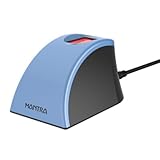
- MFS110 L1 USB Fingerprint Scanner
- Support Window, Android and Lenux
- 1 Year RD Service Registration included
- USB with Type C connector available for using in Type C supporting devices
- Scratch free Sensor Surface,Auto Finger Detection
Product prices and availability are accurate as of the date/time indicated and are subject to change. Any price and availability information displayed on Amazon at the time of purchase will apply.

