The Tool Desk
Outbyte Driver Updater FREEScan for outdated or missing drivers - takes under a minuteDriver Scan →Outbyte PC Repair FREERepair Windows errors before they cause bigger problemsFix Now →To uninstall Sims 4 custom content (CC) safely, back up your Sims 4 folder, test with Mods disabled without saving, then re-enable content and isolate any problematic files in tracked batches. A “naked Sims” symptom can be a reason to check CC, but it does not prove CC is the cause. Use this process to protect your save while you troubleshoot.
Back up your Sims 4 files before removing content
Close the game before changing files. EA recommends copying the entire Sims 4 folder from the Electronic Arts folder in Documents to a separate location before a reset or other invasive changes. Keep that copy outside the working folder so it remains available if you need to restore files.
As an Amazon Associate I earn from qualifying purchases.
CC means player-made items such as hair, clothing, and furniture. “Mods” is a broader term that also includes gameplay changes. The Mods folder is inside your Sims 4 user folder. EA supports Mods on PC and Mac, not consoles. See EA’s backup and reset instructions and EA’s guide to installing Mods.
Do these 3 things before closing this tab:
1Repair Windows errors before they cause bigger problems2Scan for outdated or missing drivers - takes under a minute3Clear out junk files and repair common Windows errorsCheck whether the issue happens with Mods disabled
This test helps determine whether the problem persists when Mods and CC are not loaded. It does not identify a specific file, and CC will not appear during the test.
#1 Best Overall

- Precision Control: The feel, shape, and sensitivity of the DualShock 4’s analog sticks and trigger buttons have been enhanced to offer players absolute control for all games on PlayStation 4.
- Sharing at your Fingertips: The addition of the Share button makes sharing your greatest gaming moments as easy as a push of a button. Upload gameplay videos and screenshots directly from your system or live-stream your gameplay, all without disturbing the game in progress.
- New ways to Play: Revolutionary features like the touch pad, integrated light bar, and built-in speaker offer exciting new ways to experience and interact with your games and its 3.5mm audio jack offers a practical personal audio solution for gamers who want to listen to their games in private.
- Charge Efficiently: The DualShock 4 Wireless Controller can easily be recharged by plugging it into your PlayStation 4 system, even when on standby, or with any standard charger with a micro-USB port.
- Start The Sims 4 and open Game Options > Other.
- Turn off Enable Custom Content and Mods, apply the change if prompted, then relaunch the game.
- Check whether the issue still occurs. When finished, exit without saving.
Do not choose Save and Exit during this test. EA warns that saving before re-enabling CC and Mods may remove content from the saved game. Read EA’s guidance on Mods, updates, and error codes.
Re-enable content and check for update compatibility
After the disabled-Mods test, return to Game Options > Other, turn on Enable Custom Content and Mods, then exit and relaunch. Before testing your files, check each creator’s notes for compatibility with your current game update. A file that worked before an update may need to be updated, or may no longer be compatible.
Rank #2

- With broad game support, the Logitech Gamepad F310 works with old standbys to today's biggest titles, so it's easy to set up and use with your favorite games.
- Profiler software allows the gamepad to be programmed to perform keyboard and mouse commands for games without gamepad support.* * Requires software installation.
- A familiar control layout that doesn't require a learning curve to be able to use, with all the same buttons as on an Xbox 360.
- The unique floating D-pad rests on four switches-instead of a single pivot point-making it responsive to quick changes in direction.
- The six-foot cord lets you lean back and play a comfortable distance from your PC monitor.
If the issue returns after re-enabling content, remove or update the files that reproduce it. When reporting a problem, include your current game version, as EA recommends.
Free tools Windows power users keep installed
One-click scans. No signup required.
Find the broken Mod or CC with tracked batches
Disabling Mods checks whether the issue persists without them; batch testing helps identify a particular file. EA describes the community’s approach as the “50/50 method.” Keep a written list of what you test so you can narrow the cause instead of repeatedly changing the same files.
Rank #3
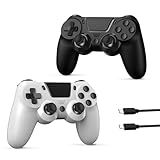
- 🎮【WIDE COMPATIBILITY】The wireless PS4 controller compatible with PS4/Pro/Slim/Windows PC(Windows 7/8/10). ❗*Attention*❗: Only when connecting for the first time, you must activate the device with the USB cable for the first pairing and connection. After that, the normal wireless connection of Bluetooth can be made, and USB data cable is no longer needed.
- 🎮【FUNCTION HIGHLIGHTS】The 2 pack PS4 controller built-in 6-axis gyro sensor has dual motor vibration & precision-tuned analog sticks deliver immersive feedback. 360° movable joystick, high sensitivity and wear-resistant technology, smooth and delay-free. 3.5mm earphone jack can help you communicate with your teammates through the built-in microphone of the high-quality 3D stereoscopic surround sound headset to achieve tacit cooperation and win the game.
- 🎮【16HS MARATHON BATTERY】Equipped with 800mAh rechargeable battery. Play 2times longer than standard controllers with 3hs quick charging. No need for wired usb cables, more freedom of operation, even away from the tv monitor, without the traditional interruptions, delays and other problems, the game process is clearer.
- 🎮【ERGONOMIC DESIGN】PS4 Controller is ergonomically designed and has a good hold, so you will not get tired even if you play games for a long time. The cross-shaped keys are designed to minimize mis-operation, allowing for light force, smooth movement, and a more responsive, feel-good feel.
- 🎮【2 PACKING & IDEAL GIFT】 The PS4 controllers package includes - 2 wireless controllers, 2 USB C charge cables, user manual. An ideal gift for Christmas, Father's Day, Children's Day, housewarming gifts, birthday gifts, etc. If you have any questions that need to be resolved after purchase, just contact us via email, we will reply within 24 hours.
- Close the game and move the Mods files out of the working Mods folder to a temporary location. Keep your backup separate.
- Put back a tracked batch of files and launch the game to check for the issue.
- If the issue returns, divide that batch into smaller groups and test again. If it does not, test the next batch.
- Repeat until you isolate the file or files that bring the issue back. Remove them or check the creator’s page for a compatible update.
EA suggests checking gameplay Mods before Custom Content because gameplay Mods are more likely to cause issues. Once those are cleared, test CC such as clothing, hair, and objects in batches. The “50/50” name describes a way to narrow groups; it is not a guaranteed fix or a success-rate claim.
Independent reader supportYour contribution helps us test, update, and keep practical guides available for everyone.If the problem continues after removing Mods
A naked-Sims appearance may lead you to inspect clothing or other CC, but EA’s guidance does not identify it as a specific diagnostic label or establish that CC always causes it. If the symptom remains with Mods disabled, do not assume that deleting more CC will fix it. Consider whether broader game files or a save may be involved, and use EA’s backup and reset process rather than deleting the user folder outright.
Rank #4

- The feel, shape, and sensitivity of the dual analog sticks and trigger buttons have been improved to provide a greater sense of control, no matter what you play.Motion sensors - Rock and roll as a highly sensitive built-in accelerometer and gyroscope detect the motion, tilt and rotation of your DUALSHOCK 4 wireless controllerDualShock 4 Wireless Controller PS4 and PC compatible. Item PS5 compatible only when playing PS4 games.
- The new multi touch and clickable touch pad on the face of the DualShock 4 Wireless Controller opens up worlds of new gameplay possibilities for both newcomers and veteran gamers
- The DualShock 4 Wireless Controller features a built in speaker and stereo headset jack, putting several new audio options in the player's hands
- The Dualshock 4 wireless controller can be easily recharged by plugging it into your PlayStation 4 system, even when in rest mode, or with any standard charger using a USB cable (type A to micro B sold separately)
When restoring files after a reset, EA recommends returning folders one at a time. If a save folder appears to be involved, test individual save files. That approach helps distinguish a problem in one file from a wider issue while keeping the backup intact. Follow EA’s instructions for backing up, resetting, and restoring The Sims 4.
Quick wins for a faster PC:
Clear out junk files and repair common Windows errorsFree Scan →Fix the driver behind crashes, sound loss and screen glitchesFind Drivers →Repair Windows errors before they cause bigger problemsFix Now →Quick Recap
Best Value

- 🎮【2 Packing】Two controllers are packaged in one box, which is less costly than buying two controllers separately. You can get two different custom designed controllers at the same time, which is very cost-effective.This will bring you a better game experience when you play with your friends, lover, family.
- 🎮【Wide Compatibility】AceGamer wireless controller compatible with PS4/Pro/Slim/Windows PC. ❗*Attention*❗: Only when connecting for the first time, you must activate the device with the USB cable for the first pairing and connection. After that, the normal wireless connection of Bluetooth can be made, and USB data cable is no longer needed. ❗*Note*❗: Connecting to PC(without Bluetooth) needs to install receiver, not included.
- 🎮【Function Highlights】360° Refined analog sticks, the new touch pad on the face of the game controller offer players precise control. Controller which built-in 6-axis gyro sensor has dual motor vibration, excellent dual shock effect design makes the tactile sense more sensitive. The optimized buttons and triggers, ergonomic design non-slip grips, which offer you fantastic gaming experience.
- 🎮【Turbo Setting】You can customize any key as a turbo key. First, hold down the 'share' key, then click the turbo key you want to set up successfully. Secondly, you can adjust the turbo frequency. First, hold down the 'share' key, then touch the joystick on the right up and down. There are three gears to adjust in total.
- 🎮【To Be AceGamer】You can get: 2x AceGamer for ps4 controllers wireless; 1x Charging Cable; 1x User Manual; Professional after-sales service. We focus on the design, production and sales of custom controllers. If you have any questions, please contact us in any time!
Product prices and availability are accurate as of the date/time indicated and are subject to change. Any price and availability information displayed on Amazon at the time of purchase will apply.

