Free tools Windows power users keep installed
One-click scans. No signup required.
You can recharge a portable power station from an AC wall outlet, compatible solar panels, or a vehicle outlet—but only when your model supports that input and the voltage, current, wattage, and connector are within its limits. AC is generally the quickest option for supported units; solar is the useful off-grid choice; and vehicle charging is convenient on the road but can be much slower.
Before connecting anything, read the charging section of your station’s manual and identify the exact input specifications. The times and limits below are manufacturer-published examples for named products, not universal figures for every power station.
As an Amazon Associate I earn from qualifying purchases.
Start with your power station’s input specifications
Portable power stations that look similar can have very different charging hardware. One model may accept a high-wattage AC feed, another may require a separate solar adapter, and a third may support only a low-power vehicle input. Treat the labels on your own unit and its manual as the controlling information.
Check these five items
- Input type: Find the AC charging port, solar or DC input, and any dedicated car-charging input. Do not assume a port labeled “DC” accepts a solar panel or a vehicle cable.
- Voltage range: Solar panels can produce a higher open-circuit voltage than their advertised operating voltage. Confirm the station’s permitted range before connecting a panel.
- Maximum current and wattage: An input limit is a ceiling, not a promise that the source will always deliver that amount.
- Connector: XT60, 8 mm, SDC and other connectors are not interchangeable merely because they fit physically. Use the connector and cable specified for your model.
- Included accessories: Verify whether the AC lead, MPPT solar adapter or car cable is in the box. Some manufacturers sell these separately.
If a manual and a product listing appear to conflict, follow the current manual or the manufacturer’s support page for your exact model and regional version.
#1 Best Overall

- Portable Generator with 60W Solar Panel Included: with a big battery pack, ZeroKor 300W solar powered generator are powerful enough to charge smartphones,tablets,laptops,headphones or other outdoor small camping supplies(Tips:Using electrical appliances over 300W may damage the portable solar generator, especially some devices that are prone to heat or built-in air compressor such as coffee maker,Hair dryer, water pump etc )
- Multiple Charging outlets for camping gear with SOS Flashlight: with 2* 300W Max wall AC outlets, 1* DC port (9V-12.6V/10A max ), 3* 5V/3A Max USB ports, 1*quick charge USB port (5V/3A 9V/2A Max), Flashlight with reading mode and SOS mode for your outdoor Adventures, our portable solar power station offers a versatile charging solution,allowing you to charge your outdoor smart devices directly from a wall AC outlet
- Multiple Charging Optional, Solar Panel Charger 60W Included: ZeroKor portable power bank generator can be recharged by Home AC outlet, DC5521 13V-23V Solar Panel (Portable Power Station built-in MPPT), 12V Carport. Take the portable solar power bank generator with you on-the-go and never worry about power shortage,the portable AC outlet design makes it more suitable for Tent camping OFF-Grid
- Built in BMS(Battery Management System) : ZeroKor portable power station features short circuit protection, over-current protection, over-voltage protection, overload protection and overheating protection. The built-in cooling fan system will automatically start and stop according to the portable battery pack internal temperature during use. Acting as a portable solar power bank, it accommodates multiple devices simultaneously, making it perfect for indoor and outdoor use
- HIGH CONVERSION EFFICIENCY: ZeroKor solar panels 60W monocrystalline solar cell have a high conversion efficiency of 20.5%, and its performance is better than that of polycrystalline solar panels under the condition of insufficient light
AC wall charging: usually the fastest and simplest method
For home charging, AC is normally the most predictable option because the wall outlet supplies power regardless of weather or daylight. DJI states that “the fastest recharging method is through the AC input port” for its Power 1000. That statement applies to that product, not automatically to every station.
How to charge from an AC outlet
- Place the station where its ventilation openings are clear and where the cable can reach without tension.
- Locate the AC charging input identified in the station’s manual. Do not use an output socket intended to power appliances.
- Connect the supplied or manufacturer-approved AC charging cable to the station.
- Plug the other end into a suitable wall outlet, then check the station’s display or app for an incoming-power indication.
- Leave the unit connected until the display reports the desired state of charge. If the manual specifies a charging mode or limit, select that mode before leaving the station unattended.
- When charging is complete, disconnect the wall plug and then the station-side connector, following the order recommended by the manufacturer.
Published AC examples
DJI quotes approximately 70 minutes to charge a Power 1000 from 0% to 100%, and about 50 minutes to reach 80%. DJI also describes a 1,200 W maximum grid-charging condition that requires the battery to be at least 60% and the ambient temperature to be 20°–35°C (68°–95°F). Those conditions and times belong to the Power 1000 setup; they should not be used as a blanket estimate for another capacity or charging circuit. See DJI’s Power 1000 support guidance.
The Anker SOLIX F3800 user guide lists a maximum AC input of 2,990 W. A maximum input rating does not mean every outlet, cable or installation will provide that power; the station’s instructions and the electrical supply determine what is actually available.
What’s actually slowing this PC down?
Pick the symptom - the matching free tool is one click away.
Why your AC time can differ
- The station may have a lower input limit than the example above.
- Charging power can change with battery state, temperature and the selected charging mode.
- A power station with a larger battery can take longer even when its charger accepts substantial wattage.
- Some models reduce charging power near full charge as part of their battery-management behavior.
Use the manufacturer’s time only when your model, input setting and conditions match the stated example.
Rank #2

- Ultra-Lightweight: Weighing only 7.5 lbs, the new Explorer 300 is 17% lighter than the industry average for its class. The sleek, integrated handle design makes it effortless to carry on long hikes or pack with your camping accessories, providing reliable power without adding bulk to your load.
- Versatile Power for 6 Devices: Equipped with 2 AC outlets, a 100W USB-C PD port, 2 USB-A ports, and a 120W car port. With a 300W rated output (600W peak surge), it easily handles laptops, drones, and cameras, while also serving as a dependable battery for camping or a robust solar powered generator when paired with panels.
- Built to Last: Upgraded with premium LiFePO4 chemistry, this portable generator delivers over 4,000 charge cycles before reaching 70% capacity. This ensures more than 11 years of reliable service life, making it a sustainable and durable energy partner for a decade of exploration.
- Fast Solar Charging: Perfect for off-grid use, this solar powered generator pairs seamlessly with Jackery panels. Reach 80% capacity in approximately 2.8 hours with a 100W solar panel, or maintain your gear with a portable 40W panel (80% in 7.5 hours), making it an essential part of your hunting essentials.
- What You Get: 1* Jackery Explorer 300 Portable Power Station, 1*40W Air Solar Panel, 1* AC Adapter, 1* Car Charger Cable, 1* User Guide. 𝐍𝐨𝐭𝐞: 𝐓𝐡𝐞 𝐄𝐱𝐩𝐥𝐨𝐫𝐞𝐫 𝟑𝟎𝟎 𝐆𝐞𝐧𝐞𝐫𝐚𝐭𝐨𝐫 𝐚𝐧𝐝 𝐭𝐡𝐞 𝐒𝐨𝐥𝐚𝐫 𝐏𝐚𝐧𝐞𝐥 𝐦𝐚𝐲 𝐛𝐞 𝐬𝐡𝐢𝐩𝐩𝐞𝐝 𝐬𝐞𝐩𝐚𝐫𝐚𝐭𝐞𝐥𝐲
Solar charging: the off-grid option that depends on compatibility and sunlight
Solar charging is practical when you are camping, working at a remote site or dealing with an outage and have adequate daylight. It is less predictable than AC because panel output changes with sun angle, shading, temperature, orientation and the station’s own input limit.
How to connect a compatible solar setup
- Read the station manual and identify the solar input’s permitted voltage, current, wattage and connector.
- Confirm whether your model requires an MPPT adapter or other interface between the panel and the station.
- Check every panel’s open-circuit voltage, maximum power rating and connector before connecting it. The open-circuit value is especially important because it can exceed the panel’s normal operating voltage.
- Keep the station and connectors dry, place the panel in unobstructed sunlight, and arrange panels according to the manufacturer’s series or parallel instructions.
- Connect the panel-side cable to the required adapter, then connect the adapter to the station’s solar input. Verify that the display shows solar input rather than an error.
- Watch the input reading for several minutes after connection. A panel’s nameplate wattage is a rating under specified test conditions, not a guaranteed real-world charge rate.
- Disconnect the panel from the station when changing the wiring or moving panels, unless the manual explicitly permits live changes.
DJI Power 1000 solar limits
For the Power 1000, DJI requires its Power Solar Panel Adapter Module (MPPT), and says the module and panels are sold separately. DJI recommends certified Zignes panels. For non-certified panels, its support guidance specifies an XT60 interface, an open-circuit voltage below 30 V, no more than 200 W per panel connected to one XT60 interface, and a total limit of 400 W per MPPT module. DJI warns that exceeding the solar-voltage limit can damage the product. Read the complete limits at DJI’s Power 1000 support page.
The Anker SOLIX F3800 guide lists a maximum solar input of 2,400 W. That specification is for the F3800 and does not establish the panel arrangement or limits for another station.
Solar problems and what they mean
- Zero input: Check that the panel is illuminated, the connector is fully seated and the adapter is the one specified for the station.
- An over-voltage warning: Disconnect the panel and recheck its open-circuit voltage against the station’s limit. Do not keep reconnecting a panel that exceeds the limit.
- Low or fluctuating wattage: Look for shade, dirt, changing cloud cover or a panel angle that is not facing the sun. A lower reading does not by itself prove the station or panel is defective.
- Input capped below the panel rating: The station may be limiting the power to its maximum permitted wattage. The panel’s printed wattage is not a guaranteed input.
Car charging: useful while traveling, but often a slow top-up
Vehicle charging works only when the station supports the vehicle voltage and you have the correct cable. A 12 V accessory socket, a 24 V outlet and a proprietary vehicle input are different use cases. Never assume that a cable from another device is safe because its plug looks similar.
Rank #3

- Powerful yet Compact: Boasting a 1,500W AC output and a 3,000W surge peak, the Solar Generator 1000 V2 can power multiple appliances, including AC units, fridges, and electric pots. With a 1,070Wh capacity and a lightweight build of only 23.8 lbs, along with a foldable handle, it makes an excellent companion for outdoor camping, road trips, and emergencies.
- One Hour Fast Charging: Charge your Explorer 1000 v2 Portable Power Station from 0% to 100% battery level in just one hour with emergency charging activated via the Jackery App. It defaults to 1.7 hours for a full charge to optimize battery health. Alternatively, reach a full charge in 3 hours with a 600W Alternator Charger, or charge to 80% in 6 hours using a 200W solar panel.
- 10 Year Lifespan: The Explorer 1000 v2 portable power station is equipped with a durable LFP battery, maintaining over 70% of its original capacity even after 4,000 charge cycles, offering longevity exceeding 10 years.
- Tailored for Versatility: Featuring two USB-C ports, one USB-A port, one DC car port, and three pure sine wave AC ports, along with LED lights, the Solar Generator 1000 V2 is capable of charging multiple devices simultaneously, meeting power needs in various scenarios. PD 100W fast USB-C charging ensures a rapid charging speed, even without power adapters.
- Smart App Control: Effortlessly switch between different charging modes with Jackery’s App—including one hour emergency charging from 0 to 100%, 30 dB quiet overnight charging mode, and energy efficiency mode. Maximize the freedom to adjust the power station to meet your needs.
How to charge from a vehicle
- Confirm in the manual whether the station accepts 12 V, 24 V or another specified vehicle source.
- Obtain the exact model-compatible cable. Check whether it is included or sold separately.
- Start with the vehicle outlet and station disconnected, then inspect the plugs for damage, moisture or debris.
- Connect the cable to the station’s supported car or DC input and to the vehicle outlet specified by the manufacturer.
- Check the station’s display for an input reading. If no charging begins, stop and verify the vehicle socket is live and the cable is the correct one.
- Monitor the setup during the first charge and keep the cable away from heat, pedals, moving parts and places where it can be crushed.
Published car-charging examples
Anker lists a 120 W car input for the SOLIX F3800 and states that its car-charging cable is not included. The accessory requirement is therefore part of the ownership cost and setup for that model. Details are in the F3800 user guide.
Goal Zero specifies its 12 V Aux to 8 mm Car Charging Cable for the Yeti PRO 4000 and gives approximately 37 hours for a full recharge through a 12 V adapter. That long duration illustrates why car charging can be a maintenance or top-up method for a large station rather than a quick replacement for AC. See Goal Zero’s portable power-station information.
DJI describes a 12 V/24 V car-outlet method for the Power 1000 using its specified Car Power Outlet to SDC Power Cable. The supported voltage and cable are specific to that setup.
Quick wins for a faster PC:
Fix the driver behind crashes, sound loss and screen glitchesFind Drivers →Repair Windows errors before they cause bigger problemsFix Now →Scan for outdated or missing drivers - takes under a minuteDriver Scan →AC, solar and car charging compared
| Method | Best fit | Published model example | Equipment and limits to verify |
|---|---|---|---|
| AC wall outlet | Predictable home or mains charging | DJI Power 1000: about 70 minutes from 0% to 100% and about 50 minutes to 80%; stated 1,200 W condition requires at least 60% battery and 20°–35°C (68°–95°F) | AC input rating, approved cable, charging mode and electrical supply |
| Solar | Off-grid charging when suitable sunlight is available | Anker SOLIX F3800: maximum solar input 2,400 W; DJI Power 1000 non-certified-panel setup: under 30 V open-circuit voltage, up to 200 W per panel at one XT60 interface and 400 W per MPPT module | Panel voltage, current, wattage, connector and any required MPPT adapter |
| Vehicle | Travel and slow replenishment when a supported outlet is available | Anker SOLIX F3800: 120 W car input; Goal Zero Yeti PRO 4000: about 37 hours for a full recharge through a 12 V adapter | Supported vehicle voltage, model-specific cable and the vehicle socket’s capability |
These are manufacturer specifications and examples, not independent head-to-head test results. No single charging time applies to all portable power stations.
Rank #4

- PORTABLE GENERATOR 80000mAh Lithium Battery With 60W SOLAR PANEL INCLUDED: With a superior lithium-ion battery pack, 300W power stations are powerful enough to charge smartphones,tablets,laptops,headphones or other outdoor Small Camping supplies
- PORTABLE BUT POWERFUL: EnginStar Portable Power Station with Certification, and the portable size of 9 x 5.5 x 7.5 inches, weights only 6.5 pounds, but armed with 296wh capacity and 300W AC output, EnginStar portable power station can provide enough juice to charge your phones, laptop, camera, cpap, drone, etc. Designed with 8 output ports can charge several devices at the same time, which make it a perfect emergency battery, outdoor and camping backup battery
- 110V PURE SINE WAVE & MULTIPORT: Built with two 110V pure sine wave AC outlets to make sure the solar generator (solar panel not included) works quieter, more efficient and more stable, which can protect your sensitive devices from damage such as laptop. 2 Regulated DC outputs (12V/24V) can provide a stable power output for DC appliances such as mini-fridge or car vacuum cleaner. Fast charger USB (5V/3.1A Max) and USB-C (18W)
- SUPERIOR PROTECTION SYSTEM: EnginStar camping power station with a advanced battery management system of voltage control and temperature control, the multiple safe-charging design can protect the battery bank from the damage of short circuit, overcharging and overload, to make sure you use it efficiently and safely. 100% original high quality lithium ion batteries support more than 1000 times of charge cycle
- 3 CHARGING WAYS POWER SUPPLY: 1) The solar power generator can be charged with any compatible 12-25V solar panel (panel included), built-in controller speeds up the battery recharge rate. 2) The portable power station with ac outlet can be charged via being plugged into wall outlet. 3) The portable ac battery bank can be charged from 12V socket of the car. At a maximum charging speed of 65W, it can be full charged in 3 hours
A compatibility checklist before you plug in
Use this checklist for every new station, panel or cable combination:
- Read the exact model number and regional edition on the station.
- Locate the manual’s charging-input table and record the allowed voltage, maximum current and maximum wattage.
- Match the connector type and polarity; a physical fit is not proof of electrical compatibility.
- Confirm whether the source is AC, solar DC, a dedicated DC charger or a vehicle input. Do not substitute one for another.
- For solar, compare the panel’s open-circuit voltage—not only its advertised operating voltage—with the station’s limit.
- For a vehicle, confirm whether the station supports 12 V, 24 V or both, and use the specified cable.
- Check which accessories are included. An MPPT module, AC lead or car cable may be optional.
- Keep the first charge under observation so you can identify an error message, unexpected heat or an input reading that does not match the manual.
Choosing the practical method for your situation
Choose AC when speed and certainty matter
Use AC before an event, during routine home charging or whenever you need a known completion time. It does not depend on sunlight and is the method DJI identifies as fastest for its Power 1000. Confirm that the outlet and station are configured for the intended input power.
Choose solar when you need independence from the grid
Solar is the logical choice for extended off-grid use, but bring a panel and adapter that are electrically matched to the station. Plan around variable production rather than assuming the panel’s label equals the wattage shown on the station.
Recommended Free Tools
Choose car charging for mobility and backup
Car charging is useful between destinations or when wall power is unavailable. It is most practical when the station has a suitable vehicle input and you accept a potentially long recharge. For a large battery, the published 37-hour Yeti PRO 4000 example shows why a vehicle connection may be better for gradual replenishment than an emergency full recharge.
Best Value
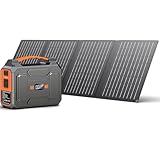
- SOLAR POWERED GENERATOR WITH PANELS INCLUDED: Apowking portable solar panels 40W performances better even under the condition of insufficient light thanks to its 20.5% high conversion efficiency by monocrystalline solar cell. with 10*DC Connectors, this solar panel kit is compatible with most portable solar powered generator on the market.
- PORTABLE POWER STATION WITH LARGE CAPACITY: This portable power station with solar panel 146Wh/39600mAh is powerful enough to charge your devices like laptops, phones, tablets, cameras, drones, fans, in-car appliances. Portable Power Station weights only 3.3lb, fits perfectly in backpack or suitcase, making it a great portable power station for camping, hurricanes, emergency, home and outdoor activities.
- SOLAR POWERED GENERATOR WITH 7 OUTPUTS: This portable solar generator for camping features with 7 outlets. 2x110V AC outlet to charge appliances within 100W(200W Peak) like tablet, laptop, fan, lights, etc; USB1+USB2 (5V/3.1A), USB3+USBC quick charge 3.0 (5V/3A, 9V/2A) for your phones, drones, iPad, GPS, MP3, camera, etc; 1x DC 12V output (9-12.6V/10A Max) for car vacuum, car air fan, etc.
- BRIGHT DUAL LED FLASHLIGHT: The portable power station solar generators with solar panel equiped with dual LED flashlights feature three modes, flashlight, strobe and SOS, very useful and handy for a dark night in times of emergency both indoors and outdoors.
- SECURED SOLAR GENERATOR: The Battery Management System (BMS) allows for voltage control, temperature control and more advanced safety operations. Designed with the cooling vents on the back to help this portable solar generator power station supply keep the temperature constant, its internal electrical elements will not be damaged by high temperatures.
Common mistakes to avoid
- Connecting an arbitrary solar panel: A panel can exceed the station’s voltage limit even when its wattage appears reasonable.
- Using a generic car cable: Cable wiring, connector type and supported voltage are model-specific. Goal Zero identifies a particular 12 V Aux to 8 mm cable for its Yeti PRO 4000, while Anker says the F3800 car cable is not included.
- Expecting rated wattage in every condition: Solar output changes with light and orientation, and the station may cap input.
- Treating a manufacturer time as universal: Published minutes and hours apply to the named model, battery state, input setup and conditions stated by that manufacturer.
- Ignoring accessories: A station may require an MPPT adapter or separately purchased car cable before charging can begin.
- Continuing after a warning: Disconnect the source, read the relevant manual section and resolve the voltage, connector or temperature issue before trying again.
How to interpret charging numbers
Charging time is determined by more than battery capacity. The station’s permitted input power, the source’s actual output, battery state and environmental conditions all matter. A 2,400 W solar-input rating, for example, describes the maximum accepted input for a particular model; it does not promise that a panel array will deliver 2,400 W in ordinary sunlight.
Likewise, DJI’s 70-minute Power 1000 figure and Goal Zero’s approximately 37-hour Yeti PRO 4000 vehicle figure describe different products and charging paths. Use them to understand the range of manufacturer claims, not to predict your own station’s result. For an accurate estimate, use the capacity and charging specifications for your exact unit and the source you intend to use.
Safe shutdown and storage after charging
- Check the display to confirm that charging has stopped or reached the intended level.
- Disconnect the source using the sequence in the manual, especially when removing solar adapters or vehicle cables.
- Inspect connectors for heat, discoloration, looseness or moisture before storing them.
- Store cables and panels so plugs cannot be bent or contaminated.
- If the station reports an error, unusual heat or repeated charge interruptions, stop using that input until the manufacturer’s troubleshooting instructions identify the cause.
The safest setup is the one that stays within the station’s published input limits and uses the accessories designed for that model. AC, solar and car charging are all viable, but their speed, equipment requirements and practical role are not interchangeable.
Windows Errors? Fix Them Before They Spread
Repair common Windows errors and clear accumulated junk for a smoother, more stable PC - no reinstall needed.Free scan · no reinstallOutdated Drivers Are Slowing You Down
One free scan finds every outdated or missing driver and matches the right update for your exact hardware.Free scan · exact hardware matchQuick Recap
Product prices and availability are accurate as of the date/time indicated and are subject to change. Any price and availability information displayed on Amazon at the time of purchase will apply.

