Start with the serving size: the protein, fiber, and sugar amounts on a Nutrition Facts label are generally listed per serving, not necessarily for the whole package. Then compare protein in grams, use fiber’s grams and % Daily Value (%DV) to judge its amount, and distinguish total sugars from the added sugars included within that total.
Start with the serving size
Find the serving size and servings per container at the top of the Nutrition Facts label. Check both the household measure and the gram amount, then compare the listed nutrients with the amount you actually plan to eat. Serving sizes reflect amounts people typically consume; they are not recommended portions, according to the FDA serving-size guidance.
As an Amazon Associate I earn from qualifying purchases.
If you eat two servings, the listed nutrient amounts generally double. Some packages also display nutrition information per package. When they do not, multiply the per-serving figures by the number of servings you eat. A kitchen scale can help weigh a portion against the label’s gram amount, but it is optional and measures food weight—not its nutrients.
Read protein in grams
For most people age four and older, the label generally lists protein in grams without a %DV, unless the product makes a protein claim. The FDA advises using the gram amount as a guide. Protein %DV is required on labels for foods intended for infants and children under four. See the FDA’s %DV guidance and Nutrition Facts label guide.
#1 Best Overall
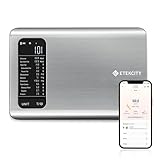
- 𝗬𝗼𝘂𝗿 𝗛𝗲𝗮𝗹𝘁𝗵 𝗘𝘅𝗽𝗲𝗿𝘁: Easily track your intake of up to 19 nutrients, monitor trends, create daily, weekly and monthly nutrition reports and more by connecting to the free Vesync app, Apple Health and Fitbit
- 𝗟𝗮𝗿𝗴𝗲 𝗗𝗮𝘁𝗮𝗯𝗮𝘀𝗲: Supported by Nutritionix, which holds about 1 million food data. You can add and customize your own food data as needed as well
- 𝗛𝗶𝗴𝗵-𝗤𝘂𝗮𝗹𝗶𝘁𝘆 𝗠𝗮𝘁𝗲𝗿𝗶𝗮𝗹: The food-grade 304 stainless steel weighing platform combines durability and easy-to-clean design
- 𝗖𝗼𝗻𝘃𝗲𝗻𝗶𝗲𝗻𝘁 𝗙𝗲𝗮𝘁𝘂𝗿𝗲𝘀: Choose units from oz/lb:oz/g (water & milk)/ml (water & milk), and the Tare button tells the exact weight of your food without container
- 𝗔𝗰𝗰𝘂𝗿𝗮𝘁𝗲 𝗪𝗲𝗶𝗴𝗵𝗶𝗻𝗴: Equipped with 4 high-precision sensors, the scale can weigh your foods between 3 g - 5000 g in 1 g increment
When comparing foods, compare protein grams for the same amount of food—or adjust the figures to equivalent portions. A larger serving can show more protein simply because it contains more food.
Use fiber grams and %DV together
The fiber line gives the grams per serving; its %DV shows how that amount fits against the FDA’s daily reference value. The FDA’s August 2023 reference sheet sets the Daily Value for dietary fiber at 28 g. Fiber is among the nutrients the FDA identifies as one to get more of. Use the FDA label guide for context and the FDA Daily Value reference sheet for the listed reference values.
Rank #2

- 𝗡𝗲𝘄 & 𝗨𝗽𝗴𝗿𝗮𝗱𝗲𝗱: Featuring more accurate sensors and a larger weighing area, the Choice Smart Nutrition Scale is the perfect upgrade to any kitchen
- 𝗦𝗲𝘁 𝗚𝗼𝗮𝗹𝘀: Create your own nutrition goals on the free VeSync app with 19 nutrition metrics such as daily calorie intake, sugar intake, and more
- 𝗠𝗮𝘀𝘀𝗶𝘃𝗲 𝗗𝗮𝘁𝗮𝗯𝗮𝘀𝗲 𝗦𝘂𝗽𝗽𝗼𝗿𝘁: Simply scan your food’s barcode to automatically add it to VeSync. VeSync receives its food data from extensive nutrition database with Millions of data
- 𝗖𝘂𝘀𝘁𝗼𝗺𝗶𝘇𝗮𝗯𝗹𝗲 𝗨𝗻𝗶𝘁𝘀: Choose the measurement units highlighted on the scale’s display. By default, the scale shows oz, lb:oz, fl’oz (water/milk), g, mL (water/milk), but you can remove the units you don’t use in the VeSync app
- 𝗦𝘆𝗻𝗰 𝗥𝗲𝘀𝘂𝗹𝘁𝘀: Share your progress with coaches, doctors, or friends, and you can sync your nutrition data with Fitbit, and Apple Health
For a quick read across different nutrients, the FDA’s general rule is that 5% DV or less is low, while 20% DV or more is high. These are label-reading guideposts, not personal nutrition targets. Compare equivalent serving sizes, and consider your own dietary needs.
Tell total sugars from added sugars
Total sugars include sugars naturally present in foods, such as milk and fruit, as well as sugars added during processing or preparation. The indented “Includes X g Added Sugars” line identifies the added-sugar subset already counted in total sugars. Do not add it to the total a second time. The FDA says total sugars has no %DV; added sugars does. Its added-sugars guidance explains the distinction.
Rank #3

- Take the Guesswork Out of Nutrition: Accurately weigh and track calories, protein, carbs, and fat using a 1M+ food database. Perfect for managing daily intake, staying on track with fitness goals, or monitoring macros for overall health.
- Vibrant TFT Display for Instant Insights: The full-color TFT screen shows weight and nutrition information clearly at a glance. Instantly see calories, protein, carbs, fat, and other key metrics for every ingredient—perfect for meal prep, protein shakes, or fitness meals.
- Perfect Portion Accuracy: Weigh foods from 2g to 5,000g in 1g increments with 5 unit options: g, ml (water), ml (milk), oz, lb:oz. The Tare function ensures precise ingredient measurement by excluding container weight.
- Hit Your Daily Nutrition Targets: Automatically calculates and updates your daily intake goals based on progress. Customize calories, protein, carbs, and fat to align with weight loss, muscle gain, or balanced diet plans.
- Nutrition Info at Your Fingertips: Quickly access nutrition data through pre-set foods, or search by name. Ideal for meal prep, protein shakes, smoothies, and tracking fitness meals accurately.
The FDA’s example shows 15 g total sugars, comprising 7 g added sugars and 8 g naturally occurring sugars. In that example, the 7 g of added sugars equals 14% DV. It illustrates how the lines relate; it is not a claim about a particular product.
The FDA’s reference sheet lists 50 g as the Daily Value for added sugars. The agency describes that reference as based on a 2,000-calorie daily diet; it is a label benchmark, not individualized advice. Pure honey, maple syrup, and similar single-ingredient sugars may display added-sugars %DV without grams in the main declaration, using a footnote approach. A missing gram declaration in this case does not mean zero added sugar.
Rank #4

- Instant Nutrition Calculation: This food scale with nutritional calculator displays real-time calories, protein, fat, and carbohydrates on its 4.3-inch large TFT screen, ideal for people preparing meals, managing health, losing weight or building muscle.
- Log Offline, Sync Anytime: Save up to 100 food presets from the app to your smart food scale, log intake anytime, and sync when needed — or access 800,000+ USDA foods directly in the app.
- Precise Measurements: Weigh up to 5kg in 1g increments, supports 5 unit readings (g/lb:oz/fl’oz/oz/ml), with a tare function to reset the macro scale so you’re only measuring what matters.
- Support Multi-Users: The digital food scale is designed for whole family, supporting up to 3 users. Each person can track their own nutritional goals and food intake, meeting diverse dietary preferences, fitness plans, and healthy lifestyle needs.
- Monitor Health & Manage Goals: Set your nutritional goals and easily track 25 nutrition facts for each meal via the RENPHO Health app. The app also syncs with Apple Health, analyzes your intake, and generates daily, weekly, and monthly nutrition reports.
Compare products on equal terms
- Match the portions. Compare the same serving size, or adjust the figures to an equivalent amount using the serving’s gram weight.
- Compare protein. Look at protein grams for that matched portion.
- Compare fiber. Use grams to see the amount and %DV for daily context.
- Compare added sugars. Check the added-sugars grams and %DV; keep total sugars in view for context, without counting added sugars twice.
The %DV helps you compare labels, but it is not a prescription for what you personally should eat. Individual priorities vary; the FDA’s general guidance is to choose foods higher in fiber and lower in added sugars more often, in line with personal needs. These label conventions describe U.S. FDA labeling and do not set individual dietary goals.
Do these 3 things before closing this tab:
1Fix the driver behind crashes, sound loss and screen glitches2Clear out junk files and repair common Windows errors3Scan for outdated or missing drivers - takes under a minuteQuick Recap
Best Value
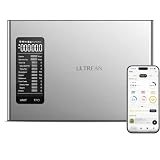
- Calorie Counter: Easily log your daily calories and monitor 20+ nutrients. Set goals, track sports, and get AI-driven insights for smarter health management. Grow with friends instantly via the NutriScale app
- Precision Meets Convenience: Dual-Mode Tracking. Select Smart AI Photo Recognition for quick meal logging on the go, or use Kitchen Scale Integration for precise tracking at home. Enjoy the convenience that fits your lifestyle
- Seamless Health Sync: Effortlessly sync your daily intake with major health and fitness apps to keep all your wellness stats in one place. Whether you’re focused on Weight Loss or Keto, our detailed progress reports and macro breakdowns help you stay motivated and reach your fitness milestones faster
- Professional Grade: Digital Kitchen Scale with BPA-Free 304 Stainless Steel Platform. Weighs up to 22 lbs (10kg max); 1g precision. Features a high-visibility backlit LCD screen for easy reading
- Effortless Operation: Switch between 5 units (g, oz, lb:oz, ml for water/milk) to suit all cooking needs. The One-Touch Tare (Z/T) function allows you to zero out container weight for precise food measurements. Perfect for Baking, Cooking, Keto, and Meal Prep needs
Product prices and availability are accurate as of the date/time indicated and are subject to change. Any price and availability information displayed on Amazon at the time of purchase will apply.

