The safest way to travel with a Nintendo Switch is to turn it off, place it in a padded or hard-shell case made for your exact console model, protect the screen from pressure and scratches, keep game cards and small accessories in closed compartments, and carry the system away from liquids, heat, cold, dust and heavy impacts. Switch, Switch OLED and Switch 2 cases are not interchangeable by default, so identify the model before buying anything.
Why a travel case matters
Nintendo’s official safety guidance says: “Do not drop, hit, or otherwise abuse the Nintendo Switch console, components, game card or accessories.” A bag that leaves the console loose exposes it to the exact hazards that warning covers: a fall from a seat, pressure from another bag, a sharp object across the display, or an impact against a hard surface.
As an Amazon Associate I earn from qualifying purchases.
Travel also adds less obvious risks. Moisture, dirt, dust and lint can affect game cards and connectors. A hot car or prolonged direct sunlight can expose the system to temperatures Nintendo warns against, while very cold conditions can create condensation when the console is brought indoors. A case is not a guarantee against damage, but it creates separation between the console and the rest of your luggage and makes careful packing repeatable.
Identify your Switch before buying protection
Case and screen-protector fit depends on the console generation and model. Treat the original Nintendo Switch, Nintendo Switch OLED Model and Nintendo Switch 2 as separate accessory categories unless a manufacturer explicitly lists your model. A case advertised only as “Switch compatible” is not enough evidence of a correct fit.
#1 Best Overall
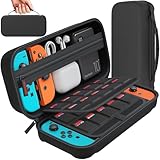
- Designed by DAYDAYUP – Premium Nintendo Switch Carrying Case. This DAYDAYUP Nintendo Switch carrying case is specifically engineered for gamers who need reliable daily protection and organized storage. Unlike generic switch case designs, it features a structured layout tailored for real use.
- Exclusive Interior Layout – Not a Generic Switch Case. This nintendo switch case features a custom-designed interior with dedicated game card slots, mesh pocket, and precise compartment spacing optimized for real usage.
- Scratch-Free Nylon Zipper – Protects Your Console. Unlike standard cases with metal zipper pulls, this nintendo switch carrying case features a specially designed nylon zipper head that prevents contact with the console and reduces scratch risk.
- Hard Shell Protection for Nintendo Switch. Built with durable EVA material, this switch case protects your console from drops, pressure, and scratches during travel and daily carry.
- Authentic DAYDAYUP Design – Avoid Low-Quality Copies. This nintendo switch case is an original DAYDAYUP design. Unauthorized sellers may offer similar-looking products with lower quality materials. Choose authentic products for best performance.
| Console | What to verify | Why it matters for travel gear |
|---|---|---|
| Original Nintendo Switch | That the case and screen protector explicitly support the original Switch. | Interior clearances, screen opening and controller storage may be designed around this model. |
| Nintendo Switch OLED Model | That the listing names the OLED model rather than only “Switch.” | The OLED model has its own fit requirements; a generic case can leave pressure points or poorly positioned padding. |
| Nintendo Switch 2 | That every compartment and protector is labeled for Switch 2. | Switch 2 accessories are a separate product class. Do not assume an older Switch case or film will fit. |
Check the model name on the console, its packaging or the system’s settings, then compare that name with the accessory’s compatibility statement. If a listing uses vague language such as “fits most consoles,” ask the seller for the exact supported model before ordering.
Choose a case around what you will actually carry
There is no single best travel case. The right choice depends on the console model, the amount of protection needed and whether you are carrying only the handheld or a complete setup.
| Trip load | Suitable case format | Features to prioritize | Trade-off |
|---|---|---|---|
| Handheld and a few game cards | Slim padded or compact hard-shell case | Snug console cradle, soft screen-facing lining, card slots and a secure closure | Little or no room for a dock, full-size charger or extra controllers |
| Handheld, charger and cables | Medium case with separated accessory storage | Dedicated cable pocket, adjustable space and padding that does not press on the display | Bulkier than a handheld-only case |
| Complete travel setup | Larger structured case | Separate sections for the console, dock, power supply, controllers and cables | More weight and a larger footprint; overpacking can create pressure inside |
| Maximum crush resistance in a packed bag | Rigid or hard-shell case with internal padding | Firm exterior, well-supported hinges and an interior that holds the system without bending against the screen | Rigid cases occupy more space and can be uncomfortable to carry |
Look for a case that closes without forcing the console into position. When the case is shut, no zipper, divider or accessory should press directly on the display. A hard exterior helps resist outside compression, while padding and a correctly shaped cradle prevent the console from moving inside. Do not treat a manufacturer’s “shockproof” wording as a tested drop rating unless the product documentation provides a specific test and conditions.
What’s actually slowing this PC down?
Pick the symptom - the matching free tool is one click away.
Check the interior before committing
- Place the console in the cradle and confirm that the screen area is not touching a zipper or hard seam.
- Close the lid gently. If you feel resistance or see the display flex, use a larger or differently shaped case.
- Check that game-card slots retain cards when the case is tilted, but do not require excessive force to remove them.
- Make sure accessory compartments cannot swing loose and land on the screen.
- Test the case with the actual charger, cables and controllers you plan to pack; listed capacity is often based on smaller accessories.
Add screen protection without creating a new problem
A screen protector can reduce scratches from grit, zippers and other items in a bag. Choose one that explicitly matches the exact Switch model and follow its installation instructions. Clean the display in a dust-free area, align the protector carefully and remove trapped particles before sealing it down.
Nintendo’s care guidance warns that unlicensed screen covers may reduce touch sensitivity or leave residue. That does not mean every third-party protector will cause trouble, but it does mean universal compatibility claims are insufficient. Check the model designation, the installation method and whether the protector is intended for the touchscreen and case clearance of your console.
Rank #2

- Elegant ballistic nylon case protects your Nintendo Switch OLED Console or Switch Console making it more portable and travel friendly
- Adjustable viewing stand allows you to play and view on the go, while providing max protection for the screen and thumb sticks when storing the Switch OLED or Switch Console
- Bonus Game Cases allow you to hold up to 8 games, secured in a recessed area underneath the Switch OLED Console making for a great travel case and storage case
- Perfect Switch OLED carry case with a comfort handle, soft satin inner top lining and sure glide zipper making it the nicest Nintendo Switch case
- Tested and approved under license by Nintendo of America, compatible with the Nintendo Switch OLED, Nintendo Switch and Nintendo Switch Lite, see all Game Traveler Switch cases in our Amazon store
A protector is an additional layer, not permission to place heavy objects on the display. Keep the console in its cradle and prevent the case lid or another item from pressing against the screen.
Pack game cards and accessories so they cannot damage one another
Nintendo cautions against exposing game cards to moisture, dirt, dust, lint and other foreign material. Store physical cards in the case’s dedicated slots or in a small closed organizer rather than loose in a backpack pocket. A dedicated card case is a convenience for organization, not a Nintendo requirement.
The Tool Desk
Outbyte Driver Updater FREEScan for outdated or missing drivers - takes under a minuteDriver Scan →Outbyte PC Repair FREERepair Windows errors before they cause bigger problemsFix Now →- Insert each card fully into its slot so it cannot slide out and collect debris.
- Keep cards away from drinks, damp clothing, sunscreen and other liquids.
- Put tiny items such as earphones, adapters or spare straps in a zipped pocket instead of the console compartment.
- Coil cables loosely and secure them so plugs cannot scrape the screen or fall onto the console.
- Do not fill every pocket just because space is available; excessive contents can bow the case and transfer pressure to the display.
Pack only the accessories needed for the trip. Removing unused controllers, duplicate cables and bulky stands reduces weight and leaves more room around the items that must be protected.
Use this packing procedure before leaving
- Shut the system down. Do not leave the console switched on while it is stored in its carrying case. Save your game, close software and use the system’s power-off command rather than simply closing the case around an active console.
- Inspect and wipe the exterior. Remove visible dust or grit with a clean, dry, soft cloth. Do not pack the console while it is wet or while liquid remains on a controller, cable or card.
- Install the console in its model-specific cradle. The display should face the soft, supported side of the case and should not contact a zipper, buckle or hard divider.
- Secure physical games. Put cards in the molded slots or a closed organizer. Keep the organizer in its intended pocket so it cannot slide onto the screen.
- Separate accessories. Place the charger, cables and controllers in their designated compartments. Keep hard plugs and connector ends from resting against the console.
- Close the case without compression. Zip or latch it normally. Never force the closure over an overfilled compartment.
- Place the case inside your travel bag thoughtfully. Keep it where it will not be sat on, stepped on or struck by heavier objects. Do not put a water bottle or unprotected metal item directly against it.
- Do a final environment check. Keep the packed system away from liquids, extreme heat, extreme cold and extended direct sunlight.
Prevent pressure and impact in backpacks and luggage
Nintendo’s general care advice specifically describes damage that can result from dropping, hitting, sitting on or stepping on the console. A case cannot prevent every force if the entire bag is crushed, so placement matters.
- Use an interior compartment that is surrounded by clothing or other soft items, but do not wedge the case so tightly that it bends.
- Keep shoes, toiletry bottles, tools and other hard objects in a different compartment.
- Do not place the case at the bottom of a bag that will be loaded with heavy items.
- When traveling by car, keep the case on a seat or in a protected compartment rather than under luggage.
- During hotel stays, leave the console in its closed case when it is not in use and keep the case off damp bathroom surfaces.
For a day bag, a slim case can work well if it has a real internal cradle. For checked luggage or a crowded equipment bag, a more structured case and a protected central position provide more separation from crushing forces. The case still needs to match the console model.
Rank #3
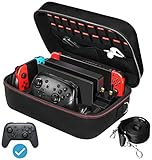
- Deluxe Travel Carrying Case. Specially designed to make your Console system even more portable & travel friendly. Comfortable handle strap is ideal for carrying. Large storage is suitable to take all the Switch accessories when go on a trip.
- Multiple Storage. Interior grooves securely hold the Console include an extra set of JoyCons or a Pro Controller, For Switch Dock, JoyCons Charging Grip, AC Adapter. Interior mesh pocket for other smaller accessories like extra JoyCons, HDMI Cable, JoyCons Straps etc.Make going on vacation very easy, perfect fit for outdoor activities and enjoy your Game.
- Hard Protective Case. Hard EVA shell case protects the console from drops, scratches, bumps, splash and dust. Soft liner protects your console from getting scratches. The design of groove make accessories separate so that avoid to scratch each other.
- Convenient to Use. Easy to carry with the comfortable handle strap. All-around zipper is easy Opening and Closing. Everything is easy to put in and take out and fits securely.
- Included: 1x iVoler Case for Nintendo Switch or OLED Model .The Switch console, pro controllers, and other accessories shown in images are for usage demonstration purposes only and are not included with this case.
Control moisture, dust and temperature
Nintendo advises keeping the system and game cards away from humidity, moisture, dirt, dust and lint, and warns against extreme heat and extreme cold. Do not leave a packed console in direct sunlight for an extended period or in a hot car.
Recommended Free Tools
Moving between cold and warm places
If the case has been in a very cold environment, leave it closed while the equipment gradually reaches room temperature. Opening it immediately can expose cold surfaces to warmer, humid air. Do not power on the console until it is dry and at a normal indoor temperature.
Handling rain and spills
A carrying case is not waterproof unless its documentation specifically says so, and even then the closure and seams determine how much protection it provides. Use a separate waterproof bag for the case during heavy rain, keep drinks in leak-resistant containers away from the console and never put damp clothing in the same compartment.
Keeping debris out
Close every card slot and accessory pocket before placing the case in a dusty environment. If grit reaches a connector or card, do not scrape it with a sharp object. Set the item aside, let loose debris fall away and use only cleaning methods appropriate for the component’s instructions.
Flying with a Switch, charger and power bank
U.S. Federal Aviation Administration passenger guidance says most rechargeable portable electronics for personal use may be carried in carry-on baggage subject to watt-hour limits. Spare lithium-ion batteries and power banks must be in carry-on baggage. Airlines may impose stricter requirements, so check the current policy of every airline on your itinerary before departure.
Rank #4

- Travel case
- Protection Library holds 12 game cards and offers full screen and analog stick protection
- microSD Card Case 2pcs, each holds 2 microSD Cards
- Comfortable carrying handle and soft cleaning cloth
| Item | Practical packing approach | Important qualification |
|---|---|---|
| Switch console | Keep it protected in the case and place the case in carry-on baggage where possible. | FAA guidance is U.S.-specific; airline and destination rules can differ. |
| Spare battery or power bank | Carry it in the cabin, protected from short circuits and damage. | Check the airline’s current watt-hour and quantity limits. |
| Charger and cables | Store them in the case’s accessory section so plugs cannot press against the screen. | Do not overfill the compartment or force the case shut. |
Security screening may require you to remove electronics from the case, depending on the airport. Keep the console accessible and close the case again before placing it back in your bag. Never leave the system powered on inside the closed case while waiting at the gate or during the flight.
Independent reader supportYour contribution helps us test, update, and keep practical guides available for everyone.What to do when something goes wrong
The case will not close
Stop forcing the zipper or latch. Remove accessories until the console sits freely, then check whether a cable, card organizer or divider is positioned over the display. If the problem remains, use a case with more depth or a layout designed for your exact model.
The screen protector has dust or bubbles
Follow the protector maker’s removal and reinstallation instructions. Do not lift the film with a knife or other sharp object, and do not continue traveling with a loose edge that can catch on case padding. If touch sensitivity changes after installation, remove the protector according to its instructions and use a model-specific alternative.
The console or cards become damp
Turn the console off, disconnect accessories and move everything to a dry, ventilated area. Do not charge or power on the system while moisture may remain inside. Keep damp cards separate from dry cards and allow them to dry completely before handling them further. Persistent moisture, corrosion or malfunction requires Nintendo’s support process rather than improvised cleaning.
Free tools Windows power users keep installed
One-click scans. No signup required.
The case takes a hard impact
Inspect the exterior, hinges, screen and controls before using the console. Look for cracks, a distorted case, loose components or controls that no longer respond normally. If the console was dropped or crushed, stop using it if there is visible damage, unusual heat or a battery-related concern.
Best Value

- SWITCH STORAGE CASE: This switch case is specially designed for Nintendo Switch 2017 or Switch OLED Model 2021, as well as your Switch Dock, AC Charging Adapter, Joy-Con Grip, Joy-Con Straps, HDMI Cable, Switch Pro controller, and up to 18 game cards slots, along with other switch accessories
- FULL PROTECTION: This 1680D hard shell case provides ultimate protection for your Nintendo Switch console against drops, scratches, and dust. The interior liner is made of soft material and also features separate compartments for accessories, preventing them from scratching each other. With this case, your switch console and accessories will be safe and secure wherever you go
- EXCELLENT WORKMANSHIP: The switch OLED case is made of EVA hard shell and high-quality nylon. It comes with a comfortable TPU handle and adjustable shoulder strap, a smooth zipper that allows for easy opening and closing, and an inside mesh pouch for storing HDMI cables and other accessories
- GAME ANYWHERE: This switch travel case is great for home storage and on the move. When not in use, you can safely store the switch console and accessories within the case. It's perfect for taking on vacation, in the car, or in outdoor activities. The case ensures that your switch console is protected and secure while on the go
- PACKAGE INCLUDES: Comes with a switch carrying case and shoulder strap. Please note that the switch accessories shown in the images are for demonstration purposes only and are not included in this case
A simple buying checklist
- Model: The case and screen protector name your exact console: original Switch, Switch OLED or Switch 2.
- Protection: The case has padding or a structured shell and prevents movement without pressing on the screen.
- Capacity: It fits the console, the cards and only the accessories you intend to carry.
- Organization: Game cards and small parts have closed, dedicated storage.
- Closure: Zippers, latches and seams do not touch the display or snag the controls.
- Travel environment: You have a plan to keep the case away from water, extreme temperatures, sunlight and heavy luggage.
- Airline compliance: Any power bank or spare battery will remain in carry-on baggage under the airline’s current rules.
How to protect a Switch on different kinds of trips
Short day trip
Use a slim model-specific case, carry the console and the games you expect to play, and leave the dock and duplicate cables at home. Keep the case in a secure section of your day bag rather than loose beside keys or a drink.
Road trip
A medium case is practical when you need a charger and several games. Keep it inside the passenger area, out of direct sun and away from luggage that could fall on it. Do not leave it in a parked car, where temperatures can become extreme.
Air travel
Use a structured carry-on case, keep the console and power bank in the cabin and verify airline requirements before leaving. Pack the system where it can be removed for screening without exposing it to a crowded conveyor or an unprotected seat.
Quick wins for a faster PC:
Clear out junk files and repair common Windows errorsFree Scan →Scan for outdated or missing drivers - takes under a minuteDriver Scan →Repair Windows errors before they cause bigger problemsFix Now →Long stay with a dock
Choose a larger case only if you need the dock, charger, cables and controllers. Separate the dock and other hard components from the handheld’s screen, and check that the loaded case closes without pressure.
The practical standard to aim for
Good travel protection is a system of small decisions: exact model fit, a case that supports rather than compresses the console, secure card storage, restrained packing and attention to moisture, temperature and impact. Follow Nintendo’s handling warnings, keep the console powered off while stored, and treat airline battery rules as a current travel requirement rather than a permanent assumption. Those habits reduce the avoidable damage risks without adding unnecessary gear.
Quick Recap
Product prices and availability are accurate as of the date/time indicated and are subject to change. Any price and availability information displayed on Amazon at the time of purchase will apply.

