To program a Maritime Mobile Service Identity (MMSI), first obtain the number assigned to your vessel, then follow the exact owner’s manual for your radio. Enter all nine digits carefully, complete the radio’s confirmation step, and verify the result with a proper Digital Selective Calling (DSC) test call—not the distress button. A stored MMSI can be difficult or impossible for an owner to change, so stop and contact the manufacturer or an authorized dealer if the number is wrong or already belongs to a previous owner.
What an MMSI is and why the entry matters
An MMSI is a nine-digit identity transmitted by DSC equipment on a marine VHF radio. It identifies the vessel to other DSC stations and to rescue authorities when the radio sends a DSC alert. On supported radios, the MMSI is also required before DSC calling features can be used. The identity belongs to the vessel, not to the person operating the radio; the U.S. Coast Guard states this explicitly in its recreational-vessel MMSI guidance.
As an Amazon Associate I earn from qualifying purchases.
Because a distress alert can include the vessel’s identity and position, a wrong MMSI can send responders to the wrong record. Treat the initial programming as a safety-critical configuration, not as a casual name or channel setting.
Outdated Drivers Are Slowing You Down
One free scan finds every outdated or missing driver and matches the right update for your exact hardware.Free scan · exact hardware matchPC Slower Than It Used to Be?
A free scan shows the junk files, broken settings and background clutter dragging Windows down - then fixes them in one click.Free scan · Windows 10 & 11Before you open the MMSI menu
Identify the exact radio and installation
Read the model label on the radio or its startup screen and download the current owner’s manual from the manufacturer. Menu names, button actions, reset rules, and programming authority differ by model. Instructions for one Garmin radio, for example, cannot be assumed to work on another Garmin model or on a different manufacturer’s unit.
#1 Best Overall

- Uniden's Marine Radios protect you from what lies ahead, as well as getting you out of dicey waters, by informing you the moment a storm starts brewing and transmitting your location should you need help.
- With triple watch features, DSC capabilities, a range of international marine channels and S. A. M. E Weather Alert—the UM385 brings everything you’ll need on the water into one compact design.
- The UM385 rugged handheld mic allows you to transmit easily from the wheel while keeping your focus on the waters ahead.
- Waterproof Radio – Complies with IPX4 waterproof standards, which means the radio is resistant to damage from rain or splashing water.
- DSC (Digital Selective Calling) - Includes Distress Button, Position Send and Request. Gives you the ability to press one button to call for help during an emergency. Full Class D DSC capability. High performance transceiver ensures clear communication and
- Write down the exact model and, if shown, the hardware or software revision.
- Check whether the radio already contains an MMSI. A used radio may retain the former vessel’s identity.
- Confirm that the radio has a reliable power supply and that its antenna and GPS connections are installed as required by the manual.
- Keep the assignment record beside the radio so you can compare every digit before accepting it.
Obtain an assignment for the correct vessel and jurisdiction
Do not invent an MMSI or copy the number from another boat. Obtain an assignment from the maritime or radio authority serving the vessel’s operating jurisdiction. In the United States, the Coast Guard describes license-by-rule MMSI assignments for eligible recreational boats operating in U.S. waters. Different licensing applies when a vessel travels to a foreign port: the Coast Guard guidance says that trip requires an FCC station license and an operator permit. Check the current eligibility and application rules at https://www.navcen.uscg.gov/mmsis-for-recreational-vessels before programming.
Non-U.S. operators should use their national maritime or radio authority’s current process. An assignment valid for one country or operating category may not satisfy another country’s requirements.
Check the vessel record
Ensure the authority’s record contains the current vessel name, call sign (where applicable), emergency contacts, equipment details, and other requested information. Keep the registration information current. Rescue authorities use these records when a DSC distress button is activated, so a correctly entered number is useful only if the associated record is accurate.
The general programming procedure
The labels below are a safe framework, not a universal button sequence. Replace them with the commands in your radio’s manual.
Rank #2

- Uniden's Marine Radios protect you from what lies ahead, as well as getting you out of dicey waters, by informing you the moment a storm starts brewing and transmitting your location should you need help.
- With triple watch features, DSC capabilities, a range of international marine channels and S. A. M. E Weather Alert—the UM385BK brings everything you’ll need on the water into one compact design.
- The UM385BK rugged handheld mic allows you to transmit easily from the wheel while keeping your focus on the waters ahead.
- Waterproof Radio – Complies with IPX4 waterproof standards, which means the radio is resistant to damage from rain or splashing water.
- DSC (Digital Selective Calling) - Includes Distress Button, Position Send and Request. Gives you the ability to press one button to call for help during an emergency. Full Class D DSC capability. High performance transceiver ensures clear communication and
- Power the radio and confirm the model. Stop if the display, controls, or manual do not match your unit.
- Open the DSC or identity setup area. Look for a menu named “DSC,” “MMSI,” “My MMSI,” “Vessel identity,” or similar.
- Select the vessel identity entry. Some radios expose it during first-time setup; others put it under DSC settings.
- Enter the assigned nine-digit MMSI. Enter digits slowly. Do not add spaces, hyphens, a country code, or a leading zero unless the authority’s assignment itself contains that digit.
- Compare the on-screen number with the assignment record. Check from left to right, then from right to left. A single transposed digit creates a different identity.
- Accept the first entry only after the comparison. Many radios require a second entry to prevent typing errors.
- Repeat the number when prompted. If the two entries do not match, cancel or retry exactly as the manual directs; do not guess which version the radio retained.
- Allow the radio to save and restart if requested. Do not remove power while it is writing settings.
- Open the identity screen again. Verify that the stored number exactly matches the assignment before making any DSC call.
If the manual says that programming is dealer-only in your region, do not attempt an undocumented reset or button combination. Arrange programming through the manufacturer or an authorized dealer.
Example: Garmin VHF 110/210
The Garmin VHF 110/210 instructions provide a concrete example of a user-entry workflow. In the radio menu, select MENU > DSC > MY MMSI. Enter the assigned number, accept it, enter the same number a second time, and accept again. The manual describes retrying when the two entries do not match. Follow the exact wording and control actions shown in Garmin’s VHF 110/210 MMSI instructions.
Garmin states in that manual, “You can enter your MMSI number only once.” Subsequent changes require a dealer. That restriction is why the digit-by-digit check must happen before the final confirmation. The rule applies to the cited VHF 110/210 models; it is not evidence that every marine VHF has the same lockout.
Example: Garmin Signal VHF and regional programming
Garmin’s Signal VHF uses a different process. Its manual says the radio needs a GPS position fix and describes a U.S. route in which the user submits the MMSI and vessel details to a Garmin dealer, then connects the radio to the ActiveCaptain application for programming. For operation outside the United States, the same manual describes direct entry of the MMSI and vessel details. Read the complete Garmin Signal VHF instructions for the model and region.
Rank #3

- High Visibility Floating Core - The perfect compact VHF radio for marine use on any size vessel, designed with a high-visibility orange floating core for buoyancy and easy retrieval if dropped overboard
- 6 Watt VHF Power – Switchable between 1/3/6 Watts of power for range demands and battery optimization, use only the amount of power you need for vessels/stations near and far
- Day/Night Display - Day/Night selectable LCD display for easy viewing and high visibility at any time of day or night, regardless of weather conditions
- Tri-Watch Mode - Instantly access Channels 9, 16, and any user-specified channel with Tri-Watch, allowing you to monitor multiple channels at once in busy waterways for safety
- NOAA Weather Alerts - 12 weather channels and National Oceanic and Atmospheric Administration emergency broadcast channel access to stay informed and safe on the water
This example demonstrates why a generic “MMSI menu” recipe is unsafe. The same manufacturer can require direct entry on one family and dealer or app-assisted programming on another, with different rules inside and outside the United States.
How the main programming paths differ
| Situation | What the evidence establishes | What you should do |
|---|---|---|
| Garmin VHF 110/210, first entry | MENU > DSC > MY MMSI, enter and confirm the number twice; Garmin says it can be entered only once. |
Use the owner’s manual, compare every digit before the final acceptance, and plan on dealer help for a later change. |
| Garmin Signal VHF in the United States | GPS position fix required; the manual describes submitting MMSI and vessel details to a Garmin dealer and connecting to ActiveCaptain. | Use the regional dealer/app process rather than trying to force direct entry. |
| Garmin Signal VHF outside the United States | The manual describes direct entry of the MMSI and vessel details. | Confirm that the assignment is valid in the country of operation, then follow the manual’s entry screens. |
| Another manufacturer or model | No universal menu sequence or reset rule is established here. | Use that radio’s current manual and national authority guidance; ask the manufacturer or an authorized dealer if programming is locked. |
| Radio with an existing identity | Some units do not permit owner changes after the first save. | Stop and obtain the model-specific correction procedure from the manufacturer or dealer. |
What to do if the MMSI is wrong or already stored
Do not transmit DSC calls from a radio displaying an incorrect identity. First record what the screen shows and compare it with the assignment document. Then contact the radio manufacturer or an authorized dealer with the model, serial number if requested, proof of the vessel’s assignment, and a description of the error.
The U.S. Coast Guard’s MMSI FAQ directs owners to the manufacturer for the model-specific reset process. Depending on the unit, clearing the stored identity may require authorized service. Do not rely on undocumented internet key combinations: an unsuccessful reset can erase other settings, leave the old identity active, or make the radio unusable until serviced.
Free tools Windows power users keep installed
One-click scans. No signup required.
If you bought a second-hand radio, treat the former MMSI as a configuration problem to resolve before installation is considered complete. The vessel’s assignment does not automatically transfer to a replacement radio, and a previous owner’s identity must not remain in service on your boat.
Rank #4

- High Visibility Floating Core - The perfect compact VHF radio for marine use on any size vessel, designed with a high-visibility orange floating core for buoyancy and easy retrieval if dropped overboard
- 6 Watt VHF Power – Switchable between 1/3/6 Watts of power for range demands and battery optimization, use only the amount of power you need for vessels/stations near and far
- Day/Night Display - Day/Night selectable LCD display for easy viewing and high visibility at any time of day or night, regardless of weather conditions
- Tri-Watch Mode - Instantly access Channels 9, 16, and any user-specified channel with Tri-Watch, allowing you to monitor multiple channels at once in busy waterways for safety
- NOAA Weather Alerts - 12 weather channels and National Oceanic and Atmospheric Administration emergency broadcast channel access to stay informed and safe on the water
Confirming DSC without sending a distress alert
After the correct MMSI is stored, test DSC using the Coast Guard’s designated test procedure where applicable. The Coast Guard says to store the group identity 003669999, choose the radio’s “Test Call” function, select that contact, and transmit. A successful exchange should display an acknowledgment and the acknowledging station’s identity. Follow the complete USCG DSC testing guidance for current details and regional availability.
“Under no circumstances should a DSC Distress Alert be sent to test your radio.”
The red distress control sends an actual alert; it is not a diagnostic button. If your radio has no “Test Call” function, cannot obtain the required GPS fix, or does not receive an acknowledgment, stop and consult the manual, dealer, or Coast Guard guidance rather than experimenting with the distress control.
Do these 3 things before closing this tab:
1Repair Windows errors before they cause bigger problems2Scan for outdated or missing drivers - takes under a minute3Clear out junk files and repair common Windows errorsGPS, position data, and the MMSI
The MMSI identifies the vessel; the GPS supplies its position. They are separate settings, but both affect the usefulness of a DSC distress transmission. Some radios will let you save an MMSI without a position fix, while others require GPS before programming or DSC operation. Garmin’s Signal VHF instructions specifically require a GPS position fix in the cited workflow.
Best Value
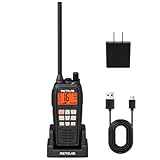
- IP68 waterproof marine radio; the RM15 VHF radio marine resists saltwater corrosion; rated for water immersion up to 1.5 meters for 30 minutes; corrosion-resistant charging contacts; perfect for offshore fishing, bass fishing, and fishing tournaments
- Floating design; the RM15 vhf radio marine stays on the water’s surface if dropped overboard; a water activated emergency strobe light indicates its location; suitable for marine activities such as boating fishing or kayaking; RM15 complies with PART 80
- Dual-way noise reduction system; the RM15 VHF marine radio reduces noise on both transmit and receive audio for clearer two-way communication; a powerful 1000mW (1W) speaker delivers loud, crisp sound even in noisy marine environments
- 16km long range communication;6W vhf marine radio;designed for open water marine activities;whether racing sailboats or navigating choppy seas during fishing trips;helps you stay connected in demanding offshore environments
- Long battery life; the RM15 VHF marine radio features a 2000mAh battery, USB-C ports on both the radio body and charger, and a included cable for 5V/2A or 5V/1A adapter charging. Enjoy over 10 hours of operation and up to 100 hours standby.
- Check the radio’s position screen before a test call or voyage.
- Verify that an internal GPS antenna has a clear view or that the networked GPS source is powered and selected.
- Investigate stale coordinates, “no position,” or an impossible location before relying on DSC.
- Keep the radio’s vessel details and the authority’s registration record synchronized after a refit, ownership change, or call-sign change.
Troubleshooting by symptom
The MMSI menu is missing
Confirm that you are in the DSC or setup menu, not the ordinary channel menu. Check whether the unit is a regional variant or a model whose programming is dealer-only. If the manual does not show a user-entry screen, contact the manufacturer or an authorized dealer.
The radio rejects the second entry
Restart the entry and type both nine-digit sequences from the assignment record, not from memory. Compare the two sequences before accepting. If the radio repeatedly reports a mismatch despite identical entries, document the message and ask the manufacturer for support.
The radio says the MMSI is already programmed
Do not attempt random resets. Record the displayed identity, stop transmitting DSC, and request the model-specific reset or reprogramming procedure from the manufacturer or dealer. Some radios permanently lock the first entry for owner-level access.
What’s actually slowing this PC down?
Pick the symptom - the matching free tool is one click away.
DSC functions remain unavailable after programming
Reopen the “My MMSI” or identity screen and verify that the number is present. Check that the radio has a valid GPS position, that DSC is enabled, and that the antenna and power installation meet the manual’s requirements. If the identity is correct but the feature remains disabled, seek technical support rather than re-entering the number repeatedly.
The test call receives no acknowledgment
Confirm that you used the test-call function and the designated test identity, not the distress control. Check the radio’s transmit power, antenna connection, GPS status, and channel or service conditions specified by the Coast Guard procedure. An unanswered test call does not justify sending a distress alert for diagnostic purposes.
Replacing a radio, moving it to another vessel, or changing ownership
An MMSI follows the vessel’s identity and registration, not the individual radio owner. When replacing a VHF, program the replacement with the vessel’s current assignment only after confirming that the new model and jurisdiction permit that method. Remove the old radio from service or have it reprogrammed before it is installed on another vessel.
For a sale, transfer, or change in operating jurisdiction, update the authority’s registration and ask both the authority and the manufacturer how to handle the radio’s stored identity. A number that was correct on the former vessel can be wrong on the new one, even if the hardware is unchanged.
The Tool Desk
Outbyte PC Repair FREEClear out junk files and repair common Windows errorsFree Scan →Outbyte Driver Updater FREEFix the driver behind crashes, sound loss and screen glitchesFind Drivers →Quick Recap
Final pre-departure checklist
- The number came from the competent authority and is valid for the vessel and intended waters.
- The radio model and regional instructions were followed exactly.
- All nine digits match the assignment record, including the second confirmation entry.
- The stored identity was reopened and checked after saving.
- The vessel’s authority record and emergency details are current.
- GPS position is present and plausible on the radio.
- A designated DSC test call was used where available.
- No distress alert was transmitted for testing.
- Any locked, inherited, or incorrect identity has been referred to the manufacturer or an authorized dealer.
Official references
- U.S. Coast Guard MMSI FAQ
- U.S. Coast Guard recreational-vessel MMSI guidance
- Garmin VHF 110/210 MMSI instructions
- Garmin Signal VHF instructions
- U.S. Coast Guard DSC testing procedure
Product prices and availability are accurate as of the date/time indicated and are subject to change. Any price and availability information displayed on Amazon at the time of purchase will apply.

