Plan a hot-weather drone mission around the exact aircraft and battery limits, not a generic temperature number or the advertised maximum flight time. Check the manufacturer’s operating range and warnings, measure the actual exposure at your launch site, design a route with an early-return reserve, monitor battery temperature continuously, and pause between flights as required by the manufacturer. If the battery overheats or the aircraft issues a relevant warning, shorten the mission and return promptly.
Why heat changes the mission plan
Heat is both a performance variable and a battery-safety issue. Motors can need more work to generate lift in hot conditions, and that can shorten a flight. Payload, wind, route shape, aircraft condition and battery condition can change the result as well. There is no defensible, model-independent rule such as “expect 20 percent less flight time.” The effect is not quantified consistently across drone models.
As an Amazon Associate I earn from qualifying purchases.
The safe planning question is therefore not “How many minutes does heat remove?” It is “What does this aircraft-and-battery combination permit today, and how much time must remain to return or land safely?” A conservative plan treats the published maximum flight time as a laboratory or ideal-condition reference, never as the amount available for the mission.
Start with the exact aircraft and battery instructions
Before looking at the weather, identify the aircraft model, the exact battery model and any installed payload. Read the current aircraft and battery manuals, the manufacturer’s operating-temperature specifications, and the warnings or takeoff limits shown by the flight app. A temperature limit belongs to that specific combination; copying a figure from another drone can create a dangerous plan.
#1 Best Overall
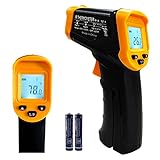
- Temperature measurement range:-50℃-500℃ (-58℉-932℉)Display resolution: 0.1 ℃ or 0.1 ℉
- ℃/℉ conversion selection function
- LCD backlight (convenient for use at night).When backlight is on,any operations will activate the backlight.
- [Data hold]When pull the trigger, LCD display reading with SCAN icon. Release the trigger, display reading with HOLD icon. Built-in 8 sec auto power off function.
- [Emissivity:0.95 preset]Most organic materials and painted or oxidized surfaces have an emissivity of 0.95 (pre-set in the unit). Inaccurate readings will result from measuring shiny or polished metal surfaces. To compensate, cover the target surface with masking tape or flat black paint. Measure the tape or painted surface when the tape or painted reach the same temperature as the material underneath.
| Record before planning | Why it matters |
|---|---|
| Aircraft model and edition | Temperature limits, warning behavior and flight-time figures differ by model and sometimes by edition. |
| Battery model and condition | The battery may have its own operating range, charging requirements and warning thresholds. Damage, swelling or unusual behavior is a reason to stop and follow the manufacturer’s safety procedure. |
| Payload and accessories | Added mass increases the lift demand and can reduce the time available for the required route and reserve. |
| Manufacturer’s temperature range | This is the governing equipment limit for the planned flight. Do not substitute a figure from a different aircraft. |
| App warnings and takeoff restrictions | These are real-time indications that may narrow the usable operating envelope even when ambient air temperature appears acceptable. |
| Published maximum flight time | Use it only as a reference under the stated test conditions. It is not a reserve target. |
FAA Advisory Circular 107-2A is active US guidance for small-unmanned-aircraft operations. It was issued on February 1, 2021, with an editorial update dated May 26, 2022. It does not replace the aircraft maker’s equipment-specific instructions. Operators outside the United States, or operators conducting work under another rule set, must apply the requirements of their own jurisdiction.
A model-specific example, not a universal limit
DJI’s Matrice 30 Series FAQ lists an operating environment of −20°C to 50°C for its TB30 battery and says optimal battery performance calls for a temperature above 18°C. Those figures are useful precisely because they identify both the aircraft family and battery. They do not establish a maximum temperature for consumer drones, other commercial aircraft or an unspecified battery.
If your manual gives a different range, use that range. If the manual is silent or unclear, do not fill the gap with another model’s number; contact the manufacturer or the responsible operator for an authoritative interpretation before flying.
Evaluate the real heat at the launch site
A weather-station forecast describes air conditions at its location, not necessarily the conditions your aircraft and battery will experience. A launch pad in direct sun, on dark pavement or inside a vehicle can be much hotter than the shaded air temperature in the forecast.
- Check the forecast for the launch site and the full mission period, including wind and the expected temperature trend.
- Note direct sunlight, reflective or heat-absorbing surfaces, shelter, elevation and whether the aircraft will remain in a hot vehicle before launch.
- Plan for the hottest part of the route, not just the temperature at the time you leave the house.
- Keep batteries out of unnecessary sun and heat while staged, using only the storage and handling method allowed by the manufacturer.
An infrared thermometer can be an optional surface-temperature check, but a reading on a case, landing pad or other surface is not the same as the battery’s internal temperature. It is not a substitute for the aircraft’s sensor, app warnings or the manufacturer’s instructions.
Design the mission around a return reserve
Write the mission as a sequence of required segments rather than as one maximum-duration flight. Identify the work that must be completed, the route to the work area, the route back, and at least one safe landing point if the aircraft must end the flight early.
Rank #2

- 【Highly Accurate & Adjusts to Any Surface】Designed with the latest thermopile sensor technology, the infrared laser thermometer gun is accurate to +/-1.5%; Improve this pizza oven thermometer gun measurements by adjusting the emissivity from 0.1–1.0 to match the surface material being measured
- 【Ultra-Fast Response】With its distance-to-spot ratio of 12:1 and a response time <500Ms, the infrared temp gun thermometer can quickly provide temperature readings of any target, even at great distances
- 【Wide Temperature Range for Multiple Uses】This infrared thermometer gun for cooking utilizes infrared technology to measure temperatures -58°F–1022°F, enabling heat detector to measure surface temp from a safe distance, even above boiling point and below freezing point; This infrared thermometer temperature gun is perfect for food preparation, auto maintenance, home repairs, etc
- 【User-Friendly】By displaying the MAX/MIN/AVG temperature of the last scan, this infrared thermometer cooking is perfect for measuring temps for AC vents or car engines; Griddle thermometer flat surface features a backlit LCD screen that automatically shuts off after 90 seconds of inactivity to conserve battery life
- Define the minimum deliverable. Decide which images, measurements or inspection passes are essential and which can be deferred. The essential segment is the part that must fit inside a conservative battery plan.
- Map the outbound and return paths. Include the distance and time to return from the farthest point, not just the time to reach it. Account for wind direction and any restricted or unsuitable landing areas.
- Choose an early-return trigger before takeoff. The trigger can be a manufacturer warning, a battery-temperature indication, a planned battery state, a time on the clock, a change in wind or the loss of a safe landing option. Write it down so that a productive pass does not tempt you to spend the reserve.
- Set a landing endpoint. The plan should specify where the aircraft will land if the work is complete, if the trigger occurs or if the aircraft must stop immediately.
- Leave margin for conditions you cannot predict precisely. Heat, payload, wind, route changes and aircraft condition all affect the usable time. Do not plan to consume the entire advertised maximum.
| Mission choice | When it helps | What to verify |
|---|---|---|
| One short sortie | The essential work fits comfortably inside the conservative reserve plan. | Return time, landing point, payload and current battery warnings. |
| Several shorter sorties | The task can be divided, allowing the aircraft and batteries to cool between flights. | Manufacturer guidance on breaks, battery rotation and charging; enough compatible batteries for the required work. |
| Reduced payload or route | Removing nonessential equipment or shortening the farthest leg lowers the lift or travel demand. | That the revised route still meets the deliverable and remains clear of hazards and restrictions. |
| Postponement | Forecast or on-site conditions approach the aircraft’s limit, warnings appear before launch or no safe reserve can be established. | A later time that remains within the manual and applicable operating rules. |
Use a preflight checklist for hot conditions
A written checklist prevents the most common error: treating a familiar aircraft as if every flight has the same limits.
- Confirm the aircraft and battery model against the current manuals.
- Check the manufacturer’s operating-temperature range and any optimal-performance recommendation.
- Inspect the battery for damage, swelling, leaks, abnormal odor or other conditions covered by the manufacturer’s stop-use instructions.
- Confirm that the battery is charged, stored and transported as directed, and that the charger is manufacturer-approved or explicitly compatible.
- Record the expected payload, route, return path, landing point and early-return trigger.
- Check the launch area for direct-sun exposure and hot surfaces.
- Review the forecast and the rules that apply at the location and for the operation.
- Decide how batteries will be protected from heat before launch and how they will be handled after landing.
Do not cool a battery with an improvised method that the manufacturer has not approved. Rapid temperature changes, moisture and unsuitable cooling equipment can create a separate safety problem.
Monitor the battery during the flight
Battery monitoring is an active task, not a one-time preflight check. Keep the battery information visible in the flight app or aircraft display and watch for temperature indications, warnings and an unexpected change in the rate of battery use.
| Observed condition | Planning response |
|---|---|
| No warning and the battery remains within the manufacturer’s stated conditions | Continue only within the preplanned route and reserve. Do not convert unused margin into extra work automatically. |
| Battery temperature rises unusually or a temperature warning appears | Stop optional work, shorten the route and return or land promptly according to the manufacturer’s procedure. |
| Aircraft or app reports a battery, temperature or takeoff limitation | Follow the displayed instruction and the manual. If the required reserve cannot be maintained, do not launch or end the flight. |
| Wind, payload or route demand becomes greater than planned | Recalculate the return requirement conservatively and use the early-return trigger rather than attempting the original scope. |
| Battery behavior is abnormal without a clear warning | Treat the uncertainty as a safety signal, land at the first suitable opportunity and follow the manufacturer’s inspection and service instructions. |
DJI’s “Drone Battery Care Checklist in Summer Days” states: “Flying in High Temperatures: pay attention to the battery temperature; if it is overheating, return to home promptly.” This is a concise operational instruction from the manufacturer, not a promise that every aircraft has the same warning threshold.
Understand overheating and thermal-runaway risk
The FAA’s “Airline Passengers and Batteries” guidance explains the underlying hazard: “Lithium-ion batteries are capable of overheating and experiencing a process called thermal runaway.” Overheating is one factor that can contribute to this process. The page is general lithium-battery safety guidance, not a drone mission-temperature table, but its warning is relevant to the decision to stop using an overheating battery.
What’s actually slowing this PC down?
Pick the symptom - the matching free tool is one click away.
If a battery becomes unusually hot, shows physical damage, emits smoke or an unusual odor, or behaves erratically, move people away and follow the aircraft maker’s emergency and disposal instructions. Do not put a suspect battery back into service merely because it cools down. The exact isolation, transport and disposal procedure depends on the manufacturer and local requirements.
Rank #3

- 𝐕𝐞𝐫𝐬𝐚𝐭𝐢𝐥𝐞 𝐓𝐨𝐨𝐥𝐬: Infrared technology allows you to measure various objects at home and outdoors; Use it for 𝒎𝒆𝒂𝒕, 𝑫𝑰𝒀 𝒄𝒂𝒏𝒅𝒚, 𝒐𝒗𝒆𝒏𝒔, 𝒈𝒓𝒊𝒍𝒍𝒊𝒏𝒈, 𝒇𝒐𝒐𝒅, 𝒄𝒐𝒐𝒌𝒊𝒏𝒈, 𝒂𝒖𝒕𝒐𝒎𝒐𝒕𝒊𝒗𝒆 𝒖𝒔𝒆, 𝑨/𝑪, 𝒓𝒆𝒇𝒓𝒊𝒈𝒆𝒓𝒂𝒕𝒐𝒓𝒔, etc.
- 𝐁𝐞𝐭𝐭𝐞𝐫 𝐀𝐜𝐜𝐮𝐫𝐚𝐜𝐲: The Lasergrip's 12:1 𝒅𝒊𝒔𝒕𝒂𝒏𝒄𝒆-𝒕𝒐-𝒔𝒑𝒐𝒕 𝒓𝒂𝒕𝒊𝒐 enables you to accurately measure temperatures from a comfortable distance. For best results, position the thermometer approximately 14.17 inches / 36 centimeters away from the target.
- 𝐄𝐚𝐬𝐞 𝐨𝐟 𝐮𝐬𝐞: Scan the surface of your object, hold down the trigger of the thermometer gun, get temp anywhere within the range of -58°–842°F / -50°–450°C. Then watch as your result appears on the bright LCD display in less than half a second.
- 𝐁𝐫𝐢𝐠𝐡𝐭 & 𝐑𝐞𝐚𝐝𝐚𝐛𝐢𝐥𝐢𝐭𝐲: Each infrared thermometer 𝒇𝒆𝒂𝒕𝒖𝒓𝒆𝒔 𝒂 𝒍𝒂𝒓𝒈𝒆, 𝒃𝒂𝒄𝒌𝒍𝒊𝒕 𝑳𝑪𝑫 𝒔𝒄𝒓𝒆𝒆𝒏, making it easy to read temperatures even in low light. With 2 AAA batteries included, powering up the thermal gun is a cinch.
- 𝐅𝐫𝐢𝐞𝐧𝐝𝐥𝐲 𝐃𝐞𝐬𝐢𝐠𝐧: The new Lasergrip displays 𝒓𝒆𝒂𝒍-𝒕𝒊𝒎𝒆 𝒕𝒆𝒎𝒑𝒆𝒓𝒂𝒕𝒖𝒓𝒆𝒔 𝒃𝒂𝒔𝒆𝒅 𝒐𝒏 𝒕𝒉𝒆 𝒂𝒗𝒆𝒓𝒂𝒈𝒆 𝒐𝒇 𝒕𝒉𝒆 𝒎𝒆𝒂𝒔𝒖𝒓𝒆𝒅 𝒔𝒖𝒓𝒇𝒂𝒄𝒆 𝒂𝒓𝒆𝒂. This means the reading you see reflects the average temperature within the circular area targeted by the infrared sensor — not a single point. It also features a 𝒎𝒂𝒙𝒊𝒎𝒖𝒎 𝒕𝒆𝒎𝒑𝒆𝒓𝒂𝒕𝒖𝒓𝒆 𝒅𝒊𝒔𝒑𝒍𝒂𝒚 for additional insights.
Plan cooling and battery rotation between sorties
Consecutive flights can add heat to the aircraft and batteries. The Wyoming Department of Transportation UAV survey manual, Section X, revised in February 2025, advises checking the manufacturer’s recommended temperature range and allowing regular breaks between flights. It does not establish a universal number of minutes for every drone.
Build the turnaround into the schedule:
- Land with the planned reserve rather than waiting for a low-battery warning.
- Power down and place the aircraft and battery in the environment specified by the manufacturer.
- Inspect for damage or abnormal heat before the next flight.
- Use a second battery only if it is compatible with the exact aircraft and handled according to the maker’s charging, storage and transport instructions.
- Resume only when the manufacturer’s conditions are met and the next sortie has its own return reserve.
The correct interval may depend on the model, battery temperature, ambient conditions and whether the battery is being charged. Do not treat a generic “cool for 10 minutes” rule as authoritative.
Use compatible batteries and approved charging equipment
Battery rotation can extend the workday, but only with batteries approved for the exact aircraft. A battery that fits physically may still have incompatible electronics, voltage, firmware or thermal behavior. Follow the manufacturer’s list of compatible batteries and chargers.
- Charge, store and transport batteries exactly as directed by the manufacturer.
- Do not charge a hot battery simply to make the next sortie start sooner; use the maker’s temperature and charging instructions.
- Keep damaged or suspect batteries out of the flight rotation.
- Do not mix charging accessories or batteries from another model unless the manufacturer explicitly approves them.
- Account for charging time and a safe charging location when deciding whether multiple sorties are practical.
Apply the rules for the location and operation
Heat planning does not replace aviation rules. In the United States, FAA AC 107-2A provides general small-UAS guidance associated with Part 107 operations, but the circular does not grant permission for every location, payload or mission profile. Check airspace requirements, operating limitations, site restrictions and any waiver or authorization that applies to the flight.
Outside the United States, use the civil-aviation authority’s rules and the conditions attached to the operation. A plan that is technically within a battery’s temperature range can still be unlawful or unsafe because of airspace, people, property, visibility or other operational constraints.
A repeatable hot-weather planning worksheet
Complete these fields before each mission and update them if conditions change:
Rank #4
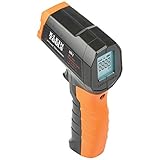
- PRECISE TEMPERATURE MEASUREMENT: Optical resolution (distance-to-spot) of 10:1 ensures accurate temperature readings from a distance
- WIDE MEASUREMENT RANGE: Measure temperatures from -4F to 752F (-20C to 400C), covering a broad range of applications
- ADVANCED FEATURES: Laser targeting, backlit display, auto power off and fixed emissivity
- FIXED EMISSIVITY: The thermometer has a fixed emissivity value of 0.95, providing consistent and accurate readings across different surfaces
- NON-MEDICAL DEVICE: Not intended for use on people or animals, complying with regulations and maintaining clear distinction from medical devices
| Planning item | Entry to make |
|---|---|
| Aircraft and battery | Exact model names and battery identifiers from the equipment labels and manuals. |
| Temperature limits | Operating range, optimal-performance guidance and any app or takeoff warning relevant to this model. |
| Site exposure | Forecast, direct sun, surface heat, shelter and expected conditions during the sortie. |
| Mission minimum | The specific work that must be completed before landing. |
| Farthest point and return route | Where the aircraft will be when the early-return trigger is reached and how it will get back. |
| Landing alternatives | Primary and alternate safe landing locations. |
| Early-return trigger | Battery warning, temperature indication, planned battery state, elapsed time or environmental change that ends optional work. |
| Between-flight plan | Cooling, inspection, battery rotation and charging steps allowed by the manufacturer. |
| Legal checks | Jurisdiction, airspace, site permissions and operational limitations. |
Common planning mistakes and their fixes
Borrowing another drone’s temperature limit
Why it fails: Battery chemistry, aircraft cooling, firmware and operating assumptions differ.
Free tools Windows power users keep installed
One-click scans. No signup required.
Fix: Quote a temperature only with the aircraft and battery model attached. The Matrice 30 TB30 specification is an example of this discipline, not a general threshold.
Planning to the advertised maximum flight time
Why it fails: Published maximums do not represent every payload, wind, route, battery condition or temperature.
Fix: Work backward from the return route and landing point, then add a reserve and an early-return trigger.
Using the forecast from a distant weather station
Why it fails: The aircraft may sit in direct sun or above a surface that is hotter than the reported air temperature.
Recommended Free Tools
Fix: Assess exposure at the actual launch and staging area and monitor the aircraft and battery during flight.
Best Value

- 🎁【High Accuracy】 DESOMIYE laser thermometer gun adopts the latest high-sensitivity temperature sensor, which can measure the temperature range of -50°C~600°C (-58°F~1112°F) in only 0.5 seconds. For best results, the reader should be 14 inches away from the object.
- 🎁【Wide Range of Applications】Infrared technology makes this temp gun convenient to measure the surface temperature of inanimate objects: cooking, baking, grilling, frozen food, fried food, car repair, completing HVAC projects, plantation, winemaking, water temperature measurement, appliances, etc.
- 🎁【Not Suitable for Humans】 This infrared thermometer gun is an industrial thermometer, it cannot be used to measure body temperature. The reading measured by the temperature measuring gun is the surface temperature of objects and liquids, and cannot measure the internal temperature, so the temperature of people or animals measured will be inaccurate.
- 🎁【Easy to Use】 Simply scan the surface of your object, hold down the trigger of the infrared thermometer gun, and release to get live temperature readings anywhere between -50°C~600°C (-58°F~1112°F).
- 🎁【User-friendly design】 With hold data function, unit switching (°C/°F), temperature calibration range between -3°C ~ 3°C. Each IR temperature gun has a large backlit LCD screen for easy temperature reading even in the dark, and 12 seconds auto-off to prolong battery life so you won't run out of power accidentally.
Waiting for a severe warning before returning
Why it fails: A warning can arrive after heat has already reduced the available margin.
Fix: Define the trigger before launch and return promptly when overheating or a relevant warning appears.
Inventing a universal cooling interval
Why it fails: Cooling depends on the model, battery condition, ambient environment and charging state.
Do these 3 things before closing this tab:
1Scan for outdated or missing drivers - takes under a minute2Repair Windows errors before they cause bigger problems3Fix the driver behind crashes, sound loss and screen glitchesFix: Use the manufacturer’s instructions and the breaks recommended for the operation; the Wyoming DOT guidance supports regular breaks but does not assign one interval to every aircraft.
Improvising a battery or charger
Why it fails: Physical compatibility does not guarantee electrical or thermal compatibility.
Fix: Use only manufacturer-compatible batteries and approved charging equipment.
What to do when conditions approach the limit
If the forecast or measured conditions are near the upper end of the aircraft’s stated operating range, treat the flight as a specific go/no-go decision. Recheck the exact battery specification, payload, route, reserve and warnings. If those facts do not support a conservative return plan, reduce the mission, divide it into shorter sorties with manufacturer-supported breaks, or postpone it.
Quick wins for a faster PC:
Scan for outdated or missing drivers - takes under a minuteDriver Scan →Clear out junk files and repair common Windows errorsFree Scan →A question such as whether a drone can fly in “100 degree weather” cannot be answered safely without the aircraft, battery, exposure, payload, route and jurisdiction. A forum question using that wording is not an operating limit. The answer must come from the exact equipment instructions and the conditions at the site.
The decision rule
Fly only when the exact aircraft and battery are within their stated conditions, the mission can be completed with a defined return reserve, and you can monitor and respond to battery temperature. Heat that pushes the equipment toward a warning, a route that consumes the reserve, or a battery whose condition is uncertain is a reason to shorten, pause or cancel the sortie. Conservative planning is not a fixed percentage deduction; it is a model-specific process that keeps the aircraft able to return or land safely.
Quick Recap
Product prices and availability are accurate as of the date/time indicated and are subject to change. Any price and availability information displayed on Amazon at the time of purchase will apply.

