Quick wins for a faster PC:
Repair Windows errors before they cause bigger problemsFix Now →Scan for outdated or missing drivers - takes under a minuteDriver Scan →To pair the current Beats Pill, charge and turn on the speaker, put it in discovery mode, then choose Beats Pill in your phone or computer’s Bluetooth settings. The Pill’s light pulses when it is discoverable; if it does not, hold the power button for three seconds. The same manual Bluetooth method works with iPhone, Android, Mac, Windows PCs, and other compatible Bluetooth devices.
What you need before pairing
Pairing is wireless and does not require a USB-C cable. You need a charged Beats Pill, a nearby device with Bluetooth, and access to that device’s Bluetooth settings. Keep the speaker close to the phone or computer while you connect it.
As an Amazon Associate I earn from qualifying purchases.
- Current speaker: These steps apply to the current Beats Pill. Beats treats the Beats Pill and Beats Pill+ as separate products.
- Discovery mode: The Pill’s status light pulses when it is ready to be found. If the light does not pulse after you turn the speaker on, hold the power button for three seconds.
- Device software: Menu names can change as iOS, Android, macOS, Windows, and other device software are updated.
- Compatibility: Beats says the Pill can connect to iOS, Android, and compatible Bluetooth devices.
Quick pairing procedure
- Charge the Beats Pill, then press its power button to turn it on.
- Watch the status light. A pulsing light means the speaker is in discovery mode. If it is not pulsing, hold the power button for three seconds.
- Open Bluetooth settings on the phone, tablet, Mac, PC, or other device.
- Turn Bluetooth on.
- Select Beats Pill from the list of available devices.
- Wait for the connected indication on the device. The Pill also provides an audio cue when pairing is completed.
If the speaker does not appear, leave the Bluetooth screen open, move the Pill closer, and repeat the discovery-mode step before trying to select it again.
Pair a Beats Pill with an iPhone
Manual Bluetooth pairing
- Make sure the Pill has charge.
- Press the Pill’s power button.
- Confirm that the light pulses. If it does not, hold the power button for three seconds to enter discovery mode.
- On the iPhone, open Settings > Bluetooth.
- Make sure the Bluetooth switch is on.
- Wait for Beats Pill to appear under the available devices list, then tap it.
- Wait for the iPhone to show the speaker as connected and for the Pill to give its pairing audio cue.
Once connected, audio routed to the iPhone can play through the Pill. The pairing itself is completed from the iPhone’s Bluetooth screen; no cable is needed.
#1 Best Overall

- SOUND BUILT TO FILL THE ROOM: The bespoke racetrack woofer displaces 90% more air than the previous Beats Pill, driving deeper, fuller bass at up to 69 watts of output.
- CRISP HIGHS, DISTORTION-FREE BASS: A redesigned tweeter delivers clear, crisp highs and rich mid-range tones, while the woofer design minimizes low-end distortion even at high volume.
- STUDIO-QUALITY SOUND, WIRED OR WIRELESS: Connect via USB-C to a laptop or compatible device for high-resolution lossless audio.
- 24 HOURS OF SOUND, AND IT’S A BACKUP BATTERY: Up to 24 hours of battery life for all-day playback, and the Beats Pill doubles as a USB-C power bank to charge your phone or other devices.
- BUILT FOR THE BEACH, THE TRAIL, AND EVERYTHING IN BETWEEN: IP67-rated for dust and water resistance, with a removable lanyard and soft-grip silicone body for life on the move.
One-touch setup on an iPhone
Beats also describes a one-touch pairing flow. Hold the powered-on Pill near an unlocked device and follow the prompt that appears on screen. If the prompt asks you to continue setup, press and hold the Pill’s power button until the LED blinks white and an audio cue sounds. A second cue indicates that the device is connected and the Pill is ready to play.
The manual route above is the dependable fallback when no setup prompt appears. It uses the standard Bluetooth menu and does not depend on a pop-up being displayed.
Pair a Beats Pill with an Android phone
- Charge the Pill and press its power button.
- Check the speaker’s light. If it is not pulsing, hold the power button for three seconds.
- Open your Android phone’s Bluetooth settings. The exact location varies by manufacturer and Android version; use the system settings search if necessary.
- Turn Bluetooth on.
- Choose Beats Pill from the available-device list.
- Wait for the phone to report that the Pill is connected.
Android phones may label the same screen Pair new device, Available devices, or a similar name. The important controls are Bluetooth on, a scan for nearby devices, and the entry named Beats Pill.
If your Android phone displays a setup prompt when the Pill is nearby, you can follow it. If no prompt appears, use the Bluetooth settings procedure rather than waiting for one.
Pair a Beats Pill with a Mac
- Turn on the charged Pill.
- If its light is not pulsing, hold the power button for three seconds to make it discoverable.
- On the Mac, open Apple menu > System Settings > Bluetooth.
- Turn Bluetooth on if it is off.
- Select Beats Pill in the nearby-device list.
- Wait for the Mac to show the speaker as connected.
The Mac’s Bluetooth panel is where the wireless connection is established. A USB-C cable is not required for this process.
Pair with a Windows PC or another Bluetooth device
The current Pill can also pair with compatible Bluetooth equipment, including Windows-based PCs. Because menu names differ between manufacturers, use the other device’s own Bluetooth instructions for the final selection step.
Rank #2

- The Beats Pill delivers powerful, room-filling sound. The bigger, bespoke racetrack woofer displaces 90% more air volume, packing more of a punch with deeper, fuller bass.
- The Beats Pill has up to 24 hours of battery life for all-day playback and can be used to charge your phone or other devices via USB-C cable.
- The portable speaker is IP67-rated for dust and water resistance for outstanding durability and includes a removable lanyard and soft-grip silicone backing to make it easy to take with you.
- The redesigned tweeter provides extra stability for crisp highs and rich mid-range tones while the woofer’s material and structure helps minimize low-end distortion even at high volumes
- Enjoy high-resolution lossless audio from your Beats Pill by connecting it to your laptop or other compatible devices via the USB-C cable
- Put the Pill near the device you want to connect.
- Turn the Pill on.
- Hold the Pill’s power button until a tone repeats. This indicates that the speaker is ready to pair with another Bluetooth device.
- Open the device’s Bluetooth setup screen.
- Enable Bluetooth and start its search for nearby devices.
- Select Beats Pill and complete any confirmation prompt shown by that device.
On a PC, the Bluetooth control may be in system settings, a quick-settings panel, or a manufacturer utility. The exact path is device-specific, but the Pill must be discoverable before it can be selected.
Do these 3 things before closing this tab:
1Scan for outdated or missing drivers - takes under a minute2Repair Windows errors before they cause bigger problems3Fix the driver behind crashes, sound loss and screen glitchesUnderstanding the Pill’s pairing signals
Pulsing light
In Apple’s setup instructions, a pulsing light means the Pill is in discovery mode. That is the state required for a phone or computer to find it during a Bluetooth scan.
Three-second power-button hold
For the current Beats Pill, holding the power button for three seconds enters discovery mode when the light is not already pulsing. This is different from simply pressing the button once to turn the speaker on.
Repeating tone for another Bluetooth device
Beats’ instructions for another Bluetooth device describe holding the power button until a tone repeats. Use that cue when pairing with equipment whose Bluetooth setup does not display the same phone-style flow.
Audio cue after connection
The Pill gives an audio cue during pairing. In the one-touch flow, a second cue confirms that the device is connected and the speaker is ready to play.
If the Beats Pill does not appear
Work through these checks in order. They address the documented causes without changing settings that are not required for pairing.
Rank #3

- SOUND BUILT TO FILL THE ROOM: The bespoke racetrack woofer displaces 90% more air than the previous Beats Pill, driving deeper, fuller bass at up to 69 watts of output.
- CRISP HIGHS, DISTORTION-FREE BASS: A redesigned tweeter delivers clear, crisp highs and rich mid-range tones, while the woofer design minimizes low-end distortion even at high volume.
- STUDIO-QUALITY SOUND, WIRED OR WIRELESS: Connect via USB-C to a laptop or compatible device for high-resolution lossless audio.
- 24 HOURS OF SOUND, AND IT’S A BACKUP BATTERY: Up to 24 hours of battery life for all-day playback, and the Beats Pill doubles as a USB-C power bank to charge your phone or other devices.
- BUILT FOR THE BEACH, THE TRAIL, AND EVERYTHING IN BETWEEN: IP67-rated for dust and water resistance, with a removable lanyard and soft-grip silicone body for life on the move.
1. Confirm the speaker is on and charged
A low or empty battery can prevent a successful setup. Charge the Pill, press the power button, and check for the normal status light.
2. Re-enter discovery mode
If the light is not pulsing, hold the current Pill’s power button for three seconds. Then return to the phone or computer’s Bluetooth list and scan again.
3. Confirm Bluetooth is enabled on the device
On iPhone, check Settings > Bluetooth. On Mac, check Apple menu > System Settings > Bluetooth. On Android, open the phone’s Bluetooth settings. Other devices use their own Bluetooth control.
4. Reduce distance and obstructions
Keep the speaker close to the device during discovery. If the Pill is across a room or surrounded by sources of interference, move it beside the phone or computer and try again.
5. Unpair and pair again
For a connection that was previously set up but no longer works, Beats’ general support guidance recommends improving the Bluetooth connection or unpairing the speaker and pairing it again. Remove the existing Beats Pill entry using the device’s Bluetooth controls, place the Pill back in discovery mode, and select it as a new device.
6. Avoid applying the wrong reset procedure
Beats support has a reset section, but reset controls differ by product and model. Do not use a button sequence copied from an older Pill or Pill+ guide on the current Pill unless the model-specific instructions identify it. A reset is not the first step for a speaker that simply needs to be made discoverable.
Rank #4

- The Beats Pill delivers powerful, room-filling sound. The bigger, bespoke racetrack woofer displaces 90% more air volume, packing more of a punch with deeper, fuller bass.
- The Beats Pill has up to 24 hours of battery life for all-day playback and can be used to charge your phone or other devices via USB-C cable.
- The portable speaker is IP67-rated for dust and water resistance3 for outstanding durability and includes a removable lanyard and soft-grip silicone backing to make it easy to take with you.
- The redesigned tweeter provides extra stability for crisp highs and rich mid-range tones while the woofer’s material and structure helps minimize low-end distortion even at high volumes.
- Enjoy high-resolution lossless audio from your Beats Pill by connecting it to your laptop or other compatible devices via the USB-C cable.
Current Beats Pill versus older Pill models
The three-second power-button instruction in this guide is specifically for the current Beats Pill. Older hardware is not automatically interchangeable with it.
The Tool Desk
Outbyte Driver Updater FREEFix the driver behind crashes, sound loss and screen glitchesFind Drivers →Outbyte PC Repair FREEClear out junk files and repair common Windows errorsFree Scan →Beats lists Beats Pill and Beats Pill+ as separate products, and an older Beats Pill quick-start guide describes a different button action for pairing. If your speaker’s button behavior, lights, or sounds do not match the current instructions, identify the exact model and use that model’s guide instead of repeatedly applying the three-second step.
This distinction matters when troubleshooting: a legacy speaker may be working normally even if it does not enter discovery mode using the current Pill procedure.
Software, regional, and feature limitations
Apple’s general Beats setup guidance covers iPhone, iPad, Apple Watch, Android, and Mac. Apple says that guide applies to iOS 27 and related version 27 systems or later, while software menus can change over time. If your labels differ, look for the device’s Bluetooth settings rather than matching the wording character for character.
Apple also notes that not all features are available in every country or region. Basic Bluetooth pairing is the core connection method, but a setup prompt or additional platform feature may not appear in every location or software configuration.
Free tools Windows power users keep installed
One-click scans. No signup required.
Charging, playback, and wired USB-C use
A USB-C cable can be used to charge the Pill and for supported wired audio, but it is not needed to pair over Bluetooth. If your immediate goal is wireless playback, complete the setup from the device’s Bluetooth menu.
Best Value
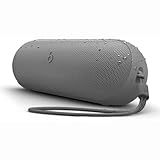
- The Beats Pill delivers powerful, room-filling sound. The bigger, bespoke racetrack woofer displaces 90% more air volume, packing more of a punch with deeper, fuller bass.
- The Beats Pill has up to 24 hours of battery life for all-day playback and can be used to charge your phone or other devices via USB-C cable.
- The portable speaker is IP67-rated for dust and water resistance for outstanding durability and includes a removable lanyard and soft-grip silicone backing to make it easy to take with you.
- The redesigned tweeter provides extra stability for crisp highs and rich mid-range tones while the woofer’s material and structure helps minimize low-end distortion even at high volumes
- Enjoy high-resolution lossless audio from your Beats Pill by connecting it to your laptop or other compatible devices via the USB-C cable
Apple lists up to 24 hours of playback for the current Pill. Apple’s footnote says that result came from testing in April 2024 with pre-production Beats Pill units, specified software, iPhone 15 Pro units, and particular playback conditions. Actual battery life varies with settings, environment, use, and other factors. Beats also states up to 24 hours of battery life on its support material, without giving a publication year on that page.
The battery figure describes potential playback time, not pairing speed or connection reliability. It should not be used as a guarantee that every unit will last 24 hours or as evidence that a Bluetooth connection has succeeded.
How to tell whether pairing succeeded
- The phone or computer lists Beats Pill as connected rather than merely available.
- The Pill provides its connection audio cue.
- Media started on the connected device plays through the speaker.
- The speaker remains selected when you leave and reopen the device’s Bluetooth controls.
If the Pill appears in the list but is not marked connected, selecting the entry again after returning the speaker to discovery mode is more useful than plugging in a cable, because charging and Bluetooth pairing are separate functions.
PC Slower Than It Used to Be?
A free scan shows the junk files, broken settings and background clutter dragging Windows down - then fixes them in one click.Free scan · Windows 10 & 11Outdated Drivers Are Slowing You Down
One free scan finds every outdated or missing driver and matches the right update for your exact hardware.Free scan · exact hardware matchPairing method by device
| Device | Bluetooth path | How to make the current Pill discoverable | Successful connection signal |
|---|---|---|---|
| iPhone | Settings > Bluetooth | Turn on the Pill; hold the power button for three seconds if the light is not pulsing | Beats Pill is selected and the speaker gives an audio cue |
| Android phone | Phone’s Bluetooth settings | Turn on the Pill; hold the power button for three seconds if the light is not pulsing | Beats Pill is selected and the phone reports connected |
| Mac | Apple menu > System Settings > Bluetooth | Turn on the Pill; hold the power button for three seconds if the light is not pulsing | Beats Pill is selected and the Mac reports connected |
| Windows PC or other Bluetooth device | The device’s own Bluetooth setup screen | Turn on the Pill and hold the power button until a tone repeats | The other device completes its Bluetooth connection and the Pill gives its cue |
Common mistakes to avoid
- Looking for the speaker before discovery mode is active: Turning the Pill on does not guarantee that it is currently visible to a new device. Check the pulsing light or use the appropriate power-button hold.
- Using the wrong menu: Pairing happens in Bluetooth settings, not in a music app or a USB connection dialog.
- Assuming a cable is required: USB-C is relevant to charging and supported wired audio, not to the wireless pairing procedure.
- Following a Pill+ sequence: The current Pill and Pill+ are separate products, and older guides may describe different button actions.
- Expecting every device to show the same prompt: One-touch setup is optional. The manual Bluetooth list works across the supported platforms described here.
- Treating battery life as a connection guarantee: “Up to 24 hours” is a playback estimate measured under stated conditions, not a pairing-performance specification.
When to use the model-specific support guide
Use the model-specific guide if the speaker has a different name, the status light behaves differently, the power-button action does not produce the expected cue, or you own a legacy Pill or Pill+. The current instructions are appropriate only when the product is the current Beats Pill described by Apple and Beats’ present support material.
For a current Pill, however, the essential sequence remains consistent: charge it, turn it on, make the light pulse or use the documented discovery action, open Bluetooth on the target device, and select Beats Pill.
Quick Recap
Product prices and availability are accurate as of the date/time indicated and are subject to change. Any price and availability information displayed on Amazon at the time of purchase will apply.

