To build a Mac mini cluster, connect every machine to the same switched Ethernet network, enable Remote Login (SSH) on each node, install the same parallel-computing software and toolchain, then launch an MPI program across the hosts. The network only provides communication: a program must be written or configured to divide work among processes before additional minis can contribute.
Start by identifying the exact model and Ethernet option of every mini. Apple lists different Ethernet and Thunderbolt capabilities by generation and configuration, so a switch or cable plan that suits one model may not suit another. Open MPI can launch processes over SSH and use TCP/IP for MPI traffic, but SSH host selection and the interface carrying MPI messages are separate configuration concerns.
As an Amazon Associate I earn from qualifying purchases.
What a Mac mini cluster can—and cannot—do
A cluster is a group of independent computers that coordinate over a network. Each Mac mini keeps its own memory, operating-system instance and storage. Networking does not pool RAM into one larger memory space, and it does not make an ordinary single-threaded application run in parallel. You need software that creates multiple processes or workers, assigns them portions of a job and combines their results.
MPI (Message Passing Interface) is a common approach for scientific, engineering and batch workloads. An MPI launcher starts processes on selected hosts; those processes exchange messages over the network while the application runs. Open MPI supplies the mpirun and mpiexec launchers. Other models, such as distributed task queues or a custom service, are possible, but the hardware and SSH preparation described here remains useful.
#1 Best Overall

- 𝐅𝐢𝐯𝐞 𝟏𝟎𝐆𝐛𝐩𝐬 𝐏𝐨𝐫𝐭𝐬 𝐟𝐨𝐫 𝐋𝐢𝐠𝐡𝐭𝐧𝐢𝐧𝐠-𝐅𝐚𝐬𝐭 𝐂𝐨𝐧𝐧𝐞𝐜𝐭𝐢𝐨𝐧𝐬: 5× 10-Gigabit ports unlock the highest performance with 10G/multi-gig bandwidth and provide up to 100 Gbps of switching capacity.
- 𝐀𝐮𝐭𝐨-𝐍𝐞𝐠𝐨𝐭𝐢𝐚𝐭𝐢𝐨𝐧: Auto-negotiation intelligently senses the link speeds and adjusts between 5-speeds (100Mb/1G/2.5G/5G/10G) for compatibility and optimal performance for all your devices, including 2.5G/5G/10G WiFi 6 AP, 10G NAS, 10G PCIe Adapter/NIC, 10G Server, gaming computer, 8K video, and more.
- 𝐑𝐞𝐥𝐢𝐚𝐛𝐥𝐞 𝐚𝐧𝐝 𝐐𝐮𝐢𝐞𝐭: IEEE 802.3X flow control provides reliable data transfer and a fanless design ensures quiet operation.
- 𝐏𝐥𝐮𝐠 𝐚𝐧𝐝 𝐏𝐥𝐚𝐲: Easy setup with no software installation or configuration needed.
- 𝐒𝐭𝐮𝐫𝐝𝐲 𝐌𝐞𝐭𝐚𝐥 𝐂𝐚𝐬𝐞: Durable metal casing and desktop/wall-mounting design are well-suited for different environments.
- What networking provides: reachability between nodes, name resolution, transport for messages and a way to administer machines remotely.
- What parallel software provides: process creation, work distribution, synchronization and result handling.
- What it does not provide automatically: pooled memory, guaranteed speedup or compatibility between arbitrary binaries and architectures.
Choose hardware from the exact Mac mini specifications
Do not design around the phrase “a Mac mini” as if every generation had the same ports. Apple’s current specifications page lists 2.5Gb Ethernet with configurable 10Gb Ethernet on the current models it documents. Apple’s 2024 Mac mini specifications describe Gigabit Ethernet configurable to 10Gb Ethernet. The exact option installed in each machine determines the maximum link speed; a 10GbE switch cannot make a Gigabit-only port operate at 10GbE.
| Item to check | Why it matters | What to record |
|---|---|---|
| Mac mini generation | Port capabilities, firmware behavior and supported macOS versions vary. | Model identifier, year or generation and serial-specific configuration. |
| Built-in Ethernet | Apple documents different base and configurable speeds by model. | Gigabit, 2.5GbE or 10GbE option actually present on each node. |
| Thunderbolt generation | Transfer ceilings and peripheral support differ; a cabling idea for one generation may not apply to another. | Thunderbolt version and available ports. |
| Processor architecture | Arm and Intel binaries, compilers and libraries may not be interchangeable. | Arm or Intel, macOS release and compiler version. |
| Memory and storage | Each process uses the node’s local resources; insufficient RAM can force swapping. | Installed memory, free disk space and location of application data. |
For a first cluster, use Ethernet through a switch. Connect one Ethernet cable from each mini to the switch, rather than relying on an unverified direct or daisy-chain arrangement. A small unmanaged switch is operationally simple; a managed switch can expose diagnostics such as negotiated speed and errors. No particular switch model is established as best by the cited documentation.
When 10GbE is worth considering
10GbE is an option when the minis, switch ports, transceivers or cables and every intervening adapter support it. It is most relevant to workloads that exchange substantial data between nodes. If the application sends only small messages and spends most of its time computing locally, the faster link may not change elapsed time. The available documentation provides interface specifications and TCP/IP support, not Mac mini cluster benchmarks, so treat any speedup as workload-dependent rather than guaranteed.
After connecting the cables, inspect the negotiated speed on each Mac and on the switch. A 10GbE-capable node connected through a 1GbE switch, an unsuitable adapter or a cable that negotiates down will communicate, but at the lower link rate. Keep the network design identical where possible so that one slow node does not become an unexpected bottleneck.
Why Thunderbolt needs separate validation
Apple lists Thunderbolt generations and transfer ceilings, but the sources used for this guide do not provide a general multi-node Thunderbolt networking recipe or macOS configuration procedure. Thunderbolt cabling alone should therefore not be presented as a plug-and-play cluster interconnect. If you pursue it, verify the exact Mac mini generation, adapters, operating-system support and routing behavior for your intended topology before purchasing hardware. Ethernet is the documented baseline for this guide.
Build a predictable network
Give every node a stable identity
Assign each mini a descriptive hostname such as mini01, mini02 and mini03. Use either DHCP reservations on your router or manually managed addresses on an isolated cluster LAN. The important property is stability: a host listed in an MPI command must resolve to the same machine tomorrow as it does today.
- Connect all minis and the administration computer to the switch.
- On each Mac, open System Settings and inspect the active Ethernet service. Confirm that the interface has an address and that the negotiated speed matches your design.
- Set hostnames in System Settings → General → Sharing or with your organization’s normal device-management method.
- From each node, test name resolution and reachability to every other node. For example, run
ping mini02and stop it withControl-C; then test the SSH service withssh mini02 hostname. - Record the final names, addresses, interface names and link speeds in a small inventory. Use that inventory when creating the MPI host list.
Do not expose an administration service to the public internet merely to make nodes reachable. Keep the cluster on a trusted LAN or protected network, apply macOS updates appropriate to your application, and restrict Remote Login to the accounts that need it.
Do these 3 things before closing this tab:
1Repair Windows errors before they cause bigger problems2Scan for outdated or missing drivers - takes under a minute3Clear out junk files and repair common Windows errorsRank #2
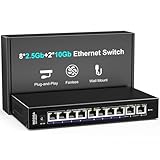
- 【10 Port 10G Ethernet Switch】The network switch includes 8 x 2.5Gb Ethernet ports, 2 x 10Gb RJ45 Port.Auto MDI/MDIX.1-8 Port Support 2.5G/1G/100Mbps, 9-10 Port Support 10G/5G/2.5G/1G/100Mbps. Provide compatibility and optimal performance for all your devices, including 10G NAS, WiFi7 routers, 10G adapters/NICs, servers, gaming PCs, 8K video, etc. Build a more stable and larger network.
- 【Super Fast Network Speeds】This network switch delivers 2.5x faster network performance than traditional Gigabit switches. With a switching capacity of up to 80Gbps, this network switch can handle large amounts of data traffic, ensuring smooth and efficient network operation.
- 【Plug and Play】Easy to use and simple to set up, no software or configuration required. Supports automatic MDI/MDIX and non-blocking data forwarding.Support Desktop/Wall Mount.
- 【Stable and Quiet】Durable metal case with 4KV lightning protection, fanless silent design for more power saving, double side cooling holes, wide temperature range -10~50°C, LED indicator lights, stable operation, easy to maintain network status.
- 【After-Sale-Service】 Every NICGIGA switch is rigorously tested for reliability, quality and performance. We provide a one-year warranty and lifetime technical support for the entire product.
Enable Remote Login and verify SSH
Apple states: "You can set up your Mac mini to allow your other computers to remotely access it using SSH (Secure Shell)." In macOS, enable System Settings → General → Sharing → Remote Login on every node. Apple describes this as secure command-line access for running commands, managing files and restarting services. Screen Sharing is a separate graphical-management option; it is not a replacement for MPI’s SSH launch path.
- On each mini, open System Settings → General → Sharing.
- Turn on Remote Login.
- Allow access for the specific user account that will launch or run jobs. Avoid using an administrator account for routine computation unless your policy requires it.
- From the prospective launch host, run
ssh mini01, accept the host key only after checking that the name and address are correct, and authenticate. - Repeat the test for every node and in both directions if nodes will launch work from one another.
Open MPI’s SSH documentation says: "When launching Open MPI jobs in a non-scheduled environment, ssh is typically used to launch commands on remote nodes." In that mode, SSH must work without an interactive password or passphrase prompt. Configure an approved key-based authentication arrangement and test it in a non-interactive command, such as ssh -o BatchMode=yes mini02 hostname. A failure here must be fixed before troubleshooting MPI itself.
Keep the remote environment usable
The remote account must be able to find the MPI executables and libraries. Open MPI recommends consistent installation locations across nodes for simplicity. If one Mac has Open MPI under one prefix and another uses a different prefix, an interactive shell may work while an MPI launch fails because the remote non-interactive shell has a different PATH or library search path.
- Install the same Open MPI release, compiler family and required libraries on every node, or deliberately document the differences.
- Use the same absolute path for the application executable where practical. If paths differ, provide a per-node mapping supported by your launcher rather than assuming shell aliases will transfer.
- Run a non-interactive check such as
ssh -o BatchMode=yes mini02 'which mpirun; which my_mpi_program'and compare the output across hosts. - Ensure the program’s input files are available at the path each process expects. MPI does not automatically copy your dataset or source tree.
Install Open MPI consistently
Open MPI’s installation guide notes that Homebrew and MacPorts offer macOS binary packages, while warning that a binary package may omit features you need or be out of date. Use the package manager already approved for your environment, check the package’s version and build options, and install the same result on every node. A package command that works on one macOS release is not a guarantee for every generation or architecture.
- Choose a supported compiler and MPI version for the application. Record the macOS version, processor architecture, compiler and Open MPI version.
- Install Open MPI on the launch host and each worker. Verify with
mpirun --versionandmpicc --showmeor the equivalent compiler wrapper available in your installation. - Compile a small MPI test program on a node whose compiler and headers match the runtime. If the application is distributed as a binary, confirm that its dependent libraries exist on every node.
- Run the program locally with one process before involving the network. Then run multiple local processes to distinguish an application error from an SSH or transport error.
- If a required feature is missing from a binary package, consult the official Open MPI release and build documentation and compile a matching installation on all nodes.
Open MPI’s platform notes list macOS 26.x on arm64 with Xcode compilers as a platform exercised in continuous integration. The notes say Intel macOS is expected to work but is not covered by that CI. This is a project platform status, not a blanket guarantee for every application, compiler combination or future macOS update. Mixed Arm and Intel clusters require especially careful validation of executables, libraries and numerical behavior.
Understand host selection versus MPI traffic
A common diagnostic mistake is to assume that a successful SSH connection proves the MPI data path is correct. Open MPI explicitly distinguishes the host list used to launch processes from the network interfaces used for MPI traffic: the host list specifies where processes start and has nothing to do with the network interfaces that are used for MPI traffic.
In practice, check two independent layers:
- Launch layer: Can the launcher resolve each hostname, authenticate without prompting and start the executable?
- Transport layer: Which interface and address does MPI select for messages, and is that interface reachable at the intended speed?
A Mac with Wi-Fi and Ethernet can launch successfully over one path while MPI selects another interface. Keep unused interfaces off the cluster path where policy allows, or configure Open MPI’s documented interface-selection options for your installation. Confirm the result with verbose diagnostics and switch counters rather than inferring it from SSH alone.
Rank #3

- ⭐【8 Port 10Gbe Ethernet Switch】8*10G/5G/2.5G/1000M/100M RJ45 Ethernet ports, 160Gbps switching capacity to meet the broadband needs of more devices, build more stable and larger network.
- ⭐【Auto-Negotiation】Autonegotiation intelligently senses link speed and adjusts between 5 speeds (10G/5G/2.5G/1000M/100M) to provide compatibility and optimal performance for all your devices, including 10G NAS, WiFi7 Router,10G Adapter/NIC, Server, Gaming PC, 8K video, etc.
- ⭐【Plug and Play】Easy to use and simple to set up, no software or configuration required. Supports automatic MDI/MDIX and non-blocking data forwarding.Support Desktop/Rackmount(with 19-inch rack ear)
- ⭐【Widely Used】Durable Metal Case, 4KV Lightning Protection, Industrial Grade 5000 RPM Fan (24dB), Dual Side Cooling Holes, Qperating Temperature 0°C to 45°C (32°F to 113F), LED Indicator Lights, Stable Operation, Easily Maintain the Network Status.
- ⭐【After-Sale-Service】 Every NICGIGA switch is rigorously tested for reliability, quality and performance. We provide a one-year warranty and lifetime technical support for the entire product.
Launch a first multi-node job
After local testing, create a host list containing only stable names. The exact syntax can vary by Open MPI release, but a simple command illustrates the relationship between process count and hosts:
Quick wins for a faster PC:
Scan for outdated or missing drivers - takes under a minuteDriver Scan →Clear out junk files and repair common Windows errorsFree Scan →mpirun -H mini01,mini02 -np 4 /absolute/path/to/my_mpi_programHere, -H supplies hosts and -np 4 requests four MPI processes. The application, not this command alone, determines whether those processes perform useful parallel work. Start with one process per node, then increase the count only after observing CPU, memory and communication behavior.
- Run a one-process job on the launch host.
- Run two processes on one host to verify the program’s own parallel path.
- Launch one process on each of two nodes and print each process’s hostname and rank from inside the test program.
- Increase the host count and message volume gradually. Record failures, elapsed time, CPU use, memory pressure and negotiated link speed.
- Only after the test is stable, run a representative workload with a data set large enough to expose communication and storage behavior.
Do not interpret a shorter runtime as automatic proof that adding nodes is beneficial. Startup overhead, synchronization, serial portions of the algorithm, file access and network traffic can outweigh extra compute capacity. The cited official sources do not establish a speedup number for any Mac mini cluster or workload.
Choose the right network and software configuration
| Decision | Use this when | Trade-off or check |
|---|---|---|
| Shared Ethernet at the built-in speed | You are learning MPI, exchanging modest messages or want the simplest documented topology. | Confirm every node and switch port negotiate the expected speed. |
| 10GbE switch and links | The workload moves substantial data between nodes and every component supports 10GbE. | Higher cost and compatibility checks; no sourced guarantee of faster application execution. |
| Managed switch | You need port statistics, VLANs or visibility into errors and negotiated rates. | More configuration; no particular model is recommended here. |
| Unmanaged switch | A small, trusted LAN needs basic connectivity with minimal administration. | Fewer diagnostics and policy controls. |
| Homogeneous software stack | You want predictable launch paths and matching libraries. | Requires coordinated updates across every node. |
| Mixed generations or architectures | You must reuse existing hardware. | Validate binaries, compilers, libraries, instruction sets and numerical results separately. |
Troubleshoot by layer
SSH asks for a password during launch
Open MPI requires non-interactive SSH for this launch mode. Test with BatchMode=yes, correct the key authorization or account policy, and verify that the remote shell does not display a prompt or blocking message. Do not hide the problem by embedding a password in scripts.
The host name cannot be resolved
Check the hostname, DHCP reservation or local name service, then test with ssh mini02 hostname and a direct address if appropriate. Ensure the host list uses the same spelling and case as the working SSH test.
What’s actually slowing this PC down?
Pick the symptom - the matching free tool is one click away.
The executable is missing on a worker
Use an absolute path and test that path through non-interactive SSH. Install or deploy the application and its dependent libraries on every node, or use the deployment mechanism your MPI environment supports. A program present only on the launch host cannot run remotely.
MPI starts but fails during communication
Separate launch from transport. Confirm that the intended Ethernet interface is up, that firewall policy allows the required traffic, and that MPI is not selecting an unreachable Wi-Fi or virtual interface. Compare interface addresses and switch port statistics, then consult the Open MPI version’s interface-selection documentation.
Rank #4

- 10G PORTS: This 5-Port 10G switch provides a cost-effective solution in adding 10G link capability with five 10G ports for highspeed connections over Cat6a cabling (or better)
- LIFETIME PROTECTION -We stand by the quality of our products. The TEG-S750 5-Port 10G Switch, 5 x 10G RJ-45 Ports is secured with Lifetime Manufacturer Protection from TRENDnet. (U.S. and Canada Only)
- 10G SPEED REQUIREMENT: In order to obtain the maximum performance and benefit of 10G speeds, you will need a 10G line activated from your Internet Service Provider, and a TRENDnet 10G PCIe Network Adapter, TEG-10GECTX (or similar product)
- NDAA + TAA COMPLIANT: With our NDAA and TAA compliant network switches, you can plan and install networking solutions that Government customers demand today (U.S. and Canada Only)
- RELIABLE TECH SUPPORT: Our team of advisors, support and tech experts are English speaking, and available for all your needs during normal business hours. We take pride in being there for our customers.
Performance is worse with more minis
Measure before changing hardware. Look for a communication-heavy algorithm, frequent synchronization, small work units, shared storage contention, memory pressure or a link negotiating below its expected rate. A faster switch may help only when communication is the limiting factor; it cannot remove serial work or inefficient process decomposition.
Operational practices for a reliable cluster
- Keep macOS, compilers, Open MPI and application builds recorded in a version matrix.
- Use the same time source and consistent locale settings when comparing logs.
- Label cables and switch ports so a failed node can be isolated without guessing.
- Keep a local copy of source, build scripts and environment configuration; do not depend on an interactive shell profile that only exists on one machine.
- Monitor free storage and memory on each node. MPI distributes processes, not files or RAM.
- Back up input data and results independently of the cluster. A switch failure should not become a data-loss event.
- Restrict Remote Login accounts and review host keys when hardware is replaced.
A practical build sequence
The following order minimizes ambiguous failures:
- Inventory each Mac mini’s generation, architecture, macOS version, memory, Ethernet option and Thunderbolt generation.
- Choose a switched Ethernet topology and a switch speed that every node and cable path can support.
- Connect the nodes, assign stable names or addresses and verify negotiated link speeds.
- Enable Remote Login and establish non-interactive SSH between the launch host and every worker.
- Install matching compilers, Open MPI versions, libraries and application files.
- Run a local MPI test, then a two-node test that prints rank and hostname.
- Verify the MPI transport interface independently of the SSH host list.
- Run the real workload with measured process counts and representative data.
- Compare results for correctness before comparing elapsed times.
This sequence gives you a usable baseline without assuming that a particular processor generation, switch speed or Thunderbolt arrangement applies to every Mac mini. Expand the cluster only when measurements show that additional nodes or a faster link address the actual bottleneck.
Bottom line for planning
Ethernet, SSH and Open MPI form a practical starting point for parallel computing with Mac minis. The essential work is consistency: identify the exact hardware, make every node reachable without interactive prompts, install a compatible software stack and verify both process launch and the interface used for MPI messages. A 10GbE switch is an optional upgrade for communication-intensive workloads, not a guaranteed performance purchase. Because no official benchmark establishes a universal Mac mini cluster speedup, measure your own application before expanding the network.
Frequently Asked Questions
Can I combine different Mac mini generations in one MPI cluster?
Yes, but treat the cluster as heterogeneous. Validate Arm versus Intel binaries, compiler and library availability, instruction-set assumptions and numerical results on every generation before running production jobs.
Does SSH determine which network interface MPI uses?
No. SSH launches processes on the hosts listed in the job, while Open MPI separately selects interfaces for MPI traffic. Test authentication and transport-interface selection as independent checks.
Will a 10GbE switch make every MPI program faster?
No. It can remove a network bottleneck only when the workload exchanges enough data for link capacity to matter. The available official documentation provides no universal Mac mini cluster speedup.
Outdated Drivers Are Slowing You Down
One free scan finds every outdated or missing driver and matches the right update for your exact hardware.Free scan · exact hardware matchPC Slower Than It Used to Be?
A free scan shows the junk files, broken settings and background clutter dragging Windows down - then fixes them in one click.Free scan · Windows 10 & 11Quick Recap
Product prices and availability are accurate as of the date/time indicated and are subject to change. Any price and availability information displayed on Amazon at the time of purchase will apply.

