To make a straight-through Ethernet patch cable, use cable and modular plugs that are designed to work together, arrange the eight conductors in either the T568A or T568B order, crimp both ends with the compatible tool, and check the finished cable with a wire-map tester. Use the same wiring pattern on both ends. A basic tester confirms continuity and pin mapping; it does not certify cable-category performance or guarantee a particular network speed.
This guide covers the parts to choose, both accepted pinouts, a connector-safe termination procedure, tester results, common faults, and the difference between a simple wiring check and professional qualification or certification testing.
As an Amazon Associate I earn from qualifying purchases.
What you are making
A normal patch lead is a straight-through copper twisted-pair cable. Its conductors run from pin 1 through pin 8 at one end to the corresponding pin at the other end. The cable can use T568A or T568B; the important requirement for a straight-through lead is that the same scheme is used at both ends.
PC Slower Than It Used to Be?
A free scan shows the junk files, broken settings and background clutter dragging Windows down - then fixes them in one click.Free scan · Windows 10 & 11Outdated Drivers Are Slowing You Down
One free scan finds every outdated or missing driver and matches the right update for your exact hardware.Free scan · exact hardware matchPutting T568A on one end and T568B on the other creates a crossover arrangement. That is a different cable type and is not the ordinary recipe for the patch cable described here. The two schemes mainly exchange the positions of the orange and green pairs; the blue pair remains on pins 4 and 5, and the brown pair remains on pins 7 and 8. See the wiring comparison from Fluke Networks.
#1 Best Overall

- EFFICIENT INSTALLATION: Modular crimp-connector tool with Pass-Thru RJ45 plugs for voice and data applications, streamlining installation process
- VERSATILE FUNCTIONALITY: Wire stripper, crimper, and cutter in one tool, designed for STP/UTP paired-conductor data cables
- PRECISE TRIMMING: Flush trimming to connector end face to prevent unintended contact between conductors, ensuring optimal performance
- COMPATIBLE CONNECTORS: Crimps and trims Klein Tools RJ45 Pass-Thru Connectors, providing reliable and secure connections
- WIDE COMPATIBILITY: Supports crimping of 4, 6, and 8 position modular connectors, including RJ11/RJ12 standard and RJ45 Klein Tools Pass-Thru
Parts and tools
Gather everything before cutting the cable. Compatibility matters more than brand: a plug intended for one conductor construction or diameter may not terminate reliably on another.
| Item | What to look for | Why it matters |
|---|---|---|
| Twisted-pair cable | Category-rated copper patch cable suitable for the installation; stranded patch cable is the focus here | The conductor construction and outside diameter must fit the plug. Do not assume bulk solid-conductor in-wall cable and a patch plug are interchangeable. |
| Modular plugs | RJ45-style plugs specified for the cable’s conductor type, gauge range and jacket diameter | Contacts and strain relief must reach the conductors correctly. Follow the exact plug instructions. |
| Crimping tool | A tool explicitly compatible with the plug design | Different plugs use different contact and cut-off arrangements; a generic-looking crimper is not automatically suitable. |
| Stripper or jacket cutter | Only if your plug or tool kit requires one | It helps remove the outer jacket without nicking insulated conductors, but no single stripper is universal. |
| Wire-map tester | A main unit and remote unit that test all eight conductors | It can expose opens, shorts, crossed conductors and other mapping errors after crimping. |
The product-specific Leviton EZ-RJ45 connector instructions illustrate why strip length, conductor preparation and tool choice must come from the connector maker rather than from a universal recipe.
Choose T568A or T568B
Use the convention already used by the jacks, patch panels or other cabling you are extending when that information is known. Either convention is suitable for a straight-through patch lead when both ends match. Confirm the plug’s pin-view diagram before inserting wires: viewing a plug from the latch side or contact side reverses the apparent order.
Do these 3 things before closing this tab:
1Fix the driver behind crashes, sound loss and screen glitches2Clear out junk files and repair common Windows errors3Scan for outdated or missing drivers - takes under a minute| Pin | T568B conductor | T568A conductor |
|---|---|---|
| 1 | White/orange | White/green |
| 2 | Orange | Green |
| 3 | White/green | White/orange |
| 4 | Blue | Blue |
| 5 | White/blue | White/blue |
| 6 | Green | Orange |
| 7 | White/brown | White/brown |
| 8 | Brown | Brown |
The complete T568A/T568B comparison and orientation diagrams are available in Fluke Networks’ wiring-code reference. Decide once, write the sequence down, and use that same sequence for both terminations.
Rank #2

- Professional RJ45 Crimper: Ethernet crimping tool kit includes RJ45 Crimper Pass Through,20PCS CAT6 Pass-Thru Connectors, 20PCS Connector Covers, 1 x Wire Stripper and 1 x Network Cable Tester(9V Battery Not Included)
- All-In-One RJ45 Crimping Tool: Wire stripping, crimping, and cutting tool for paired-conductor data cables.Ideal for crimping 8 position modular plugs such as CAT5e, CAT6 and CAT6a connectors (including shielded) (not AMP)
- Wide Application: Designed for telephone lines, alarm cables, computer cables, intercom lines, speaker wires, and thermostat wiring Scanning Function - Find out working wire (network cables, phone lines, buried cable and even cable behind wall)
- Long Lasting: Made of heavy-duty steel, this RJ45 passthrough crimp tool delivers high torque without bending and is highly durable. The black oxide finish resists rust and corrosion, making it an excellent tool for cutting,stripping and crimping
- Good Workmanship: The blades are made of high quality steel blade, sharp and replaceable which maintains razor sharpness. This cat6 crimper is made of industrial steel and Polypropylene, it is durable and safe
Terminate the first end
- Cut the cable squarely. A clean, perpendicular cut gives all eight conductors the same starting point. Leave enough length for the route and a small service loop; do not stretch the cable while measuring.
- Read the plug instructions. Check the permitted cable diameter, conductor type and specified jacket strip-back distance for the exact plug. The EZ-RJ45 procedure linked above applies to that product, not to every modular plug.
- Remove only the required jacket. Use the recommended stripper or cutter and avoid scoring the insulation. Keep the twists as close to the plug as the connector design permits; unnecessarily untwisting pairs can compromise the cable’s intended geometry.
- Separate and straighten the conductors. Untangle the four pairs, then arrange the wires in your chosen eight-position sequence. Keep the colors in order from pin 1 to pin 8 according to the plug diagram, not according to how the connector looks from an unverified angle.
- Trim the conductor ends evenly. The wires should enter the plug together so each reaches its assigned contact. Uneven ends can leave one contact short or prevent the jacket from reaching the strain-relief area.
- Insert the cable fully. Push the conductors through the plug until each wire reaches its contact position and the outer jacket is inside the connector’s rear section. The jacket, rather than just the individual insulated wires, should be captured by the strain relief when the design requires it.
- Inspect before crimping. Look through the plug to verify the color order, that no conductor has slipped behind another, and that the jacket has not pulled back. Correcting an order error before crimping avoids wasting the plug.
- Crimp with the compatible tool. Place the plug in the tool specified for it and complete the crimp in one controlled operation. The contacts should seat into the conductors and the strain relief should hold the jacket; do not substitute pliers or an unrelated crimper.
Terminate the second end
Cut and prepare the far end using the same connector guidance. Repeat the identical eight-conductor order you selected for the first end. For example, a cable begun as T568B must finish as T568B on pins 1 through 8; changing to T568A at the far end intentionally creates a crossover pattern.
- Strip the second jacket end to the connector maker’s specified length.
- Preserve pair organization while arranging the conductors.
- Verify the sequence against the pin diagram and the first plug.
- Insert the conductors and jacket fully into the second plug.
- Inspect the alignment, then crimp with the same compatible tool type.
Do not judge the result by color alone. A wire can display the expected color at a contact while belonging to the wrong twisted pair, a condition a simplistic continuity check may not detect.
Inspect both plugs before testing
- Every contact position contains one conductor, with no empty slot or doubled wire.
- The color order is identical at both ends when viewed using the plug’s defined orientation.
- The outer jacket reaches the connector’s strain-relief area rather than ending outside it.
- No insulation is trapped under a contact where bare conductor should be present.
- No conductor is visibly nicked, sharply kinked or pulled out of alignment.
- The plug housing and latch are intact, and the crimp appears even across all contacts.
If a visual check finds a wrong order or incomplete insertion, cut off the plug and terminate a new one. Re-crimping the same damaged plug is not a dependable repair.
Quick wins for a faster PC:
Fix the driver behind crashes, sound loss and screen glitchesFind Drivers →Repair Windows errors before they cause bigger problemsFix Now →Test the finished cable with a wire-map tester
- Disconnect the cable. Remove it from switches, routers, computers, patch panels and any source of electrical power before attaching a hand tester.
- Separate the tester units. Plug one cable end into the tester’s main unit and the other end into its remote unit. Use the tester’s labeled ports; a remote connected to the wrong jack can produce a misleading result.
- Start the wire-map test. Follow the particular model’s instructions for automatic or manual testing. Displays differ: some use numbered LEDs, while others show a graphic map or a fault code.
- Check all eight mappings. For a straight-through cable, the expected result is pin 1 to pin 1, pin 2 to pin 2, continuing through pin 8 to pin 8. A tester may also report opens, shorts, reversed pairs or crossed conductors.
- Record the result before moving the cable. Intermittent faults can appear when a plug is flexed. If the tester supports a repeated or continuous mode, watch the map while gently moving each plug without exceeding normal handling.
- Remove the tester and retest after any repair. A replacement plug changes the termination, so the complete eight-pin test must be run again.
Fluke describes verification tools as performing basic continuity functions that assure wires are connected to the proper termination points and not to other conductors in its Network Cable Testing Overview. Follow your model’s indicator legend rather than assuming every tester uses the same display.
Rank #3

- Fast, reliable RJ45 Crimp Tool for voice and data applications with Pass Through 50PCS RJ45 connector plug, 50PCS Covers Network/Phone cable tester, plier, Mini Cable Stripper (Replacement blades available)
- RJ45 Pass Through Crimp Tool - Reduce prep work time significantly with Pass Through technology
- Compact RJ45 Crimper - crimps and trims RJ45 Pass Through connectors onto paired-conductor cables (round STP/UTP cables)
- Wiring diagram on the tool helps eliminate rework and wasted materials
- Phone/Network Cable Tester - Network Cable Tester for cables with RJ45/RJ11/RJ12 Connector (9V battery not included); We can test our just finished cable in this tester, and we will quickly know whether this cable work or not
How to read common wire-map results
| Tester indication | Likely condition | Next action |
|---|---|---|
| 1-1 through 8-8, all eight present | Continuity and pin mapping are correct for a straight-through lead | Label the cable if useful, then use it for the intended connection. This result is a wiring check, not a category-performance certification. |
| One pin does not light or reports open | A conductor is not contacting, is cut, is too short, or was missed during insertion | Inspect that contact and the jacket entry. Replace the affected plug if the conductor cannot be repositioned cleanly. |
| Two or more pins show a short | Conductors or contacts are touching, or a plug was damaged during crimping | Cut off the suspect plug, inspect for stray copper or crushed insulation, and terminate again. |
| Numbers appear crossed or reversed | The conductor order differs between ends, or the tester is showing a crossover arrangement | Compare both plugs with the selected T568A or T568B sequence. Re-terminate the end with the wrong order if a straight-through cable is required. |
| Continuity passes but pairs are flagged, or network performance is erratic | A split pair or another pairing error may exist even though individual conductors have one-to-one continuity | Use a tester that identifies pair relationships, inspect the color-pair arrangement, and rebuild the termination if the pairs were mixed. |
For examples of why a continuity-only check can miss a split pair, see Fluke Networks’ wire-map explanation and its split-pair identification guidance.
What a basic tester cannot prove
A wire-map pass confirms that conductors reach the expected contacts and are not shorted to other conductors under the tester’s basic checks. It does not establish the cable’s insertion loss, return loss, crosstalk, bandwidth, maximum supported data rate, Power over Ethernet behavior, or compliance with every limit for a cable category.
Fluke separates basic verification from qualification and certification testing. Qualification evaluates whether a link can support specified network technologies, while certification measures performance against the limits of a cabling standard using appropriate test equipment and test limits. A homemade cable can therefore pass a wire map and still fail a higher-level performance test.
The Tool Desk
Outbyte PC Repair FREERepair Windows errors before they cause bigger problemsFix Now →Outbyte Driver Updater FREEScan for outdated or missing drivers - takes under a minuteDriver Scan →| Test level | What it answers | Suitable use |
|---|---|---|
| Basic wire-map verification | Are the conductors continuous, correctly mapped and free of obvious shorts or opens? | DIY patch-cable assembly and locating termination mistakes. |
| Qualification testing | Does the link meet the requirements for a specified network application or technology? | Checking whether an installed link is appropriate for a target application when the tester supports that qualification. |
| Certification testing | Does the permanent link or channel meet specified standard limits for its category and configuration? | Professional installation acceptance and documented compliance. |
Do not convert a basic tester’s green light into a claim that the cable is gigabit-capable, 10-gigabit-capable, PoE-safe or category-compliant. Those conclusions require the relevant test method, equipment and limits.
Rank #4
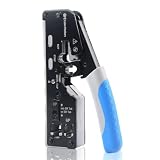
- All-In-One Cable Creator: Create professional-quality Ethernet cables with this Cat 8 Ethernet cable crimping tool. Use this shielded Cat6 crimp tool with bulk Ethernet cable and connectors to build custom-length patch cables for your network.
- Cut, Strip & Crimp in One Tool: This shielded RJ45 crimp tool pass through combines a wire cutter, wire stripper, and wire crimper for an all-in-one solution. The Cat6a shielded crimp tool makes it easy to create custom-length ethernet wire quickly and efficiently.
- Broad Ethernet Compatibility: This RJ45 pass through crimp tool works with Cat5, Cat6, Cat6A, Cat7, and Cat8 shielded Ethernet connectors. It is compatible with RJ11, RJ12, and RJ45 connectors and supports both pass-through connectors and standard RJ45 connectors. This RJ45 crimp tool features an adjustable switch to adjust the crimp type and a built-in crimping clip for shielded dovetail clips found on shielded cable.
- Pass-Through Simplicity: The Cat 8 crimping tool is optimized for pass-through connectors, simplifying wire termination and reducing errors. Just insert, pass through, and crimp with this shielded Cat6 crimp tool for reliable results every time.
- Rugged, Durable Design: This RJ45 crimp tool shielded is built with a durable metal frame for long-lasting performance. Ideal for IT professionals, network installers, and DIYers looking for a reliable Ethernet crimping tool for home or commercial networks.
Troubleshoot by symptom
The tester reports an open on one conductor
Start at the plug associated with the reported pin. Confirm that the conductor reaches the front contact and that the jacket was not stripped so far back that the wire moved during crimping. If the contact is not seated or the conductor is too short, cut off the plug and repeat the termination with a new connector.
The tester reports a short
Look for a stray conductor strand, insulation displaced from a contact, a crushed plug or a crimp that forced contacts together. Replace the suspect plug rather than trying to reshape its contacts. Test the complete cable after replacement.
The map shows a crossover
Compare the two ends pin by pin. One end is likely T568A while the other is T568B, or the wires were placed in a different order. If the intended cable is straight-through, rebuild the incorrect end so both ends use the chosen scheme.
What’s actually slowing this PC down?
Pick the symptom - the matching free tool is one click away.
The map passes but the network link is unreliable
First repeat the test while gently handling the plugs to expose an intermittent crimp. Then check whether the tester can identify split pairs rather than only continuity. If the cable still passes basic checks, its performance may require qualification or certification equipment; a wire-map result alone cannot diagnose every high-frequency or category-limit problem.
Best Value

- Multi-Modular RJ45 Crimper - The Ethernet Crimper is ideal for stripping, cutting, crimping CAT5 CAT5e, CAT6,CAT6A,CAT7 cable and RJ11/RJ12 standard and Pass Through RJ45 connectors with dovetail clip
- Crimping Shield Cable Function - This Pass through rj45 crimp tool is suitable for both shielded and unshield modular plugs, especially for pass through modular plugs with metal dovetail clips
- Network Cable Tester - We upgraded cable tester, which is not only more durability, but also the test range can reach up to 300M, the Network Cable Tester for cables with RJ45/RJ11/RJ12 conectors(9V battery not included)
- Compact design - compact, non-slip comfort grip reduces hand fatigue - one-handed operation for easy storage, precision crimping dies and blades provide long-lasting tools for faster, more reliable cutting, stripping and crimping
- Kit included - Use's manual, RJ45 pass through crimp tool, 50PCS cat6 connector, 50PCS boots, network cable tester, mini wire stripper
The tester gives an unexpected display
Read the specific tester manual. LED order, remote numbering, automatic scan timing and fault terminology vary between models. Verify that the remote unit is connected to the far end and that no equipment remains attached to the cable.
Final build checklist
- The cable is suitable stranded patch cable for the chosen plugs.
- The plugs and crimp tool are specified to work with that cable construction and size.
- A single convention, T568A or T568B, was selected for both ends.
- Each conductor follows the selected eight-pin sequence.
- The outer jacket is captured by both connector strain-relief areas.
- Both plugs were visually inspected before testing.
- The tester’s straight-through map shows pin 1 through pin 8 mapped to the same number at the far end.
- Any claim about speed, PoE, category or standards compliance is based on an appropriate qualification or certification test, not merely on continuity.
When to make a new cable instead
A modular plug is inexpensive compared with the time spent chasing an intermittent connection. If a conductor was nicked, a plug was crimped crookedly, the jacket will not stay under strain relief, or repeated re-terminations produce inconsistent maps, cut back to undamaged cable and use a fresh plug. Keep the repaired lead shorter if necessary rather than leaving a mechanically weak termination in service.
For a simple home or small-office patch lead, the practical stopping point is a clean visual inspection followed by a complete eight-pin wire-map pass. Treat that result accurately as verification of the wiring, and reserve claims about transmission performance for a test designed to measure it.
Quick Recap
Product prices and availability are accurate as of the date/time indicated and are subject to change. Any price and availability information displayed on Amazon at the time of purchase will apply.

