What’s actually slowing this PC down?
Pick the symptom - the matching free tool is one click away.
To make your Galaxy Tab S11 last longer between charges, lower the screen brightness, shorten the screen timeout, check which apps are using the most battery, and put rarely used apps to sleep. Turn on Power saving mode when extra runtime matters more than full background activity or performance. Samsung does not publish a Tab S11-specific runtime gain for any one of these changes, so the best combination depends on how you use the tablet.
What to expect from the Tab S11 battery
Samsung lists the Wi-Fi Galaxy Tab S11 (SM-X730) with an 8,400 mAh typical, non-removable battery and up to 18 hours of wireless video playback. The 18-hour figure is Samsung’s manufacturer claim based on internal lab testing, not a guarantee for mixed use or an estimate of how long your own tablet will last. Brightness, screen-on time, workload, streaming quality, signal strength, location services, and other settings all affect actual runtime. Samsung Galaxy Tab S11 specifications
As an Amazon Associate I earn from qualifying purchases.
Make these changes first
- Lower brightness: Open Settings and reduce brightness to the lowest level that remains comfortable, especially indoors. Adaptive brightness can adjust output to ambient light. Samsung identifies brighter screens as a source of higher battery use. If the Settings layout differs, search Settings for “Brightness.”
- Shorten screen timeout: In Settings, search for “Screen timeout” and choose a shorter idle interval so the display switches off when you stop using the tablet. Samsung Canada’s general Galaxy guidance gives a range of 15 seconds to 10 minutes and recommends one minute or less to save battery; available choices can vary by device and region. Samsung screen timeout guidance
- Check battery usage: Open Settings and search for “Battery usage.” Look for apps with unexpectedly high use, especially if they are active when you are not using them. Battery menu labels and paths can differ by software version.
- Restrict apps you rarely use: From the battery or background-usage settings, put infrequently used apps to sleep. Use deep sleep for apps that do not need to run in the background. Avoid deep-sleeping messaging apps or anything where delayed notifications would be a problem. Samsung’s guidance is to “Put rarely used apps to sleep in the background to avoid battery drainage.” Samsung battery-drain guidance
Choose a stronger saving mode when needed
Power saving mode
Turn on Power saving mode when preserving the remaining charge is more important than unrestricted background behavior. Samsung says the mode limits background activity and features; app updates or notifications may be delayed, and performance may change. Find “Power saving” in Settings or search Settings if the menu path differs by software version. Samsung battery-drain guidance Samsung Power saving guidance
Light performance mode
Samsung describes Light performance mode as a way to prioritize battery efficiency and cooling over processing speed during everyday use. It is not necessarily available under that name on every software version. If you see it in your device’s performance settings, consider it for routine tasks where maximum processing speed is unnecessary.
#1 Best Overall
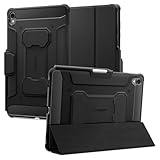
- S Pen Storage and Compatibility: Fully compatible with the S Pen and includes a built-in holder that keeps your stylus secure and easily accessible during travel, work, school, or everyday use, ensuring you always have your S Pen ready for writing, drawing, note-taking, or productivity tasks.
- Car-Inspired Premium Design: Car-inspired design with carbon fiber accents and a matte black finish delivers a sleek, modern look while the textured surface enhances grip, reduces fingerprints, and improves secure handling during daily use at home, office, classroom, or on the go.
- Air Cushion Drop Protection: Air Cushion Technology is built into every corner to absorb shock from accidental drops and impacts, while reinforced edges provide additional protection for the screen and body during everyday use, commuting, travel, or busy environments.
- Versatile Kickstand Cover: The cover transforms into a stable kickstand for hands-free viewing and multiple viewing angles, making it ideal for watching videos, video calls, browsing, drawing, or working in both landscape and productivity modes.
- Precision Fit for Galaxy Tab S11 (2025): Precisely designed for the 11-inch Samsung Galaxy Tab S11 (2025), ensuring a secure fit with full access to buttons, ports, speakers, and features while maintaining compatibility with the S Pen for seamless everyday use.
Match other settings to what is draining the battery
Demanding apps, high-resolution streaming, location services, and weak or overlapping wireless signals can all increase consumption. Use Battery usage to identify patterns before changing connectivity settings: disabling every connection may disrupt navigation, syncing, or other normal tasks without addressing the main drain. If a particular demanding task is what uses the charge, reducing that activity or its intensity is more targeted than switching off features you need. Samsung battery optimization guidance
Independent reader supportYour contribution helps us test, update, and keep practical guides available for everyone.When you are away from an outlet
A USB-C PD power bank is an optional way to recharge during travel or a long day away from an outlet; it adds an external recharge rather than extending the tablet’s runtime on its internal charge. Samsung lists USB Type-C and 45 W Super Fast Charging support for the Tab S11, but that specification alone does not establish compatibility or charging speed for any particular third-party power bank. Check the bank’s USB-C PD output and cable compatibility before buying. Samsung Galaxy Tab S11 charging information
Quick Recap
Rank #4

- Only compatible with SM-X730, SM-X736, SM-X736B, SM-X520, SM-X400, SM-X406, SM-X406B, SM-X526, SM-X526B, SM-X510, SM-X516B, SM-X710, SM-X716B, SM-X718U. Check your device by “Settings”--”About tablet” before purchasing to avoid buying wrong product
- Premium 9H hardness tempered glass prevent your tab S11/S10 lite/ S10 fe/ S9 fe 5g/ s9 from unwanted scratches by keys and other hard items effectively
- Only 0.3mm-thickness, keeps the sensitivity of S-Pen and Multi-Touch subsystem. Follow your speed with precision and responsiveness
- The air-exhausting adhesive makes the tempered glass automatically attach to your tablet screen smoothly and easily
- Package included: 2 pack screen protector compatible with Galaxy Tab S11(11”), Tab S10 Lite ( 10.9”), Tab S10 FE/ S9 FE 5G (10.9"), Tab S9 (11")
Rank #3

- [Perfect Compatibility] Only fit for Samsung Galaxy Tab S11. Fit Models: SM-X730/SM-X736. NOTE: Not for Samsung Galaxy Tab S9. Please Go to Settings > About tablet to check your device model before purchasing
- [360 Degree Rotating] This case supports 360 degree rotation for flexible landscape and portrait viewing. The front cover comes with two anti-slip grooves, allowing you to prop up your tablet at multiple stable angles. Not only is it functional and convenient, but it also helps you find the most comfortable reading or viewing
- [Sturdy Protection] Built with clear PC back, shockproof TPU frame and PU leather front cover, this case protects your tablet well against drops and bumps. Also offer seamless protection with precise cutouts for the speaker, camera, buttons and other ports
- [Built-in S Pen Slot] You can store your S Pen in the case and use it with your tablet anywhere. It is also easy to take out when needed (Note: S Pen Not Included)
- [Auto Wake/Sleep] Wake up the screen or bring it to a sleep mode by opening or closing the front cover
Rank #2

- Compatibility Model: The Case is compatible with Samsung Galaxy Tab S11 11-Inch 2025 Model SM-X730/X736/X736B, Not compatible with any other iPad devices.
- New Upgraded Stand Structure: We have upgraded the traditional 1 magnet stand or 2 magnet stand to 3 brackets to better adapt to the trend of large-sized iPads, making it more stable when multiple scenes are used.
- More Comfortable Material: The use of upgraded fabrics gives the tablet case a longer service life. The internal and external fabrics feel as smooth and comfortable as the skin
- Using the Latest Technology: We make the product flatter, simpler, and more suitable for our iPad while reducing 0.5 lb compared to similar products.
- Trustworthy Supplier: VIKESI's case allows you to use it worry-free, with 30-day free returns and a 2-year comprehensive warranty.
If the battery still drains unusually fast
- Review Battery usage again after changing settings and look for an app or activity that remains unusually active.
- Consider whether recent use involved more screen time, demanding apps, streaming, location services, or a weak signal than usual.
- Do not treat battery replacement as a routine DIY step: Samsung lists the Tab S11 battery as non-removable. If the tablet continues to lose charge unusually quickly, consult Samsung support or an authorized service provider.
Product prices and availability are accurate as of the date/time indicated and are subject to change. Any price and availability information displayed on Amazon at the time of purchase will apply.

