You can choose an available commentary language while watching Formula 1 in the Apple TV app, but a Dolby Atmos-capable Apple TV setup does not guarantee that a particular F1 event is broadcast in Atmos. Atmos playback depends on both the event’s audio and your connected equipment.
How to choose an F1 commentary language on Apple TV
- Check that the event is available in the Apple TV app in your region and that your subscription includes it. F1 availability and features can vary by region and hardware, as Apple explains in its guide to watching Formula 1 in the Apple TV app.
- Start the event and show the playback controls.
- Open Audio Options, choose Audio Track, then select one of the broadcast languages offered for that event. The available tracks can vary.
These controls select an available language; Apple’s instructions do not identify a separate F1 Dolby Atmos switch.
As an Amazon Associate I earn from qualifying purchases.
Does Formula 1 on Apple TV have Dolby Atmos?
Apple’s instructions explain how to select F1 audio tracks, and its Atmos support guide says Apple TV 4K can play Atmos when both the content and audio setup support it. Those documents do not establish that F1 events in the Apple TV app are encoded in Atmos. A compatible soundbar or receiver alone cannot confirm the broadcast’s format.
Outdated Drivers Are Slowing You Down
One free scan finds every outdated or missing driver and matches the right update for your exact hardware.Free scan · exact hardware matchWindows Errors? Fix Them Before They Spread
Repair common Windows errors and clear accumulated junk for a smoother, more stable PC - no reinstall needed.Free scan · no reinstallTo verify a specific event, check its audio details in the app or look for an Atmos indication from your playback equipment while it is playing. If no Atmos track is provided, the system cannot make the event’s source audio native Atmos simply because the connected hardware supports the format.
#1 Best Overall

- Simplified 5.1ch Dolby Atmos Setup: Enjoy immersive 4D sound with real Dolby Atmos and 5.1-channel audio. Five built-in speakers, including two side-firing drivers, create wide surround without rear speakers. Precision DSP ensures <0.5 ms latency for smooth, theater-like sound. Setup takes less than 1 minute.
- Voice Clarity Enhancement: VoiceMX technology uses advanced DSP algorithms to isolate and enhance vocal frequencies in real time. Dialogue remains crisp and easy to follow by separating speech from background effects and music, even at low volumes or during intense scenes.
- 300W Output with 6-Driver System: Featuring five precision-tuned full-range drivers and a dedicated wired wooden subwoofer, the system delivers up to 300W of peak power for bold, room-filling sound. With a frequency response of 45 Hz–18 kHz and a maximum SPL of 99 dB, it reproduces everything from subtle nuances to explosive cinematic effects.
- 18 mm High-Excursion Driver: Powered by BassMX technology, the wired wooden subwoofer features a 18 mm high-excursion driver, a 5.3L tuned cabinet, and a high-density magnetic circuit. This design delivers deeper, tighter bass with greater air displacement and enhanced low-frequency performance—bringing more realism to every scene.
- HDMI eARC for True Dolby Atmos: HDMI eARC supports up to 37 Mbps of bandwidth, unlocking the full potential of lossless Dolby Atmos 5.1-channel audio. Compared to standard ARC, eARC delivers richer surround effects and greater detail. CEC integration allows the TV and soundbar to work together with unified control.
What you need for Dolby Atmos on Apple TV 4K
Apple documents these Atmos-capable setup options in its Apple TV 4K Dolby Atmos and surround-sound guide:
- A television that supports Dolby Atmos.
- A compatible soundbar connected to a television that supports Atmos.
- An Atmos-enabled AV receiver and compatible speakers.
- One or two HomePod speakers. HomePod mini does not support Dolby Atmos.
These are equipment routes for Atmos playback generally, not confirmation that an F1 broadcast supplies Atmos audio. Apple TV 4K selects the best quality supported by both the content and the setup.
Rank #2

- HEAR YOUR TV BETTER: Designed with simplicity in mind, the Bose TV Speaker is an all-in-one soundbar that clarifies speech and is a simple fix for better TV sound
- WIDE, NATURAL SOUND: 2 angled full-range drivers deliver a more realistic, spatial audio experience for overall better TV sound from a small soundbar
- ENHANCED DIALOGUE: This sound bar for smart tv is designed to specifically focus on clarifying and elevating vocals and pronunciation
- BLUETOOTH TV SPEAKER: Pair your device to this Bluetooth soundbar to wirelessly stream your favorite music and podcasts. Connect up to 3 devices through the inputs (HDMI, Optical in, and AUX in); the first powered on device will automatically connect
- SIMPLE SETUP: A single connection from this compact soundbar to the TV via an optical audio cable (included) or an HDMI cable (sold separately) has you up and running in minutes
Connect a soundbar or receiver for Atmos
For a soundbar or AV receiver, Apple’s recommended HDMI path is Apple TV 4K to the audio device, then the audio device to the television. Apple notes that most televisions do not pass Atmos through to a soundbar or receiver.
Free tools Windows power users keep installed
One-click scans. No signup required.
- Connect Apple TV 4K to an HDMI input on the soundbar or receiver.
- Connect the soundbar or receiver’s HDMI output to the television.
- Check the device and television settings, then confirm that the audio equipment reports Atmos during playback of content known to provide it.
For HomePod setups, Apple also documents HomePod stereo-pair and eARC details in its HomePod and AirPlay speaker guide.
Rank #3
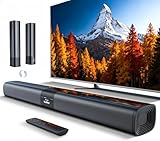
- 𝐂𝐨𝐦𝐩𝐚𝐜𝐭 𝐘𝐞𝐭 𝐏𝐨𝐰𝐞𝐫𝐟𝐮𝐥 - Two 3.9" x 2.1" oval full-range drivers provide a larger diaphragm surface than traditional circular units of the same height. Combined with extended excursion, they deliver balanced, clear, and powerful audio from this compact soundbar.
- 𝟐 𝐢𝐧 𝟏 𝐃𝐞𝐭𝐚𝐜𝐡𝐚𝐛𝐥𝐞 - Attach the included base to transform sound bar into tower speakers, widening the soundstage for a more immersive experience.
- 𝐑𝐨𝐨𝐦-𝐅𝐢𝐥𝐥𝐢𝐧𝐠 𝐀𝐮𝐝𝐢𝐨 - Soundbar reaches up to 98dB, easily filling every corner of your living room with rich, powerful sound.
- 𝐈𝐧𝐬𝐭𝐚𝐧𝐭 𝐒𝐞𝐭𝐮𝐩 𝐟𝐨𝐫 𝐘𝐨𝐮𝐫 𝐓𝐕 - Simply plug the included optical cable into the TV's optical/SPDIF port to instantly enjoy clear and stable audio.(HDMI cable is not included
- 𝐖𝐢𝐫𝐞𝐥𝐞𝐬𝐬 𝐁𝐥𝐮𝐞𝐭𝐨𝐨𝐭𝐡 𝟓.𝟑 𝐒𝐭𝐫𝐞𝐚𝐦𝐢𝐧𝐠 - Stream music wirelessly to soundbar from your phone or tablet. Also compatible with Amazon Echo via Bluetooth.
F1 access and device support vary
Apple says F1 content and app features vary by country or region and hardware. Formula 1 lists Apple TV as an F1 TV Premium partner route in the United States; its partner subscription instructions describe activation and access. F1 TV plan availability and features depend on the subscriber’s country: Formula 1 says to select the plan for the country of residence and the country used at signup on its F1 TV subscription page. Check current local terms before subscribing.
Formula 1’s supported devices page lists Apple TV 4K (1st generation or later) for F1 TV. That is device compatibility information for F1 TV, not an Atmos requirement or evidence about the audio format of a particular event.
Quick Recap
Rank #4

- Wireless Subwoofer, Place It Anywhere: The wireless subwoofer connects to the soundbar without audio cables, giving you the freedom to place it anywhere in your room for flexible setup.
- Mica-Reinforced Drivers for Greater Accuracy: Mica-reinforced diaphragms increase driver rigidity by up to 30%, helping suppress cone breakup and unwanted resonance. The enhanced stability helps reduce distortion by up to 20%, delivering cleaner, more accurate sound with improved clarity and detail.
- VoiceMX Technology for Clear Dialogue: VoiceMX technology uses advanced DSP algorithms to isolate and enhance vocal frequencies in real time. By dynamically boosting the 120 Hz–6 kHz vocal range with adaptive EQ and gain control, dialogue stays clear and easy to follow in any scene.
- BassMX Deep Bass Technology: With an 18 mm high-excursion driver, 6.5 L tuned cabinet, and high-density magnetic circuit, the wireless subwoofer produces strong low-frequency output. BassMX optimizes 45–150 Hz bass for deeper, tighter, and more realistic sound at any volume.
- 240W Peak Output with 2.1 Channel System: Featuring a precision-tuned soundbar and a dedicated wireless subwoofer, the system delivers up to 240W of peak power for room-filling sound. With a frequency response of 45 Hz–18 kHz and a maximum SPL of 95 dB, it reproduces clear dialogue, detailed mids, and impactful bass for movies, music, and gaming.
Product prices and availability are accurate as of the date/time indicated and are subject to change. Any price and availability information displayed on Amazon at the time of purchase will apply.

