OPPO’s ColorOS 16 rollout is model-, region- and carrier-dependent. The reliable way to determine eligibility is to compare your phone’s exact model and variant with OPPO’s published rollout plan, then check the update card in Settings. A model appearing in a planned period does not guarantee that the OTA is available in your country today.
On ColorOS 12 and later, open Settings > About device and tap the top software card to check. If ColorOS 16 is offered, follow the on-screen download and installation prompts. Back up important data, use a working connection, keep the phone plugged in or above 40% charge, and do not power it off while the update runs.
As an Amazon Associate I earn from qualifying purchases.
Which OPPO phones are on the ColorOS 16 plan?
OPPO Global groups eligible products into planned rollout periods. These are schedule labels, not guaranteed delivery dates. OPPO says timing can vary by model, country or region and carrier; carrier-exclusive versions follow the carrier’s schedule. The order shown by OPPO does not establish the order in which every device receives the software.
The page is a global plan rather than a live status checker. Match the complete model name, including a 5G designation or special edition, and then verify availability on the device itself. A phone in a past period can still be waiting for its regional OTA, while a phone absent from the list should not be assumed to qualify.
#1 Best Overall
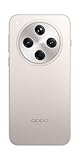
- 6.59 inches, AMOLED, 1B colors, 1256 x 2760 pixels
- 512GB Storage, 16GB RAM
- Android 15, Mediatek Dimensity 9400 (3 nm), Octa-core (1x3.63 GHz Cortex-X925 & 3x3.3 GHz Cortex-X4 & 4x2.4 GHz Cortex-A720)
- Rear: 50 MP, f/1.8, 24mm (wide), 1/1.56", 1.0µm, multi-directional PDAF, OIS, 50 MP, f/2.6, 73mm (periscope telephoto), 1/1.95", 0.61µm, 3x optical zoom, multi-directional PDAF, OIS, 50 MP, f/2.0, 15mm, 120˚ (ultrawide), 1/2.75", 0.64µm, multi-directional PDAF, Front: 32 MP, f/2.4, 21mm (wide), 1/2.74", 0.8µm
- 157.4 x 74.3 x 7.9 mm (6.20 x 2.93 x 0.31 in)
| Planned period on OPPO Global | Models listed by OPPO |
|---|---|
| November 2025 | Find N5; Find N3; Find N3 Flip; Find X8 Pro; Find X8; Reno14 Pro 5G; Reno14 5G; Reno14 5G Diwali Edition; Reno14 F 5G; Reno13 Pro 5G; Reno13 5G; Reno13 F 5G; Pad 3 Pro |
| December 2025 | Find N2 Flip; Reno13 F; K13 Turbo Pro 5G; K13 Turbo 5G |
| Q1 2026 | Find X5 Pro; Reno12 Pro 5G; Reno12 5G; Reno12 F 5G; Reno12 FS 5G; Reno12 F Harry Potter Edition; Reno12 F; Reno12 FS; Reno11 Pro 5G; Reno11 5G; Reno11 F 5G; Reno11 FS; Reno10 Pro+ 5G; F31 Pro+ 5G; F31 Pro 5G; F31 5G; F29 Pro 5G; F27 Pro+ 5G; F25 Pro 5G; K13 5G; K13x 5G; K12x 5G; Pad 3; Pad 2; Pad SE |
OPPO checked this schedule in 2026 and labels the periods as approximate. The list does not establish that every listed unit has already been updated. ColorOS 16 features can also differ according to the hardware in each model.
How to read the list without over-interpreting it
A listing is best treated as a plan for a product family, not as a promise tied to a particular day. “November 2025,” “December 2025” and “Q1 2026” identify the periods OPPO used on its global page; they do not say that every unit in every market received the same build during that period. Rollouts can be introduced in waves, paused, or routed through a carrier’s approval process.
There is also no universal ColorOS 16 installation date for all OPPO phones. Two customers who bought phones with the same retail name can see different results if one handset is an operator model, an imported unit, or a variant sold under a different regional channel. The phone’s own updater remains the deciding test.
What’s actually slowing this PC down?
Pick the symptom - the matching free tool is one click away.
How to verify your exact model, region and carrier
Find the model name on the phone
Open Settings > About phone or Settings > About device. Record the model name exactly as shown. Small differences matter: for example, Reno13 F and Reno13 F 5G are separate entries, as are Reno12 F, Reno12 F 5G, Reno12 FS and the Reno12 F Harry Potter Edition. A carrier-branded or region-specific variant may use a different software channel from an unlocked equivalent.
Do not rely only on the name printed on a case, a retailer listing or a shortened name shown in an advertisement. Include the network designation, “Pro” or “Plus” wording, and any edition name. If the About screen presents a longer identifier, keep it available when contacting support. This prevents a near match from being mistaken for the exact model OPPO scheduled.
Identify the software region
Note the country where the phone is being used and where it was purchased. The global schedule does not override local certification, distribution or carrier controls. If the phone was imported, its original sales region can affect which update server and firmware channel it uses even when you are currently in another country.
For an imported handset, write down both locations: the original sales market and your present country. A phone can continue following its original channel rather than switching simply because its SIM card or physical location changed. Give both details to support if the status is unclear.
Quick wins for a faster PC:
Fix the driver behind crashes, sound loss and screen glitchesFind Drivers →Clear out junk files and repair common Windows errorsFree Scan →Check whether a carrier controls updates
Carrier-exclusive models can follow a carrier schedule. This means two otherwise similar phones may show different update availability. Do not treat a missing notification on one carrier as proof that the model is excluded worldwide.
Rank #2

- 6.59 inches, AMOLED, 1B colors, 1256 x 2760 pixels
- 512GB Storage, 16GB RAM
- Android 15, Mediatek Dimensity 9400 (3 nm), Octa-core (1x3.63 GHz Cortex-X925 & 3x3.3 GHz Cortex-X4 & 4x2.4 GHz Cortex-A720)
- Rear: 50 MP, f/1.8, 24mm (wide), 1/1.56", 1.0µm, multi-directional PDAF, OIS, 50 MP, f/2.6, 73mm (periscope telephoto), 1/1.95", 0.61µm, 3x optical zoom, multi-directional PDAF, OIS, 50 MP, f/2.0, 15mm, 120˚ (ultrawide), 1/2.75", 0.64µm, multi-directional PDAF, Front: 32 MP, f/2.4, 21mm (wide), 1/2.74", 0.8µm
- 157.4 x 74.3 x 7.9 mm (6.20 x 2.93 x 0.31 in)
Look for evidence that the handset was sold or configured by a network operator, such as a carrier name on the packaging or software information. If you are unsure, ask the carrier or OPPO support which channel applies. Carrier testing can delay an OTA after the unlocked version begins receiving it.
Use the on-device result as the deciding check
The rollout table is a guide to planned eligibility. The update screen on your own phone is the practical confirmation that ColorOS 16 has been released for that particular model, region and software channel. A notification is helpful, but its absence is not a final verdict because OPPO stages releases.
Eligibility checklist before you troubleshoot
Use this four-part comparison whenever you are trying to decide whether your OPPO phone should receive ColorOS 16:
The Tool Desk
Outbyte PC Repair FREEClear out junk files and repair common Windows errorsFree Scan →Outbyte Driver Updater FREEScan for outdated or missing drivers - takes under a minuteDriver Scan →- Exact model: Match every suffix, 5G label, Pro or Plus designation and special-edition name.
- Country or region: Compare the market where the handset was sold with the market where you are checking it.
- Carrier status: Determine whether an operator controls the software channel or testing schedule.
- On-device offer: Open the updater and see whether ColorOS 16 is actually presented for installation.
Only the fourth item confirms current availability. The first three explain why a global schedule may not match what you see today.
How to check for ColorOS 16 in Settings
Menu labels vary slightly by model and ColorOS version. OPPO documents the following route for ColorOS 12 and later:
- Open Settings.
- Tap About device. Some phones label this area About phone.
- Tap the top software card, which displays the current ColorOS version or update status.
- Allow the phone to check for an available update. If ColorOS 16 is ready for your device, the screen will show the package and an option to download or install it.
- If your phone uses an older ColorOS release and does not show the software card, look in Settings for Software Update or System Update.
OPPO may also display an update notification. Opening that notification takes you to the same official updater. Read the version and release information shown on the phone before accepting the installation, particularly if several updates are pending.
If the menu names do not match
Do not assume that a missing “About device” label means the phone cannot run the update. Search Settings for “update,” or inspect the About phone section for a software card. Older ColorOS versions can use Software Update or System Update as a separate menu. The wording and location can differ by device.
What a successful check tells you
If the updater offers a ColorOS 16 package, it has identified a package for your current model and software channel. Review the version details and prompts shown there. If it reports that the software is up to date, that means no newer package is being offered to that phone at that moment; it does not necessarily contradict a planned global period.
Rank #3

- 6.82 inches, LTPO AMOLED, 1B colors, 1440 x 3168 pixels
- 512GB Storage, 12GB RAM
- Android 16, Qualcomm SM8850-AC Snapdragon 8 Elite Gen 5 (3 nm), Octa-core (2x4.6 GHz Oryon V3 Phoenix L + 6x3.62 GHz Oryon V3 Phoenix M)
- Rear: 200 MP, f/1.5, 23mm (wide), 1/1.12", PDAF, OIS, 200 MP, f/2.2, 70mm (periscope telephoto), 1/1.28", PDAF (15cm - ∞), OIS, 3x optical zoom, 50 MP, f/3.5, 230mm (periscope telephoto), 1/2.75", PDAF, OIS, 10x optical zoom, 50 MP, f/2.0, 14mm, 123˚ (ultrawide), 1/1.95", PDAF, Front: 50 MP, f/2.4, 21mm (wide), 1/2.75", PDAF
- 163.2 x 77.0 x 8.7 mm or 9.1 mm
How to install the official ColorOS 16 OTA
Prepare before downloading
- Back up important photos, documents, contacts and other files.
- Connect to a reliable Wi-Fi network when practical. Wi-Fi can reduce mobile-data usage, but a working mobile connection may also be used if necessary.
- Plug the phone into power, or make sure the battery is above 40%.
- Keep the phone available for the duration of the process. Do not plan to make calls, travel with the device, or remove its power while installation is underway.
Close work that cannot be interrupted and make sure you know your screen lock or account credentials before starting. The essential precautions from OPPO are a backup, a working connection, sufficient power and no interruption during installation. The updater may restart the phone, so do not treat a dark screen during the expected restart as an immediate failure.
Start the update
- From the update card in Settings, tap the available ColorOS 16 package.
- Review the on-screen release notes and any terms or prompts.
- Tap the download command and wait for the package to finish.
- When prompted, choose Install now, Restart or the equivalent command shown by your model.
- Leave the phone powered and untouched while it verifies the package, restarts and completes installation.
- After the phone returns to the lock screen, open Settings > About device and confirm that the ColorOS version now shows 16.
The exact button text and restart timing can differ by model. Follow the labels presented by the built-in updater rather than attempting to force a different package. If the updater offers only an intermediate version, install only what the official screen presents and then check again after that installation completes.
Is a purchase required?
No accessory or new OPPO phone is required to use the official OTA process. A compatible handset can be updated through its built-in Settings updater. Do not buy a device simply because a retailer claims that a purchase is needed to unlock ColorOS 16; eligibility is determined by the model, software channel and rollout, not by an accessory.
Recommended Free Tools
Why ColorOS 16 may not appear yet
The rollout is staged
OPPO says releases are staged across countries and regions and may take up to two months or more. That is general support guidance, not a promise for a particular model. A phone assigned to November 2025, December 2025 or Q1 2026 may therefore receive the OTA at a different point from another phone with the same marketing name.
Staging also means that repeatedly refreshing the screen does not force an unreleased package onto the device. Check again after a reasonable interval rather than treating the first “up to date” message as a permanent answer.
Your region or carrier has a different schedule
Regional certification and carrier testing can delay an update. Recheck the phone’s exact variant and carrier status, then consult the OPPO support channel for the country in which the phone is sold or used.
The model name is similar but not identical
Compare every suffix and edition in About device with OPPO’s list. Reno13 F is not the same list entry as Reno13 F 5G, and Reno12 FS is distinct from Reno12 F 5G. A near match is not confirmation of eligibility.
Free tools Windows power users keep installed
One-click scans. No signup required.
The updater has not refreshed
Use the software-update screen again after a reasonable interval and keep the phone connected to a working network. An absent notification by itself does not establish that the phone is ineligible.
Rank #4

- 6.78 inches, LTPO AMOLED, 1B colors, 1272 x 2772 pixels
- 512GB Storage, 16GB RAM
- Android 16, up to 5 major Android upgrades, ColorOS 16, Mediatek Dimensity 9500 (3 nm), Octa-core (1x4.21 GHz C1-Ultra & 3x3.5 GHz C1-Premium & 4x2.7 GHz C1-Pro)
- Rear: 50 MP, f/1.5, 23mm (wide), 1/1.28", 1.22µm, multi-directional PDAF, OIS, 200 MP, f/2.1, 70mm (periscope telephoto), 1/1.56", 0.5µm, 3x optical zoom, multi-directional PDAF, OIS, 50 MP, f/2.0, 15mm, 120˚ (ultrawide), 1/2.76", 0.64µm, multi-directional PDAF, Front: 50 MP, f/2.0, 21mm (wide), 1/2.76", 0.64µm, PDAF
- 161.3 x 76.5 x 8.3 mm (6.35 x 3.01 x 0.33 in)
Troubleshooting an update that will not download or install
No update is offered
- Confirm the model under About phone/About device, including its edition and network designation.
- Confirm the country or region and whether the handset is carrier-customized.
- Compare those details with OPPO’s global schedule, treating the period as approximate.
- Check the updater again later; staged availability can lag the published period.
- If the model, region and timing still appear correct but no package is offered, contact local OPPO support.
The download stops or fails
- Return to a stable Wi-Fi or mobile connection and retry from the built-in updater.
- Keep the phone connected to power and avoid switching networks during the download.
- Follow any error message or retry option shown on screen.
The documented guidance supports the official OTA flow. It does not establish a safe, universal manual-install package for every listed model and region, so do not sideload firmware from an unverified source. Changing the phone’s region as a shortcut is likewise not an established universal fix.
Installation is interrupted
Do not repeatedly force-restart the phone or power it off while the installer is working. If the device cannot complete the update or repeatedly returns an error, record the exact message and contact an OPPO service center or local support channel for model-specific recovery instructions.
You are using an imported phone
Tell support the model, current country, original sales region and carrier. Those details help determine whether the handset is following a different software channel from locally sold units.
The phone appears to be working but the version did not change
Wait for the restart sequence to finish, unlock the phone, and check Settings > About device again. If the version still has not changed or the updater reports an error, do not repeat an unofficial installation attempt. Capture the message and give it to OPPO support or a service center.
Independent reader supportYour contribution helps us test, update, and keep practical guides available for everyone.What to do after ColorOS 16 installs
Let the phone finish its first restart before judging performance or opening many apps. Confirm the version in Settings > About device, reconnect accounts or accessories if the system requests it, and verify that important files and core functions are present. ColorOS 16 capabilities can vary by hardware, so a feature shown in general product material may not be available on every model in the rollout list.
Check essential functions such as calling, mobile data, Wi-Fi and Bluetooth when convenient. If a feature is missing, first confirm that the phone completed the update and that the feature is supported on that hardware; the ColorOS 16 name alone does not guarantee identical capabilities across the entire list.
When to contact OPPO support
Use local OPPO support or an authorized service center when the official updater fails, the phone repeatedly reports an installation error, the model variant is unclear, or the device remains without an update after checking the relevant regional and carrier schedule. Provide the exact model name, current ColorOS version, country, carrier and any error text. OPPO’s support guidance is the appropriate next step when an OTA is not offered or cannot complete.
Crashes, No Sound, or Screen Glitches?
Random freezes, missing sound and display glitches usually trace back to one bad driver. Find and replace yours safely.Free scan · under a minuteWindows Errors? Fix Them Before They Spread
Repair common Windows errors and clear accumulated junk for a smoother, more stable PC - no reinstall needed.Free scan · no reinstallSupport can also clarify an imported phone’s channel and whether a carrier controls release timing. Keep screenshots or the wording of the updater message available, because “no update available” and “installation failed” require different checks.
Best Value

- 6.82 inches, LTPO AMOLED, 1B colors, 1440 x 3168 pixels
- 1TB Storage, 16GB RAM
- Android 16, Qualcomm SM8850-AC Snapdragon 8 Elite Gen 5 (3 nm), Octa-core (2x4.6 GHz Oryon V3 Phoenix L + 6x3.62 GHz Oryon V3 Phoenix M)
- Rear: 200 MP, f/1.5, 23mm (wide), 1/1.12", PDAF, OIS, 200 MP, f/2.2, 70mm (periscope telephoto), 1/1.28", PDAF (15cm - ∞), OIS, 3x optical zoom, 50 MP, f/3.5, 230mm (periscope telephoto), 1/2.75", PDAF, OIS, 10x optical zoom, 50 MP, f/2.0, 14mm, 123˚ (ultrawide), 1/1.95", PDAF, Front: 50 MP, f/2.4, 21mm (wide), 1/2.75", PDAF
- 163.2 x 77.0 x 8.7 mm or 9.1 mm
Frequently asked questions
Frequently Asked Questions
Is my OPPO phone eligible for ColorOS 16?
Compare the exact model and variant in Settings > About phone/About device with OPPO Global’s planned list. The listed periods are approximate, and country, carrier and software channel can change availability. Confirm the result by checking the phone’s own updater.
How do I check for ColorOS 16 on my OPPO phone?
On ColorOS 12 and later, open Settings > About device and tap the top software card. Older phones may show Software Update or System Update separately. Follow the labels on your device because menu names vary.
Why hasn’t my OPPO phone received the update yet?
OPPO stages releases by country and region, and its support guidance says a rollout may take up to two months or more. Carrier testing, an imported handset, or a different model suffix can also explain the delay. A missing notification alone does not prove ineligibility.
Does a November 2025, December 2025 or Q1 2026 listing guarantee the update date?
No. Those are planned periods on OPPO Global’s schedule, not guaranteed dates for every unit. OPPO says timing varies by model, region and carrier, and the order shown is not a guaranteed release sequence.
Can I install ColorOS 16 manually if the OTA is missing?
Use the built-in official updater. The available guidance does not establish a safe universal manual package for every model and region, so avoid sideloading unverified firmware or changing the region as a shortcut.
What should I do if the download or installation fails?
Retry from a stable connection with the phone on power, follow the on-screen error instructions, and do not power off or repeatedly force-restart the device during installation. If it still fails, contact local OPPO support or an authorized service center with the model, region, carrier and error text.
Do I need to buy an accessory or a new phone to get ColorOS 16?
No. The official OTA process does not require an accessory purchase. Eligibility depends on the handset’s model, region, carrier channel and staged rollout.
Do these 3 things before closing this tab:
1Clear out junk files and repair common Windows errors2Scan for outdated or missing drivers - takes under a minute3Repair Windows errors before they cause bigger problemsWill every ColorOS 16 feature work on every listed OPPO model?
Not necessarily. OPPO notes that some features depend on hardware, so capabilities can differ among phones and tablets on the rollout plan.
The Bottom Line
Match the complete model and variant, country, and carrier status against OPPO’s approximate ColorOS 16 plan, then use Settings > About device and the top software card to check the OTA. If it appears, back up your data, use a reliable connection, keep the battery above 40% or connect power, and leave the phone untouched until installation finishes. If the update is missing or fails, wait for the staged rollout and contact local OPPO support rather than sideloading unverified firmware.
Quick Recap
Product prices and availability are accurate as of the date/time indicated and are subject to change. Any price and availability information displayed on Amazon at the time of purchase will apply.

