Do these 3 things before closing this tab:
1Scan for outdated or missing drivers - takes under a minute2Clear out junk files and repair common Windows errors3Fix the driver behind crashes, sound loss and screen glitchesTo make a Lenovo Idea Tab Plus last longer between charges, start by lowering screen brightness and shortening screen timeout, then check Battery usage for apps that are consuming unusually much power. Use Battery Saver when background updates can wait, and reduce demanding activities such as streaming, gaming, navigation, or hotspot use when you need more runtime. The exact settings and labels can vary by software version and region.
What to expect from the Idea Tab Plus battery
Lenovo lists a typical 10,200 mAh rechargeable Li-ion battery for the Idea Tab Plus. Its stated maximums are about 13 hours of YouTube streaming and 13.5 hours of Chrome browsing. These are approximate results from Lenovo’s internal testing under optimal lab and network conditions—not guaranteed everyday runtimes. Lenovo says actual battery life varies with configuration, usage, software, operating conditions, wireless functions, power settings, screen brightness, and battery aging. See Lenovo’s Idea Tab Plus PSREF (last modified September 5, 2025).
As an Amazon Associate I earn from qualifying purchases.
The tablet has a 12.1-inch 2.5K IPS display, a 90 Hz refresh rate, and listed brightness of up to 600 nits typical or 800 nits in HBM. A large, bright screen can make display settings worth checking, but Lenovo’s published specifications do not establish how much any setting will extend runtime. The PSREF lists Android 15 or later; the installed version and menus may differ by regional firmware.
Free tools Windows power users keep installed
One-click scans. No signup required.
Reduce screen power use first
Lower brightness and use automatic brightness
Reduce brightness to a level that remains comfortable to read. If available, turn on adaptive or automatic brightness so the screen can respond to ambient light rather than staying brighter than needed. Google includes both steps in its general Android battery-life guidance. No verified test establishes a specific percentage or number of extra hours for the Idea Tab Plus.
#1 Best Overall
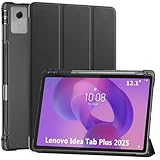
- Smart case for Lenovo Idea Tab Plus 12.1 Inch / Lenovo Tab K12 2025 ONLY (Model Number: TB361FU/TB361ZU). NOT compatible with any other devices. Please check the model number before purchase
- Ultra slim and lightweight hard back adds minimal bulk while protecting your precious device
- Premium PU leather exterior and soft microfiber interior offer great protection against daily use
- Support auto sleep / wake feature (only when the function of your tablet turned on); Magnet secures the case closure, easy snap on and off
- Full access to all features (Cameras, Speaker, Ports and Buttons)
Shorten screen timeout
Set the screen to turn off sooner when the tablet is idle. Look in Settings for Display and then Screen timeout; wording and location can vary. A shorter timeout helps avoid leaving the display on after you put the tablet down.
Try Dark theme if you prefer it
Google lists dark theme as an option that may help, but the Idea Tab Plus uses an IPS panel rather than OLED. Dark backgrounds therefore should not be expected to deliver the dramatic display-related savings associated with turning off pixels on OLED screens. Treat Dark theme as an optional comfort or preference setting, not the main battery fix.
Rank #2

- Compatibility: Designed Tempered Glass Screen Protector for Lenovo Idea Tab Plus 12.1 inch / Lenovo Tab K12 (2025)
- Perfect Touch response: Glass Thin Material gives you the experience of feeling the original screen
- Strong Protection: 9H strong-hardness prevents scratches from keys and other outside objects. 99% HD Clarity and Maintains the Original Touch Experience
- Easy Installation: Our screen protector comes with dust remover, screen wipe and lint-free dry cloth. Ensure no air bubbles and easy installation
- Orzero Customer Service: Protected by Orzero Service. If there is any quality problem, please feel free to contact us
Find apps using more battery than expected
Open Settings and look for Battery usage or a similarly named screen. Review which apps are using power, especially if the drain began after installing or updating an app. Menu labels can differ between Android versions and regional builds.
- If one app’s use seems out of proportion to how much you used it, update it or restrict its background activity where Android offers that option.
- Use Adaptive Battery if it is available in your Settings; Google recommends it as a way to manage battery use.
- Before restricting an app, consider whether you rely on its background alerts, syncing, or location access. Limiting those activities can delay notifications or stop some features from working as expected.
Use Battery Saver when background updates can wait
On Android, a likely route is Settings → Battery → Battery Saver. If you do not see that path, search Settings for “Battery Saver”; the exact menu can vary. Turn it on when the charge is low or when you need the tablet to last through a trip or a long stretch away from power.
Rank #3
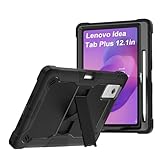
- 【Model Compatibility】Specifically designed for Lenovo idea Tab Plus 12.1 inch full access to all buttons, ports and features. Will not fit the other model.
- 【Full Protection】This tablet case features three layers of protection. The outer shell is made of hard TPU, the inner shell is made of hard PC and the front frame is shock-resistant hard PC. In addition, it features four built-in heat absorbing foam inserts and the four corners are specially treated to increase shock resistance. Therefore, this product offers maximum protection for your tablet
- 【360 Rotatable Kickstand】Our upgraded kickstand offers you more angles of use, allowing you to type, watch movies, work, and much more easily
- 【Stand function】 free your hands when you reading and watching.you can adjust different viewing angles as you like.
- 【Reminder】if you have any doubts please feel free to contact us by mail,we will provide satisfied solutions to you.
Battery Saver can limit background activity and may delay some features, network connections, or apps. It is most useful when longer runtime matters more than immediate background updates.
Cut sustained activity and unnecessary connections
When you need to conserve charge for hours, reduce activities that keep the display, processor, location services, or network busy. Google’s battery guidance recommends reducing unnecessary wireless and location activity; what is practical depends on how you use the tablet.
Rank #4

- Slim & Lightweight Everyday Protection: Designed to keep your Lenovo Idea Tab Plus protected without adding bulk. The slim, lightweight profile slips easily into bags and is comfortable to carry all day. Product Dimensions - 11.01" x 8.09" x 0.43"
- Magnetic Snap On Fit for Easy Use: Features a clean magnetic attachment that snaps on securely in seconds, making it simple to protect your tablet at home, work, or on the go.
- Convertible Stand for Viewing & Sketching2/20/2026 Folds effortlessly into stand mode for comfortable viewing, typing, or smooth sketching—perfect for entertainment, productivity, and creative use.
- Built In Pen Holder for Added Convenience: Integrated pen holder keeps your Lenovo Tab Pen stored securely and always within reach, so you’re ready whenever inspiration strikes.
- Premium Materials & Modern Design: Crafted from durable PU leather and polycarbonate for reliable protection against everyday wear, finished in a clean Luna Grey for a refined look.
- Take breaks from prolonged video streaming and graphics-heavy games.
- Turn off hotspot or tethering when no other device needs the connection.
- Stop GPS navigation or location access when you no longer need it. Location-dependent apps may not work correctly while it is off.
- Switch off Bluetooth when you are not using a connected accessory.
- On a cellular model, use Wi-Fi instead of mobile data when appropriate. Changing connections can affect coverage and connectivity.
Keep the tablet cool and avoid full-discharge routines
Avoid leaving the tablet in a hot car or direct sun. Google says a hot battery drains faster even while the device is idle, and excessive heat can damage it. You do not need to regularly drain the battery to zero to “teach” it its capacity; see Google’s Android battery-care guidance.
Recommended Free Tools
Troubleshoot sudden or persistent drain
- Restart the tablet. This is a simple first check if battery use changes suddenly.
- Check for updates. Install available Android system and app updates, then see whether the drain continues.
- Review Battery usage again. Look for an app or activity that is consuming an unusual share and adjust it if appropriate.
- Contact Lenovo support if the problem persists. A factory reset is not a routine first step: Google notes that it removes device data and advises backing up first.
Where is Charge Optimization on the Idea Tab Plus?
A universal Lenovo Idea Tab Plus menu path for Charge Optimization or a charge limit is not established. The tablet’s software can vary by region, so search Settings for “Charge Optimization” or check Lenovo’s device-specific support information for your model and firmware. Do not assume the control exists on every build based on a third-party video description.
Best Value
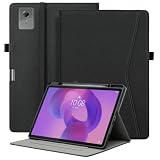
- Compatible Models: Suitable for Lenovo Idea Tab Plus 12.1 Inch, not suitable for other tablet models. Please check the model of your tablet
- Portable Storage and Multi-Angle: Designed with a front pocket to easily store bank cards, ID, and other items. Multi-angle anti-slip strip design for easy adjustment of viewing angle
- Comprehensive Protection: The outer layer is made of synthetic leather, which is dirt-resistant and aesthetically pleasing, while the inner shell uses TPU soft material to provide full protection, perfectly preventing damage from tablet drops
- Automatic Sleep/Wake Function and Built-in Pen Slot: Can automatically wake or turn off the tablet. The built-in slot for a stylus allows it to be used anytime
- Multi-Functional Design: The built-in elastic hand strap allows you to hold the tablet with one hand for easy viewing and use. There is also an external elastic band to prevent accidental opening of the cover when the tablet is closed
Lenovo lists a 45 W USB-C adapter specification, but that concerns charging, not runtime between charges. A charger or power bank can replenish the battery; the available specifications do not show that either extends runtime per charge.
Does Dark Mode save battery on the Idea Tab Plus?
It may help in some circumstances, but the Idea Tab Plus’s IPS display means you should not expect the large savings often associated with dark themes on OLED displays. Try it if you like the appearance, while prioritizing brightness, screen timeout, app use, and Battery Saver for practical battery management.
Google’s recommendations are general Android guidance, not verified Idea Tab Plus menu instructions. Google notes that some steps apply only to Android 13 and later and advises users to consult the device manufacturer for device-specific directions.
Quick Recap
Product prices and availability are accurate as of the date/time indicated and are subject to change. Any price and availability information displayed on Amazon at the time of purchase will apply.

