To improve battery life on a Vivo phone, first check Settings > Battery (or the equivalent menu) to see which apps and activities are using power. Then address the causes you actually see: use Battery Saver when its restrictions suit you, limit background activity for power-hungry apps selectively, and adjust high-drain activities or connectivity to match your conditions. Menu names and available features vary by model, software version, carrier, and region.
Find what is using battery before changing settings
Open Settings > Battery and review battery or power consumption since the last full charge. The screen can help identify apps and system functions associated with use, but Vivo says its figures are approximate. Treat the list as a clue about your own phone, not a precise measurement or a diagnosis based on another Vivo model.
As an Amazon Associate I earn from qualifying purchases.
If an app appears high on the list, consider how and when you used it. Navigation, video, games, calls, and video calls can consume power during active use; an app near the top is not necessarily malfunctioning. Vivo’s battery-drain and power-consumption FAQ index addresses questions such as how to view an app’s power consumption and why battery may drain quickly on standby.
What’s actually slowing this PC down?
Pick the symptom - the matching free tool is one click away.
Choose a battery-saving mode with its tradeoffs in mind
Look in the Battery settings for Battery Saver, Super Battery Saver, or the equivalent option available on your phone. Vivo manuals describe these modes as ways to extend use by limiting some combination of background activity, features, network connections, visual effects, or device performance. The exact behavior and availability depend on the model and software.
#1 Best Overall

- Compatible Models: Specifically designed for BLU Vivo X5 (V0490UU), V7 (V0430UU), and G6 (G0210UU). Please confirm your phone model to ensure compatibility before purchase.
- Long-Lasting Power: With a 3000mAh capacity and over 800 charge cycles, this battery minimizes the need for frequent recharging, offering extended standby and usage times at an exceptional value.
- Perfect Fit Design: Unlike many aftermarket batteries, this replacement matches the original dimensions, ensuring a seamless fit into your phone’s motherboard without any installation issues
- Reliable and Safe Performance: Built with premium-grade lithium-ion cells and certified by UL, CE, and RoHS standards, this battery delivers dependable power without compromising your device’s hardware.
- Advanced Protection Technology: Equipped with an upgraded smart IC chip to safeguard against overheating, overcharging, over-discharging, and short circuits, ensuring stable and worry-free use.
These modes can be useful when you need more time before the next charge, but restrictions may affect performance, background syncing, or the arrival of live notifications. If an important app must keep syncing or alerting you promptly, check how the chosen mode behaves on your device before relying on it.
Restrict background activity selectively
If the battery screen points to an app consuming power while you are not using it, consider limiting that app’s background activity through the phone’s battery or app settings. Avoid blanket restrictions: messaging, email, security, and other apps may need background access for timely notifications or syncing.
Rank #2
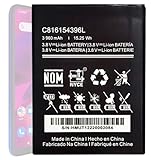
- Compatible with BLU VIVO X6 V0570WW Part #: C816154396L.
- Pattaya Replacement Battery for BLU VIVO X6 V0570WW .Check your device model at first to avoid wrong purchase.
- Uses Grade A+ rated battery cells. Brand new 0 cycle, built to last up to 500 charging cycles. Every battery is manufactured and tested under strict quality control standards.
- Please ensure battery is connected to devuce well. Use your original charger and cable which came with your phone to recharge this replacement battery. The battery would reach to its optimum effect of using after 3 to 5 complete charge and discharge cycles.
- Please contact us at the first time if you are not satisfied this item.We will do our best to solve your problem quickly and efficiently.
Menu paths differ across Vivo phones. A Vivo India community post dated November 1, 2022, gives background power-use paths for older Funtouch OS versions; those are historical examples, not reliable universal directions for current phones. If you cannot find the control, check your model’s manual or contact Vivo support.
PC Slower Than It Used to Be?
A free scan shows the junk files, broken settings and background clutter dragging Windows down - then fixes them in one click.Free scan · Windows 10 & 11Outdated Drivers Are Slowing You Down
One free scan finds every outdated or missing driver and matches the right update for your exact hardware.Free scan · exact hardware matchTarget the activities that are draining your charge
Vivo’s support FAQ identifies several situations associated with faster drain. Their impact depends on actual use, signal and other conditions; the listed activities do not imply a fixed amount of battery loss.
Rank #3

- This battery is compatible with BLU VIVO X5 V0490UU, Universal Extra Battery, please carefully check your phone model before purchase.
- When you replace your old battery, please carefully and gently disconnect your old battery's cable then connect your new battery to the mainboard. If you phone cannot be powered on with the new battery, you may need to install it again and be sure to check if the cable has been properly connected.
- If you have any questions or got any issues with our product, please feel free to contact us, we will reply to you within 24 hrs. We highly appreciate your kind patience.
- All the batteries have been tested before shipping out, and come with repairing tools for installation. No installation instruction.
- Need professional installation technology,We won't responsible for any damage due to improper operation.
- Weak mobile signal: Poor reception can be associated with faster drain. Moving to an area with stronger reception, when practical, may help.
- 5G use: Vivo lists 5G as a potential drain source compared with 4G. If battery runtime matters more than 5G speed or coverage, check whether your model and carrier offer a network-mode choice.
- Personal hotspot: Turn it off when you are done sharing the connection.
- Navigation, video, gaming, calls and video calls: These are active-use situations Vivo identifies as possible contributors. Shortening or pausing them when convenient may reduce consumption.
- Connected watches: A connected wearable is another possible contributor to check if standby drain is a concern.
Vivo’s reviewed support materials do not establish universal percentage savings for these changes, so use your phone’s battery screen to see whether a change helps your own pattern.
Do not switch off wireless connections automatically
Turning off Wi-Fi or Bluetooth can reduce standby consumption in some circumstances, but it is not a universal battery fix. A Vivo manual cautions that when mobile signal is weak, wireless connections can substitute for mobile-network use; disabling them in that situation may increase power consumption. Consider reception and what you are doing before changing connection settings.
Rank #4

- Compatible with BLU Vivo X5 V0490UU Part #: C806045280L.
- Pattaya Replacement Battery for BLU Vivo X5 V0490UU .Check your device model at first to avoid wrong purchase.
- Uses Grade A+ rated battery cells. Brand new 0 cycle, built to last up to 500 charging cycles. Every battery is manufactured and tested under strict quality control standards.
- Please ensure battery is connected to devuce well. Use your original charger and cable which came with your phone to recharge this replacement battery. The battery would reach to its optimum effect of using after 3 to 5 complete charge and discharge cycles.
- Please contact us at the first time if you are not satisfied this item.We will do our best to solve your problem quickly and efficiently.
Check battery health if your Vivo supports it
Daily runtime and long-term battery capacity are different issues. On supported models, Vivo provides battery-health information such as maximum capacity and cycle count under Settings > Battery health and charging or a similarly named menu. These readings can help distinguish a usage-related drain from a battery whose capacity has declined, but not every Vivo phone displays them.
Free tools Windows power users keep installed
One-click scans. No signup required.
Vivo’s battery-maintenance guidance says higher temperatures accelerate battery aging and gives 0°C to 35°C as the battery’s optimal working range. This is maintenance guidance, not a promise of a particular lifespan or daily runtime. See Vivo’s battery-health and maintenance manual for the guidance relevant to its covered device context.
Best Value

- This battery is compatible with BLU Studio Mega S0910Q Vivo Go V0390WW, please carefully check your phone model before purchase.
- When you replace your old battery, please carefully and gently disconnect your old battery's cable then connect your new battery to the mainboard. If you phone cannot be powered on with the new battery, you may need to install it again and be sure to check if the cable has been properly connected.
- If you have any questions or got any issues with our product, please feel free to contact us, we will reply to you within 24 hrs. We highly appreciate your kind patience.
- All the batteries have been tested before shipping out, No installation instruction.
- Need professional installation technology,We won't responsible for any damage due to improper operation.
When fast drain continues
If battery use remains unusually high after you have checked app and activity consumption, or if supported health information indicates reduced capacity, seek model-specific guidance from Vivo. Feature availability and service options can vary by country or region, carrier, model, and software version. Consult the device manual or contact local Vivo support for appropriate next steps.
Quick Recap
Product prices and availability are accurate as of the date/time indicated and are subject to change. Any price and availability information displayed on Amazon at the time of purchase will apply.

