You can start Trackmania on Steam without buying anything. Steam lists the game as free to play. Install it, create or sign in to a Ubisoft Account when prompted, and begin with the free Starter access. Starter includes official campaign tracks, rotating weekly and hourly events, online racing, local multiplayer, leaderboards, and the track editor. A paid Club subscription expands the campaigns, community content, events, and hosting tools, but it is not required for a first session.
What you are getting on Steam
The game that matches this description is Trackmania, the 2020 racing game developed by Nadeo and published by Ubisoft. Its core loop is deliberately simple to understand and difficult to master: drive a short track, learn where you lost time, and repeat until your line, braking and steering are cleaner. The “sandbox” part comes from the editor and the large library of player-made tracks, while the competitive side comes from medals, leaderboards, ghosts and online events.
As an Amazon Associate I earn from qualifying purchases.
Steam’s listing labels Trackmania Free To Play. That label means you can download and race with Starter access; it is not merely a timed demo. The account requirement is separate from payment: Steam states that a Ubisoft Account is required. You may therefore need to create a Ubisoft Account or connect an existing one before the game lets you continue.
Do these 3 things before closing this tab:
1Scan for outdated or missing drivers - takes under a minute2Repair Windows errors before they cause bigger problems3Fix the driver behind crashes, sound loss and screen glitchesStarter and Club are different access levels
Starter is the free tier and contains substantial racing rather than a single introductory track. Club is the paid access tier described by Ubisoft and Steam. Club broadens the selection of campaigns, community creations and activities, and adds hosting and other club features. Since the live store and in-game offers can change, check the current Steam and Ubisoft pages for the present Club term and price instead of relying on an old price quote.
#1 Best Overall

- Immersive Gaming Experience: Perfect for Xbox and PC gaming titles, the Driving Force simulates the feeling of driving a real car with precision steering and pressure-sensitive pedals
- Premium Control: The Driving Force feedback racing wheel provides a detailed simulation of driving a real car, with helical gearing delivering smooth, quiet steering and a hand-stitched leather cover
- Customizable Pedals: These pressure-sensitive nonlinear brake pedals provide a responsive, accurate braking feel on a sturdy base - with adjustable pedal faces for finer control
- 900-Degree Rotation: Lock-to-lock rotation of the Driving Force means you can turn the wheel around two and a half times, hand over hand on wide turns - just like a real F1 race car
- Up Your Game: Take your racing simulation to the next level with Driving Force accessories like the Driving Force Shifter or desk and rig mounts
What to check before installing
These are the hardware and software requirements shown on the Steam listing. They are store-stated requirements, not an independent performance test, so check the live listing again before installing if your computer is close to the limits.
| Requirement | Minimum listed by Steam | Recommended listed by Steam |
|---|---|---|
| Operating system | 64-bit Windows 10 or Windows 11 | 64-bit Windows 10 or Windows 11 |
| Processor | Intel Core i5-2500K or AMD FX 6100 | Intel Core i5-4690K or AMD Ryzen 5 1500X |
| Memory | 4 GB RAM | 8 GB RAM |
| Graphics | NVIDIA GeForce GTX 660 or AMD Radeon R9 270X | NVIDIA GeForce GTX 970 or AMD Radeon RX 480 |
| Graphics API | DirectX 11 | DirectX 11 |
| Available storage | 3 GB | 3 GB |
The 3 GB figure is the storage requirement stated on the listing, not a guarantee that future patches will never need additional temporary space. Leave some extra free capacity for updates. Windows must be 64-bit; a 32-bit installation does not satisfy the listed requirement.
Keyboard, controller and local play
Steam tags Trackmania with Controller and Shared/Split Screen. A gamepad is therefore an optional way to play, particularly if you prefer analogue steering, but the listing does not establish that a controller is necessary or better than a keyboard. Do not treat a racing wheel or pedals as a prerequisite: the official information does not require or specifically recommend them.
How to install and reach your first race
The exact launcher wording can change, so use the current labels shown by Steam and Ubisoft rather than looking for a particular historical button name. The reliable path is:
- Open the Trackmania page in Steam. Confirm that you are looking at the free-to-play Trackmania listing, then choose Steam’s install option.
- Allow the download to finish. Keep at least the listed 3 GB available and more if Steam needs temporary update space.
- Launch the game from Steam. On the first run, the game will require a Ubisoft Account. Sign in to an existing account or create one using the account flow presented to you.
- Complete the Steam-to-Ubisoft account connection. Read the account names carefully before confirming; using the wrong Ubisoft Account can put progress and entitlements on an account you did not intend to use.
- Enter Starter access. You do not need to purchase Club to begin racing. Select the free access option offered after sign-in.
- Start with an official campaign track. Pick one of the easiest tracks available for the current season and drive it once without chasing a perfect time.
- Replay against your own ghost. Trackmania lets you race your personal-best ghost on all tracks. Use it to identify one corner, jump or landing to improve rather than trying to fix the entire lap at once.
This sequence deliberately avoids promising a particular menu layout. Ubisoft and Steam verify the account requirement and available activities, but they do not provide a permanent, screen-by-screen installation script; launcher and menu labels can change with updates.
What free Starter access includes
Ubisoft’s access information and Steam’s game description together list the following Starter features. Availability of rotating activities can vary by schedule, while the core Starter content remains the foundation for a free account.
| Starter feature | What it means for a new player |
|---|---|
| Five environments | Starter racing spans Red Island, Blue Bay, Green Coast, White Shore and Stadium. |
| Selected official campaign tracks | The easiest tracks from each season’s official campaign are available, giving you a structured way to learn the handling. |
| Weekly Shorts | Short, changing player-created tracks provide quick runs and a different challenge from the campaign. |
| Weekly Grand Track | A weekly race format available to Starter players under the current access description. |
| Weekly Grand Enduro | An endurance-style weekly activity accessible to free Starter players through Arcade Channel as described by Ubisoft. |
| Hourly Arcade Channel | Rotating online racing sessions change on an hourly schedule; check the in-game schedule for the live lineup. |
| 2v2 Ranked | Team-based competitive races for players who want a formal online mode. |
| Local hotseat and split-screen | Two or more people can share local play in the modes supported by the game, including turn-taking hotseat and split-screen. |
| PC local server | You can run a local server on PC for supported private or local sessions. |
| Leaderboards, medals and trophies | Every run can be measured against posted times and the game’s achievement-style awards. |
| Track creation | The editor provides more than 3,000 3D blocks and items for building your own courses. |
| PC replay and skin editors | PC players can edit replays and vehicle skins using the included creation tools. |
Nothing in that list requires you to become a competitive player immediately. A sensible first session is one campaign track, a few attempts against your ghost, and one changing activity such as a Weekly Short or Arcade Channel race. If you prefer playing with friends, local hotseat, split-screen or a supported local server gives you a way to learn without entering ranked competition.
Recommended Free Tools
Rank #2
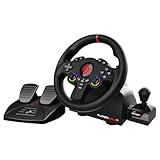
- MULTI-COMPATIBLE GAMING STEERING WHEEL: PS4, Switch 2, Switch, Xbox Series X/S, Xbox One, and PC. For setup, follow the connection instructions specific to each console (user manual included). An official controller must be connected for proper operation. Suitable for most racing games: GTA, Gran Turismo, Forza, Dirt, WRC, Farming Simulator, etc. This steering wheel is not compatible with PS5
- DOUBLE JOYSTICK: all the functions of a controller right on the steering wheel. Perfect for playing GTA: you steer and control your character without letting go of the wheel
- IMMERSIVE DRIVING EXPERIENCE: comes with analog pedals (accelerator and brake), 22 cm wheel diameter, 180° rotation angle, and steering wheel paddles for smooth and fast gear shifting. Programmable RGB LEDs around the 2 sticks and programmable buttons to suit all driving styles: 3 sensitivity modes depending on the type of circuit. Vibration motor available
- FINISH AND STABILITY: Robust ABS structure and ergonomic profile for excellent grip and improved comfort during long gaming sessions. For added stability, the wheel features a suction cup mounting system, ensuring perfect adhesion to most surfaces. Sold separately: clamping screws for mounting on cockpit
- WARRANTY & AFTER-SALES SERVICE: The Superdrive steering wheel comes with a 2-year manufacturer's warranty. Online support is available on the Subsonic website to answer your questions. Updates are also available in our FAQ section
A low-friction first-session plan
1. Learn the driving feel before optimizing
Use an easy official campaign track and complete a clean lap. Concentrate on steering smoothly, releasing the accelerator before a corner and landing jumps in a straight line. Trackmania rewards consistency; a slower lap that stays on the road gives you a better reference than a fast attempt that crashes.
2. Turn repetition into a measurable goal
Run the same track again and compare your car with your personal-best ghost. Choose one change—brake later, take a tighter entry, or correct a landing—and test only that change. Medals and leaderboard positions make improvement visible, but your own ghost is the most immediate opponent and does not require a subscription.
3. Sample a rotating mode
After a few campaign attempts, try a Weekly Short or enter the Arcade Channel when its hourly rotation suits you. These formats expose you to different track designs and help you decide whether you prefer solo time improvement, quick community tracks or live racing.
4. Add competition when the controls feel predictable
2v2 Ranked is available in Starter access. Treat your first matches as practice in reading a track and recovering from mistakes rather than as a test of your final ability. You can also play locally with hotseat or split-screen if you want competition without online matchmaking.
Quick wins for a faster PC:
Fix the driver behind crashes, sound loss and screen glitchesFind Drivers →Repair Windows errors before they cause bigger problemsFix Now →5. Build something only after you know what you enjoy
The editor is available from the free tier and contains more than 3,000 building blocks and items. Start with a short loop, one jump and a clear finish rather than attempting a huge circuit. Driving your own creation immediately reveals whether a jump is reachable and whether checkpoints are placed fairly.
Current progression and the January 2026 update
Ubisoft Nadeo announced an update on January 26, 2026, planned for January 27. The notice described four vistas—White Shore, Green Coast, Red Island and Blue Bay—along with Weekly Grand Track, Grand Enduro and updated medal progression. Because this is a dated announcement and event schedules can change, use it as a guide to the progression system and verify the live in-game calendar before planning around a specific start time.
Environment unlocks described in that update
The January 2026 notice says White and Green campaign tracks remain free and unlocked. It describes the following medal thresholds for additional campaign access:
Rank #3

- Compatible with PlayStation 5, PlayStation 4, and PC .Use the HORI Device Manager app to download firmware, adjust settings and make up to 4 custom profiles
- Full-size racing wheel and pedals optimized for authentic racing simulation
- 270-degree turn radius with adjustable output options
- Mount security with sturdy clamp system
- Use the HORI Device Manager app to download firmware, adjust settings and make up to 4 custom profiles
- Blue tracks: unlock at 10 bronze medals.
- Red tracks: unlock at 10 silver medals.
- Black tracks: unlock at 10 gold medals.
These thresholds are tied to the progression system described in that January 2026 post. If the game displays different requirements later, follow the current in-game information rather than assuming the old thresholds still apply.
Grand Track and Grand Enduro
The same update describes Weekly Grand Track as a 10-lap race against 31 other cars. It says Grand Enduro runs for 60 laps after a qualification phase. The announcement lists event times in CET, but those published times should not be treated as a permanent timetable: check the Arcade Channel and event panels in your own region before joining.
Importantly for a free player, the announcement says Weekly Grand Track is available to all Starter players and Grand Enduro is accessible in free Starter Access from Arcade Channel. You do not need Club solely to try those formats.
Free Starter versus paid Club
The practical difference is breadth, not whether the game is playable. Starter supplies a curated set of official tracks and a broad selection of activities. Club adds the complete catalogue and more ways to organize or host play.
| Area | Starter (free) | Club (paid access) |
|---|---|---|
| Official campaigns | Easiest tracks from each season’s official campaign, with progression and medal goals. | All full seasonal campaigns. |
| Community tracks | Weekly Shorts and other free, rotating community options listed by Ubisoft and Steam. | Expanded community creations, including past Weekly Shorts as described by the access information. |
| Daily and special activities | Hourly Arcade Channel, Weekly Grand Track, Grand Enduro and other Starter activities that are currently scheduled. | Track Of The Day, Cup Of The Day, additional club activities and the broader event set described for Club. |
| Online competition | Includes 2v2 Ranked and the free online activities offered in the current schedule. | Includes the wider Club activity and event access. |
| Creation and hosting | Track editor with more than 3,000 blocks and items, PC replay and skin editors, and a PC local server. | Online room hosting, club-oriented creation and event features, plus the other hosting options listed for Club. |
| Vehicles and presentation | Starter racing content. | Premium car skins and the additional Club content described on Steam. |
| After a subscription ends | Not applicable. | Ubisoft says content paid for during a subscription—including campaign and Track Of The Day tracks—remains available after the subscription ends. |
Steam describes Club as a one-year access option. The exact offer, renewal terms and price are volatile, so check the current store page before paying. The important beginner decision is simpler: play Starter first, then decide whether the full campaigns, older community tracks, special activities or hosting tools justify Club for you.
Choosing campaign, community or competitive play
Choose campaign tracks if you want a clear lesson path
The selected official campaign tracks are the most structured starting point. Their medals give you a concrete target, and the environments vary the surfaces and visual cues you must learn. Repeat a track until you can finish cleanly, then move to the next rather than spending your first hour searching for the hardest available challenge.
Choose community modes if you want variety
Weekly Shorts are brief and change over time, making them useful when you have only a few minutes. Arcade Channel sessions rotate hourly, so they can expose you to unfamiliar community designs without requiring you to browse for a particular creator or map.
Rank #4

- REALISTIC RACING SIMULATION DUO: Feel what is like to drive a real race car with G920 Driving Force Racing Wheel & Pedals and Driving Force Shifter
- PAIRED FOR PRECISION: Take full control of the race with G920 Driving Force Racing Wheel & Pedals and Driving Force Shifter
- PRECISE CONTROL: Helical transmission gears reduce noise and vibration with anti-backlash keeping wheel and pedals tight. The six-speed “H” shifter helps you execute smooth, accurate gear transitions
- FORCE FEEDBACK: The dual motor force-feedback realistically simulates the feel of tires on a turn, understeer, oversteer, drifting and more
- PREMIUM BUILD: Look, feel and durability of a real race car wheel, pedals and shifter. Wheel cover, knob and boot are covered in high-quality, hand-stitched leather with a solid steel gear shaft and polished metal pedals
Choose ranked or event racing if you want pressure
2v2 Ranked, Weekly Grand Track and Grand Enduro are for players who enjoy a live result or a shared event objective. Learn the basic route first; a 10-lap or 60-lap format magnifies mistakes, but it also gives you many opportunities to settle into a rhythm after a poor opening lap.
Choose local multiplayer when the account setup is inconvenient for guests
Hotseat and split-screen let people play on one PC. Guests do not need to learn the online schedule, and you can use the same short campaign tracks to teach braking and cornering before trying a longer community course.
Windows Errors? Fix Them Before They Spread
Repair common Windows errors and clear accumulated junk for a smoother, more stable PC - no reinstall needed.Free scan · no reinstallOutdated Drivers Are Slowing You Down
One free scan finds every outdated or missing driver and matches the right update for your exact hardware.Free scan · exact hardware matchUsing the editor without getting overwhelmed
Trackmania’s editor is part of Starter access, not a locked preview. Ubisoft and Steam describe more than 3,000 3D blocks and items, which is enough to build roads, jumps, scenery and technical sections. The large item count can make a first project feel harder than driving one. Keep the first build small:
- Lay a start and finish. Make a loop that can be driven in under a minute.
- Add one defining feature. Use either a jump, a sharp turn or a surface change, not all three at once.
- Drive it immediately. Test whether the route is readable and whether the landing is physically reachable.
- Place checkpoints around risk. A checkpoint before a difficult section prevents one mistake from forcing a complete restart during testing.
- Refine before decorating. Adjust speed, sight lines and recovery space first; scenery can wait.
PC players also receive replay and skin editors. Those tools are optional layers for people who enjoy presenting a run or customizing a vehicle; they are not needed to compete on campaign tracks.
Common first-day problems and what to check
The game asks for an account even though Steam says free to play
Free to play describes the price of Starter access, not the absence of account services. Steam explicitly marks a Ubisoft Account as required. Complete the account creation or sign-in and linking flow shown at launch. If you have more than one Ubisoft Account, stop and verify which one you want connected before confirming, because progression and entitlements may attach to that account.
You expected every campaign track to be available
Starter is not the same catalogue as Club. The free tier provides the easiest tracks from each seasonal campaign, while Club adds full seasonal campaigns. Medal thresholds can also gate environments under the progression system described in the January 2026 update. That is an access distinction, not evidence that the installation failed.
An event is missing or starts at a different time
Weekly Shorts, Arcade Channel sessions and the Grand events are schedule-based. The January 2026 announcement published times in CET, but those times can be revised and your local display may differ. Check the current in-game event panel rather than relying on a saved timetable or an old article.
Best Value

- TRUEFORCE: Next-gen TRUEFORCE technology connects to game engines for high-definition feedback; experience the ultimate driving experience with processing at 4000 times per second
- Programmable dual clutch: Get off the starting line cleaner and faster; a programmable dual clutch simulates real race car launch assist right from the controller, when playing supported games
- Control your game: Fine-tune your speed with a built-in LED RPM indicator; integrated PlayStation 5, PS4, PC game controls, a 24-point selector and progressive brake spring keep steering under control
- Premium Racing Design: Refreshed Logitech G gear design includes premium materials like a hand-stitched black leather wheel cover and polished metal pedals; experience the pleasure of driving at home
- On-wheel game controls: Take charge of wheel sensitivity, force feedback levels and simulated steering; Logitech G Hub Gaming software enable button customisation right from the controller
Your PC is close to the minimum specification
Compare your computer with Steam’s complete minimum table, including 64-bit Windows, 4 GB RAM, the listed graphics card class, DirectX 11 and 3 GB storage. These are the store’s stated requirements, not a promise of a particular frame rate. If your machine is below any one of them, resolve that mismatch before troubleshooting account or controller behavior.
You are unsure whether to buy a controller
You do not have to buy one to begin. Steam’s Controller tag confirms controller support, while the same listing’s split-screen tag supports local gamepad play. The official information does not establish a controller as mandatory or a racing wheel and pedals as necessary. Start with the input device you already own and change only if it limits your comfort.
How to decide whether Club is worth considering
Give Starter enough time to answer a specific question: do you want more Trackmania, or only a quick free racing game? Club is most relevant when one of these is true:
The Tool Desk
Outbyte Driver Updater FREEFix the driver behind crashes, sound loss and screen glitchesFind Drivers →Outbyte PC Repair FREEClear out junk files and repair common Windows errorsFree Scan →- You want every track in the seasonal campaigns rather than the selected Starter tracks.
- You regularly play community content and want access to past Weekly Shorts and the wider Club catalogue.
- You want Track Of The Day, Cup Of The Day, additional club activities or the expanded event set.
- You plan to host online rooms or organize club activities instead of only joining public sessions.
- You care about the premium car skins included in the Club description.
If none of those matters yet, continue with Starter. The free tier already supports campaign practice, ghosts, medals, leaderboards, online modes, local multiplayer and creation, so paying immediately is not required to find out whether the driving model suits you.
A practical first-week routine
Day one: establish control
Install, finish account linking, run several easy campaign tracks and save your best times. Do not worry about Club or advanced editor work while you are still learning how the car responds to steering and braking.
Days two and three: improve one section at a time
Replay the same tracks against your personal ghosts. Mark the corner or landing where the ghost pulls away, then repeat that section until the gap shrinks. Medals provide a useful external target, but the repeatable process matters more than a single lucky lap.
Days four and five: rotate activities
Try a Weekly Short and an Arcade Channel session. Note which format you actually enjoy: short technical puzzles, changing multiplayer races, or the predictable structure of campaign tracks.
What’s actually slowing this PC down?
Pick the symptom - the matching free tool is one click away.
Days six and seven: add people or creation
Use 2v2 Ranked if you want team competition, invite friends to hotseat or split-screen, or build a small test track with the editor. At the end of the week you should know whether you need Club’s broader catalogue and hosting features, rather than guessing from the store label.
Bottom line for a Steam beginner
Trackmania is a genuine free-to-play racing game on Steam: Starter access lets you install, race and create without buying Club. The only essential extra step is a Ubisoft Account and the associated account-linking flow. Begin with the easiest official campaign tracks, use your personal ghost to learn the route, then sample Weekly Shorts, Arcade Channel or a current event. Treat Club as an expansion for full campaigns, wider community access and hosting—not as an admission fee for the basic game.
Quick Recap
Product prices and availability are accurate as of the date/time indicated and are subject to change. Any price and availability information displayed on Amazon at the time of purchase will apply.

