Free tools Windows power users keep installed
One-click scans. No signup required.
Sharper handheld telephoto photos come from solving the right kind of blur. First determine whether camera shake, subject movement, missed focus, or deliberately shallow depth of field is making the frame look soft. Then support the lens with your left hand, use a shutter speed appropriate to the focal length and subject, and treat stabilization as help for camera movement—not a substitute for a fast shutter when the subject is moving. For a very heavy setup, a properly fitted monopod can reduce fatigue without giving up mobility; use a tripod when the scene allows a fixed position.
Identify what is actually soft before changing settings
“Blur” and “out of focus” are not interchangeable diagnoses. Nikon contributor Reed Hoffmann notes that photographers often use the word blur when they mean out of focus, which makes troubleshooting harder. Inspect the frame at a high magnification and ask where, if anywhere, detail remains sharp. His guidance is summarized in Nikon’s explanation of the basics.
As an Amazon Associate I earn from qualifying purchases.
Camera movement
If the entire frame—including a static background—has a directional smear or no crisp detail at all, the camera or lens probably moved during the exposure. Long focal lengths magnify small angular, shift, and roll movements. A slow shutter speed, wind, an unstable stance, or pressing the shutter too abruptly can all contribute.
Subject movement
If a fence, rock, or other stationary object is sharp but a person, bird, or vehicle is smeared, the subject moved while the shutter was open. Stabilization cannot freeze that movement. The fix is usually a faster shutter speed, more available light, or a change in timing—not a different stabilization mode.
#1 Best Overall

- LIGHTWEIGHT ALUMINUM DESIGN RETRACTABLE MONOPOD: Collapses down to a very compact 16.75” and weighs just .59 LBS. Fits neatly into a carry-on or a tote bag and is lightweight enough to stow away in a backpack on a hike with no regrets. Includes carry pouch.
- UNIVERSAL CAMERA POLE STAND THREAD MOUNT: ¼ inch universal thread to attach any DSLR or mirrorless digital camera, video camera, ball head, or scope up to 5 lbs. Includes a 3/8 inch screw adapter.
- COMFORTABLE GRIP: All ours camera tripods & monopods features a soft foam grip and safety wrist strap. It’s the ideal stabilizing solution for capturing sharp images and smooth video.
- SAFE AND SECURE CAMERA STICK : Built-in non-skid rubber foot with retractable leg spike, making it perfect walking stick camera monopod for indoor and outdoor terrain.
Missed focus
A uniformly soft subject with no directional streak can be an autofocus or focusing error. Check whether the sharpest plane is in front of or behind the intended subject. Recheck your focus point, refocus on a high-contrast detail at the subject’s distance, and avoid judging focus from a tiny phone preview.
Intentional background blur
A telephoto lens can make a subject look crisp while the background is very soft. That is normal optical rendering, not a failed exposure. Judge the subject’s important detail separately from the background, and decide whether the amount of blur matches your intent.
Hold the lens, not just the camera body
With a heavy telephoto, the lens is the part that needs the most support. Nikon’s camera-holding guidance recommends the right hand on the camera grip and the left hand cradling the camera body or lens. Apply that principle to a long zoom by placing the left palm under the lens’s balance point, then adjusting the hand position as you change focal length. Keep the grip firm enough to control the equipment but loose enough to avoid transmitting tremors.
Do these 3 things before closing this tab:
1Repair Windows errors before they cause bigger problems2Scan for outdated or missing drivers - takes under a minute3Clear out junk files and repair common Windows errorsRank #2
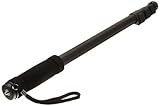
- VERSATILE CAMERA SUPPORT: Monopod for camera supports video cameras, still cameras, and scopes up to 6.6 lbs with 1/4-inch universal thread mount
- EXTENDED REACH: Four leg sections extend up to 67 inches, providing flexible height adjustment for various shooting angles and positions
- STABLE FOOTING: Non-skid rubber foot and retractable spikes ensure secure placement on different surfaces, preventing unwanted movement during use
- PORTABLE DESIGN: Made of lightweight aluminium weighing less than 1 lb with built-in cushion grip and adjustable wrist strap for comfortable carrying
- COMPLETE PACKAGE: Includes carrying bag for convenient storage and transport; product dimensions 1.7 x 1.6 x 21.4 inches when collapsed
Build a stable stance
- Face the subject squarely. Stand with one foot slightly ahead of the other rather than keeping both feet parallel. The staggered stance gives your upper body a wider, more stable base.
- Keep your elbows close. Let the elbows rest lightly against your torso. Avoid flaring them outward, which increases the lever arm of every small movement.
- Bring the setup to your face. Do not crane your neck or hold the camera at arm’s length. A relaxed head and shoulders reduce fatigue during a long wait.
- Use controlled breathing. Breathe normally, settle the frame after an exhale, and press the shutter smoothly. Do not strain or hold your breath for so long that your body begins to shake.
- Brace when the environment permits. Lean your back or shoulder against a tree or pole, or rest an elbow on a wall or table. These are additional contact points, not replacements for a secure hold.
Nikon presents these as technique suggestions rather than a guaranteed keeper rate; your result will still depend on focal length, shutter speed, wind, fatigue, and how much of the frame the subject occupies. When possible, keep the strap from swinging and remove anything that can bump the lens barrel while you track the subject.
Set a shutter speed for both focal length and subject motion
A useful starting point for a stationary subject is a shutter speed around twice the focal length. Nikon’s super-telephoto landscape guidance gives 1/800 second with a 400mm lens as an example of that approach. This is a technique recommendation, not a universal rule: stabilization, sensor format, wind, technique, subject distance, and final output size all change the result. Read the original guidance at Nikon’s super-telephoto landscape article.
| Focal length | Twice-the-focal-length starting point | When to go faster |
|---|---|---|
| 200mm | About 1/400 s | Walking subjects, wind, or noticeable hand tremor |
| 300mm | About 1/600 s | Running subjects, panning, or a very high-resolution sensor |
| 400mm | About 1/800 s | Birds, vehicles, or any subject changing direction quickly |
| 500mm | About 1/1000 s | Erratic movement, gusts, or an unstable stance |
| 600mm | About 1/1200 s | Fast action or a crop that will reveal small motion streaks |
The values outside the 400mm example are straightforward applications of the same starting-point formula, not measured guarantees. If you use a crop-sensor body, the angle of view is narrower, so test your own combination rather than treating the nominal focal length as a promise of sharpness.
Rank #3

- PORTABLE CAMERA MONOPOD: Elevate your photography and videography with the added flexibility of a camera monopod. This aluminum monopod extends to a maximum height of 61 inches (155cm) and weighs just 0.83 lbs, supports up to 11.02 lbs(5kg). This handy compact monopod is designed for photographers looking to capture images on the go without carrying or setting up a full tripod.
- COMPACT HIKING STICK TRAVEL PARTNER: The camera monopod pole with a folded height of 16.9 inches (43cm) and weighing approximately 0.83 pounds (378g), This camera tripods & monopods is compact and lightweight, perfect for travel, hikking, wildlife photography companion. Easily fits into a 20-inch carry-on, ensuring you're always equipped for capturing the moment.
- ADJUSTABLE HEIGHT OPTIONS: This monopod camera stand's height is adjustable to meet your different photography requirements, 5-section design and 4 adjustable levels: 16.9 inches (43cm), 29.9 inches (76cm), 41.3 inches (105cm), 51.6 inches (131cm) and 61 inches (155cm).
- STURDY AND SUPPORTIVE: The camera tripods & monopods features reinforced aluminum alloy legs provide reliable stability, accommodating cameras up to 11.02 pounds (5kg). It's designed for secure shooting, ensuring your equipment remains steady when shooting and walking. Ideal for hobbyist photographers on-the-go with compact cameras, CSCs, DSLRs.
- ADAPTIVE MODES FOR DIVERSE SCENARIOS: Seamlessly switch between modes to adapt to different shooting environments, such as Monopod Mode for Classic single-leg support, Selfie Stick Mode for Capture creative angles effortlessly and Walking Stick, Hiking Stick and Trekking Pole Mode for outdoor adventures.
Let subject movement set the higher limit
For a moving subject, the shutter speed needed to stop the subject can be much faster than the speed needed to counter your hands. Nikon summarizes the distinction plainly: choose a faster shutter speed for subject movement; use a tripod or monopod for camera movement. Sony likewise explains that a fast shutter freezes motion but reduces exposure time, so you need enough light or a higher ISO. Its explanation is at Sony’s shutter-speed guide.
Raise shutter speed in small steps while watching the exposure. If the image becomes too dark, open the aperture if your lens and desired depth of field allow it, raise ISO, add light, or wait for brighter conditions. A sharp, slightly noisy frame is usually more useful than a clean but motion-blurred frame. For a stationary landscape, you can instead lower shutter speed and rely on support, provided the subject itself will not move.
Use stabilization for camera shake, with realistic expectations
Optical or sensor-based stabilization detects some camera movement and shifts optical elements, the sensor, or both to compensate. Canon describes angular, shift, and roll shake and explains that stabilization may be implemented in the lens, in the camera body, or through coordinated control on compatible systems. The technical overview is at Canon’s image-stabilization explanation.
Rank #4

- 【Robust & Portable】 Made of aluminum alloy, the metal camera monopod with feet is robust and supports DSLR cameras up to 17.6lb/8kg. Weighing only 0.88lb/401g and folding down to a compact 17.3"/44cm, the monopod stand is incredibly portable, even with a wrist strap and rubber handgrip for easy carrying on the go
- 【Effortless Height Adjustment】 Extend the camera mono pod from 67.5cm, 94cm, 123cm to 155cm, and quick lock with a simple flip. Whether shooting at a low angle or for an expansive panorama view, you can flexibly adjust to get the best shot
- 【1/4" & 3/8" Screw Adapter】 The compact handheld monopod pole is equipped with a dual headed 1/4" to 3/8" screw adapter for mounting various DSLR cameras, mirrorless cameras, camcorders, gimbals, video rigs, etc., compatible with Sony Canon Nikon, compatible with Insta360 compatible with DJI action cams, for mount adapters compatible with GoPro, for phone holders compatible with iPhone Android cell phones, other photography and videography equipment, gears, or accessories
- 【Interchangeable Spike Feet】 Nonslip rubber feet grip stably on indoor smooth surfaces like floors or rocks, while the convertible steel spike feet are designed for soft outdoor surfaces such as grass, sand, or dirt. The interchangeable design of this camera stand is flexible and versatile for different shooting scenarios
- 【Versatile Application】 The camera pole compatible with gopro and other cameras can double as a selfie stick, hiking handle stick or trekking pole, or even a handy golf monopod, versatile content creator essential for exploring the outdoors, taking selfies with friends, vlogging, or capturing stunning landscapes
Nikon describes vibration reduction (VR) as a way to minimize blur caused by camera shake. Its VR page advertises performance of up to four stops slower than a non-VR lens for supported combinations, based on CIPA standards, while noting that the result varies by lens. That is a manufacturer rating, not a guaranteed handheld shutter speed for every photographer or setup. See Nikon’s VR information.
What stabilization can and cannot do
- It can help: Hand tremor, small body movements, and the shake that becomes obvious at long focal lengths.
- It cannot help: A bird flapping, a runner changing direction, a vehicle moving through the frame, or focus placed on the wrong detail.
- It may not be enough: In strong wind, on a vibrating platform, or when the shutter is so slow that subject movement dominates.
Handheld, monopod, and tripod modes
Use the stabilization mode intended for handheld work when you are carrying the setup. Some lenses add a panning mode; use it only as specified by that lens’s manual. A Nikon manual for certain 500mm and 600mm lenses describes VR NORMAL for handheld or monopod use and provides a separate TRIPOD setting. Those switch positions are specific to that lens family, so do not copy them blindly to another model. Consult the exact manual at Nikon’s 500mm/600mm lens manual.
On a rigid tripod, stabilization can sometimes introduce movement or interact with the tripod’s own vibrations. Nikon’s landscape article recommends turning VR off in the described tripod setup, while the lens manual remains the authority for exceptions. Follow your camera and lens instructions rather than applying a universal on-or-off rule.
Best Value
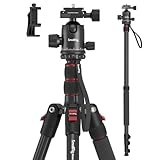
- Wide Compatibility: This camera tripod is universally compatible with cameras and devices with 1/4"-20 and 3/8"-16 threaded holes, such as DSLR cameras, action cameras and mirrorless cameras, etc. It can also be used with cell phones and projectors. 【Note】For cameras with telephoto zoom lens, you need to purchase additional tripod mount ring or telephoto lens mount for better balance.
- 2 in 1 Tripod Monopod: You can easily turn the aluminum tripod into a monopod according to your needs, this tripod is a good companion for your hiking or traveling.
- Angle Adjustable:The specially designed 36mm metal ball-head can rotate 360 degree allowing you to take photos at any angle with horizontally and vertically. And the central pole can be inverted to allow for low angle shooting and macro photography.
- Height Adjustable: 4-section column legs with 3 quick release flip-locks allows you to adjust the working height from 16" to 71" in seconds. 16.9" folden size is easily took to anywhere for outdoor photography.
- Load Bearing and Innovative Design: The dslr tripod offers high level of stability using great quality level of magnesium aluminum alloy. The net weight of the tripod is 1530g, it can withstand up to 33 lbs/15 kg(vertical)or 11 lbs/5 kg(tilt). Different from other tripods, this tripod has Three 1/4" threaded holes added to the bracket, which can meet the needs of external magic arms, mobile phones, monitors, etc.
Choose the right support for the situation
Support is a decision about mobility, duration, and whether the subject allows a fixed position. A monopod reduces the physical load of a heavy lens while letting you reposition quickly. A tripod gives the most stable platform when you can stay in one place, but it takes longer to deploy and limits movement.
| Option | Best use | Advantages | Limitations and checks |
|---|---|---|---|
| Handheld | Short sessions, changing viewpoints, active subjects | Fastest to move; no support equipment | Most demanding on technique and endurance; shutter speed must cover camera shake and subject motion |
| Monopod | Long waits, events, wildlife, or any heavy lens that must remain mobile | Supports lens weight, reduces fatigue, and changes position quickly | Does not make the setup motionless; verify payload, locking security, and lens-foot attachment |
| Tripod | Landscapes, observatories, hides, and other fixed positions | Most stable; permits long exposures and relaxed framing | Heavier setup and slower movement; confirm stabilization behavior and plate compatibility |
Mount a heavy lens by its foot
If the lens has a tripod collar and foot, attach the tripod plate to that foot and mount the lens directly. Nikon recommends this arrangement so the camera mount does not carry the full leverage of a large lens. Confirm that the plate fits both the foot and the head’s clamp, and check that every lock is fully engaged before letting go of the camera.
Reduce contact movement on a tripod
Pressing the shutter can move a long lens even when the tripod is solid. Nikon suggests a remote release or a two-second delay in the described landscape setup. Sony also lists a tripod, remote commander, or two-second timer as ways to avoid movement from touching the camera. Read Sony’s telephoto guidance at Sony’s telephoto-lens support article. A self-timer is a practical alternative when your camera has no compatible remote.
Quick wins for a faster PC:
Scan for outdated or missing drivers - takes under a minuteDriver Scan →Clear out junk files and repair common Windows errorsFree Scan →Fix the driver behind crashes, sound loss and screen glitchesFind Drivers →A repeatable handheld shooting workflow
- Stabilize your body first. Stagger your feet, bring elbows toward your torso, and cradle the lens under its balance point.
- Classify the subject. Decide whether it is static, slowly moving, or fast and erratic. This determines how far above the camera-shake starting point you need to set the shutter.
- Set a conservative shutter speed. Begin around twice the focal length for a static subject; increase it for movement, wind, or visible hand tremor.
- Enable the appropriate stabilization mode. Use the handheld setting described by your camera and lens manual. Do not assume a tripod setting from another lens applies to yours.
- Set exposure without sacrificing the shutter. Adjust aperture and ISO to maintain the chosen shutter speed. Check the histogram or highlights rather than relying only on the rear-screen brightness.
- Acquire focus on the intended detail. Place the focus area on the subject, confirm that the plane of sharpness is where you need it, and refocus if the subject changes distance.
- Settle before releasing. Track the subject smoothly, pause your breathing briefly after a natural exhale, and squeeze rather than jab the shutter.
- Review at useful magnification. Inspect the subject’s eyes, text, feather detail, or another fine feature—not just the overall thumbnail. If the whole frame is smeared, raise shutter speed or add support; if only the subject is smeared, address subject motion.
- Repeat with one change at a time. Change shutter speed, support, or focus technique separately so you know which adjustment helped.
Troubleshoot common soft-image patterns
| What you see | Likely cause | Most useful next change |
|---|---|---|
| Everything has a small directional smear | Camera movement | Raise shutter speed, improve the stance, brace the lens, or use a monopod/tripod |
| Background is sharp but the moving subject is streaked | Subject movement | Use a faster shutter and adjust ISO or light to preserve exposure |
| The subject is soft but a nearby object is sharp | Focus landed elsewhere | Reposition the focus area and verify the plane of focus at high magnification |
| Sharpness varies from frame to frame while you stand still | Inconsistent support, breathing, or shutter release | Rebuild the stance, cradle the lens, and use a smoother release |
| Images soften only on a tripod | Stabilization/tripod interaction or vibration | Check the exact lens manual, test stabilization off or the specified tripod mode, and use a timer or remote |
| Frames are sharp in good light but soft at dusk | Shutter speed fell below the setup’s tolerance | Raise ISO, open the aperture where acceptable, or add support |
Practical limits to keep in mind
- There is no universal handheld shutter speed. The same nominal focal length can behave differently with different stabilization systems, sensor formats, lens weights, wind, stance, subject distance, and output sizes.
- Manufacturer stop ratings are conditional. The “up to four stops” VR claim applies to supported combinations under CIPA-based testing; it is not a promise that every frame will be sharp four stops below your normal speed.
- Support does not remove subject motion. A tripod can hold the camera still while a person or animal continues to move.
- Compatibility matters. Match a monopod or tripod to the lens’s weight, the support’s payload rating, the lens foot, and the plate or clamp standard. A support that fits the camera but not the lens foot can leave the setup poorly balanced.
- Test at the way you publish. A frame that looks acceptable as a small web image may reveal motion blur in a large print or a deep crop. Review the detail size you actually need.
The reliable sequence is diagnosis, support, shutter speed, stabilization, and then careful focus review. Start with the least complicated change that addresses the observed fault: a better hold for camera shake, a faster shutter for subject movement, a refocus for missed focus, and a monopod or tripod when the equipment’s weight—not your composition—is the limiting factor.
Quick Recap
Product prices and availability are accurate as of the date/time indicated and are subject to change. Any price and availability information displayed on Amazon at the time of purchase will apply.

