Do these 3 things before closing this tab:
1Repair Windows errors before they cause bigger problems2Fix the driver behind crashes, sound loss and screen glitches3Clear out junk files and repair common Windows errorsStart with Settings > Storage to see what is using space, then tackle the largest categories carefully. Uninstall apps you no longer use, clear an app’s cache only when appropriate, remove downloads and offline media you recognize, and move wanted files to a computer. Before removing photos from your phone, verify that their backup is complete and on the account you intend to keep.
TECNO menus and features vary by model and HiOS version, so labels may differ. If you cannot find a setting, use TECNO’s support resources for your exact model rather than relying on a cleanup path that may not apply to your phone.
As an Amazon Associate I earn from qualifying purchases.
First, find out what is using your TECNO phone’s storage
- Open the phone’s Settings app.
- Tap Storage and review the categories shown. The wording and layout can vary by model and software version.
- Start with the largest categories, such as apps, photos, videos, or downloads, and review their contents before deleting anything.
Storage holds files and app data; memory is used while programs run. A slow phone is not automatically a storage problem, so check the storage breakdown before trying to free space. Do not try to delete an entire System or Other category: the available official guidance does not establish what those categories contain on every TECNO model.
Remove apps and temporary files without wiping app data
Uninstall apps you no longer need
Review your installed apps and uninstall ones you recognize and no longer use. Removing an app can also remove data stored only by that app, so check whether you need anything inside it before uninstalling.
#1 Best Overall

- [With Card Adapter]This memory card allows you to put the mini TFcard into the card adapter, just like any normal SD card.
- [High Capacity]Plenty of space for thousands of snapshots and hours of videos to be recorded,meaning you can stop worrying about running out of storage space.
- [Apply to]Apply to smartphone,tablet,action camera,surveillance,tachograph,drone,computer.
- [Durable]They are temperature resistant, waterproof, shock proof, x-ray proof, and static proof.
Clear cache selectively
For an app that is taking up more space than expected, open its app information and look for Storage and Clear cache. The exact path varies. Cache is temporary data; after it is cleared, an app may take longer to load or rebuild some temporary files on its next use.
Do not treat Clear storage or Clear data as another name for clearing cache. Those options permanently remove app data. Check the app’s own cleanup tools first, and proceed only if you understand what will be lost.
Rank #2

- STORAGE CAPACITY: Offers ample storage space for photos, videos, music, and files on your compatible devices.
- COMPATIBILITY: Designed to work with smartphones, tablets, cameras, drones, and other microSD-enabled devices.
- FAST TRANSFER SPEEDS: Enables quick file transfers and smooth playback of high-resolution videos and images.
- DURABLE BUILD: Constructed to withstand temperature changes, water exposure, and everyday wear and tear.
- COMPACT DESIGN: Slim, lightweight form factor fits easily into any microSD card slot for convenient portable storage.
Free space from photos and videos only after checking backup
If you use Google Photos, first confirm it has finished backing up and that you are signed in to the account where you want those photos kept. Then, in Google Photos, tap your profile image and choose Free up space on this device. Review the amount shown and confirm only if you are ready to remove those local copies.
This action removes device copies, not the backed-up copies in Google Photos. Google notes that items less than 30 days old may remain on the device. After local copies are removed, they may no longer appear in the phone’s built-in Gallery or be available offline; backed-up copies remain viewable in Google Photos when you are signed in and connected.
Rank #3

- Wide Application: The 128 GB micro SD card is perfect for Android smartphones, tablets, digital cameras, game consoles, dash cameras, drones and surveillance system etc; It can use to store or back up high-res photos, videos, music and more
- Fast Transfer Speed: The TF memory card adopts Speed Class UHS-3(U3) and V30, A1 and provides you with 90 MB/s of read speed and 30 MB/s of write speed, and supports full HD video recording compatible with camera/camcorder/dslr models
- Reliability & Security: The Micro SD card uses high-quality chip, features water-resistant, anti-magnetic, shockproof, high or low temperature resistant, and always keeps data safe
- Large Capacity: 128 GB Micro SDXC Card has a large capacity that can store almost 115808 photos of 3MP,320 movies of 400M in 4K Full HD,16000 songs of 8M.Memory card 128 gb can also adds extra capacity to your devices, free up the devices space
- Kindly Note: By default the 128 GB micro SD card is formatted as exFAT. Actual available capacity for data storage is approx. 90% of the labeled capacity due to formatting and other functions. 1GB=1,000,000,000 bytes
Review downloads and offline media one item at a time
Open the Downloads folder and look for files you recognize and no longer need. Also check the downloaded or offline sections of the apps you use for music, movies, and other media. Remove items within the app that downloaded them when that is how its storage is managed. Avoid deleting unfamiliar files just because they are large.
Keep files you want by copying them to a computer
For photos, videos, or other files you want to retain outside the phone, Android recommends transferring files and folders to a computer with a USB cable.
Rank #4
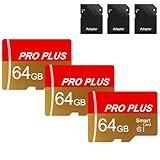
- 【3-Pack Bulk Deal】: Three premium 64GB memory cards included with every order allow you to expand multiple devices simultaneously or create an instant backup
- 【Versatile Compatibility】: This memory card is designed to work flawlessly with a wide range of devices including mobile phones, computers, game consoles, cameras, drones, surveillance equipment, and car recorders, ensuring hassle-free usage without worrying about compatibility issues
- 【Rapid Data Transfer】: The high speed TF card Experience blazing-fast data transfer speeds, ensuring swift and efficient transfer of photos, videos, files, and data. (Note:TF cards transfer speed may vary depending on capacity, test platform hardware, test software, and operating system)
- 【Reliable Stability】: Utilizing high-speed C10, A1 grade chips, our TF cards offer exceptional stability, providing robust protection for your valuable data, and ensuring peace of mind in various scenarios
- 【Bonus Adapter】: Each TF card includes a adapter, expanding compatibility and enhancing convenience for accessing and transferring data across a broader range of devices
- Connect the TECNO phone to the computer with a data-capable USB cable compatible with both devices.
- Use the phone’s available USB or file-transfer prompt, then copy the files or folders you want to keep.
- Open the copied files on the computer to verify the transfer before deleting the originals from the phone.
A compatible external drive may be another option, but connector and USB OTG support depend on the phone. Check your model’s documentation before relying on external storage.
The Tool Desk
Outbyte PC Repair FREERepair Windows errors before they cause bigger problemsFix Now →Outbyte Driver Updater FREEFix the driver behind crashes, sound loss and screen glitchesFind Drivers →Recheck storage and get model-specific help if needed
Return to Settings > Storage after cleanup to see whether the categories changed. If System or Other still appears unexpectedly large, review app usage and consult TECNO’s resources for your exact model. The official guidance does not explain those categories for every TECNO phone, so avoid deleting hidden folders or using a factory reset as routine cleanup.
Quick Recap
Best Value

- [Versatile microSD] This micro SD card frees up more storage space on your device to shoot more and faster, ideal for Android smartphones, tablets, action cameras, drones, Nintendo Switch, GPS, dashcams, security cameras, and laptops. An SD adapter expands compatibility with SD card slots
- [Ultra-fast speed] This Class 10 U3 micro SD card utilizes UHS-I technology to boost up to 90MB/S read speed and 30MB/S write speed, offering fast transfer of photos, videos, documents, and other data
- [4K Video Recording] This 64GB V30 microSD card provides high speed and large capacity to capture continuous full HD videos, 4K UHD videos, and high-resolution photos on your trips, adventures, and sporting events
- [Excellent App Performance] Equipped with an A1 app classification (Random read: 1500 IOPS, Random write: 500 IOPS), this microSDXC memory card provides quick app loading and smooth application experience
- [Reliable & Durable] This TF card is manufactured with global TOP 3 flash and the highest standards, waterproof, shockproof, temperature proof, and X-ray proof to present exceptional durability
Product prices and availability are accurate as of the date/time indicated and are subject to change. Any price and availability information displayed on Amazon at the time of purchase will apply.

