Quick wins for a faster PC:
Repair Windows errors before they cause bigger problemsFix Now →Fix the driver behind crashes, sound loss and screen glitchesFind Drivers →Start with a controlled diagnosis: check the shooter’s own minimum and recommended requirements, confirm it is using the intended GPU, update the graphics driver and Windows, verify the installation, disable unnecessary overlays and recording tools, and follow the game’s shader instructions. Then check ventilation and memory pressure. Change one item at a time and record whether the symptom returns; if it does, send the publisher a precise system profile, reproduction path, and crash report.
Identify what is actually failing
“Stuttering,” “low FPS,” and “crashing” describe different failures. A useful fix depends on separating them before changing settings.
As an Amazon Associate I earn from qualifying purchases.
| Symptom | What to record | Why the distinction matters |
|---|---|---|
| Low average frame rate | Resolution, graphics preset, demanding settings, and whether the rate is consistently low | Requirements, GPU selection, or excessive settings are more likely starting points than a damaged file. |
| Short hitches or uneven frame times | When the hitch occurs: first launch, after an update, entering a new area, during combat, or unpredictably | Shader work, background applications, memory pressure, or heat can produce intermittent pauses even when the average FPS looks acceptable. |
| Game-process crash | Exact error, menu or match location, and whether the desktop remains usable | This points toward the game, driver, files, or an interfering application. |
| Blue screen, forced reboot, or total lockup | Whether Windows restarts, shows a stop error, or loses power | A full-PC failure needs operating-system and hardware troubleshooting as well as contact with the game publisher. |
Write down the exact game and launcher, Windows edition and version, CPU, GPU, VRAM, system RAM, graphics-driver version, monitor setup, resolution, graphics settings, and the point at which the problem began. Note whether it followed a game patch, Windows update, driver installation, settings change, or hardware change. Reproduce the same action after each change so you can tell which change helped.
What’s actually slowing this PC down?
Pick the symptom - the matching free tool is one click away.
Check the shooter’s requirements before changing hardware
Use the system requirements published for the exact shooter. A general rule such as “this is a gaming PC” cannot establish that a particular title will run well. Capcom’s Steam troubleshooting guidance warns that failing to meet minimum requirements can cause poor frame rates or prevent the game from running. If the minimum is met but the recommended specification is not, lowering graphics settings is a sensible first test; some games require a restart before a change takes effect.
#1 Best Overall

- 【High Performance Cooling Fan】 Automatic speed control of the motherboard through the 4PIN PWM fan cable interface, which can determine the speed according to the temperature of the motherboard, with a maximum speed of 1550RPM. Configured with up to 55cm of cable for PWM series control of fans, ideal for cases and CPU coolers.
- 【Quality Bearings】The carefully developed quality S-FDB bearings solve the problem of pc cooling fan blade shaking in lifting mode, keeping fan noise to a minimum while providing maximum cooling performance when needed and extending the life of the fan.
- [Excellent LED light] The high-brightness LED atomizing argb fan blade can effectively reflect the light, making the ARGB lighting effect softer, and it matches the cooler and case more perfectly. Up to 17 modes of light effects with ARGB support, color can be managed and synchronized through the port on motherboard.
- 【Silent Fan Size】 Model: TL-C12C-S X5, Size: 120*120*25mm, Speed: 1550RPM±10%, Noise ≤ 25.6dBA Connector: 4pin pwm, Current: 0.20A, Air Pressure: 1.53mm H2O, Air Flow: 66.17CFM, Higher air flow for improved cooling performance.
- 【Perfect Match】The PC fan can be used not only as a case fan, but is also suitable for use with a cpu cooler to create a cooling effect together, which can take away the dry heat from the case and the high temperature generated by the CPU in operation, allowing for maximum cooling; Ideal for cases, radiators and CPU coolers.
Use settings as a diagnostic, not a promise
- Record your current resolution, preset, and individual settings.
- Lower the resolution or a few GPU-heavy options, then restart if the game requests it.
- Repeat the same scene or match and compare the symptom, not just the FPS counter.
- Restore one setting at a time if the change did not help, so you know which visual compromise was responsible.
| Change | Likely trade-off | Useful result |
|---|---|---|
| Lower resolution or render scale | Sharper detail is reduced | If the frame rate improves substantially, rendering load is a leading suspect. |
| Reduce shadows, lighting, reflections, or volumetric effects | Scene depth and lighting quality decline | Can reveal whether a specific GPU-heavy option causes the slowdown. |
| Reduce texture quality | Surface detail declines; VRAM demand may fall | Useful when the installed GPU has limited VRAM or texture streaming causes hitches. |
| Limit the frame rate | Peak FPS is lower | May make frame times and heat behavior steadier on a system that cannot sustain its uncapped rate. |
Do not promise a particular FPS gain. The result depends on the title, scene, driver, resolution, and hardware. Keep a short note of every setting you alter so you can reverse it or report it accurately.
Update the graphics driver and Windows separately
A graphics-driver update, a Windows update, and a GPU-selection correction are three different checks. Complete each one rather than assuming one update covers all three.
Install the driver that matches the installed GPU
- Identify the exact graphics processor in Windows or the computer maker’s specification page.
- Download the current driver intended for that GPU and your Windows version from the GPU manufacturer, or follow a current driver notice from the game publisher.
- Install it, restart Windows, and test the same reproducible scene.
- If ordinary updating does not resolve graphical problems or startup failures, consider the installer’s clean-install option. Use it as a second-line step, not the default for every stutter.
Driver versions change with GPU model, operating system, and game. A driver number that was current for one computer is not universal advice.
Crashes, No Sound, or Screen Glitches?
Random freezes, missing sound and display glitches usually trace back to one bad driver. Find and replace yours safely.Free scan · under a minutePC Slower Than It Used to Be?
A free scan shows the junk files, broken settings and background clutter dragging Windows down - then fixes them in one click.Free scan · Windows 10 & 11Apply Windows updates and reboot
Install relevant Windows updates, restart, and test again. A pending restart can leave a driver or system component only partially applied, making a before-and-after comparison unreliable.
Make sure a laptop uses the intended GPU
Many laptops have an integrated GPU and a separate high-performance GPU. If the shooter launches on the integrated chip, low FPS can persist even after a driver update.
Rank #2
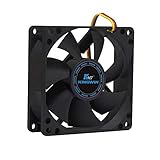
- ✅ Quiet 80mm PC Fan – Designed for silent operation with low noise levels, this 80mm computer case fan is perfect for quiet PC builds, office desktops, and home servers.
- ✅High Airflow Cooling Fan – Optimized blade design delivers excellent ventilation and airflow to reduce system heat buildup for better PC performance and longevity.
- ✅Universal Fit for Computer Cases & CPU Coolers – Compatible with standard 80mm mounts, ideal as a replacement fan for PC cases, CPU coolers, and custom water cooling radiators.
- ✅Ideal for Mining Rig Cooling – Built to handle high-performance environments such as crypto mining rigs and GPU farms, maintaining airflow and minimizing overheating risks.
- ✅Long Life Bearing & Durable Design – Features a reliable long life bearing for extended lifespan and consistent cooling, housed in a rugged black frame for lasting use.
- Open Settings > System > Display > Graphics.
- Add the game executable if it is not listed.
- Select the game, choose Options, select High performance, and save.
- Also check the laptop maker’s or GPU vendor’s graphics-control panel for an application-specific preference.
- Launch the game again and confirm that the intended adapter is active using the game’s telemetry or a trusted system monitor.
Menu names can vary by Windows release and vendor software. The important point is to assign the game itself, not merely the launcher, to the discrete adapter.
Repair damaged or missing game files
A failed update, interrupted download, or damaged file can cause crashes, missing assets, or unusual hitching. Use the launcher’s built-in verification or repair function; it compares the installation and reacquires files that do not match.
Steam
- Open Steam and select Library.
- Right-click the shooter and choose Properties.
- Open Installed Files.
- Select Verify integrity of game files and wait for the process to finish.
- Restart Steam if requested, then launch the game and repeat the same test.
Battle.net and other launchers
For games distributed through Battle.net, use the game’s options menu and choose Scan and Repair. Other launchers may call the same function Verify, Repair, or Check files. Use the label supplied by that launcher rather than deleting folders manually.
Verification can replace files; it does not prove that every crash is caused by the installation. If the files pass and the symptom is unchanged, continue to the next diagnostic instead of repeatedly verifying.
Close overlays, recorders, and unnecessary applications
For a controlled comparison, close programs that capture video, display an in-game overlay, monitor performance, or consume substantial CPU, GPU, memory, or disk bandwidth. Capcom identifies resource-consuming recording programs and performance overlays as possible performance or stability problems, and Activision lists interfering applications in its Warzone troubleshooting guidance.
Rank #3

- High performance cooling fan, 120x120x25 mm, 12V, 4-pin PWM, max. 1700 RPM, max. 25.1 dB(A), >150,000 h MTTF
- Renowned NF-P12 high-end 120x25mm 12V fan, more than 100 awards and recommendations from international computer hardware websites and magazines, hundreds of thousands of satisfied users
- Pressure-optimised blade design with outstanding quietness of operation: high static pressure and strong CFM for air-based CPU coolers, water cooling radiators or low-noise chassis ventilation
- 1700rpm 4-pin PWM version with excellent balance of performance and quietness, supports automatic motherboard speed control (powerful airflow when required, virtually silent at idle)
- Streamlined redux edition: proven Noctua quality at an attractive price point, wide range of optional accessories (anti-vibration mounts, S-ATA adaptors, y-splitters, extension cables, etc.)
- Exit the shooter.
- Disable or close optional overlays from chat, GPU utilities, recording software, and other monitoring tools.
- Close unnecessary browsers and background utilities, especially those actively downloading, synchronizing, or recording.
- Start the game and reproduce the same hitch or crash.
- Re-enable one tool at a time only after the game is stable, testing after each change.
This approach identifies an interfering program without leaving you permanently without useful tools. If a particular application is listed by the game publisher as incompatible, follow that publisher’s current instruction.
Handle antivirus exclusions cautiously
Do not broadly disable antivirus or Windows security. Investigate an exclusion only when the game’s official support guidance or a specific quarantine event indicates that a game file is being blocked. Limit any exception to the named game files, keep protection enabled elsewhere, and remove the exception if it does not change the behavior.
Treat shader compilation and caches as game-specific
Shader compilation can cause temporary stutters, particularly on first launch or after a game or driver update, but not every hitch is a shader problem. The correct procedure differs by title.
Complete any required preloading
Activision’s Warzone guidance says shader preloading is an important part of first boot and should be allowed to finish before leaving the main menu. If a game displays a shader-preparation progress indicator, wait for it to complete, then test a normal match. Interrupting the process can make the next launch repeat the work.
Follow the named game’s cache instructions
Capcom documents a particular game-cache file procedure for some graphical problems. That does not establish that every shooter uses the same path or that deleting arbitrary cache folders is safe. Use only the current instructions for your title, and make a backup or note of the original location when the publisher advises it.
Free tools Windows power users keep installed
One-click scans. No signup required.
Rank #4

- High Performance Cooling Fan: The design of nine fan blades, the maximum speed reaches 1200 RPM, and it is connected to the motherboard through the 3 PIN interface, providing a good cooling effect for the case
- Low Noise: Every fans is equipped with four soft silicone cushions that can absorb vibration at high speeds. The maximum noise is only 32.1 dBA. Keep the case in a relatively quiet environment when working
- Hydraulic Bearing Design: High-quality bearings can make the fan rotate more stably, reduce noise, and prolong its service life. Each fan can work an average of 30,000 hours
- Simple Installation: This computer fan's size is 120 mm and is compatible with all types of cases, making it easy to install. You can do it even if you have no installation experience
- Good Insulation and Heat Resistance: Case fan uses PBT environmental protection material, with good insulation and heat resistance, tough and durable quality
If the hitch happens in every session long after shader preparation has completed, look at drivers, overlays, memory, heat, and settings instead of repeatedly clearing caches.
Check ventilation and heat behavior
A hot system can lose smoothness or become unstable. Capcom states that gameplay may be less smooth when a PC generates too much heat and recommends good ventilation; lowering graphics settings or limiting the frame rate can reduce load.
Inspect the physical setup
- Make sure intake and exhaust vents are not pressed against a wall, carpet, bedding, or another obstruction.
- Check that fans spin when the system is under load and that dust is not blocking the heatsinks or filters.
- On a laptop, test on a hard surface with unobstructed vents.
- Observe whether hitches or crashes appear only after several minutes of play, when the system has warmed up.
Temperature behavior is a clue, not proof of a failed component. Use a reliable monitor to compare idle and in-game behavior, but do not apply a universal “safe temperature” number to every CPU, GPU, case, and laptop design.
When a case fan replacement is justified
Buy a replacement or additional PC case fan only after confirming an airflow problem or a failed fan. Check the case’s supported dimensions, mounting pattern, power connector, clearance, and the direction of airflow before ordering. A fan is not a general cure for low FPS, damaged files, or a game-only crash.
Recommended Free Tools
Check memory pressure and disk swapping
Steam’s hardware-performance guidance identifies low available memory and swapping to disk as possible causes of repeated hitches. During a reproducible stutter, observe Windows’ memory and disk activity and note whether available memory becomes very low while the disk is heavily active.
Best Value

- 【High Performance Cooling Fan】 Automatic speed control of the motherboard through the 4PIN PWM fan cable interface, which can determine the speed according to the temperature of the motherboard, with a maximum speed of 1550RPM. Configured with up to 55cm of cable for PWM series control of fans, ideal for cases and CPU coolers.
- 【Quality Bearings】The carefully developed quality S-FDB bearings solve the problem of pc cooling fan blade shaking in lifting mode, keeping fan noise to a minimum while providing maximum cooling performance when needed and extending the life of the fan.
- [Excellent LED light] The high-brightness LED atomizing argb fan blade can effectively reflect the light, making the ARGB lighting effect softer, and it matches the cooler and case more perfectly. Up to 17 modes of light effects with ARGB support, color can be managed and synchronized through the port on motherboard.
- 【Silent Fan Size】 Model: TL-C12C-S X3, Size: 120*120*25mm, Speed: 1550RPM±10%, Noise ≤ 25.6dBA Connector: 4pin pwm, Current: 0.20A, Air Pressure: 1.53mm H2O, Air Flow: 66.17CFM, Higher air flow for improved cooling performance.
- 【Silent Fan Size】 Model: TL-C12C-S X3, Size: 120*120*25mm, Speed: 1550RPM±10%, Noise ≤ 25.6dBA Connector: 4pin pwm, Current: 0.20A, Air Pressure: 1.53mm H2O, Air Flow: 66.17CFM, Higher air flow for improved cooling performance.
- Close unnecessary applications before launching the game.
- Stop large downloads, synchronization jobs, or other disk-heavy tasks while testing.
- Compare the same scene with background programs closed and open.
- Do not buy a memory upgrade until measurements and the game’s requirements indicate that memory pressure is involved, and confirm compatibility with the motherboard or laptop.
Memory pressure can explain a hitch without explaining a crash. Keep those symptoms separate when reporting the issue.
Use a crash-specific decision path
If the game closes to the desktop
- Verify the game files.
- Update the GPU driver and Windows, then reboot.
- Disable overlays and recording tools.
- Confirm the game is assigned to the intended GPU on a dual-GPU laptop.
- Apply the title’s own shader-preloading or cache guidance.
- Record the exact menu, map, mode, or action that triggers the closure.
If the computer restarts or shows a blue screen
Describe it as a system failure, not merely “the game crashed.” Record any stop code, whether the reboot occurs in other applications, and whether it happens only after the PC heats up. Contact the game publisher with the game details while also following Windows and hardware troubleshooting for the full-PC failure.
If the crash is repeatable in one location
Capture the shortest reliable sequence: launch, menu choices, map or mode, action, and approximate time to failure. A precise reproduction path gives support a way to test the same condition.
Compare fixes without losing track of the result
| Diagnostic option | What it tests | Cost to image quality or convenience | Restart commonly needed? |
|---|---|---|---|
| Lower demanding graphics settings | Whether rendering load is excessive | Lower visual quality | Sometimes; follow the game prompt |
| Frame-rate limit | Whether an uncapped load causes uneven frame times or heat | Lower peak FPS | Usually not, unless the title requests it |
| Disable overlays and recorders | Whether background hooks or capture load interfere | Loss of optional overlay features | Usually not; fully exit affected programs |
| Driver update | Whether outdated or incompatible graphics software is involved | Possible settings reset | Yes, restart after installation |
| File verification | Whether installation files are missing or damaged | Download time and disk activity | Only if the launcher requests it |
| Shader preloading | Whether the title needs to compile shaders before play | Waiting at the menu before the first session | Follow that game’s instructions |
Evaluate each option by whether it reduces the specific symptom, how much visual quality or convenience it costs, whether frame times become steadier, and whether a restart is required. Revert changes that have no measurable effect.
Prepare an actionable support report
If the sequence does not resolve the problem, send the game publisher a complete report rather than a general statement that the game is broken. Include:
- Game name, edition, launcher, and the date the issue began.
- CPU and GPU models, GPU VRAM, system RAM, Windows version, graphics-driver version, and monitor configuration.
- Resolution, graphics preset, individual settings changed, frame-rate limit, and whether the game uses integrated or discrete graphics.
- Where and when the issue occurs, whether it is constant or intermittent, and whether it began after an update or hardware change.
- Exact reproduction steps, including the map, mode, menu path, and action that triggers the hitch or crash.
- Whether the game process closes, Windows shows a blue screen, or the whole PC restarts.
- Relevant security software details only when they relate to a quarantine or documented conflict.
- The game’s crash report or log when the publisher’s support page provides one.
Attach the requested files through the publisher’s official support channel and follow its current privacy and log-upload instructions. Keep the description factual: state what happened, what you changed, and whether the same test still reproduces it.
When to stop changing settings
Once requirements, GPU selection, drivers, Windows, files, background programs, shader preparation, ventilation, and memory pressure have been checked, further random tweaks are unlikely to clarify the cause. Preserve the working configuration, document the failed tests, and escalate with the exact evidence above. That record lets support distinguish a title-specific fault from a driver, operating-system, cooling, or hardware problem without asking you to repeat every basic step.
Do these 3 things before closing this tab:
1Clear out junk files and repair common Windows errors2Scan for outdated or missing drivers - takes under a minute3Repair Windows errors before they cause bigger problemsQuick Recap
Product prices and availability are accurate as of the date/time indicated and are subject to change. Any price and availability information displayed on Amazon at the time of purchase will apply.

