The Tool Desk
Outbyte PC Repair FREERepair Windows errors before they cause bigger problemsFix Now →Outbyte Driver Updater FREEScan for outdated or missing drivers - takes under a minuteDriver Scan →First identify which feature is failing: Windows Hello signs a person in to a PC, Nest familiar face detection labels people in camera alerts, and Apple Face ID unlocks a personal device. They use different settings and enrollment data, so the fix depends on the device. Use the matching steps below.
Windows Hello: fix facial recognition sign-in on a PC
If Windows Hello cannot recognize you, sign in with your PIN or password while you troubleshoot. Microsoft says its face sign-in needs a clear view and must determine that it is seeing a live person, not a photo or other image. See Microsoft’s Windows Hello recognition guidance.
As an Amazon Associate I earn from qualifying purchases.
Check the camera, lighting, and your appearance
- Clean the camera and make sure nothing is covering it. Microsoft’s advice is: “Make sure the camera is clean and unobstructed.” Microsoft Support troubleshooting tips.
- Try more even lighting. Harsh or very bright light from the side can interfere with recognition.
- Remove hats or accessories that cast shadows across your face.
- Consider whether your appearance differs from enrollment—for example, you have started or stopped wearing glasses, changed facial hair, or made another substantial change. Glasses are generally not a problem if you wore them when setting up recognition; if your appearance has changed, Microsoft suggests scanning again.
Windows Hello uses a camera configured for near-infrared imaging. Microsoft’s technical description notes that some glasses, major facial shape or texture changes, and environments with high ambient near-infrared light may call for additional enrollment. Read Microsoft’s Windows Hello face authentication documentation.
Quick wins for a faster PC:
Clear out junk files and repair common Windows errorsFree Scan →Fix the driver behind crashes, sound loss and screen glitchesFind Drivers →Repair Windows errors before they cause bigger problemsFix Now →Improve recognition before replacing the scan
- Open Settings > Accounts > Sign-in options.
- Select Facial Recognition (Windows Hello).
- Choose Improve recognition and follow the prompts for another scan. Microsoft says this adds another face template, which can improve the chance of recognition.
If that does not help, use Remove, then Set up to enroll again. This replaces the old scan with the latest one rather than adding another template, so try Improve recognition first when you want to retain the earlier enrollment.
#1 Best Overall

- 𝐔𝐥𝐭𝐫𝐚 𝐇𝐃 𝟒𝐊 𝐂𝐥𝐚𝐫𝐢𝐭𝐲: Features true 4K UHD resolution to capture every detail around your home. It can even recognize license plates up to 33 ft (10m) away.
- 𝐀𝐈 𝐌𝐨𝐭𝐢𝐨𝐧 𝐃𝐞𝐭𝐞𝐜𝐭𝐢𝐨𝐧 𝐚𝐧𝐝 𝐒𝐦𝐚𝐫𝐭 𝐓𝐫𝐚𝐜𝐤𝐢𝐧𝐠: Built-in AI instantly detects and automatically tracks people, vehicles, or important events within view, minimizing false alarms and keeping your property secure.
- 𝟑𝟔𝟎° 𝐏𝐫𝐨𝐭𝐞𝐜𝐭𝐢𝐨𝐧 𝐰𝐢𝐭𝐡 𝐍𝐨 𝐁𝐥𝐢𝐧𝐝 𝐒𝐩𝐨𝐭𝐬: Enjoy comprehensive coverage with a wide viewing angle, minimizing blind spots and allowing you to monitor your front porch, yard, or even your driveway.
- 𝐌𝐨𝐭𝐢𝐨𝐧-𝐀𝐜𝐭𝐢𝐯𝐚𝐭𝐞𝐝 𝐒𝐢𝐫𝐞𝐧: Protect your home with a powerful, motion-activated strobe light that scares off unwanted visitors and gives you instant notifications about suspicious activity.
- 𝐀𝐥𝐰𝐚𝐲𝐬-𝐎𝐧 𝐒𝐞𝐜𝐮𝐫𝐢𝐭𝐲 𝐰𝐢𝐭𝐡 𝐒𝐨𝐥𝐚𝐫𝐏𝐥𝐮𝐬 𝟐.𝟎 𝐓𝐞𝐜𝐡𝐧𝐨𝐥𝐨𝐠𝐲: Just 2 hours of direct sunlight daily keeps your camera fully charged for continuous, maintenance-free operation in any weather.
Managed PCs and camera faults
On a work or school PC, enhanced anti-spoofing may be enabled by an administrator. Microsoft warns that its stricter recognition standard can cause difficulty in a dark room. Contact your IT team before changing security settings on a managed device. If the camera still cannot recognize you after the checks and rescan, Microsoft says to contact the computer manufacturer; the camera may have a hardware problem.
Nest cameras and doorbells: troubleshoot familiar face detection
Google calls its camera feature familiar face detection. It identifies people in camera events; it is not a Windows or phone sign-in feature. Confirm that your camera is eligible and that your Google Home Premium subscription supports the feature. Google says familiar face detection is unavailable for cameras based in Illinois. Check Google’s familiar face detection requirements and guidance.
Rank #2

- 𝐔𝐥𝐭𝐫𝐚 𝐇𝐃 𝟒𝐊 𝐂𝐥𝐚𝐫𝐢𝐭𝐲: Features true 4K UHD resolution to capture every detail around your home. It can even recognize license plates up to 33 ft (10m) away.
- 𝐀𝐈 𝐌𝐨𝐭𝐢𝐨𝐧 𝐃𝐞𝐭𝐞𝐜𝐭𝐢𝐨𝐧 𝐚𝐧𝐝 𝐒𝐦𝐚𝐫𝐭 𝐓𝐫𝐚𝐜𝐤𝐢𝐧𝐠: Built-in AI instantly detects and automatically tracks people, vehicles, or important events within view, minimizing false alarms and keeping your property secure.
- 𝟑𝟔𝟎° 𝐏𝐫𝐨𝐭𝐞𝐜𝐭𝐢𝐨𝐧 𝐰𝐢𝐭𝐡 𝐍𝐨 𝐁𝐥𝐢𝐧𝐝 𝐒𝐩𝐨𝐭𝐬: Enjoy comprehensive coverage with a wide viewing angle, minimizing blind spots and allowing you to monitor your front porch, yard, or even your driveway.
- 𝐌𝐨𝐭𝐢𝐨𝐧-𝐀𝐜𝐭𝐢𝐯𝐚𝐭𝐞𝐝 𝐒𝐢𝐫𝐞𝐧: Protect your home with a powerful, motion-activated strobe light that scares off unwanted visitors and gives you instant notifications about suspicious activity.
- 𝐀𝐥𝐰𝐚𝐲𝐬-𝐎𝐧 𝐒𝐞𝐜𝐮𝐫𝐢𝐭𝐲 𝐰𝐢𝐭𝐡 𝐒𝐨𝐥𝐚𝐫𝐏𝐥𝐮𝐬 𝟐.𝟎 𝐓𝐞𝐜𝐡𝐧𝐨𝐥𝐨𝐠𝐲: Just 2 hours of direct sunlight daily keeps your camera fully charged for continuous, maintenance-free operation in any weather.
Check the face library and alerts
- Review the shared familiar-faces library in Google Home to see whether the person is present or has been misidentified. Home members can manage the library and notification settings.
- Distinguish a familiar-face alert from a generic person alert. If the camera is unsure who it sees, Google says it may send a person alert instead of identifying the person by name.
Inspect what the camera sees
Check the camera’s view at different times of day. Sun glare or reflections can affect detection; Google also identifies close relatives, a face reflected in a mirror, and someone shown on a TV as possible sources of confusion. Adjust the camera view away from objects that may trigger misleading person or face alerts. These checks may help explain a missed or incorrect identity, but changing the library alone is not a guaranteed fix. See Google’s familiar face detection troubleshooting steps.
Consider privacy before saving faces
Google advises checking local privacy laws before saving face data and getting the person’s permission first where required. Its stated Illinois limitation applies to cameras based there; it should not be treated as a rule for every product or location.
Rank #3

- Magnetic & Screw-free Mounting: Enjoy effortless installation in seconds. The powerful magnetic base snaps onto any metal surface for a rock-solid hold, or can be placed on any flat surface. No drills, no damage, perfect for both indoors and out. NOTE: For smooth operation of your eufyCam C35, please update your eufy App to version 5.2.10_16477001 (iOS) or 5.2.10_17014 (Android) or newer.
- Spotlight-free Color Night Vision: See true colors, even in total darkness. Our advanced sensor technology reveals critical details like faces and license plates without any spotlight, ensuring clear evidence and zero disturbance.
- Smarter Security with HomeBase Mini: The included HomeBase Mini is the brain of your system, unlocking advanced AI features like Facial Recognition and Cross-Camera Tracking for a truly intelligent and connected experience.
- All Features, Zero Monthly Fees: Unlike other brands, your one-time purchase includes everything—no mandatory subscriptions for cloud storage, no extra charges for AI, and no battery replacement costs.
- Flexible Local Storage: Store footage centrally and securely indoors on the HomeBase Mini (expandable up to 1TB) for ultimate peace of mind. The camera itself also supports a separate microSD card slot for direct local recording (up to 256GB, at least 32GB recommended, card not included).
Apple Face ID: use the iPhone or iPad troubleshooting path
If the problem is unlocking an iPhone or iPad Pro, check that the TrueDepth camera is unobstructed and consider setting up an alternate appearance if your look is materially different. Follow Apple’s Face ID troubleshooting guidance. This is a personal-device authentication fix, not a way to correct Nest camera alerts or Windows Hello sign-in.
Quick Recap
Best Value
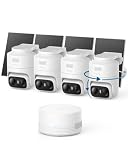
- 𝟑𝟔𝟎° 𝐀𝐈 𝐓𝐫𝐚𝐜𝐤𝐢𝐧𝐠 𝐰𝐢𝐭𝐡 𝐏𝐚𝐧 𝐚𝐧𝐝 𝐓𝐢𝐥𝐭: Deliver 360° property coverage and eliminate blind spots with a single camera. Auto-tracking keeps subjects perfectly centered, providing ultimate home protection. NOTE: For smooth operation of your eufyCam C37, please update your eufy App to version 6.0.10 or newer.
- 𝐙𝐞𝐫𝐨 𝐌𝐨𝐧𝐭𝐡𝐥𝐲 𝐅𝐞𝐞𝐬: Protect your home without cloud subscriptions or hidden costs. Save up to $300 over three years and experience complete security without falling into the subscription trap.
- 𝐔𝐧𝐥𝐨𝐜𝐤 𝐒𝐦𝐚𝐫𝐭𝐞𝐫 𝐅𝐞𝐚𝐭𝐮𝐫𝐞𝐬 𝐰𝐢𝐭𝐡 𝐇𝐨𝐦𝐞𝐁𝐚𝐬𝐞 𝐌𝐢𝐧𝐢: Connect up to 10 cameras in one app to enable human/vehicle/pet/facial recognition, cross-camera tracking, and expandable local storage — a smarter security system, made simple.
- 𝟐𝐊 𝐂𝐨𝐥𝐨𝐫 𝐍𝐢𝐠𝐡𝐭 𝐕𝐢𝐬𝐢𝐨𝐧: Capture crystal-clear details with 2K resolution, delivering 77% more pixels than standard 1080p. The built-in spotlight illuminates faces, license plates, and clothing details in vivid color, even in total darkness.
- 𝐃𝐞𝐭𝐚𝐜𝐡𝐚𝐛𝐥𝐞 𝐒𝐨𝐥𝐚𝐫 𝐏𝐚𝐧𝐞𝐥𝐬 𝐟𝐨𝐫 𝐕𝐞𝐫𝐬𝐚𝐭𝐢𝐥𝐞 𝐈𝐧𝐬𝐭𝐚𝐥𝐥𝐚𝐭𝐢𝐨𝐧: Position each 3W solar panel for optimal sunlight while pointing the cameras exactly where you need them. Never compromise between viewing angle and power. Enjoy continuous charging with zero maintenance, rain or shine.
Rank #4

- 𝐔𝐥𝐭𝐫𝐚 𝐇𝐃 𝟒𝐊 𝐂𝐥𝐚𝐫𝐢𝐭𝐲: Features true 4K UHD resolution to capture every detail around your home. It can even recognize license plates up to 33 ft (10m) away.
- 𝐀𝐈 𝐌𝐨𝐭𝐢𝐨𝐧 𝐃𝐞𝐭𝐞𝐜𝐭𝐢𝐨𝐧 𝐚𝐧𝐝 𝐒𝐦𝐚𝐫𝐭 𝐓𝐫𝐚𝐜𝐤𝐢𝐧𝐠: Built-in AI instantly detects and automatically tracks people, vehicles, or important events within view, minimizing false alarms and keeping your property secure.
- 𝟑𝟔𝟎° 𝐏𝐫𝐨𝐭𝐞𝐜𝐭𝐢𝐨𝐧 𝐰𝐢𝐭𝐡 𝐍𝐨 𝐁𝐥𝐢𝐧𝐝 𝐒𝐩𝐨𝐭𝐬: Enjoy comprehensive coverage with a wide viewing angle, minimizing blind spots and allowing you to monitor your front porch, yard, or even your driveway.
- 𝐌𝐨𝐭𝐢𝐨𝐧-𝐀𝐜𝐭𝐢𝐯𝐚𝐭𝐞𝐝 𝐒𝐢𝐫𝐞𝐧: Protect your home with a powerful, motion-activated strobe light that scares off unwanted visitors and gives you instant notifications about suspicious activity.
- 𝐀𝐥𝐰𝐚𝐲𝐬-𝐎𝐧 𝐒𝐞𝐜𝐮𝐫𝐢𝐭𝐲 𝐰𝐢𝐭𝐡 𝐒𝐨𝐥𝐚𝐫𝐏𝐥𝐮𝐬 𝟐.𝟎 𝐓𝐞𝐜𝐡𝐧𝐨𝐥𝐨𝐠𝐲: Just 2 hours of direct sunlight daily keeps your camera fully charged for continuous, maintenance-free operation in any weather.
Which fix applies?
| Feature | What it does | Where to troubleshoot |
|---|---|---|
| Windows Hello | Signs a person in to a PC | PC camera, lighting, and Windows facial-recognition enrollment |
| Nest familiar face detection | Labels people in eligible home-camera events and alerts | Google Home feature eligibility, familiar-faces library, alerts, and camera view |
| Apple Face ID | Authenticates a person on an iPhone or iPad Pro | TrueDepth camera and Apple Face ID settings |
Product prices and availability are accurate as of the date/time indicated and are subject to change. Any price and availability information displayed on Amazon at the time of purchase will apply.

