An iPad mini that will not charge is usually caused by the power source, cable, adapter, temperature, debris, or a deeply discharged battery—not necessarily a failed battery or charging port. Start with a known-good wall outlet, a cable that matches your iPad mini’s connector, and a compatible power adapter. Then allow enough time for a very low battery to respond before trying a force restart or arranging service.
Connector type depends on the generation. Apple identifies the iPad mini (6th generation) and iPad mini (A17 Pro) as USB-C models; do not buy a USB-C replacement cable until you have identified your device.
As an Amazon Associate I earn from qualifying purchases.
First, confirm what “won’t charge” means
Connect the iPad mini to power and look for a lightning bolt on the battery icon or a large battery image on the Lock screen. Those are the normal signs that charging has started. When the battery is extremely low, the screen can stay blank for up to two minutes before the low-battery image appears.
A very low iPad may need up to 10 minutes on charge before it can be used. Apple’s diagnostic guidance describes a deeper-discharge case that can take 20 to 30 minutes to turn on. These are different checkpoints, not a promise that every iPad will recover after a fixed wait. If there is no change after the initial diagnostic interval with known-good equipment, move on to service rather than leaving the iPad connected indefinitely.
#1 Best Overall

- 【Compatible device】:Our for Apple charger cable compatible with iPhone 14/13/12/11/Pro/Max/Mini/XS/XS Max/XR/X/8 Plus/8/7 Plus/7/6s Plus/6s/6 Plus/6/5s/5c/5,for iPad Air/Air 2,for iPad mini/mini 2/mini 4,for iPad 4th gen,for iPod Touch 5th gen.(Note: If you encounter any incompatibility or unusable issues after receiving the product, please contact us in time to solve the problem you encounter.)
- 【MFi-certified Chip】: 2 Pack 6Ft BSTOEM cable adopts for Apple's officially certified chip to ensure faster and safer charging. No rupture, low loss.
- 【Fast Charging & Data Sync 2 in 1】:2.4 Amp(MAX) fast charging and 480mpbs/s data transmission, while preventing overheating and overcharging. Trickle charge and protect the device battery.
- 【Super durable】:BSTOEM iPhone charging cable is more durable. Reinforced and lengthened cable joints passed 10,000+ bend test. Laser welding technology is adopted at the connection between the connector and the cable to make the connection more firm and will not break easily.
- 【What You Get】:2 × New USB-A to Lightning Cable and Six months friendly customer service. Any questions or product damaged please contact us,we will reply to you within 24 hours to help you resolve any issues you encounter. (Note: This cable is a USB-A to lightning cable, not a USB-C cable. Please confirm whether your device has a lightning interface. If you want to use it in a vehicle, please confirm whether your vehicle's USB port has charging output function.)
If the iPad displays a slow-charger message, it may still be charging. Wired charging at 7.5 watts or less can take longer than expected. Slow charging alone does not prove that the port or battery has failed.
Identify the connector before replacing anything
The phrase “iPad mini” covers several generations, and the charging connector is not the same across them. If the iPad turns on, open Settings > General > About and note the model name. If it will not turn on, compare the physical port with the cable you have and check the original packaging or purchase record. Do not force a plug that does not fit.
| iPad mini model | Connector guidance | What to buy or test |
|---|---|---|
| iPad mini (6th generation) | USB-C | A known-good USB-C cable and compatible USB power adapter |
| iPad mini (A17 Pro) | USB-C | A known-good USB-C cable and compatible USB power adapter |
| Earlier iPad mini generations | Verify the connector for the exact model before purchasing | Use a cable that matches the port; do not assume USB-C |
A replacement cable can eliminate a failed cable as the cause, but it cannot repair a damaged port or worn-out battery. Treat it as a diagnostic substitution, not as a guaranteed repair.
The Tool Desk
Outbyte PC Repair FREERepair Windows errors before they cause bigger problemsFix Now →Outbyte Driver Updater FREEFix the driver behind crashes, sound loss and screen glitchesFind Drivers →Safety checks before plugging in
- Suspected liquid: Do not connect a charging cable if liquid may be inside the port. Apple’s user guide warns: “If you suspect there may be liquid in the charging port of iPad, don’t plug the charging cable into it.”
- Heat or cold: Charging can pause at extreme temperatures. Move the iPad to a moderate environment and let it return to a normal temperature before testing again.
- Battery repair: Do not open the iPad or attempt a casual battery replacement. Apple states: “Only technicians with the knowledge, experience, and tools required to repair electronic devices should replace a battery.”
- Port cleaning: Never use metal picks, liquids, or forceful scraping. Do not blow compressed air into the opening.
Step-by-step: troubleshoot the charging failure
1. Start with a working outlet and a simple setup
- Test the wall outlet with another device, or move to an outlet you know works.
- Connect the iPad mini directly to a compatible USB power adapter and the correct cable for its connector.
- Leave out extension accessories, unpowered hubs, and questionable adapters during the first test. The goal is to remove variables.
- Watch for the lightning bolt on the battery icon or the large low-battery image on the Lock screen.
Apple also permits charging from a USB 2 or later port on a computer, but the computer must be turned on and not asleep. A powered USB hub or dock, or a compatible powered Magic Keyboard, can also supply power. These are useful alternatives after the direct wall-outlet test; a wall adapter and compatible cable are the simplest diagnostic combination.
2. Give a deeply discharged iPad time to respond
After connecting the iPad, do not repeatedly unplug and reconnect it. If the battery is extremely low, the screen may remain blank for up to two minutes. Continue charging for up to 10 minutes before judging whether it can be used. Apple’s newer diagnostic checklist allows 20 to 30 minutes for a deep-discharge case to turn on.
Rank #2
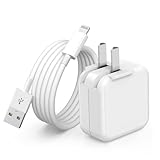
- 🌐【Fast Charging for iPad iPhone】This iPad Air charger charge faster than regular iPad iPhone Fast Charger with new intelligent IC chip tech,up to 12W,copper wires in charger cord strengthening signal and sync data transfer up to 480mbps.If incompatibility exists,possible reasons may include mismatched interfaces,improper operation,device compatibility issues,or damage to the device itself,and power should also be considered.In fact,even if the interfaces are the same,if the charger's power is lower than the device's required power,the charging speed will be very slow and it may even be unable to fully charge. Conversely,if the charger's power is too high,it may damage the device's battery
- 🌐【Universal Compatibility】Guaranteed to provide a complete charge and smooth sync compatibility with all charger devices including iPad 4/ 5/ 6/ 7/ 8/ 9, iPad Mini/ Mini 2/ Mini 3/ Mini 4/ Mini 5, iPad Air/ Air 2/ Air 3, iPad Pro 12.9 inch(2015) / Pro 9.7 inch(2016)/ Pro 10.5 inch(2017), iPhone, iPod and more lightning port devices.(Note:The package includes USB A to Lightning Cable,Not USB C Cable,so our products are not compatible with USB C Devices)
- 🌐【Safe Fast Charging】The iPad Mini Charger High Quality Chips Protect Your Devices. If the phone is unable to charge, the first reason may be that the phone is overheating during charging, triggering a protection mechanism that prevents charging. Therefore, it is recommended not to play with the phone while charging, as it easily generates heat and can also cause slow charging. The second reason is that something has entered the phone port, and the debris inside the port needs to be cleaned
- 🌐【Foldable Plug & Lightning Cable】With 100-240 volt input, this charger is ideal for worldwide travel. It fits into your pocket or bag, no scratching and ensures stable performance and strong adaptability.When the device parts come apart, please use the correct method to reassemble them, such as aligning them parallel to the plug slot
- 🌐【What You Get】1 Pack 12W iPad Charger Block & 1Pack 6.6Ft iPad Lightning Charger Cable. We offer 24 hours friendly customer service, If there are any quality problem, please feel free to contact us. Wish you a happy shopping.Notice:The iPhones have a protection system that slows down charging when they detect that the device is too hot or too cold.If this happens to your phone, it's recommended to disconnect it, let it return to its normal temperature, and then reconnect it
Use the time estimates as observations, not guarantees:
- Blank for up to two minutes: This can be normal at the start of charging when power is critically low.
- No usable screen after several minutes: Continue the initial charging check with the iPad undisturbed.
- No image after the specified initial check: Substitute the cable and adapter, then arrange service if the result does not change.
Do not interpret a longer wait as proof that the battery will eventually recover. A persistent blank screen with known-good equipment needs diagnosis.
Quick wins for a faster PC:
Fix the driver behind crashes, sound loss and screen glitchesFind Drivers →Repair Windows errors before they cause bigger problemsFix Now →3. Substitute both the cable and the power adapter
A cable can look normal while its conductors or connector have failed. The adapter can also be the problem. Test with a different compatible cable and a different compatible power adapter, changing one item at a time when possible so you can identify which part changes the symptom.
For a sixth-generation or A17 Pro iPad mini, use a USB-C cable. For another generation, use the connector confirmed for that model. If the replacement combination works, retire the suspect cable or adapter rather than continuing to use it intermittently.
If the iPad reports that the charger is slow, allow extra time. Apple says wired charging at 7.5 watts or less might take longer than expected; it is a speed limitation, not a universal failure threshold.
Rank #3

- Important Information: This is a USB-C to USB-C cable and as such will only work with USB-C chargers. It does not work with USB-A chargers.
- Supports Power Delivery: Get up to 60W high-speed charging for all of your USB-C devices when paired with a USB-C charger.
- Universal Compatibility: Compatible with virtually all USB-C devices including phones, tablets, and laptops. (This cable does not support media display.)
- Built to Last: A hard-wearing nylon exterior and a bulletproof fiber core combine to create a cable that can withstand up to 5,000 bends.
- What You Get: 2 × New Nylon USB-C to USB-C Cable (6 ft), hook-and-loop cable tie, welcome guide, reliable product support, and responsive assistance.
4. Correct the temperature before testing again
Charging may pause when the iPad is very hot or very cold and resume once the battery returns to its normal operating range. Move it indoors to a moderate environment, remove heat-trapping coverings, and let the device stabilize naturally. Do not cool it with ice, refrigerate it, or apply a heater. Reconnect it only after it is at a normal-feeling temperature.
5. Inspect the port and clean only when it is safe
Lint or other debris can prevent the plug from seating fully. If there is no suspicion of liquid:
- Disconnect every cable.
- Turn the iPad mini off.
- Hold the port facing downward so loosened debris can fall out rather than deeper inside.
- Use a clean, dry, small, soft-bristled, nonmetallic brush very gently around the opening.
- Reconnect the correct cable without forcing it.
Apple’s cleaning guidance specifically rules out compressed air and moisture in openings. Do not use a pin, paper clip, knife, tweezers, toothpick, solvent, or spray. If liquid may have entered the port, skip cleaning and cable testing and seek service guidance instead.
6. Force-restart an iPad mini without a Home button
Modern iPad mini models do not have a Home button. With the iPad connected to power, perform this sequence:
- Quickly press and release the volume button closest to the top button.
- Quickly press and release the volume button farthest from the top button.
- Press and hold the top button until the Apple logo appears and the iPad restarts.
The two volume presses must be quick and in order; then keep holding the top button through the restart. This does not erase data. If you have an older iPad mini with a Home button, Apple provides a different force-restart combination for Home-button iPads. Do not apply the no-Home-button sequence to that design and expect the same result.
Rank #4

- Apple MFi Cerfitied Charger: Our apple charger cable compatible with iPhone 14/13/12/11/Pro/Max/Mini/iPhone XS/iPhone Max/iPhone XR/iPhone X/iPhone 8 Plus/iPhone 8/iPhone 7 Plus/iPhone 7/iPhone 6s Plus/iPhone 6s/iPhone 6 Plus/iPhone 6/iPhone 5s/iPhone 5c/iPhone 5/iPad Pro/iPad Air/Air 2/iPad mini/mini 2/mini 4/iPad 4th gen/iPod Touch 5th gen/ iPod.
- Apple chargers perfect comptibility : The Apple MFi Certified Chip Ensures That The Cable Can output Safe and effective current for the device. The iPhone charging cable is composed of high-quality copper wires, which can accept 2.4A current for fast charging and 480 Mbps/s fast data transmission.
- Reinforced Durable: Exquisite workmanship ensures 5V/2.4A(max) output.Ensures high speed charging and be tested to bend 90-degree more than 5000 times.
- Fast charging Lightning Cable: Full support with iOS versions and all future updates,Gold-plated C48 terminal and tinned copper material ensures charging performance increased by 30%,High coverage aluminum foil makes data transmission is not disturbed by external signals.
- What you get:4-Pack 3.3ft Original [Apple MFi Certified] iPhone charger cables for different occasions.Replace your phone accessories cords or add another for home, work or travel.
7. Repeat one controlled charging test
After the restart, use the known-good wall adapter and compatible cable again. Keep the iPad still and observe whether the charging icon remains present. A stable icon and increasing battery percentage indicate that the basic power path is working. If the connection cuts in and out, do not keep wiggling the plug to find a “sweet spot.” Intermittent contact is a reason to stop testing and arrange service.
Use the symptom to choose the next action
| What you see | What it establishes | Next action |
|---|---|---|
| Low-battery image appears after a blank screen | The iPad is receiving at least some power and was deeply discharged | Leave it connected through the initial 10-minute check; allow up to 20–30 minutes for a deep-discharge case |
| It charges with a different cable or adapter | The original cable or adapter is the likely failed part | Replace the incompatible or defective accessory and stop using the unreliable one |
| It charges only when the plug is held at an angle | The connection is unstable; the cause could be the cable, plug, or port | Stop manipulating the connector and arrange inspection |
| It shows a slow-charger message | Power is available but charging may be slower, especially at 7.5 watts or less | Use a compatible higher-capability adapter and allow additional time |
| No image after a controlled test with known-good equipment | The fault is not explained by the original outlet, cable, or adapter | Arrange Apple or authorized service rather than repeatedly reconnecting |
| Charging pauses while the iPad is very hot or cold | Temperature protection may be suspending charging | Let the iPad return to a moderate temperature, then test again |
This table helps prioritize the next check; it does not identify a failed battery or port from symptoms alone.
Independent reader supportYour contribution helps us test, update, and keep practical guides available for everyone.When to stop troubleshooting and arrange service
Arrange service when a functioning, model-compatible cable produces an intermittent connection, or when the iPad still will not charge and shows no image after the initial charging check. Apple’s diagnostic guidance treats both situations as service cases. Continuing to insert, twist, or scrape the connector can turn an accessory problem into port damage.
Apple offers in-person service through a Genius Bar or Apple Authorized Service Provider, as well as mail-in service. The device normally must be inspected before a repair estimate is given. Cost and availability can vary with location, coverage status, taxes, shipping, parts availability, and the provider. Authorized providers may set their own fees, so there is no single universal iPad mini charging-repair price to quote in advance.
What’s actually slowing this PC down?
Pick the symptom - the matching free tool is one click away.
What service may investigate
A technician can distinguish among an accessory fault, debris or liquid damage, a USB-C or other charging-connector problem, and a battery or power fault. For the iPad mini (A17 Pro), Apple’s repair manual includes charging and power troubleshooting and a USB-C connector repair procedure. Apple’s diagnostic material also describes connector replacement for wired-charging issues and battery replacement for specified battery-charging or no-power problems in newer models.
Best Value

- ·[iPad Charger Fast Charging]Get USB C fast charging for your iPad with iPad charger. Equipped with two powerful 20W PD 3.0 USB-C power delivery wall plugs and two Type C to C cables (6ft), this iPad Pro 12.9 fast charger can charge your iPad device from 0% to more than 55% in just 30 minutes - 3x faster than the original 5W charger.
- ·[iPad USB-C Wide Compatibility]This 20W PD wall charger can fast charge New 2025 iPad Air 13/11 inch(M3),New 2025 iPad 11 inch (A16);2024 iPad Pro 13/11 inch (M4),2024 iPad Air 13/11 inch(M2);iPad Mini(A17 Pro);2022/2021/2020/2018 iPad Pro 12.9 6th/5th/4th/3rd Generation,iPad Pro 11 4th/3rd/2nd/1st Generation;2022 iPad 10th Generation;2022 iPad Air 5th Generation, 2020 iPad Air 4th Generation;2021 iPad Mini 6th Generation, or other type c device (Not compatible with others iPad versions)
- ·[Safety Assurance]The iPad fast charger have intelligent Chip inside, actively adjust the power output depending on the device's needs. as battery gets fuller, charging becomes slower to give battery time to absorb the charge and prevent battery from breaking
- ·[2-PACK 6 FT Long USB C to USB C Cable]Using High Quality ipad charger cord with Copper core wire, this iPad charger can charge and sync data faster. Speed up to 480 mbps/s, ensuring charge and data high effective transmission. The USB C cables with their 6ft lengths, offer versatility and make it easy to stretch from a wall socket to your couch or from your in-car charger to the back seat of your car.
- ·[2 Pack iPad Charger Included]2 Pack 20W USB C Wall Charger & 2 Pack 6Feet iPad Charging USB C Cable. (Attention:This charger set Lightning cable is not inclided,Not for iPhone 14/13)
Those are repair pathways, not a diagnosis you can make from “won’t charge.” The A17 Pro procedures should not be generalized to every iPad mini generation. Battery work requires the knowledge, experience, and tools Apple specifies for trained technicians.
Prepare the iPad before handing it over
- If it still powers on, back up important data and note whether charging is stable or intermittent.
- Record which outlet, cable, and adapter combinations you tested.
- Tell the technician about any liquid exposure, unusual heat, drops, or a connection that works only at an angle.
- Check coverage and the service location’s estimate, turnaround, and mail-in requirements before sending the device.
Common mistakes that make the problem worse
Buying the wrong connector
USB-C is specified for the sixth-generation and A17 Pro iPad mini, but that does not make USB-C universal across the iPad mini line. Identify the model before ordering a replacement. A cable that cannot seat correctly is not a troubleshooting tool.
Plugging in after possible liquid exposure
Moisture and electrical contacts are a dangerous combination. If liquid may be in the port, do not “check whether it still works” by connecting a cable. Follow service guidance instead.
Do these 3 things before closing this tab:
1Repair Windows errors before they cause bigger problems2Scan for outdated or missing drivers - takes under a minute3Clear out junk files and repair common Windows errorsScraping the port with metal
Metal tools can damage contacts and create a new fault. Apple’s limited cleaning advice is a powered-off iPad, disconnected cables, and a clean, dry, soft nonmetallic brush. Compressed air and moisture should not be used.
Assuming the battery is dead
A no-charge symptom can come from an outlet, adapter, cable, temperature condition, debris, connector, battery, or another power component. The safe checks above narrow the possibilities without pretending to identify a component remotely.
Installing software to fix a hardware power path
Apps and “battery optimization” utilities cannot repair a failed cable, adapter, connector, or battery. Use the physical checks, force-restart procedure, Apple diagnostics, and service route instead.
Quick decision checklist
- Identify the exact iPad mini generation and connector.
- Use a working outlet, compatible cable, and compatible wall adapter.
- Leave the iPad connected long enough to cover the blank-screen and deep-discharge intervals.
- Try a different compatible cable and adapter.
- Let the iPad return to a moderate temperature if it is very hot or cold.
- If safe and dry, power it off and gently brush visible debris with a clean, dry, nonmetallic soft brush.
- Force-restart a no-Home-button model using the two volume presses followed by holding the top button.
- Stop if the connection is intermittent, liquid may be present, or there is still no response after the controlled test; arrange inspection.
The practical boundary is simple: perform the reversible power, cable, temperature, cleaning, and restart checks once in a controlled order. If known-good equipment still produces no charging image—or the connector works only intermittently—professional inspection is safer than more force.
Crashes, No Sound, or Screen Glitches?
Random freezes, missing sound and display glitches usually trace back to one bad driver. Find and replace yours safely.Free scan · under a minutePC Slower Than It Used to Be?
A free scan shows the junk files, broken settings and background clutter dragging Windows down - then fixes them in one click.Free scan · Windows 10 & 11Quick Recap
Product prices and availability are accurate as of the date/time indicated and are subject to change. Any price and availability information displayed on Amazon at the time of purchase will apply.

