PC Slower Than It Used to Be?
A free scan shows the junk files, broken settings and background clutter dragging Windows down - then fixes them in one click.Free scan · Windows 10 & 11Crashes, No Sound, or Screen Glitches?
Random freezes, missing sound and display glitches usually trace back to one bad driver. Find and replace yours safely.Free scan · under a minuteStart by identifying what the tablet is doing: a screen that is frozen while the device is on, a black screen with no apparent power, or a logo or progress screen that never finishes loading. Those symptoms need different steps, and button combinations vary by brand and model. Try the manufacturer’s force-restart procedure first; if the screen stays black, check power and charging; if startup hangs, use the maker’s recovery instructions.
Identify the problem before trying a fix
Look at the screen and choose the closest match:
- Frozen while on: The display is lit, but taps or buttons do not work as expected.
- Black or apparently off: The screen is blank and the tablet shows no clear sign of power.
- Stuck during startup: A logo, progress indicator, or startup screen remains visible without completing the boot.
Find the tablet’s brand and model before following button instructions. A restart sequence for one tablet is not necessarily safe or effective on another. Apple separates an unresponsive or black iPad from an iPad stuck during startup; Amazon also provides separate power, charging, and recovery guidance.
As an Amazon Associate I earn from qualifying purchases.
If the screen is frozen, force-restart the tablet
A force restart is a sensible first step for an unresponsive tablet. It is different from a factory reset and is not intended to erase your files. Follow only the sequence for your device family.
Do these 3 things before closing this tab:
1Repair Windows errors before they cause bigger problems2Fix the driver behind crashes, sound loss and screen glitches3Clear out junk files and repair common Windows errorsiPad without a Home button
- Press and quickly release the volume button closest to the top button.
- Press and quickly release the other volume button.
- Hold the top button until the Apple logo appears.
iPad with a Home button
- Hold the Home button and the top button together.
- Keep holding until the Apple logo appears.
Apple provides these steps for an iPad that does not respond: If your iPad won’t turn on or is frozen.
#1 Best Overall

- New,replacement
- 3.82V,5100mAh
- Compatible part number:HQ-3565N HQ-3565S
- Compatible model:Galaxy Tab A7 Lite 8.7 2021 SM-T220 SM-T225 SM-T225C SM-T225N(Not compatible all Tab A7 series.Pls check the part number of the original battery before buy)
- If you have any questions or have any problems about the product, please feel free to contact us, we will reply to you within 24 hrs. We highly appreciate your kind patience
Samsung Galaxy Tab
Samsung UK instructs Galaxy Tab owners to hold Power and Volume Down together for more than seven seconds, until the tablet reboots. If that does not work, Samsung’s page describes holding Power for up to two minutes to shut down, leaving the tablet off for one minute, and then turning it on. These are Samsung’s instructions, not a universal Android procedure. Samsung notes that an app loading or running incorrectly is the most common reason for a Galaxy Tab to freeze, according to its support page, updated 31 May 2023. See Samsung’s Galaxy Tab frozen or not responding guidance.
Amazon Fire Tablet
- Disconnect charging equipment.
- Hold the Power button for 40 seconds, or until the tablet restarts.
- Reconnect the tablet to power.
- Press Power for two to three seconds to turn it on.
Remove a case if it might press against or obstruct the Power button. Amazon’s 40-second instruction is for Fire Tablet, not tablets generally. See Amazon’s Fire Tablet power and restart guidance.
For another Android brand or an unfamiliar model, look up the manufacturer’s exact support instructions rather than assuming Samsung’s combination applies.
Free tools Windows power users keep installed
One-click scans. No signup required.
Rank #2
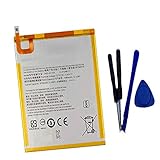
- New,replacement
- 3.82V,5100mAh
- Compatible Part number:SWD-WT-N8 GH81-17427A GH81-17145A GH81-18922A
- Compatible Model:for Galaxy Tab A 8.0 2019 8.0 Inch SM-T290 SM-T295 SM-T297 SM-T290N SM-T295N SM-T297N Series (It is not compatible all Galaxy Tab A 8.0 series.Pls check the part number of the original battery and the model of the tablet before buy. )
- If you have any questions or have any problems about the product, please feel free to contact us, we will reply to you within 24 hrs. We highly appreciate your kind patience.
If the tablet is black or will not turn on, check charging
A blank screen does not by itself prove that the tablet has failed. Check the power path before trying recovery or a reset:
- Try a wall outlet you know works.
- Check that the cable and adapter are connected firmly. If available, try a different compatible cable and adapter.
- Inspect the charging port for debris or visible damage. Do not force an object into the port.
- Remove a case or accessory that could obstruct the cable or buttons.
- Leave the tablet connected to power before concluding that it is not charging.
Amazon advises charging a Fire Tablet for at least 30 minutes; depending on cable speed, it may take 30 minutes before a charging icon appears or the tablet powers on. Amazon also recommends trying another cable and adapter, using a wall outlet, and checking the USB port. Details are in its Fire Tablet power guidance and charging guidance.
Apple likewise recommends trying a different power adapter or cable when an iPad will not charge, and avoiding excessively hot or cold conditions. See Apple’s iPad charging guidance. A known-compatible spare cable or adapter can help isolate a charging problem, but there is no single charger established as compatible with every tablet. Check the tablet’s connector and power specifications before buying accessories.
Rank #3

- HQRP® Rechargeable Battery;
- Battery Voltage: 3.7V; Capacity: 4600 mAh; Li-Pol;
- 200 Days warranty! Battery size: 125x80x3mm;
- Compatible with: RCA 10-Inch Viking Pro RCT6303W87 RCT6303W87DK RCT6K03W13 Tablet PT3090135 3.7v 4Ah 4600mAh
If startup hangs on a logo or progress screen
iPad: use Apple’s computer-assisted recovery flow
For an iPad stuck on the Apple logo or showing a red or blue screen during startup, Apple instructs users to connect the iPad to a computer, enter recovery mode using the appropriate device-specific buttons, and choose Update when offered the choice to update or restore. Update is Apple’s documented choice at that prompt; the procedure is not a guarantee that every startup failure will be resolved. Follow the exact instructions for your iPad model on Apple’s recovery and startup support page.
Fire Tablet: distinguish rebooting from wiping
Amazon’s Fire Tablet support includes recovery-mode and reset options. Recovery button combinations can differ on older models, so verify the instructions for the exact Fire model before proceeding. A reboot option in recovery is not the same as an option that wipes the device. Use Amazon’s Fire Tablet support instructions to identify the relevant option.
Understand the consequences before a factory reset
A factory reset is a last-resort step, not another kind of force restart. For a Fire Tablet, Amazon says a reset removes downloaded content, including in-app purchases, returns the tablet to factory settings, and deregisters it from the Amazon account. The tablet must be registered again to use it. Before choosing a wipe option, consider whether important content is backed up and whether you can access the account needed to set the device up again. See Amazon’s Fire Tablet reset guidance.
When to contact the manufacturer or arrange repair
Contact the manufacturer if the model-specific restart and charging checks do not help, the tablet repeatedly freezes, or the device shows signs of physical damage. Samsung advises further troubleshooting and contacting a Samsung Service Centre or requesting repair. Amazon says a Fire Tablet that still will not turn on or charge may be eligible for warranty replacement. Apple provides a support route for iPad startup and power problems. Repair or replacement eligibility depends on the product, warranty, and region; confirm the options with the manufacturer.
Quick Recap
Product prices and availability are accurate as of the date/time indicated and are subject to change. Any price and availability information displayed on Amazon at the time of purchase will apply.

