Free tools Windows power users keep installed
One-click scans. No signup required.
For most large companies, the reliable route is not a hunt for a personal address. Start with the company’s own published contact channels, confirm the person’s role through a professional profile, and use a general or role-based inbox whenever it will do the job. An address you infer or get from a finder tool is only a lead until you have checked it.
What a realistic outcome looks like
A good search gives you three things: a confirmed person and role, a company-published route to that person or their function, and, only where it is genuinely needed, a work address you have checked. Large organizations often do not publish individual staff email addresses, so many searches end at a general inbox, a contact form, or a press desk. That is a legitimate result, and often the right one.


As an Amazon Associate I earn from qualifying purchases.
A six-step workflow
Work through these steps in order. Each one is cheaper and lower-risk than the one after it.
What’s actually slowing this PC down?
Pick the symptom - the matching free tool is one click away.
1. Define the role you need
Write down why you are making contact and which function should receive it: sales, partnerships, press, support, procurement, or a named team. Search for a role rather than building a list of everyone at the company. Then confirm the person’s current employer, title, location, and responsibilities against recent company material or a professional profile. Public sources offer no foolproof way to confirm current employment, so where the contact matters, check two independent references.
#1 Best Overall
2. Check the company’s own contact paths
Review, in this order: the contact page, the team or about pages, the press or media page, the legal or privacy notice, and the site footer. These often list a sales, support, press, or privacy inbox, a switchboard number, or a contact form. Match the channel to your request: a privacy question belongs with the privacy team, and a media query with the press desk. Pages can go stale or route only certain inquiries, so confirm the address appears on a current page before you rely on it.
3. Use LinkedIn to confirm identity, not to find contact details
LinkedIn’s help documentation confirms that members can be searched by name, company, and other profile details. It is equally explicit about the limit: “We don’t allow members to search for an email address directly on LinkedIn to discover a member’s profile.” (LinkedIn Help, “Manage your profile’s visibility on and off LinkedIn”; the displayed update date on that page falls around August 2026.) The same page explains that visibility settings affect whether a profile can be found off the platform, so a missing result does not prove that a person does not exist or does not work where you think. Use the profile to confirm role and employer. Do not treat it as a source of a private address.
Rank #2

- PREMIUM HARDCOVER SPIRAL ADDRESS BOOK: This durable address book spiral bound design combines a rigid 5.8" x 8.5" hardcover with reinforced metal corners. Unlike flimsy address books, it resists bending, tearing, and daily wear, making it a reliable contact organizer for home, office, or travel.
- A–Z TABS WITH SPACE FOR 600+ CONTACTS: This address book with alphabetical tabs provides 6 pages for each letter and space for 4 contacts per page. Like practical address books with alphabet tabs, it keeps names, addresses, phone numbers, and emails easy to find. Also includes sections for emergency information, important dates, and notes.
- LARGE PRINT & 100GSM NO-BLEED PAPER: This large print address book features spacious writing areas and clearly labeled fields for comfortable reading and writing. Designed as a practical address book for seniors, it uses premium 100GSM paper to help reduce bleed-through and ghosting when writing with ballpoint or gel pens.
- ALL-IN-ONE TELEPHONE ADDRESS BOOK: More than a basic phone number book, this telephone address book organizes names, addresses, phone numbers, emails, birthdays, anniversaries, and reminders in one place. The indexed layout works like a convenient phone book with alphabet tabs, helping you locate important contacts quickly.
- THOUGHTFUL GIFT WITH POCKET & ELASTIC CLOSURE: This address book with tabs includes an inner pocket for stamps, business cards, and notes, plus an elastic band to keep pages secure. A useful alternative to ordinary telephone and address books, it makes a thoughtful gift for seniors, teachers, families, new homeowners, or anyone who prefers a classic telephone book.
4. Search public role pages
Search the company’s own domain for role terms such as “press contact”, “media enquiries”, or “partnerships”, combined with the person’s name where you have it. Conference speaker biographies, company author pages, and trade association directories can name a person and occasionally publish a business contact. A May 25, 2026 StackOptic guide describes this kind of domain-restricted searching as a practical method. Treat any hit as a statement to verify, not as proof that the address is meant for unsolicited outreach, and check the publication date, since a bio may be years old.
5. Infer an address only as a last resort
If no direct address is published and you genuinely need one, you can look at the company’s apparent email pattern or use an email-finder service. Both methods produce candidates, not confirmed addresses. Verify the candidate before use, using the checklist in the next section.
Rank #3
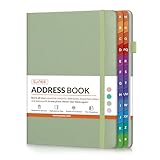
- Organize All Your Contacts in One Place: Keep track of names, addresses, phone numbers, emails, and notes with this address book. Say goodbye to scattered sticky notes and forgotten contacts.
- Colorful A–Z Tabs: Colorful alphabetical tabs help you locate information faster, saving time and reducing frustration. Perfect for home, office, or holiday planning.
- No-Bleed Paper: Crafted with high-quality 120gsm paper that resists ink bleed-through. Your notes stay neat, legible, and smudge-free—ideal for pen or pencil.
- Bonus Pages: Includes dedicated sections for emergency contacts, special dates, password, and extra notes—everything you need in one compact book.
- Thoughtful & Practical Gift Idea: A stylish and functional gift for friends, family, teachers, or coworkers. Great for birthdays, holidays, or anyone who appreciates staying organized.
6. Choose the lightest channel that works
Prefer a contact form or general inbox to a direct line, and a role mailbox to a personal one. Record where each address came from and the date you checked it, so you can re-verify it later or stop using it when the source changes.
Comparing the routes
The routes differ mainly in how much confidence they give you about the person and the address. Treat the table as a guide to how much checking each route needs, not as a ranking of tools.
Rank #4
| Route | What it typically gives you | Confidence | Main risk |
|---|---|---|---|
| Company contact, about, team, and press pages | General inbox, phone number, contact form, or a named press or media contact | High where published, provided the page is current | Pages can be stale or route only certain inquiries |
| Professional profile (LinkedIn) | Current role, employer, and location as the person has presented them | Good for identity; gives no contact route | Profile may be out of date or limited by visibility settings |
| Public role pages (conference bios, author pages, trade directories) | Name, role, and sometimes a business contact | Moderate; depends on publication date | Dated information, and not always meant for outreach |
| Inferred domain pattern | A candidate address | Low until verified | Wrong format, a departed employee, or a mailbox not meant for you |
| Third-party finder or database | A returned candidate address, sometimes with other details | Varies; check how the provider sources its data | Stale or inaccurate records, plus privacy and terms questions |
Verifying an inferred or returned address
Run this checklist before you send anything to an address you did not find published on the company’s own pages.
The Tool Desk
Outbyte Driver Updater FREEScan for outdated or missing drivers - takes under a minuteDriver Scan →Outbyte PC Repair FREEClear out junk files and repair common Windows errorsFree Scan →- Confirm the person’s name, role, and employer from at least one source other than the finder.
- Check the domain against the company’s own website, and watch for lookalike domains.
- Compare the pattern with an address the company has published, such as a press or support mailbox. A matching pattern is a clue, not proof.
- Run an email-verification check if the address must be tested. Verification reduces risk, but it does not guarantee that a mailbox is deliverable or that the person still works there.
- Do not send repeated or bulk messages to unverified addresses.
Hunter, NeverBounce, and ZeroBounce are the tools most often named in this category. Their features, prices, accuracy claims, and terms change over time, and vendor-written guides are not independent tests of accuracy. Check each provider’s current published documentation, including how it sources data and how opt-out requests are handled, before you pay for a plan.
Best Value

- ORGANIZE YOUR CONTACTS - This address book with alphabetical tabs makes organizing your contacts a breeze. Safely store names, addresses, emails, phone numbers, and more all in one place. Never lose important information again!
- ALPHABETICAL TABS - This address book and password book combo has tabs that run from “AB” to “XYZ”, with enough space for ~12 contacts for each letter of the alphabet. A total of 118 contact pages!
- SUPPLEMENTAL PAGES - Not only does this spiral address book have plenty of room for contacts, it includes (2) Important Dates pages for birthdays & anniversaries, (1) Emergency Contacts page, (10) Website Logins pages for passwords, and (8) blank notes pages.
- PREMIUM DESIGN QUALITY - This address book for seniors & women has 100gsm bright white paper that won’t bleed through, metal lay-flat spiral binding, a back inside pocket for bills or receipts, and sturdy chipboard covers with gold foil stamping and reinforced edges.
- GREAT GIFT ITEM - This small address book is 6” x 8.25” so it easily fits into a purse, briefcase, or desk drawer. It makes a thoughtful gift for parents, seniors, girls, moms, neighbors, coworkers, and more. Visit our store for matching inspirational office supplies for women!
Privacy and legal limits
A work email address or business telephone number remains personal data when it relates to an identifiable person. The European Commission’s GDPR explainer, “Application of the GDPR”, says the rules cover “personal data relating to natural persons in the course of a professional activity, such as the employees of a company/organisation, business email addresses like ‘forename [dot] [email protected]’ or employees’ business telephone numbers.” Under the GDPR, a use of such data still needs a lawful basis, and recipients have rights such as objecting to direct marketing. Being visible on a company website does not, by itself, make every later use permissible.
The UK Information Commissioner’s Office guidance on directory services is narrower. It addresses services that publish subscriber information. It calls for telling individual subscribers, offering a clear chance to opt out, allowing correction or withdrawal on request, and obtaining express consent before offering reverse-search functions. It does not set a general rule for every contact search, and it should not be read as one.
Rules vary by country, by channel (email, phone, or post), and by whether the recipient is an individual or a company. Check the requirements for the place you and the recipient are in before you contact anyone at scale.
Recommended Free Tools
Quick Recap
When nothing useful turns up
- No named person on the site: write to the function’s general inbox and ask for the right contact to be routed to you.
- No profile, or a hidden one: rely on company pages and recent press material to confirm the role.
- Only an inferred address exists and verification fails: stop, and use a contact form or the switchboard instead.
- The request concerns a personal matter, such as a home address or personal mobile number: this falls outside a business-contact search, and finder tools should not be used to pursue it.
Product prices and availability are accurate as of the date/time indicated and are subject to change. Any price and availability information displayed on Amazon at the time of purchase will apply.

