Cross-play is enabled by the individual game, not by a universal console switch. Turn on the game’s cross-play option, allow cross-network play in Xbox privacy settings when applicable, and use the publisher account system to add friends.
What controls cross-play
Cross-play lets players on different hardware enter the same supported matchmaking pool. A PS5, Xbox or PC cannot force cross-play if the game does not support that exact platform combination, edition and mode.
As an Amazon Associate I earn from qualifying purchases.
It is a game-by-game feature
Look for Cross-play, Cross-platform play or Cross-network play in the title’s Settings, Account, Network or Online menu. Some games enable it automatically; others provide separate controls for casual, ranked, franchise or other modes.
Crashes, No Sound, or Screen Glitches?
Random freezes, missing sound and display glitches usually trace back to one bad driver. Find and replace yours safely.Free scan · under a minutePC Slower Than It Used to Be?
A free scan shows the junk files, broken settings and background clutter dragging Windows down - then fixes them in one click.Free scan · Windows 10 & 11Cross-play is not cross-progression
Playing together does not guarantee that levels, purchases or saved progress move between platforms. Check the publisher’s account and cross-progression rules separately before changing platforms.
#1 Best Overall

- On-Ear Volume Control
- Convenient Flip-To-Mute Mic
- 40mm Speakers for Superior Sound
- Premium, Noise-Isolating Ear Cushions
- Multiplatform Compatibility Across Platforms
Check these requirements first
- Confirm the official support page lists the exact PS5, Xbox and PC combination you need.
- Verify that the desired mode supports cross-play; a game may allow it in public matches but not in ranked, franchise or another mode.
- Check whether the players are using compatible editions and console generations. An older-console version may use a separate matchmaking pool.
- Update the game and the console or PC client before changing settings.
- Make sure every player is signed in to the required publisher account and that the accounts are linked to their platform accounts.
- Confirm that everyone is in a supported region. Riot’s console guidance says cross-play works only within the same region, regardless of device.
Enable cross-play on PS5
Use the game’s own menu
- Launch the game on PS5.
- Open Settings, Options, Account, Network or Online.
- Set Cross-play or Cross-platform play to On or Allow.
- Apply the change, return to the main menu and restart the game if it asks you to.
There is no single universal PlayStation cross-play switch documented for all games. If no such option appears, the title may have cross-play enabled by default, may manage the setting through its publisher account, or may not support the platform combination.
For example, Electronic Arts says cross-play is enabled by default the first time you start Madden NFL 26 on PC, PS5 or Xbox Series X|S. That default applies to supported modes; it is not a system-wide PS5 setting.
Enable cross-play on Xbox
Allow cross-network play in Xbox privacy settings
Xbox’s platform permission can block a game even when its in-game toggle is enabled. To allow it, use this path:
Quick wins for a faster PC:
Fix the driver behind crashes, sound loss and screen glitchesFind Drivers →Clear out junk files and repair common Windows errorsFree Scan →Rank #2

- 【Brook Wireless Headset】: It conquers multi-gaming consoles with ONE device. Support Wirelessly: PS5、PS4、NS、PC、macOS; Support Wired: XB. (Noted: The Mic will be disabled when it's connected via a 3.5mm port.)
- 【50mm Neodymium Drivers】: Brook Wireless Headset's extra bass lets you experience immersive gaming audio.
- 【Your comfort, Our Jobs】: Detachable Mic, Adjustable headband; Cozy leather earpads make listening lighter, and also it's replaceable.
- 【Headset Control Bottons】: Press and tune them easily on your Headset. Volume, Mute, Power; USB-C Charging port (Battery Life: 10-12 Hours), Microphone port.
- 【Package includes】: Wireless Headset, 2.4Ghz wireless dongle (USB-A), Earpads, 3.5mm audio cable, USB-C Charging cable, Pouch, Quick Guide, and Additional EarPads.
- Open Settings.
- Choose General.
- Open Online Safety & Family.
- Select Privacy & Online Safety.
- Choose Xbox Privacy.
- Open View Details and Customize.
- Select Communication and Multiplayer.
- Set You can join cross-network play to Allow.
Bungie documents this setting for Destiny 2; its disable instruction says to set the same control to Block, so Allow is the enabling value.
Check the game’s own control too
Some games require both the Xbox permission and an in-game option. Riot notes that Xbox players may need both controls enabled. Activision’s Black Ops 6 guidance also says console settings take priority when they conflict with the game’s cross-play control.
Review family-account restrictions
Child and family accounts can inherit stricter multiplayer or communication permissions. If the setting cannot be changed, the family organizer may need to update the account’s online-safety rules.
Rank #3
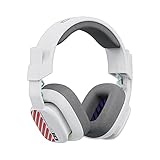
- Enhanced sound quality: ASTRO Gaming A10 Gen 2 Headset for for Xbox Series X|S, Xbox One, Nintendo Switch, PC, Mac & Mobile Devices features custom-tuned 32mm dynamic drivers so you can always hear your game and teammates with clarity and precision
- Flip-to-mute mic: Integrated boom microphone that can be flipped up to mute for privacy and down for crystal-clear comms via a 6.0 mm unidirectional mic
- In-line volume control: This Xbox gaming headset features a removable headphone cable with in-line volume control, letting you adjust audio without pausing the game
- Built to last: An ultra durable headband and sturdy construction offers reliable performance that transcends the standard gaming headset for Xbox Series X|S
- Comfortable over-ear headset: Ergonomical and robust circumaural construction with a closed back design; optimal for long sessions
Enable cross-play on PC
Use the game’s menu when available
Open the title’s Settings, Account, Network or Online page and enable cross-play. PC games do not share one universal operating-system switch, so the publisher’s instructions for that title take precedence.
Recommended Free Tools
Check the PC storefront
The storefront can change what is possible. Activision says Microsoft Store and Xbox PC players can adjust global cross-play in the Xbox PC app for Black Ops 6. In that title, cross-play cannot be disabled on Steam or Battle.net. Do not assume a setting available in the Xbox PC app also exists in another launcher.
Add a friend and join the cross-platform party
A PSN or Xbox friend request alone may not be enough. Many games use a separate publisher account and player-search service.
Rank #4
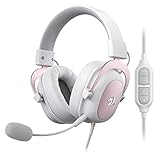
- Precisely Clear Audio - Enjoy the real clear and lossless sound quality with 7.1 Surround-Sound technology, creating a field of immersion wherever in game field, listening to alive concert or in a chat room. The 53mm drivers offer a wider frequency range, richer sound fields, higher definition and extreme fidelity sound.
- Adjustable & Comfortable - Its free-adjustable headband with lightweight robust made steel frame will free your head from extra burdens when gaming or listening to music. The finest leatherette with premium memory foam filler enables your ear to breathe and keep them dry and cool. No need to worry, even after hours of wear you feel nothing but comfort.
- All in Control - The Redragon H510 boasts independent line control with sound volume +/-, on/off and mic on/off. All settings can be adjusted by one hand to meet different needs in any situation, make sure you can doing well even in a tense game.
- Talk it Like You Hear it - Not only can you hear lossless sound but you can talk it out. The detachable noise-cancellation microphone will surely offer you the clearest communication between teammates or friends, no more distorted sound and boomed mic cases.
- For All Platforms - With detachable 3.5mm braided cable built-in USB control box and 3.5mm jack input. Styled to match any platform you use, whether PC, PS4/3, Xbox One X/Series X, NS(Some models like S in old version might need an adapter, adapter NOT included), Switch or Mobile Devices.
- Open the game’s social, friends or account menu.
- Find the publisher-specific player search.
- Enter the friend’s exact player ID, including any required number or capitalization.
- Send the request and have the other player accept it.
- Invite or join through the game’s social menu after both accounts show as online.
Black Ops 6 uses an Activision ID. Madden NFL 26 uses EA Connect’s Player Search, where you can search by EA ID or a platform identifier.
Independent reader supportYour contribution helps us test, update, and keep practical guides available for everyone.Examples of why title-specific verification matters
| Game or guidance | What it establishes | Limitation to check |
|---|---|---|
| Madden NFL 26 | Cross-play starts enabled by default on PC, PS5 and Xbox Series X|S. | Only supported modes and those three platform families are covered by that statement. |
| Black Ops 6 | Uses Activision ID for social features; Xbox console privacy settings can override the in-game choice. | PC behavior differs by Microsoft Store/Xbox PC, Steam and Battle.net. |
| Apex Legends | The official FAQ lists PS4, PS5, Xbox One, Xbox Series X|S, Nintendo Switch, EA App and Steam. | A broad platform list does not prove that every mode, edition or region shares one pool. |
| Fortnite | Disabling cross-play can leave only limited modes, such as solo play, according to Epic’s guidance. | Turning the option off can reduce available matchmaking. |
Support documentation changes: Obsidian’s Grounded 2 cross-platform page was updated August 11, 2026, while Riot’s console access guide is dated February 20, 2026. Use the current page for the game and platform you actually own.
Do these 3 things before closing this tab:
1Clear out junk files and repair common Windows errors2Fix the driver behind crashes, sound loss and screen glitches3Repair Windows errors before they cause bigger problemsCross-play troubleshooting checklist
- Recheck support. Verify the exact game, platform combination, edition, generation and mode on the publisher’s official support page.
- Restart after changes. Update the game and client, change the privacy setting, then fully restart the game and console or PC app.
- Fix Xbox permissions. Confirm You can join cross-network play is Allow; inspect family or child-account restrictions if it is locked.
- Confirm account links. Sign in to the required publisher account on every platform and add the correct publisher player ID, not only a console gamertag.
- Check region. Players may need to be assigned to the same supported region; Riot explicitly requires the same region for cross-play.
- Check the mode. Ranked, franchise, competitive or other modes may disable cross-play even when public matchmaking supports it.
- Check the generation and edition. A player on an older console or a different edition may be outside the same matchmaking pool.
Cost and equipment
Enabling cross-play itself requires no separate purchase. A microphone or gaming headset is optional communication equipment, not a cross-play requirement. PlayStation notes that PC Remote Play voice chat requires a microphone, but that requirement concerns voice chat rather than joining a cross-platform match.
The practical rule
Start with the game’s official platform-and-mode support list. Enable its in-game cross-play control, set Xbox’s cross-network permission to Allow when relevant, then add friends through the publisher account system. If matchmaking still fails, check region, mode, edition, console generation and family-account restrictions before changing hardware settings.
Quick Recap
Product prices and availability are accurate as of the date/time indicated and are subject to change. Any price and availability information displayed on Amazon at the time of purchase will apply.

