Windows Errors? Fix Them Before They Spread
Repair common Windows errors and clear accumulated junk for a smoother, more stable PC - no reinstall needed.Free scan · no reinstallCrashes, No Sound, or Screen Glitches?
Random freezes, missing sound and display glitches usually trace back to one bad driver. Find and replace yours safely.Free scan · under a minuteYes, but not by installing software on the old pager. A legacy pager needs a new Meshtastic-capable microcontroller, LoRa radio, antenna, power system and usually a custom interface for its screen and keyboard. The shortest supported route is the purpose-built LILYGO T-Lora Pager: flash the firmware for its exact regional variant, attach an antenna before powering it, and configure the node. Reusing an old pager shell is a separate electronics project.
What “convert a pager” actually means
Meshtastic is an open-source, community-driven platform for off-grid communication over LoRa. A node transmits packets, can rebroadcast packets from other nodes to form a mesh, and may connect to a phone through Bluetooth, Wi-Fi or USB, depending on the hardware. Text messaging, encryption and optional GPS are part of the platform. It can operate without cellular service or an internet connection.
As an Amazon Associate I earn from qualifying purchases.
A conventional pager normally contains a receiver and a decoder designed for a paging network. Its processor, radio, display, keyboard, battery charger and firmware were not designed to run Meshtastic. Replacing or reprogramming only the pager software therefore does not create a Meshtastic node. You must provide a supported MCU and LoRa transceiver, then solve the antenna, power and user-interface problems around them.
Recommended Free Tools
Two very different projects
| Approach | What you build | Best reason to choose it | Main risk |
|---|---|---|---|
| Purpose-built pager | A complete supported T-Lora Pager with Meshtastic firmware | Fastest path to a working handheld node with an integrated screen, keyboard, radio and battery system | Less freedom to preserve a particular vintage shell |
| Legacy-shell conversion | A supported MCU/radio board installed inside the old case, plus custom power, RF and interface wiring | Keeping a specific form factor, enclosure or hardware aesthetic | The original LCD, keyboard, battery and charger may have undocumented or incompatible interfaces |
There is no universal pager wiring standard. A case that looks suitable can still require extensive reverse engineering, and a successful conversion may initially work only as a headless node controlled from the Meshtastic phone client.
#1 Best Overall

- LoRa chip:SX1262
- Github : github.com/Xinyuan-LilyGO/LilyGoLib
- WIKI : wiki.lilygo.cc/get_started/en/LoRa_GPS/T-LoraPager/T-LoraPager.html
- Board Function: RTC, Battery Charger, Battery Gauge GPlO Expand, Audio Power Amplifier, TF Card, Keyboarod
- If you have any questions or suggestions about the product, please feel free to contact us. We will answer your question as soon as possible.
The easiest supported option: LILYGO T-Lora Pager
The LILYGO T-Lora Pager is a pager-form-factor Meshtastic device rather than a retrofit. Its design removes the hardest integration tasks: selecting a compatible radio and MCU, matching an antenna, designing safe charging, and writing drivers for an undocumented display or keypad.
| Component or feature | Published specification | Why it matters |
|---|---|---|
| Microcontroller | ESP32-S3 | Runs the Meshtastic firmware and provides the device-control functions |
| LoRa transceiver | Semtech LR1121 | Provides the long-range radio link used by the mesh |
| Regional variants | 915 MHz, 868 MHz and 433 MHz | You must select the hardware band appropriate to your region and local rules |
| Display | 2.33-inch color display, 222 × 480 pixels | Provides a built-in message and status interface |
| Input | Full QWERTY keyboard | Allows text entry without relying on a phone |
| Antenna | Foldable external antenna | Provides the intended RF connection and keeps the antenna accessible |
| Connectivity and sensors | USB-C, u-blox GPS, NFC/RFID, IMU, power monitoring and audio circuitry | Adds charging/data access, positioning and handheld-device functions |
| Firmware file pattern | firmware-tlora-pager-X.X.X.xxxxxxx.bin |
Helps distinguish the pager target from visually similar boards |
Meshtastic documentation identifies a US purchase source and an international manufacturer store for this model. Availability and shipping vary, so verify that the board’s frequency variant matches the country where you will operate it.
Parts and design decisions for a legacy pager shell
1. Identify every original interface
Before removing anything, photograph the inside and label the battery, display connector, keypad contacts, speaker, charging contacts and antenna. Record connector orientation, wire colors, screw locations and the available space. Treat every signal as undocumented until you have traced it. A pager LCD may use a proprietary serial protocol, unusual voltage levels or a controller that is not documented publicly. The keypad may be a matrix rather than individually wired switches.
Free tools Windows power users keep installed
One-click scans. No signup required.
Rank #2

- LoRa Communication Chip: Equipped with SX1262 LoRa chip for long-range wireless communication at 915MHz frequency
- Github : github.com/Xinyuan-LilyGO/LilyGoLib
- WIKI : wiki.lilygo.cc/get_started/en/LoRa_GPS/T-LoraPager/T-LoraPager.html
- Board Function: RTC, Battery Charger, Battery Gauge GPlO Expand, Audio Power Amplifier, TF Card, Keyboarod
- If you have any questions or suggestions about the product, please feel free to contact us. We will answer your question as soon as possible.
2. Select a Meshtastic-capable core
Use a board and radio combination that Meshtastic supports, rather than choosing a generic microcontroller and hoping that a build can be adapted later. The official device material lists partner or community choices including the RAK11310, which combines an RP2040 with an SX1262 radio, and a Raspberry Pi Pico paired with a Waveshare LoRa module. The supported-device overview favors newer Semtech SX126x or LR11xx radios for performance and compatibility.
Check the exact board target, pinout, available flash and memory, USB connector, battery input and display buses before buying. A board can be electrically suitable yet physically impossible to mount in a thin pager case. Keep the first prototype on the bench; do not cut the enclosure until the node has transmitted and received reliably.
3. Provide a proper LoRa antenna and RF path
Choose the board’s regional frequency and use its intended antenna connector or a properly matched antenna. Do not assume that the original pager antenna will work. A legacy antenna may have been designed for a different band, impedance or receiver architecture, and its electrical characteristics may be unknown. Route the RF connection as the board maker specifies, keep it short, and avoid pinching or sharply bending the coax when closing the case.
Rank #3

- LoRa chip:SX1262
- Github : github.com/Xinyuan-LilyGO/LilyGoLib
- WIKI : wiki.lilygo.cc/get_started/en/LoRa_GPS/T-LoraPager/T-LoraPager.html
- Board Function: RTC, Battery Charger, Battery Gauge GPlO Expand, Audio Power Amplifier, TF Card, Keyboarod
- If you have any questions or suggestions about the product, please feel free to contact us. We will answer your question as soon as possible.
4. Design power and charging independently
A pager battery or charging circuit is not automatically compatible with a modern development board. Confirm the board’s regulated-voltage range, battery chemistry, charging method, protection requirements and current capability. Preserve or add appropriate over-charge, over-discharge and short-circuit protection. Never connect an unidentified battery directly to a board just because its connector fits. During the prototype phase, use a known-good supply or battery arrangement and measure for overheating before enclosing it.
5. Decide whether the first version needs the old user interface
The fastest proof of concept is a headless node: install the Meshtastic board, antenna and safe power system, then control it from a phone client. Retaining the original LCD or keyboard is optional and should be treated as a second engineering phase. You will need to identify signal levels, buses, pin assignments and timing, then write or adapt interface code. Meshtastic does not define a universal legacy-pager display or keyboard driver.
Step-by-step legacy-pager conversion
- Document the shell. Photograph and label the internal parts, measure the cavity and note where USB access, antenna clearance and battery replacement will be possible.
- Bench-test the new core. Connect the supported MCU/radio board, its intended antenna and a safe power source outside the case. Confirm that it can be flashed and recognized before modifying the pager.
- Match the regional radio. Select the 915 MHz, 868 MHz or 433 MHz hardware appropriate to your operating region and follow applicable radio rules. The antenna must match that band.
- Build the power system. Use the board maker’s specified supply or protected battery arrangement. Add a switch or service connector if the original pager controls are not reusable.
- Run a headless node. Configure the Meshtastic settings from a client and verify basic sending, receiving and reboot recovery. This separates radio and firmware issues from display and keypad work.
- Trace the keyboard. Use the documented connector and a safe logic-level measurement method to determine whether the keys form a matrix, what voltage they use and how the original controller scanned them. Do not connect unknown pins directly to GPIO.
- Trace the display. Identify the controller or bus, voltage levels, reset line and timing. If no documentation exists, plan for a replacement display rather than assuming the old one can be driven.
- Write the interface layer. Map key events and display updates to the Meshtastic device’s available software interfaces. Keep the radio and power code unchanged while testing the UI.
- Fit the enclosure last. Keep the antenna clear of shielding and metal obstructions, leave USB reachable for flashing and recovery, and provide ventilation and strain relief. Close the case only after extended RF and thermal checks.
How to flash and start a T-Lora Pager
Meshtastic’s getting-started sequence is deliberately hardware-first. The same order prevents most avoidable failures on a T-Lora Pager.
Rank #4

- 【LORA】LR1121 LORA chip supports dual-band operation at 830-945 MHz and 2.4 GHz.
- 【Github】github.com/Xinyuan-LilyGO/LilyGoLib
- 【WIKI】 wiki.lilygo.cc/get_started/en/LoRa_GPS/T-LoraPager/T-LoraPager.html
- 【Board Function】 RTC, Battery Charger, Battery Gauge GPlO Expand, Audio Power Amplifier, TF Card, Keyboarod
- If you have any questions or suggestions about the product, please feel free to contact us. We will answer your question as soon as possible.
- Identify the exact device. Confirm that the hardware is the T-Lora Pager and note whether it is the 915 MHz, 868 MHz or 433 MHz variant. Do not substitute a T-Deck or generic ESP32 firmware because the enclosure looks similar.
- Attach the antenna. Install the foldable antenna before applying power. Meshtastic warns:
Never power on the radio without attaching an antenna as doing so could damage the radio chip.
- Prepare USB. Use a USB-C cable that carries data, not a charge-only cable. If the computer does not create a serial device, install the serial driver required by the board and try another known-good data cable.
- Flash the matching target. Select the T-Lora Pager firmware and the correct regional build. The published file naming pattern is
firmware-tlora-pager-X.X.X.xxxxxxx.bin; the target name matters more than a similar product name. - Wait for the reboot. Keep the device connected until flashing completes and the pager restarts. If it disappears during the process, reconnect over USB and use the board’s documented recovery procedure rather than repeatedly interrupting power.
- Configure the node. Set the radio region, node role, channel and security settings in the Meshtastic client. Pair over the connection supported by the hardware, such as Bluetooth, Wi-Fi or USB, and set any optional GPS or device preferences you need.
- Test locally first. Exchange messages with another Meshtastic node nearby, check that the display and keyboard respond, and verify that the device reconnects after a power cycle before relying on it in the field.
Configuring a converted headless node
Region and frequency
The region setting must agree with the radio hardware and the rules where you operate. A 915 MHz board is not interchangeable with an 868 MHz or 433 MHz variant merely by changing a software label; the antenna and RF design must also suit the band. If you move the node to another country, verify both the permitted band and the local power or duty-cycle requirements.
Node role, channel and security
Choose the node role that matches its purpose, select the channel used by the other nodes you intend to reach, and set security credentials deliberately. A wrong channel or mismatched key can look like a dead radio even when the hardware is functioning. Record the configuration before experimenting so that you can restore a known-good setup.
Quick wins for a faster PC:
Clear out junk files and repair common Windows errorsFree Scan →Scan for outdated or missing drivers - takes under a minuteDriver Scan →Repair Windows errors before they cause bigger problemsFix Now →Phone-assisted operation
A shell conversion does not need a working pager display to exchange messages. A phone client can provide the user interface while the installed board handles LoRa traffic. This is a practical first milestone: prove the mesh, power and RF path before investing time in a custom LCD or keyboard driver.
Best Value
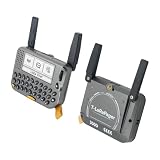
- 【LORA】LR1121 LORA chip supports dual-band operation at 830-945 MHz and 2.4 GHz.
- 【Github】github.com/Xinyuan-LilyGO/LilyGoLib
- 【WIKI】 wiki.lilygo.cc/get_started/en/LoRa_GPS/T-LoraPager/T-LoraPager.html
- 【Board Function】 RTC, Battery Charger, Battery Gauge GPlO Expand, Audio Power Amplifier, TF Card, Keyboarod
- If you have any questions or suggestions about the product, please feel free to contact us. We will answer your question as soon as possible.
Common failure points and recovery
| Symptom | Likely cause | What to check |
|---|---|---|
| No serial device during flashing | Charge-only USB cable, missing serial driver or wrong port | Use a known data cable, install the board’s required driver and reconnect with the antenna attached |
| Device boots but cannot reach other nodes | Wrong regional firmware, channel, security key or antenna path | Confirm the hardware band, region, channel and key; inspect the connector and coax |
| Radio becomes hot or fails after first power-up | Power applied without an antenna or an incompatible supply | Disconnect power, attach the intended antenna, and verify supply voltage and battery protection before trying again |
| Old display stays blank | Unknown bus, voltage, reset sequence or unsupported controller | Return to the headless configuration and identify the display electrically before writing a driver |
| Keyboard produces random input | Incorrect matrix wiring, logic levels or scan timing | Map rows and columns, confirm levels, add appropriate protection and test one key at a time |
| Intermittent resets in the shell | Battery sag, inadequate regulator, pinched cable or thermal buildup | Test on a known-good supply, inspect strain relief and leave airflow and service access |
Purpose-built pager versus a shell conversion
| Decision factor | LILYGO T-Lora Pager | Legacy shell conversion |
|---|---|---|
| Time to first working node | Short: the radio, MCU, UI and enclosure are integrated | Long and unpredictable: bench wiring and reverse engineering come first |
| Display and keyboard documentation | Designed for the device and firmware target | Model-specific; no universal wiring or driver is established |
| RF and antenna integration | Foldable antenna and LR1121 radio are part of the design | Must be selected, matched and positioned by the builder |
| Battery and charging | Integrated hardware intended for the product | Must be checked or replaced; the old charger is not automatically safe |
| Repairability | Standardized board and documented target make replacement simpler | Custom wiring can be repaired only if you document it carefully |
| Firmware support | Has a named Meshtastic target and firmware pattern | Depends on the chosen supported board and any custom UI code |
| Total cost | Mostly the device and its regional variant | Board, radio, antenna, battery hardware, connectors and your development time |
A Motorola T900 case or another recognizable pager shell can be used only if its internal dimensions, openings and controls can accommodate the new electronics. The case name does not imply electrical compatibility, and there is no documented universal adapter that makes an old pager a Meshtastic device.
Range, mesh behavior and realistic expectations
LoRa range depends on antenna placement, frequency, terrain, height, interference, transmit settings and the number and location of relay nodes. Meshtastic documentation highlights a 331 km record as a project feature claim; it is not a guaranteed distance for a pager conversion or a normal urban result. A custom shell with a poor antenna position can perform much worse than the same radio on an open bench.
Meshtastic’s mesh can extend coverage when other nodes rebroadcast packets, but a single node still needs a usable radio path to at least one peer. The system’s ability to work without cellular or internet infrastructure is useful for remote areas, events and outages, yet it does not remove the need for correct regional settings, a suitable antenna and compatible channel security.
The Tool Desk
Outbyte Driver Updater FREEScan for outdated or missing drivers - takes under a minuteDriver Scan →Outbyte PC Repair FREERepair Windows errors before they cause bigger problemsFix Now →Which route should you choose?
- Choose the LILYGO T-Lora Pager if you want a working pager-shaped node, a built-in QWERTY keyboard and display, and the least firmware and hardware integration work.
- Choose a legacy-shell build if preserving a particular enclosure is the main goal and you are comfortable designing power, RF and mechanical mounting systems.
- Start with a headless conversion if you are unsure about the old LCD or keyboard. A phone-controlled node proves the radio and power architecture before you spend time on custom drivers.
- Use a supported SX126x or LR11xx-based board when building inside a shell, and verify the exact Meshtastic target before ordering parts.
The practical answer is therefore two-tiered: buy the supported T-Lora Pager for a reliable, documented conversion, or treat an old pager as an enclosure for a complete custom electronics project. In either case, attach the correct antenna before power, use a data-capable USB cable for flashing, and validate the regional radio variant before expecting the node to join a mesh.
Quick Recap
Product prices and availability are accurate as of the date/time indicated and are subject to change. Any price and availability information displayed on Amazon at the time of purchase will apply.

