The Tool Desk
Outbyte PC Repair FREERepair Windows errors before they cause bigger problemsFix Now →Outbyte Driver Updater FREEScan for outdated or missing drivers - takes under a minuteDriver Scan →For the HAVIT Freego Pro E553BT, pair over Bluetooth by selecting HAVIT Freego Pro in your device’s Bluetooth settings. This works with Bluetooth-equipped PCs and supported iOS or Android phones. PlayStation says third-party Bluetooth wireless headsets are not supported directly on PS5, and the Freego Pro documentation does not establish a USB-audio or analog-audio connection for that console.
Check that you have the Freego Pro E553BT
“Freego Pro” most likely refers to HAVIT’s E553BT air-conduction Bluetooth headphones. Check the model label if your headset looks like an over-ear gaming headset: HAVIT sells separate gaming headsets, and some Freego Pro page copy mentions features that conflict with the E553BT description. The E553BT manual identifies the Bluetooth pairing name as HAVIT Freego Pro. HAVIT’s product information describes Bluetooth V5.3 and support for iOS and Android; see the HAVIT Freego Pro product page and E553BT manual.
As an Amazon Associate I earn from qualifying purchases.
Connect the Freego Pro to an iPhone or Android phone
- Press and hold the headset’s power button for about three seconds to turn it on. According to the E553BT instructions, the indicator flashes red and blue when the headset is ready to pair.
- Open Bluetooth settings on your phone and scan for available devices.
- Tap HAVIT Freego Pro in the device list and follow any on-screen prompt.
The distributor’s E553BT instructions say the headset reconnects to the last device it connected to when switched on. If it does not appear, check that it is powered on and in pairing mode, and that it is not already connected to another nearby device. HAVIT lists iOS and Android compatibility, but that should not be read as a guarantee for every handset or software configuration.
Windows Errors? Fix Them Before They Spread
Repair common Windows errors and clear accumulated junk for a smoother, more stable PC - no reinstall needed.Free scan · no reinstallCrashes, No Sound, or Screen Glitches?
Random freezes, missing sound and display glitches usually trace back to one bad driver. Find and replace yours safely.Free scan · under a minuteConnect it to a PC
- Turn on Bluetooth on the PC, then put the headset into pairing mode using the power button. The indicator should flash red and blue.
- Open the PC’s Bluetooth device list and select HAVIT Freego Pro.
- After pairing, open the computer’s sound settings. Select the headset as the audio output; select it as the input as well if you want to use its microphone and the PC offers it as an input device.
Menu names differ between operating systems. The E553BT manual does not give version-specific Windows or macOS paths, so use your computer’s Bluetooth and sound settings rather than relying on a particular menu label. If the headset pairs but you hear no audio, check that the PC has selected it as the output device.
#1 Best Overall

- Gamechanger Audio: Plunge into a surround soundscape with our xbox headset with mic, turning every game into a thrilling and unbeatable gaming experience.
- Your Gaming Marathon Wingman: Gear up for the ultimate gaming marathon with our gaming headsets xbox which is designed to keep up with your endurance and passion. The combination of a strong aluminum frame and soft memory foam earcups enable you to focus on the game without fatigue.
- Unobstructed Conversations: Our xbox series x headset's high-sensitivity mic captures every nuance of your voice, facilitating clear and direct communication with your squad.
- Durable by Design: Our headset's combination of sturdy aluminum alloy and human-centric design ensures it stays in top shape, no matter the gaming conditions or accidental bumps.
- Universally Versatile: Our headset with microphone for pc seamlessly connects to major gaming platforms like PS5, PS4, Xbox Series X|S, Xbox One, and Nintendo Switch, ensuring compatibility and convenience for gamers everywhere.
Can you connect the Freego Pro directly to a PS5?
Not over Bluetooth, according to PlayStation’s stated compatibility guidance. Its PS5 FAQ, published November 9, 2020, says: “Wireless headsets from third-party companies that use a Bluetooth connection will not be supported on PS5, though most USB and analog headsets will be supported.”
The available E553BT documentation establishes Bluetooth and a USB-C charging port, but does not establish that the headset supports USB audio through a dongle or analog audio through a cable. Do not treat the USB-C charging port as a PS5 audio connection, or assume gaming-headset features mentioned in conflicting product-page copy apply to this model.
Rank #2

- Razer HyperSense: Converting sound signals into vibrations in real time, the Razer Kaira Pro provides tactile feedback from within the earcups with an intensity level that’s controlled via the Razer Audio App
- TriForce Titanium 50mm Drivers: With titanium-coated diaphragms for added clarity, these drivers can tune highs, mids, and lows separately—producing rich, full-range sound for deeper gaming immersion
- Detachable HyperClear Supercardioid Mic: Experience greater noise rejection from the sides and back plus better voice isolation that’s supported by mic monitoring and game/chat balance for optimal audio levels
- Razer SmartSwitch: Easily switch between audio from your console and phone for total convenience while gaming
- Low-Latency Bluetooth with Quick Connect: Toggle Gaming Mode via the Razer Audio App to reduce latency for smoother mobile gameplay - utilize its Quick Connect feature to switch between previously connected devices with just one tap
Possible TV-mediated audio route
If your TV supports sending its audio to Bluetooth headphones, you may be able to pair the Freego Pro with the TV and hear PS5 sound that way. This is a TV-mediated workaround, not direct PS5 pairing, and whether it works depends on the TV and connected equipment. Microphone routing, headset controls, and audio delay also depend on that setup; the available product and platform information does not establish particular results. Check the TV’s Bluetooth audio support and decide whether listening only is sufficient before relying on this route.
Recommended Free Tools
Quick Recap
Best Value

- DUAL-MODE WIRELESS: Maximize platform compatibility by combining Bluetooth 5.3 connectivity with a low-latency 2.4GHz USB-C digital wireless transmitter; USB-A adapter included.
- UNMATCHED AUDIO: Experience premium audio with bass boosted high-sensitivity 40mm drivers, and tuned acoustic chambers that delivers impressively balanced game audio; choose the right mix of Xbox game audio and team chat with on-ear game/chat balance controls.
- CRYSTAL CLEAR CHAT. INSTANT MUTE: High-quality, flip-to-hide boom microphone provides crystal clear voice pickup, discretely folds into the earcup, and automatically mutes your voice when closed.
- VERSATILE WIRELESS GAMING COMPANION: Stay connected by taking Bluetooth calls or listening to music from your mobile phone; access deep customization with the RIG 600 PRO Navigator app, including custom equalizer settings, microphone sensitivity, wireless modes, and more.
- ALL-DAY COMFORT: Enjoy all-day, ultralightweight comfort with RIG signature Snap-Fit design for small, medium and large sizing, earcups wrapped in breathable fabric, matched with a virtually unbreakable and cushioned headband.
Rank #4

- Active Noise Cancellation (ANC) Technology: Experience immersive audio with our over-ear Bluetooth headphones, featuring Active Noise Canceling (ANC) technology for stunning stereo sound and crystal clear calls, making them perfect for music lovers and professionals alike
- Immersive HD Stereo Sound: Equipped with 40mm dynamic drivers, these over-ear headphones deliver rich, detailed sound that brings your music to life, offering an immersive audio experience like never before
- Foldable and Portable Design: Designed for ultimate convenience, our folding portable design allows for easy storage and travel, ensuring your noise-canceling headphones are always ready to go wherever you are
- Comfortable Protein Leather Earmuffs: Experience ultimate comfort with our protein leather earmuffs, which provide a soft, luxurious feel against your skin, allowing for extended wear without discomfort
- 50H Battery Life: Enjoy up to 50 hours of battery life with low-power chip technology and a high-performance battery, providing you with uninterrupted listening throughout the day without the hassle of constant recharging
Rank #3
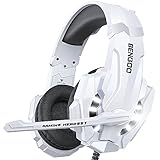
- 【Multi-Platform Compatible】Support PlayStation 4, New Xbox One, PC, Nintendo 3DS, Laptop, PSP, Tablet, iPad, Computer, Mobile Phone. Please note you need an extra Microsoft Adapter (Not Included) when connect with an old version Xbox One controller.
- 【Surrounding Stereo Subwoofer】Clear sound operating strong brass, splendid ambient noise isolation and high precision 40mm magnetic neodymium driver, acoustic positioning precision enhance the sensitivity of the speaker unit, bringing you vivid sound field, sound clarity, shock feeling sound. Perfect for various games like Halo 5 Guardians, Metal Gear Solid, Call of Duty, Star Wars Battlefront, Overwatch, World of Warcraft Legion, etc.
- 【Noise Isolating Microphone】Headset integrated onmi-directional microphone can transmits high quality communication with its premium noise-concellng feature, can pick up sounds with great sensitivity and remove the noise, which enables you clearly deliver or receive messages while you are in a game. Long flexible mic design very convenient to adjust angle of the microphone.
- 【Great Humanized Design】Superior comfortable and good air permeability protein over-ear pads, muti-points headbeam, acord with human body engineering specification can reduce hearing impairment and heat sweat.Skin friendly leather material for a longer period of wearing. Glaring LED lights desigend on the earcups to highlight game atmosphere.
- 【Effortlessly Volume Control】High tensile strength, anti-winding braided USB cable with rotary volume controller and key microphone mute effectively prevents the 49-inches long cable from twining and allows you to control the volume easily and mute the mic as effortless volume control one key mute.
Product prices and availability are accurate as of the date/time indicated and are subject to change. Any price and availability information displayed on Amazon at the time of purchase will apply.

