Connect the antenna’s coaxial cable to the TV’s ANT IN, VHF/UHF, or ANT/CABLE jack. Then select Antenna as the signal type in the TV’s channel settings and run a channel scan. The TV stores the broadcast stations it can receive; menu names vary by model.
How to connect an antenna to your TV coax input
-
Find the TV’s threaded coaxial jack, usually labeled ANT IN, VHF/UHF, or ANT/CABLE. Screw or push the antenna lead into the jack as appropriate and make sure the connection is secure. This sends the antenna signal to the TV’s tuner; it is not an HDMI connection.
As an Amazon Associate I earn from qualifying purchases.
-
Open the TV’s Settings, Home, or Menu, then look for Channels, Channel Setup, Signal Type, or a similar option.
The Tool Desk
Outbyte PC Repair FREERepair Windows errors before they cause bigger problemsFix Now →Outbyte Driver Updater FREEFix the driver behind crashes, sound loss and screen glitchesFind Drivers →Special offer. See more information about Outbyte and uninstall instructions. Please review EULA and Privacy policy. -
Set the signal type to Antenna rather than Cable. Sony’s instructions describe this selection as part of configuring over-the-air reception: Sony support: missing channels with an indoor antenna and Sony support: program or add channels.
#1 Best Overall
 Boobrie 2-Pack F-Type Coaxial Cable Connector RG6 Adapter F Female to F Female Antenna Connector RG6 Coax Cable Extender for TV Antenna, Nickel Plated
- RG6 F-Type coaxial connector for connecting 2 F-Pin cables and for extending the length of RG6 coaxial cables.
- RG6 F-Type Female coaxial couplers providing spare or replacement Adapters to use on different audio systems. Help you connect F male to F male connector or cable extension cord.
- BOOBRIE RG6 Female to Female Coaxial Connector can act as an adapter on a video or satellite box to convert a Coaxial male output into a a coaxial female output. And compatiblity with rg59 and rg6 coaxial cables.
- Compatible with Satellite (Including DIRECTV and Dish Network), Cable TV and Internet (including Comcast, Coax, and Charter), and Off-Air Antenna systems. Widely used in extending the connection of a cable box, TV, satellite receiver, VCR, cable modem, off-air antenna or other digital audio / video component settings, whether indoors or outdoors.
- Package included: 2 pieces RG6 F-type female to female cable connectors.
-
Choose the scan function. It may be named Auto Program, Program Channels, Channel Scan, or Digital Auto Tuning. Let the scan finish; it can take a few minutes. See Sony’s Android TV Auto Program instructions for one manufacturer example.
-
When the scan is complete, return to Live TV or the channel list and tune to a station the TV found.
Rank #2
 Ancable 75 Ohm to 300 Ohm Adapter Gold Plated, UHF/VHF/FM Balun Transformer
- Baluns Transformers: Converts transform 75-ohm coaxial connector cable wire to 300-ohm twin-lead.
- Ultra-High Quality: The surface is electroplated with real Gold, Improves transmission speed, reduces loss, reduces interference, resist oxidation and improves conductivity.
- Simply and Easy: With this adapter, you can make your own homemade antenna. Supports bandwidth 5-900MHz frequency HD TV UHF VHF FM antenna.
- Universal Compatibility: This matching transformer comes with Male "F " connector, Widely work with Radio, HiFI, AV Receiver, TV Antenna, and Mini system: Sangean Cambridge Audio One Pure Evoke Tivoli Audio Demon Roberts Sony Marantz Yamaha Hitachi hi-fi DAB Radio, etc
- 100% GUARANTEE! All Ancable products come with 103% No Questions Asked Guarantee for either a replacement or refund. We care about only putting out high-quality products that satisfy your needs.
The exact menu path depends on the TV model and software. If the labels differ, check the owner’s manual for the model-specific channel-scan instructions.
How to scan for local channels with an antenna
A channel scan tells the TV’s tuner to search for available broadcast stations and add them to its stored channel list. Run one after first connecting an antenna, after moving or turning the antenna, or when you want the TV to look for channels that were not included in an earlier scan. Manufacturer instructions may call the process Auto Program, Channel Scan, or another similar name. Sony’s guidance on new channels notes that a fresh scan may be needed to update the stored list.
Rank #3

- Quick & Secure Connections: Effortlessly connect/disconnect F-pin cables—perfect for RV, satellite, and cable TV setups. No tools needed for fast, reliable hookups.
- Universal Compatibility: Works with all coax cables (RG6), satellite dishes, antennas, and internet modems. Ideal for RVs, trailers, and home installations.
- Weather & Interference Resistant: Sealed flat-port design blocks moisture and reduces static/RF interference for crystal-clear signal quality.
- Premium Nickel-Plated: Durable, corrosion-resistant construction ensures strong signal retention and long-lasting performance.
- Convenient 3-Pack Value: Get 3 high-quality F-type connectors—perfect for multiple setups or backups. Hassle-free indoor/outdoor use.
The TV must have a built-in digital tuner to scan and store broadcast channels on its own. If the television is only a display and has no tuner, consult its manual to determine whether you need an external tuner. The FCC’s historical DTV transition guide illustrates the separate wiring role of a converter box with an analog TV; it is background rather than a current model-specific setup guide.
Independent reader supportYour contribution helps us test, update, and keep practical guides available for everyone.Why is my TV not finding channels from my antenna?
-
No channels found: Confirm the signal type is set to Antenna, check that the coaxial lead is seated, and run the scan again.
Rank #4
 RG6 Coax Quick Connector Quick Push On Male to F Female Adapter,2 Pack
- HIGH QUALITY: We have upgraded this Quick Push On Male to F Female Adapter, This F Type connector is a redesigned new model, the appearance is different from the market, the Quick Push plug there is to do an upgrade, Male side not easy to falling apart,you can check the designed of Quick Push On Male. and the material of our products is full copper, I studied the others review of the customer, the others connectors were falling apart easliy might be material is zinc alloy
- QUICK CONNECT&DISCONNECT: F Type Quick Connect Cable TV Connectors make your F-Pin cables easily connect and disconnect; great for quick hookups on RV cable and satellite cables.F-Pin Push-on Male to Female Connector, Easy Connect and Disconnect
- Applicable : Fits for Antenna, Satellite receiver,cable TV,RVers, Internet, RV Trailer, Coax Cable and so on. extremely low signal attenuation. Accommodates most Male F-Type connectors and wall plates for indoor settings alike.Commonly used on RG58, RG59, RG6, and RG11 coaxial (50Ohm) cable.
- Easy installation: Push on connector is quicker and easier than threaded connector, just pull and push, don't need screwing.
- Package Included: 2 x F-PIN push on male to F female RG6 Coax Cable Connector
-
Some channels are missing: Move or turn the antenna, then scan again. Reception depends on your location, antenna type, and placement, so there is no guaranteed channel count. Sony points viewers to AntennaWeb to check local station availability and antenna recommendations.
Special offer. See more information about Outbyte and uninstall instructions. Please review EULA and Privacy policy. -
The picture drops in and out: The TV may not be receiving a strong enough signal to maintain the picture. If you are using an indoor antenna, Sony suggests considering an outdoor antenna.
Best Value
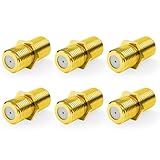 VCE RG6 Coax Cable Connector F-Type Female to Female Gold Plated 2 Pack
- Seamless Extension & Conversion: This coaxial cable extender extends RG6/satellite cables and converts male to female coaxial outputs
- Ultra-Compact Low-Profile Design: This female to female coaxial connector (0.36x0.82in) installs flush, avoids adjacent port conflicts, perfect for tight spaces
- Pure Copper Gold-Plated Durability: This coax coupler features solid pure copper core with full gold plating, providing excellent corrosion and oxidation resistance, stable in high-humidity and temperature-fluctuating environments
- High Shielding for Pristine 4K Video: This coaxial cable connector delivers 90-135dB EMI shielding, supports Full HD/3D/4K, compatible with DirecTV/Dish Network
- Tool-Free Install & Value 2-Pack: Quick hand-tightened installation. Includes 2 gold-plated cable connectors
-
A channel changed or a new station appeared: Run another scan so the TV can refresh its stored channel list.
-
Your menus do not match these labels: Use the manual for your exact TV model. Manufacturer menu paths can differ by model and software.
Quick Recap
Bestseller No. 1
Product prices and availability are accurate as of the date/time indicated and are subject to change. Any price and availability information displayed on Amazon at the time of purchase will apply.
Do these 3 things before closing this tab:
1Clear out junk files and repair common Windows errors2Fix the driver behind crashes, sound loss and screen glitches3Repair Windows errors before they cause bigger problems
