The quest players often call Tarkov’s “GPS tracker quest” is Following the Bread Crumbs, a Lightkeeper task. You do not need to buy or carry a real GPS device. The quest awards one Far-forward GPS Signal Amplifier Unit (GPSA) after you eliminate 20 Raiders, search two areas in The Lab, recover secured tape from the manager’s office, and deliver that tape to Lightkeeper.
The most common progression mistake is looking for the Lab search objectives before finishing the Raider objective. The two search tasks are exposed only after the 20 Raider eliminations are complete, so confirm the active objective list in Tarkov before assuming a marker is missing or the quest is broken.
As an Amazon Associate I earn from qualifying purchases.
What the “GPS tracker quest” actually is
“GPS tracker quest” is player shorthand, not the task’s listed name. The relevant Lightkeeper quest is Following the Bread Crumbs. Its reward is an in-game Far-forward GPS Signal Amplifier Unit, commonly abbreviated GPSA. That reward name is the source of the GPS terminology; it does not create a real-world equipment requirement.
Windows Errors? Fix Them Before They Spread
Repair common Windows errors and clear accumulated junk for a smoother, more stable PC - no reinstall needed.Free scan · no reinstallCrashes, No Sound, or Screen Glitches?
Random freezes, missing sound and display glitches usually trace back to one bad driver. Find and replace yours safely.Free scan · under a minuteThe available quest reference identifies five pieces of work, but they are not all visible at once. First, you must reach the Raider-elimination requirement. Only then do the two search objectives appear. After the searches, you recover a secured tape in the manager’s office and take it to Lightkeeper.
#1 Best Overall

- Custom made based on beanie from Escape from Tarkov
- A great gift for the holidays or to add to your Tarkov collection
- Perfect for raiding!
Exact prerequisites, access items, keycards, and a complete safe route are not established by the available references. Before committing a raid, open the quest in the client and use the current objective text and markers as the authority for your build and route.
Objective order and reward
| Order | Objective | What to verify |
|---|---|---|
| 1 | Eliminate 20 Raiders | Finish the full count before expecting the Lab search objectives. |
| 2 | Search the weapon-testing area in The Lab | This objective is listed after the Raider requirement is completed. |
| 3 | Search the human-experiment room in The Lab | This objective is also exposed after the Raider requirement. |
| 4 | Obtain the secured tape inside the manager’s office in The Lab | Confirm the tape pickup registers in the objective panel. |
| 5 | Bring the tape to Lightkeeper | Complete the hand-in through the current Lightkeeper interaction. |
| Reward | One Far-forward GPS Signal Amplifier Unit (GPSA) | This is the listed reward, not equipment required to start or finish the task. |
Before you enter a raid
Use the following preparation routine to avoid planning around objectives that are not active yet.
- Open the Lightkeeper task. Read the objective text currently shown in the client rather than relying on a remembered route or a community checklist.
- Check the Raider counter. If the elimination objective is incomplete, treat it as the current gate. The Lab search entries may not be displayed at all.
- Confirm the map and access requirements. The available quest data does not establish every prerequisite, keycard, or access item. Do not assume that a map marker proves you can enter an area.
- Plan for objective confirmation. After each search or pickup, verify that the task panel changed before extracting. A room visit without a registered search does not prove that the objective completed.
- Keep the tape objective distinct from the searches. Searching both locations and taking the secured tape are separate actions in the listed sequence.
This preparation matters because third-party maps and trackers can describe the intended task while your client reflects a different prerequisite state, a patch change, or an objective that has not unlocked.
Quick wins for a faster PC:
Scan for outdated or missing drivers - takes under a minuteDriver Scan →Clear out junk files and repair common Windows errorsFree Scan →Fix the driver behind crashes, sound loss and screen glitchesFind Drivers →Step 1: Eliminate 20 Raiders
The first listed requirement is a total of 20 Raider eliminations. The available reference does not establish a single definitive map, spawn pattern, or route for earning that count, so do not treat an assumed location as guaranteed. Use the active quest panel and the current raid conditions to determine where your eliminations will count.
Rank #2

- Card's inspiration comes from Game, high similarity to the original.
- The cards is made of PVC.And all cards have a card holder to protect them.
- Excellent material and thickness.A great replica!
- Best choice for game fans,halloween cosplay prop and even cards collectors.
- Include:7pcs cards
Track the count deliberately
- Check the objective counter before entering a raid.
- After a confirmed Raider kill, allow the counter to update before leaving the area or extracting.
- Record your remaining count externally only as a convenience; the client’s count is the authoritative value.
- If a kill does not advance the counter, stop planning the next stage until you understand whether the target was actually a Raider and whether the task is active.
Do not search for Lab markers too early
The two Search objectives appear after the 20 Raider eliminations are completed. If you have only the elimination entry, that is expected progression, not evidence that the Lab portion is missing. Finish the count, return to the task screen, and then re-open the objective list.
Step 2: Confirm the Lab searches have unlocked
Once the Raider requirement is complete, check the quest again. The weapon-testing area and human-experiment room should now be represented as separate Search objectives. Treat each as its own checkpoint.
If the entries do not appear immediately, refresh your view of the task, verify that the elimination counter reached 20, and check the client’s current quest state. Avoid substituting a community map’s full list for the objective text shown in your game.
The Tool Desk
Outbyte Driver Updater FREEFix the driver behind crashes, sound loss and screen glitchesFind Drivers →Outbyte PC Repair FREERepair Windows errors before they cause bigger problemsFix Now →Step 3: Search the weapon-testing area in The Lab
The first Lab search is the weapon-testing area. The objective wording identifies the destination, but the available material does not establish a precise room number, route, or access item. Use the in-game marker and the current Lab layout rather than a stale screenshot.
Rank #3
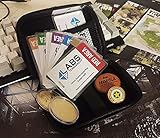
- Brand: Zhipengwen
- Included components: Cards
- Quantity: 1
- Enter The Lab only after the weapon-testing search is visible in your active objectives.
- Navigate to the area identified by the client’s marker or objective description.
- Perform the game’s search interaction in the designated area; merely passing through the room may not register the task.
- Wait for the objective panel to update before moving on.
If the search does not complete, leave and re-enter the interaction area, verify that the objective is active, and check whether the client displays a more specific interaction prompt. Do not assume that every nearby laboratory room belongs to the weapon-testing objective.
Step 4: Search the human-experiment room
The second Lab search is the human-experiment room. It is a separate objective even if both locations are visited during one raid.
- Confirm that the weapon-testing objective has registered, then select the human-experiment objective in the task panel.
- Follow the current marker or text to the designated room.
- Complete the search interaction rather than simply entering the room.
- Wait for the client to mark the objective complete before attempting the tape pickup.
The order of the two searches is not specified beyond their appearance after the Raider requirement. If your client presents a particular sequence or marker, follow that live state.
Free tools Windows power users keep installed
One-click scans. No signup required.
Step 5: Obtain the secured tape in the manager’s office
After the search objectives, the listed task requires you to obtain secured tape inside The Lab’s manager’s office. This is a recovery objective, not another generic search entry.
Rank #4
![TOP CUSTOMS Escape from Tarkov - Tagilla Figurine Replica [Updated Packaging]- Collectible Figurine Statue- FactoryBoss - Gift Idea - Gamers](https://m.media-amazon.com/images/I/41EZSWsEqsL._SL160_.jpg)
- Exclusive Top Customs design – crafted to closely resemble Tagilla’s in-game appearance with premium attention to detail
- Made from durable hard PVC, NOT 3D printed, using high-quality injection molding for a clean, professional finish
- Perfect for collection and display alongside your Tarkov gear or gaming setup!
- Ideal gift for your squadmates, friends, boyfriends/girlfriends
- A must-have for Tarkov fans. Whether you’re messing around in the hideout or building the ultimate 'Chad' loadout, this collectible hits hard.
- Open the quest panel and verify that the secured-tape objective is active.
- Use the client’s marker and current Lab access information to reach the manager’s office.
- Locate the secured tape and complete the pickup interaction.
- Confirm that the objective changes to the delivery step before extracting or changing plans.
The available references do not establish a specific keycard, lock state, spawn position, or guaranteed route to the office. If the office is inaccessible, check the live objective requirements and any current access instructions instead of assuming that a remembered route still applies.
Step 6: Bring the tape to Lightkeeper
The final listed objective is to bring the secured tape to Lightkeeper. The tape must be obtained first; visiting Lightkeeper without the registered item does not satisfy the hand-in step.
- Confirm that the task panel shows the delivery objective and that the tape pickup registered.
- Reach Lightkeeper using the current access and route information available in your client.
- Use the Lightkeeper interaction to hand over the tape.
- Wait for the completion state and reward confirmation before treating the quest as finished.
Completion awards one Far-forward GPS Signal Amplifier Unit. Because it is listed as the reward, it should not be confused with a required GPS receiver, tracker, or other real-world device.
Common objectives mistakes and their fixes
| Mistake | Why it happens | Fix |
|---|---|---|
| Searching The Lab before killing 20 Raiders | The full quest chain is visible in some guides or trackers, while the client reveals objectives progressively. | Complete the Raider counter first, then reopen the task and look for the two Search entries. |
| Calling the task a GPS quest and buying GPS hardware | The reward’s name suggests a physical tracking device. | Use the official task name, Following the Bread Crumbs; GPSA is an in-game reward. |
| Treating a map marker as proof of access | Community maps can show a destination without reflecting your current prerequisites or locked areas. | Confirm access requirements and active objectives in Tarkov. |
| Counting a room visit as a completed search | Search objectives require the game’s interaction and a state update. | Perform the search interaction and wait for the objective panel to change. |
| Leaving after taking the tape without checking the hand-in step | The pickup and delivery are separate objectives. | Verify that the task has advanced to “Bring the tape to Lightkeeper.” |
| Assuming community data is live game state | Unofficial tools can lag patches or depend on incomplete data. | Use those tools for orientation only and treat the client as authoritative. |
How to use optional web tools without being misled
Two types of community utility are relevant: a map locator and a quest tracker. They solve different problems and are not substitutes for the in-game objective panel.
Best Value

- Exclusive Top Customs design - Inspired by the iconic Customs boss from Escape from Tarkov, this Reshala figurine is designed for fans who want a piece of Tarkov on their shelf.
- Made using durable PVC injection molding for consistent detail and a clean finish — not 3D printed.
- Stands approx. 9 cm (3.54 inches) tall, ideal for desks, shelves, gaming setups, or collector displays.
- A unique collectible for Tarkov players, streamer fans, or anyone building a Tarkov-themed collection.
| Tool type | Useful for | Data or behavior described by its site | Limit |
|---|---|---|---|
| Map locator | Finding task locations, viewing markers, and orienting yourself in a map. | Tarkov GPS provides task and objective search, map markers, and a player-position display after you select the game screenshots folder. | It is a web utility, not an in-game GPS feature. Its markers do not prove that your quest stage or access state matches the map. |
| Quest tracker | Organizing broader progression and quest-item status. | Tarkov App presents a quest-item tracker and describes storing progress locally in the browser. | It is optional organization; the quest’s actual completion state remains the client’s objective panel. |
| Patch-oriented map updates | Checking whether a community map has announced recent changes. | TarkovHead reported updated side-quest data for patch 1.1.0.0 and GPS-based player-position tracking on its Icebreaker map on August 14, 2026. | That notice describes the website’s features, not a change to Tarkov’s in-game GPS mechanics. |
Use a locator when you need orientation and a tracker when you need organization. Neither tool establishes exact prerequisites, guarantees current markers, or replaces the game’s own completion events. Tarkov App also states that its data depends on the availability of unofficial data, which is another reason to verify every critical step in the client.
Troubleshooting when an objective appears stuck
The Lab searches are not listed
- Check whether the Raider count is exactly 20 and registered.
- Refresh the task view and reopen Following the Bread Crumbs.
- Confirm that you are viewing the active Lightkeeper task, not a similarly named entry.
- Do not infer a bug from a map that shows later objectives before your client unlocks them.
A search does not register
- Verify that the correct Search objective is active.
- Move to the specific area identified by the marker or current text.
- Complete the interaction and wait for the objective panel to update.
- If the state still does not change, leave the area, recheck the task after the raid, and confirm whether a patch or prerequisite changed the objective.
The tape is not available or cannot be handed in
- Make sure both Lab searches are marked complete.
- Confirm that the tape pickup itself registered; being inside the manager’s office is not enough.
- Check that the task has advanced to the Lightkeeper delivery step.
- Use current client instructions for access and hand-in conditions, because the available quest references do not establish every keycard or route requirement.
The reward is not visible
Wait for the Lightkeeper hand-in to complete and for the task state to refresh. The listed reward is one Far-forward GPS Signal Amplifier Unit; it is not an item you need to bring to the quest.
What is and is not confirmed about routing
The objective sequence is clear, but the available references do not support a guaranteed raid-by-raid route. They do not establish the exact Raider map, all prerequisites, required keycards, access consumables, or a universally safe path through The Lab. Those details can change with patches and server conditions.
What’s actually slowing this PC down?
Pick the symptom - the matching free tool is one click away.
A reliable route therefore has two parts: use the live client to determine what is currently active and accessible, then use a community map only to reduce navigation time. If the two disagree, prioritize the client’s objective text, counter, interaction prompt, and completion state.
Printable completion checklist
- Open Following the Bread Crumbs under the Lightkeeper tasks.
- Verify the current Raider counter and eliminate 20 Raiders.
- Reopen the task and confirm that the Lab search objectives are now visible.
- Search the weapon-testing area in The Lab.
- Search the human-experiment room in The Lab.
- Obtain the secured tape inside the manager’s office.
- Confirm the task has advanced to the Lightkeeper delivery step.
- Bring the tape to Lightkeeper and wait for completion.
- Collect the listed Far-forward GPS Signal Amplifier Unit reward.
Keeping the guide accurate across patches
Quest references and third-party tools are community-maintained and can lag behind a game update. A site announcement about GPS-style player-position tracking describes that site’s interface, not a new in-game GPS mechanic. Before a difficult raid, compare any map or checklist with the current task text, objective order, markers, and interaction prompts in your client.
Quick Recap
Product prices and availability are accurate as of the date/time indicated and are subject to change. Any price and availability information displayed on Amazon at the time of purchase will apply.

