Do these 3 things before closing this tab:
1Scan for outdated or missing drivers - takes under a minute2Repair Windows errors before they cause bigger problems3Fix the driver behind crashes, sound loss and screen glitchesThe most useful DIY home security setup is a mix of devices chosen for the risks they address: an alarm hub and entry sensors for opening doors and windows, a camera or video doorbell for remote viewing, and physical measures such as locks and security lighting. Add interconnected smoke alarms as a separate fire-safety layer. No single gadget guarantees that a break-in will be prevented, and the right combination depends on your home, budget, privacy preferences, and whether you want paid monitoring.
Which DIY security gadgets do what?
Start with the job each device is meant to do. Home security systems can combine intrusion alerts with video, remote control, emergency notifications, and monitoring for hazards such as smoke, carbon monoxide, or water, but features differ by system. The Federal Trade Commission (FTC) recommends checking what a system actually includes rather than assuming every kit offers the same protection: FTC guidance on choosing a home security system.
As an Amazon Associate I earn from qualifying purchases.
| Device category | What it can do | What to compare |
|---|---|---|
| DIY alarm hub and entry sensors | Detect and report the opening of protected doors or windows; coverage and functions vary by kit. | Included sensors and coverage, installation, backup power, app access, optional monitoring fees, alarm response process, contract and cancellation terms. |
| Outdoor camera or video doorbell | Let you view or record an exterior area remotely. | Encryption, update support, account security, privacy controls, viewing permissions, storage terms, and whether you can disable remote viewing. |
| Locks and security lighting | Provide physical access control and improve visibility around the home. | Fit, installation, inside access, lighting coverage, and local requirements. CISA includes locks, keys, alarms, lights, and CCTV among residential security measures to consider: CISA Personal Security Considerations Action Guide. |
| Interconnected smoke alarms | Provide a fire-warning layer; they are not intrusion detectors. | Interconnection, sensor type, power source, placement, local requirements, and maintenance. |
How to choose an alarm kit and monitoring
Compare the kit’s actual coverage with the doors and windows you want protected. Check whether the hub has backup power, what happens when an alarm triggers, and whether the response is handled by you, your contacts, or a paid monitoring service. Hardware, app features, cloud storage, and professional monitoring may be separate offerings, so read the written terms for each.
PC Slower Than It Used to Be?
A free scan shows the junk files, broken settings and background clutter dragging Windows down - then fixes them in one click.Free scan · Windows 10 & 11Outdated Drivers Are Slowing You Down
One free scan finds every outdated or missing driver and matches the right update for your exact hardware.Free scan · exact hardware match- Confirm which sensors are included and whether additional sensors are needed for your planned coverage.
- Ask about backup power and what functions remain available during an outage.
- Find out whether monitoring costs extra, how responders are contacted, and whether local alarm registration or false-alarm rules apply.
- Read the contract length, warranty, repair terms, cancellation process, and any conditions attached to promotional or “free equipment” offers.
- Take time to review the paperwork rather than deciding under pressure. The FTC discusses these questions and sales tactics in its home-security system shopping guidance.
How to choose and secure a camera
A camera can help you check an exterior area, but it also creates a route into your home’s privacy if its account, network, or device is poorly secured. Prefer products with encryption, a clear update-support policy, strong account protections, and controls over who can view or share footage. Avoid placing cameras where they may capture private rooms or intimate activity. The FTC’s camera security guidance recommends reviewing these protections before purchase.
#1 Best Overall

- AI Motion Detection 2.0 – Driving AI to the next level, human&vehicle detection and flexible detection area are more accurate than before. For quicker locating in crucial moments, human&vehicle smart searching in recordings offers you great help.
- Tried-and-True Safe Guard – This one-stop security solution can work with TVI, AHD, CVI, CVBS & IP cameras, the kit includes 1080P cams. The 8CH 3K lite DVR can hook up with 1080P@30fps or 3K/5MP@20fps cams. Therefore, you can also DIY it with other cameras in your home.
- Reliable 24/7 Continuous Recording – With a pre-installed 1TB HDD(Support up to 10TB HDD), providing 24/7 surveillance recording for you. Upgraded H.265+ saves more storage space and uses less bandwidth, recording videos longer and smoother viewing.
- Smart Dual-Light Effectively Guard Your Home – This newly upgraded security system offers you a crisp full color night vision, IR mode and color night vision switch flexibly. Once detect intruders, immediate pushes pop up on your phone, securing your peace of mind day&night.
- Color Night Vision & IP67 Weatherproof – Built-in IR lights and white lights, these cameras can see up to 100ft in B&W night vision, full-color night vision up to 66ft. Rated IP67, these wired cameras can brave all weather, and stand from cold to hot.
Secure the camera account and network
- Change default usernames and passwords; use a strong, unique password for the camera account.
- Turn on two-factor authentication when the service offers it.
- Keep the camera’s firmware and companion app current.
- Review household access and sharing permissions, and remove people who no longer need access.
- Disable remote viewing if you do not need it, and use the camera’s privacy controls when appropriate.
- Change the router’s default login, install router firmware updates, and turn off remote management if you do not use it. The FTC covers these steps in guidance for securing internet-connected devices at home.
Where smoke alarms fit in a DIY setup
Smoke alarms address fire, not intrusion, and belong in a distinct home-safety plan. The U.S. Fire Administration (USFA) recommends alarms in every bedroom, outside each sleeping area, and on every level of the home. Interconnected alarms sound together when one detects smoke. USFA advises: “Choose interconnected smoke alarms so that when one sounds, they all sound.” Check local requirements with your fire marshal, particularly when choosing alarm types.
USFA lists starting costs of $6 and up for ionization or photoelectric alarms, $24 and up for dual-sensor alarms, $30 and up for models with a microprocessor, and $40 and up for wireless/radio-frequency models. These are USFA’s listed starting costs on its page reviewed September 28, 2026, not a current retailer price survey. It says alarms should be replaced 10 years from their manufacture date and notes that occupants may have less than two minutes to escape once an alarm sounds. Follow the agency’s guidance on power, testing, and maintenance at USFA’s smoke alarm page. For hardwired models, USFA says: “Only qualified electricians should install hardwired smoke alarms.”
Quick Recap
Best Value

- A great fit for 2-4 bedroom homes, this Alarm Kit includes one Base Station, two Keypads, eight Contact Sensors, two Motion Detectors, and one Range Extender.
- Includes an intuitive Keypad that can arm and disarm your Alarm and Contact Sensors that detect when doors or windows open.
- Choose the Ring Alarm Kit that fits your needs and detect even more with additional Alarm Sensors and accessories (sold separately) at any time.
- Receive mobile notifications when your system is triggered and monitor all your Ring devices all through the Ring app.
- More peace of mind. Subscribe to a compatible Ring Protect Plan (sold separately) to Arm your Alarm from anywhere, keep your system online if the Wi-Fi goes down, and more. Plus, get 24/7 Professional Monitoring for emergency police, fire and medical response, and more.
Rank #4

- 4K UltraHD Video Quality: Capture stunningly clear footage with real 4K resolution at 15FPS and a wide 120° field of view.
- Can Be Placed Anywhere The Zetronix Atom 4K Self-Install Covert Camera Kit is a tiny, powerful, and versatile device. Its compact size allows you to discreetly place it inside any ordinary object in your home, office, or garage.
- Ultimate Body Camera The Zetronix Atom 4K comes with 8 several-button attachments to let you record natural surveillance in 4K without raising any suspension from your subjects
- Extended Battery Life: The 2000mAh removable battery provides 4-5 hours of recording time on a single charge, perfect for prolonged monitoring.
- Expandable Storage: Supports micro SD cards up to 256GB (not included) to store hours of footage in high definition.
Rank #3
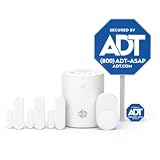
- 30 Days Free Monitoring with paid subscription: No long-term contracts, cancel anytime. Choose month-to-month monitoring plan options, including Self-Protect or Pro-Protect, which provides 24/7 pro monitoring.
- Help protect every entry point: includes the 1 base hub, 3 door/window sensors, 1 pet-friendly motion sensor, 1 yard sign, and 4 window stickers so you can secure key entry points the moment you unbox.
- Install in minutes: mount with screws or adhesive tape, no heavy tools or wiring required, then follow guided setup in the ADT+ app. Renter-friendly and homeowner-approved.
- Arm and disarm from just about anywhere: control your full security system from the ADT+ app and get real-time phone alerts the moment a door or window sensor is triggered.
- Grows with your home: start with this kit and add indoor cameras, outdoor cameras, doorbell cameras, glass break sensors, and more. Ideal apartment security system that scales as you do.
Rank #2

- A great fit for 1-2 bedroom homes, this kit includes one base station, one keypad, four contact sensors, one motion detector, and one range extender.
- Includes an intuitive Keypad that can arm and disarm your Alarm and Contact Sensors that detect when doors or windows open.
- Choose the Ring Alarm Kit that fits your needs and detect even more with additional Alarm Sensors and accessories (sold separately) at any time.
- Receive mobile notifications when your system is triggered and monitor all your Ring devices all through the Ring app.
- More peace of mind. Subscribe to a compatible Ring Protect Plan (sold separately) to Arm your Alarm from anywhere, keep your system online if the Wi-Fi goes down, and more. Plus, get 24/7 Professional Monitoring for emergency police, fire and medical response, and more.
A practical order for building coverage
- List the openings and areas you need to cover. Note which doors and windows should trigger an alert and which exterior areas would benefit from a camera or lighting.
- Choose an alarm kit around its included coverage. Verify sensor count, backup power, app functions, and response steps before deciding whether the kit fits.
- Decide whether you want paid monitoring. Compare the recurring cost and written service, cancellation, and warranty terms with a self-managed alert setup.
- Add cameras selectively. Check privacy and security controls before placing cameras, and limit viewing and sharing access to people who need it.
- Strengthen physical measures. Check locks, keys, and lighting for suitable fit, installation, and access from inside.
- Complete the fire-safety layer separately. Place and maintain interconnected smoke alarms according to USFA guidance and local requirements.
Product prices and availability are accurate as of the date/time indicated and are subject to change. Any price and availability information displayed on Amazon at the time of purchase will apply.
Recommended Free Tools

