Quick wins for a faster PC:
Scan for outdated or missing drivers - takes under a minuteDriver Scan →Clear out junk files and repair common Windows errorsFree Scan →Fix the driver behind crashes, sound loss and screen glitchesFind Drivers →Choose the SCUF Omega if you want the greatest number of physical control points and Bluetooth support. Choose the Razer Raiju V3 Pro if you prefer removable mouse-click back buttons, supplied alternate stick caps, trigger stops, a longer stated battery estimate, and published PC polling figures. Both are officially licensed PS5 performance controllers without haptic feedback, and the available evidence does not establish a universal winner for comfort, accuracy, latency, or durability.
SCUF Omega vs. Razer Raiju V3 Pro at a glance
These controllers target the same buyer: a PS5 player who wants more inputs and competitive controls than a standard DualSense provides. Their layouts and connection options are different enough that the right choice depends on how you play rather than on a single performance ranking.
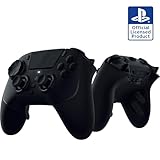

As an Amazon Associate I earn from qualifying purchases.
| Category | SCUF Omega | Razer Raiju V3 Pro | What the difference means |
|---|---|---|---|
| Additional controls | Four rear paddles, two side buttons and five G-Keys; 11 additional inputs in total. In PS5 mode, only G1 and G5 are remappable. | Four removable, multi-function mouse-click back buttons and two claw-grip bumpers. | Omega offers more physical input locations; Raiju uses a more focused rear-button and bumper arrangement. |
| Connections | Wired USB-C, 2.4 GHz wireless dongle and Bluetooth. | Wired USB-C and 2.4 GHz wireless dongle. | Bluetooth gives Omega broader device flexibility. |
| Stick system | SCUF says the thumbsticks and faceplates are swappable. | TMR sticks with replaceable caps; alternate caps and button covers are supplied. | Both offer some physical customization, but the replacement systems are not identical. |
| Battery figure | Around 17 hours, as reported by TechRadar in 2026. | Up to 36 hours, according to Razer. | These figures come from different sources and methods, so they are not a controlled head-to-head result. |
| Haptics and wake | No haptic feedback in SCUF’s comparison documentation. | No haptic feedback; Razer says the controller cannot wake a PS5 from sleep. | Neither is a DualSense replacement for haptic effects. Raiju owners must use the console button or another controller to wake the PS5. |
| Reference price | $219.99 / £209.99 in TechRadar’s June 2026 review. | $219.99 / £199.99 in the same review. | These are dated regional review prices, not guaranteed current offers. |
What the SCUF Omega actually gives you
Eleven extra inputs, but not eleven freely programmable PS5 functions
SCUF and the PlayStation Blog describe the Omega as having 28 total inputs, including 11 additional customizable inputs. The extra hardware consists of four rear paddles, two side buttons and five G-Keys. That total is useful when comparing the amount of physical control available, but it should not be read as 11 independently remappable controls in every mode.
Do these 3 things before closing this tab:
1Clear out junk files and repair common Windows errors2Scan for outdated or missing drivers - takes under a minute3Repair Windows errors before they cause bigger problemsSCUF’s manual specifies that, in PS5 mode, only G1 and G5 are remappable. Other G-Keys have fixed functions. The four paddles and side buttons still provide additional places to assign or trigger supported actions, but the exact mapping depends on the controller’s mode and software. Check the current manual before buying if a particular game command must be assigned to a particular button.
Three ways to connect
The Omega supports a wired USB-C connection, a 2.4 GHz wireless dongle and Bluetooth. That combination is the clearest reason to favor it when the same controller will move between a PS5, a computer and mobile devices. SCUF’s product announcement says the Omega is compatible with PS5 consoles, PC, Mac, iOS and Android.
SCUF’s manual documents testing on PS5 CFI-1000, CFI-2000 and CFI-7000 series hardware. That is useful coverage of the PS5 families identified in the manual, although firmware, regional bundles and future console revisions can change. Keep the dongle and USB-C cable available for initial pairing and troubleshooting even if Bluetooth is your preferred everyday connection.
Swappable parts
SCUF’s FAQ says the Omega’s thumbsticks and faceplates are swappable. This lets you change the physical feel or replace a worn part without replacing the entire controller. Swappable parts do not guarantee immunity from stick drift, and the available information does not establish a durability advantage over the Razer design.
What’s actually slowing this PC down?
Pick the symptom - the matching free tool is one click away.
What the Razer Raiju V3 Pro adds
Removable mouse-click rear buttons and claw-grip bumpers
Razer documents four removable, multi-function back buttons with a mouse-click actuation style, plus two claw-grip bumpers. The back buttons are intended for rapid presses while your thumbs stay on the sticks. Their removability matters if you prefer a less crowded rear shell for a particular game or grip.
The two claw-grip bumpers create another pair of reachable controls without relying on the four rear buttons. This is a different design priority from Omega’s five G-Keys: Raiju gives you six clearly described auxiliary controls, while Omega provides more total physical input points but has PS5-mode restrictions on several G-Keys.
Trigger-stop switches and TMR sticks
Trigger-stop switches shorten the trigger travel for games where a quick digital-like press is useful, such as shooters. For racing or other games that need gradual acceleration and braking, the full trigger range is usually more appropriate, so set the switches according to the game rather than leaving them in one position permanently.
The Raiju uses TMR sticks with replaceable caps. Razer includes alternate stick caps and button covers, allowing you to change the contact shape and replace selected external pieces. TMR is a component description, not proof that drift, wear or calibration problems can never occur; no independent durability or drift test for these two controllers was established.
Published polling figures
Razer lists 250 Hz wireless polling on PS5 and 2,000 Hz wired polling on PC. These are manufacturer specifications for the stated connection and platform, not an independent latency comparison with the Omega. A higher polling figure on a PC connection should not be treated as evidence that the Raiju will feel faster on PS5 in every game.
Connection and platform choice
When Omega’s Bluetooth matters
Bluetooth is the practical differentiator if you want one controller for PS5 and non-console devices without using a dedicated 2.4 GHz receiver each time. Omega’s stated compatibility includes PC, Mac, iOS and Android, in addition to PS5. For competitive PS5 play, you can still use the wired USB-C connection or the supplied 2.4 GHz path when you want the documented console connection options.
When Raiju’s simpler connection set is enough
Razer documents wired USB-C and 2.4 GHz dongle operation. If the controller will stay on a PS5 and a single PC, the lack of Bluetooth may not matter. Fewer connection modes can also make your setup easier to remember: select wired operation or the dongle, then keep the receiver connected to the target device.
Rank #3

- 4 Removable Mouse Click Back Buttons & 2 Claw Retention Buffers 6 - Resealable Buttons to Leave them All Behind - Enjoy the same ultra-fast responsive activation found in our top gaming mice with 4 removable buttons built in the ergonomic, rubberized handles; plus with 2 claw retention pads for added control.
- Symmetrical TMR Thumbsticks with Interchangeable Head - Designed for Pixel-Excellence Accuracy: Take the edge by laser sharp aiming using anti-skid magnetic TMR finger sticks that are fine-tuned, engineered for ultimate accuracy for ultimate control in game.
- Razer Pro HyperTriggers - Instant Response with Lightning Speed Mouse Click Triggers: Challenge your competitors with clear, fast clicks or enable full analog control for long, sensitive shots. Adjust each trigger individually to your needs; all with one button movement.
- Razer Mecha-Tactile PBT Action Buttons and 8-Way Motion D-Pad - Ultra-Fast Movements with Tactile Feedback: Combining the speed of micro switches with cushioning of a rubber membrane, compete with clickable and responsive buttons that are comfortable to press and hold in heavy use.
- Razer HyperSpeed Wireless - Latency-Free, Esports Class Performance: Provides ultra-low-latency 2.4GHz connectivity, experience a fast and reliable performance that meets the demands of the most intensive competitive gamers on PlayStation 5.
Pairing and troubleshooting checklist
- Connect the controller by USB-C first when configuring it or updating any required software.
- For wireless play, place the correct 2.4 GHz receiver where it has a clear path to the controller and console or PC.
- If Omega is paired to another Bluetooth device, disconnect that device before troubleshooting PS5 wireless behavior.
- Verify that the controller is in the intended PS5, PC or mobile mode before judging a missing button assignment.
- Test every rear, side or bumper control in the actual game after mapping; a physical input can exist without being freely remappable in the selected mode.
Battery life: a claim, not a head-to-head result
Razer states up to 36 hours of battery life for the Raiju V3 Pro. TechRadar’s 2026 coverage lists around 17 hours for the Omega. The numbers should be read with their qualifications: one is a manufacturer’s “up to” estimate and the other is review-reported context, and neither source describes a controlled test using identical brightness, polling, wireless mode, headset use and play conditions.
If you regularly play long sessions away from a cable, Raiju’s stated figure is the more favorable specification. If you normally play wired or charge between sessions, battery capacity should carry less weight than the control layout and connection type. Do not convert the two figures into a precise percentage advantage.
PS5 features you give up compared with DualSense
No haptic feedback
Neither controller offers haptic feedback. Games that use the DualSense’s detailed vibration effects will not reproduce those effects through the Omega or Raiju. Adaptive-trigger behavior is not established as a feature in the supplied product information either, so buy these as performance-control alternatives, not as full feature replacements for a DualSense.
Raiju cannot wake the console from sleep
Razer’s FAQ states that the Raiju V3 Pro cannot wake a PS5 from sleep. You will need to press the console’s power button or use another controller that can wake it. This limitation is easy to overlook because the Raiju can operate normally after the PS5 is awake.
Price, warranty and availability checks
TechRadar’s June 2026 review placed both controllers in the premium tier at $219.99 in the United States. Its listed United Kingdom prices were £209.99 for the Omega and £199.99 for the Raiju V3 Pro. Those are dated review prices, not live quotes, and stock, bundles, warranty terms and regional model numbers can change.
Windows Errors? Fix Them Before They Spread
Repair common Windows errors and clear accumulated junk for a smoother, more stable PC - no reinstall needed.Free scan · no reinstallOutdated Drivers Are Slowing You Down
One free scan finds every outdated or missing driver and matches the right update for your exact hardware.Free scan · exact hardware matchRank #4

- ----Before You Play----The first time Charging the controller, you may need to POKE THE RESET BUTTON to get the charging started. CAUTION: In some specific version of your console, you may need to plug in a headphone to activate vibration, Mic and speaker.
- 【Wide Compability 】This pS-5 controller supports P5, PS-5 slim and PS-5 pro, Windows PC, iOS, Android and Mac, NOT compatible with PS-4
- 【Hall Effect Sticks and Trigger】Enjoy precised control and drift free gaming experience with our Hall Effect ps-5 controller. Without any physical contact, the joystick provides a massively long life span with consistancy and reliability.
- 【Surrounding Tape Light RGB】Tape light RGB surrounding the whole controller covered in clear shell gives a personal vibe. Switch between 5 different modes and 3 brightness level. Press the light button to change lighting mode, press touch pad + joystick up or down to change brightness
- 【Large Battery Capacity】The built in 1500 mAh battery is solid on long game sessions, A single session can lasts more than 10 hours and takes only 2~3 hours to be fully charged.
- Check the current price in your country rather than converting the figures above.
- Confirm that the listing is the PS5-compatible model and includes its wireless receiver, alternate parts and required cable.
- Read the return policy before opening the package, particularly if you are unsure about rear-button reach or trigger-stop feel.
- Compare the seller’s warranty terms with the manufacturer’s current support policy.
How to choose in six steps
- Count the controls you will genuinely use. Choose Omega if four paddles, two side buttons and the G-Key area match your intended mappings. Choose Raiju if four removable click back buttons and two claw-grip bumpers are enough and you prefer that arrangement.
- Decide whether Bluetooth is required. Omega is the only one of the two with documented Bluetooth support. If your setup is PS5 plus PC or mobile devices, that can outweigh other differences.
- Choose your stick and trigger priorities. Raiju supplies alternate caps, TMR sticks and trigger stops. Omega offers swappable thumbsticks and faceplates. Select the system whose physical options match your grip and games.
- Set a realistic battery expectation. Treat “up to 36 hours” and “around 17 hours” as source-specific estimates, not a laboratory comparison. Prioritize battery only if you often play wirelessly for long periods.
- Accept the PS5 feature trade-off. If haptic feedback or waking the console from sleep is essential, neither controller is a complete fit; Raiju has the additional documented wake limitation.
- Verify the live deal and return terms. Prices and availability change. A return option is valuable when the final decision depends on whether the rear controls suit your hand.
Best fit for common PS5 scenarios
Warzone, Apex Legends and other competitive shooters
For a shooter player who wants to keep both thumbs on the sticks while jumping, crouching, reloading or changing weapons, either layout can help. Omega is the better match if you already know you need many distinct physical inputs and can work within its PS5-mode remapping limits. Raiju is the better match if you favor clicky back buttons, claw-grip bumpers and short trigger travel.
Neither controller should be labeled the objectively more accurate or lower-latency option. The supplied evidence contains no controlled comparison of aim accuracy, input latency or comfort.
Mixed PS5, PC and mobile use
Omega’s documented Bluetooth support and compatibility with PS5, PC, Mac, iOS and Android make it the more flexible single-controller choice. Raiju remains suitable when your devices support its wired or 2.4 GHz setup and you do not need Bluetooth.
Long wireless sessions
Raiju has the stronger published battery estimate, at up to 36 hours from Razer. Omega’s around-17-hour figure from TechRadar may still be sufficient for many sessions, especially if you charge between uses, but the two values were not measured under matching conditions.
Players who want to customize appearance and feel
Omega’s swappable thumbsticks and faceplates appeal to players who want replaceable exterior parts. Raiju includes alternate stick caps and button covers and uses replaceable TMR stick caps. Compare the exact parts included in the regional package before assuming that a preferred shape or color is supplied.
What is not established by current evidence
- There is no independent, controlled Omega-versus-Raiju test proving a winner for comfort, accuracy, latency, durability or battery life.
- Manufacturer polling and battery figures are specifications or estimates, not equivalent laboratory measurements.
- More physical buttons do not automatically mean faster play; reach, accidental presses and the mappings supported by your game matter.
- Swappable sticks and TMR components do not constitute a guarantee against drift or long-term wear.
SCUF Director of Product Marketing Jake Tenorio described the Omega in the PlayStation Blog announcement as: “Building on 15 years of pro player insights and controller designs, meet Scuf Omega, a new performance controller that is officially licensed for PlayStation 5 consoles and compatible with PS5 consoles, PC, Mac, iOS, and Android.” That is SCUF’s product statement and should not be treated as independent validation of competitive performance.
Final recommendation
Buy the SCUF Omega when your decision centers on the largest number of physical control points or on Bluetooth and broad device compatibility. Buy the Razer Raiju V3 Pro when removable mouse-click back buttons, claw-grip bumpers, supplied alternate caps, trigger stops, the longer stated battery estimate and published PC polling specifications matter more. Both are credible premium PS5 performance-controller choices, but neither has evidence here to justify a universal comfort, accuracy, latency or durability verdict.
Quick Recap
Product prices and availability are accurate as of the date/time indicated and are subject to change. Any price and availability information displayed on Amazon at the time of purchase will apply.

