The best wall bracket for a 32-inch TV is the one that matches your television’s exact VESA hole pattern and stand-free weight, supports your wall construction, and provides the movement you actually need. A 32-inch label is only an initial filter; it does not prove that a bracket fits.
Before buying, record the TV model, measure the horizontal and vertical spacing between its mounting holes, weigh the television with its stand removed, and compare both figures with the bracket’s published limits. Then choose fixed, tilting or full-motion hardware according to viewing position, glare, clearance and the fastening method allowed by the installation manual.
As an Amazon Associate I earn from qualifying purchases.
Start with the television, not the screen-size label
Manufacturers group brackets by diagonal screen size because it is convenient, but compatibility is determined by the mounting interface and load rating. Two televisions that are both 32 inches can have different hole spacing, different weights and different rear-panel shapes. A bracket advertised for 32-inch sets can still be unsuitable for your particular model.
Windows Errors? Fix Them Before They Spread
Repair common Windows errors and clear accumulated junk for a smoother, more stable PC - no reinstall needed.Free scan · no reinstallCrashes, No Sound, or Screen Glitches?
Random freezes, missing sound and display glitches usually trace back to one bad driver. Find and replace yours safely.Free scan · under a minuteFind the exact model information
Use the model number on the television’s rear label, packaging or settings menu. Sony’s model-oriented support guidance is a useful example of the level of detail to look for: the television documentation should identify the permitted wall-mount pattern and the TV’s weight for mounting. Use the instructions for your own model rather than assuming that every 32-inch set uses the same dimensions.
#1 Best Overall
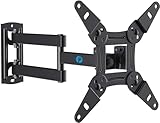
- TV Mount Compatibility - The swivel TV wall mount is compatible with most LED LCD flat or curved 13″-43″ TVs/Monitors up to 44 lbs with VESA mounting patterns 75x75 to 200x200mm. The single TV mount for 24 30 32 39 40 42 43 Inch can be installed on single wood studs, concrete, or brick walls, perfectly compatible with SAMSUNG, SONY, LG, VIZIO, TCL, ELEMENT, SCEPTRE, HISENSE and other TV brands. Please confirm your screen size and TV/monitor VESA before ordering.
- Full Motion for Optimal Viewing - Our articulating arm small tv mount tilts +9°/-11° for anti-glaring, max swivels 90° display left or right according to your seats position (note: max. swivel angle depends on screen size) and rotates 360° for landscape and portrait orientation. It extends 14.59" and retracts back to 2.7" to save space. Makes your viewing or working feel more enjoyable!
- Universal Monitor Wall Mount - ideal for large computer monitors, especially monitors sizes 13, 17, 19, 21, 24, 27, 32, 34, 35 inch ultrawide monitors with VESA patterns from 75x75mm to 200x200mm. Use it as a full motion monitor wall mount to clear up desktop space and for ergonomic computer screen installation to improve your posture.
- Easy Installation - step-by-step instructions and all the necessary hardware is provided, single stud installation simplifies the placement of the TV/monitor on the wall. Removable TV plate designed for single-person installation which helps you to install this full motion TV wall mount without any hassle.
- Friendly After-sales Service - our corner tv wall mount 40 inch is constructed from high quality steel materials, we are so confident in the construction, strength and durability of this wall bracket that we are provide 5-year friendly customer service. Please feel free to contact us anytime, rain or shine:-)
Measure the VESA pattern
VESA is the distance, in millimetres, between the centres of the mounting holes: first horizontally, then vertically. A pattern of 100 × 100 means 100 mm across and 100 mm down; 200 × 100 means 200 mm across and 100 mm down. Measure centre-to-centre, not from the outside edges of the holes. If the manual states the pattern, use that specification and use measurement only as a cross-check.
Use the TV’s weight without its stand
Remove the table stand before weighing the set, or use the manufacturer’s listed wall-mounting weight if it is explicitly identified. Do not use shipping weight, boxed weight or the weight of the television plus accessories. The bracket’s capacity must exceed the actual TV weight, and the selected wall and fasteners must also be capable of carrying the load under the mount’s instructions.
Choose the movement that suits the room
Mount type changes both the viewing experience and the installation space. The categories below describe what each design is intended to do; they are not a performance ranking.
Free tools Windows power users keep installed
One-click scans. No signup required.
| Mount type | Movement | Best fit | Important requirements |
|---|---|---|---|
| Fixed | Screen stays close to the wall with no routine tilt or swivel. | A straight-on seating position, minimal protrusion and a clean appearance. | Accurate height planning, access to cables before mounting and a wall surface permitted by the manual. |
| Tilting | Usually pivots vertically so the top or bottom edge can angle toward the viewer. | Televisions mounted above eye level, bedrooms, kitchens or rooms where ceiling or window light causes glare. | Enough clearance to adjust the mechanism and sufficient space for cables at the chosen angle. |
| Full-motion | Arm extends from the wall and can normally swivel; some models also tilt. | Corner installations, seating spread across a room or a screen that must be pulled out for access. | More wall projection, a suitable structural fastening point, careful arm-clearance planning and cable slack. |
When a fixed bracket is the sensible choice
Choose fixed hardware when the primary seat is directly in front of the screen and the television can be mounted at a comfortable height. It generally has the smallest projection and the fewest moving parts. Because there is no post-installation angle adjustment, mark the height carefully and connect cables before the screen is secured if the bracket will make the ports difficult to reach.
When tilting is worth the extra adjustment
A tilt mechanism helps when the screen is higher than eye level. Angling the panel toward the viewer can reduce a washed-out image caused by overhead or window reflections, but it cannot correct a poor horizontal viewing position. Check the manufacturer’s minimum wall clearance and make sure an angled screen will not strike a shelf, cabinet or wall light.
Rank #2

- Important: Watch the video and learn the”Designed for" details listed below!
- Designed for concrete, brick and wood studs wall (single stud).
- Designed for TVs up to 80 lbs (36.3 KG) and display sized 26" - 55" (66 CM - 140 CM).
- Designed for VESA sized from 3.9'' x 3.9'' through 15.7'' x 15.7''.
- Comfortable View with tilt range from +10° to -5°.
When full-motion hardware solves a real problem
Full-motion arms are useful when viewers sit in more than one direction or when the screen is mounted near a corner. The arm must be folded and extended within the limits stated in its manual; a 32-inch television may be light enough for the rating but still require a particular stud spacing or concrete anchor arrangement. Measure the distance from the wall to the arm’s furthest position so doors, walkways and adjacent furniture remain clear.
Match the bracket’s VESA range exactly
Read the bracket specification for supported horizontal and vertical patterns. A listing that says “up to 400 × 400” does not automatically support every smaller or rectangular pattern; confirm that your exact pair of dimensions appears in the stated range or hole layout. Also check the screw diameter and length specified for the television. Screws that are too short may not engage securely, while screws that are too long can damage internal components.
Recommended Free Tools
One For All’s official selection guidance treats VESA and weight compatibility as the primary criteria and screen size as an indication. That is the right order of checks: use the diagonal size to narrow the search, then let the mounting pattern and weight determine whether a model remains eligible.
Check capacity independently of VESA fit
A bracket can have the correct holes and still be unsuitable if its load limit is too low. Compare the TV’s stand-free weight with the bracket’s stated maximum capacity, not merely with the bracket’s advertised screen range. Leave a sensible margin rather than treating the limit as a target, especially if the arm will be extended regularly.
Capacity figures are manufacturer-listed specifications. They do not replace the requirement to use the permitted fasteners in a suitable wall. The wall, anchors, studs and screws form one load-bearing system; the bracket’s headline rating alone cannot guarantee a safe installation.
Rank #3
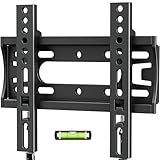
- 【Universal Compatibility】 Fixed TV wall mount fits most 14-42 inch screens up to 66lbs with Max VESA 200x200mm. Monitor wall mount supports single wood studs, concrete.
- 【Ultra slim & Save Space】Low Profile tv wall mount Holds TV just 0.6" from the wall – maximizing space with minimal bulk. Ideal for bedrooms, kitchens, dorms, RV, or Small spaces.
- 【15-MIN Easy INSTALLATION】Flat tv wall mount includes bubble level & all necessary mounting hardware,and coded instructions.
- 【Customer Service Support】Backed by 10-year hassle-free replacement and dedicated US-based support team.
- 【 CRITICAL NOTE】 On wooden studs, NEVER use anchors – secure directly with provided wood screws! Anchors will be sent per requested.
Confirm the wall and fastening method
Wall compatibility is product-specific. Some mounts specify wood-stud installation, while others list concrete, brick or more than one of those surfaces. A statement that a bracket supports wood does not mean it can be screwed into plasterboard without structural backing, and a concrete-compatible anchor is not automatically suitable for hollow block or another masonry type.
For stud walls
Locate the structural studs permitted by the mount’s instructions and verify their spacing against the bracket’s mounting slots. Mark the centre of each stud, drill the specified pilot holes and use only the supplied or specified lag screws and washers. Do not substitute random wall plugs where the manual requires direct stud fastening.
For concrete or brick
Identify whether the surface is solid concrete, brick or another masonry material and use anchors rated for that material and load. Drill diameter, depth and edge distance matter. Follow the selected bracket’s manual for anchor type and placement; do not transfer one model’s masonry directions to another.
For walls outside the instructions
If the wall is metal-framed, hollow, damaged, unusually thick, tiled over, or otherwise not covered by the manual, pause before drilling. Obtain advice from a qualified installer who can identify the structure and specify an approved fixing method. This is safer than extrapolating from a product page’s broad wall-type list.
Manufacturer-listed examples to use as specification references
The following examples illustrate how different listings present compatibility. They are not independent test results or a ranking of the best brackets.
The Tool Desk
Outbyte Driver Updater FREEFix the driver behind crashes, sound loss and screen glitchesFind Drivers →Outbyte PC Repair FREEClear out junk files and repair common Windows errorsFree Scan →Rank #4

- TV Wall Mount Compatibility: This swivel wall mount TV bracket fits 13-43inch TV wall mount, up to 55 lbs. VESA patterns 75x75mm to 200x200mm. Mounts securely on Single wood studs or concrete/brick walls.
- Optimized Viewing Experience: Enjoy a glare-free view with tilt adjustment +5° to -15° and ±90° swivel for flexible positioning. The full motion TV wall mount rotates 360° for the best angle from anywhere in the room (max swivel depends on TV size).
- Universal & Space-Saving: Design This swivel TV wall mount sits just 2.9 inches from the wall when folded and extends up to 15 inches, giving you flexible placement without bending. Ideal for 32 40 42 43 inch TV wall mount setups in living rooms, offices, or bedrooms.
- Quick & Easy Installation: Includes step-by-step instructions and all hardware for hassle-free setup. Single-stud mounting and a removable TV plate make installing this TV bracket simple—even for one person.
- Durable & Reliable: Made from high-quality steel, this 32 inch TV wall mount is built to last. Backed by 10-year hassle-free replacement and dedicated US-based support team. Contact us anytime for support-we’re here to help!
| Example | Movement | Listed screen range | Listed capacity | Listed VESA information | Wall information |
|---|---|---|---|---|---|
| LevelOne 650310 | Fixed | 32–55 inches | Up to 40 kg | 100 × 200 through 400 × 400 | Brick, concrete and wood listed by the manufacturer |
| LevelOne 650320 | Fixed | 32–55 inches | Up to 55 kg | Patterns up to 400 × 400 | Follow the current product specification and manual |
| VIVO MOUNT-M-WM075 | Full-motion | 32–75 inches | Up to 110 lb | 200 × 200 mm to 600 × 400 mm | Wood-stud or concrete/brick options listed |
| One For All WM4617 | Movement type and detailed mechanism should be checked in the current listing | 32–90 inches | Not stated in the cited selection guidance | 100 × 100 to 600 × 400 | Check the model’s installation documentation |
These figures come from manufacturer listings and should be checked against the current specification before purchase. The fact that a model starts at 32 inches does not establish that it fits your TV; the exact VESA pattern, weight and wall method still have to agree.
Plan cable access, clearance and viewing height
Measure the rear of the television
Look for recessed ports, a protruding power plug and any rear-panel bulge. A very slim fixed bracket can press a cable against the wall or prevent a connector from seating. If the manual specifies spacers, use them exactly as directed. Do not improvise washers or spacers that alter screw engagement.
Set a comfortable height
Mark the centreline of the screen while seated in the main viewing position. For a fixed or lightly tilted installation, the middle of the panel is usually easier to view when it is near eye level. If the only available location is above a cabinet or fireplace, a tilt model may be more comfortable, but it cannot make an excessively high position ideal.
Account for movement
With a full-motion arm, mark both the folded and extended positions. Check that the arm will not hit a side wall, window trim or cabinet, and that a swivel will not pull cables tight. Leave enough slack for the full travel specified by the mount, while keeping cables away from pinch points.
Installation workflow
Use the selected bracket’s manual as the controlling document. The following sequence helps prevent common errors without replacing model-specific directions.
Best Value

- TV Wall Mount Applicability - This TV mount fits most 14-42 inch TVs and monitors(especially for Samsung Smart Monitor M7/M70D), with 44 lbs. Max loading and vesa sizes from 75x75mm to 200x200mm. This wall mount TV bracket is designed for single wood stud or concrete/brick walls.
- ±90° Rotation & Swivel Design - With the ±90° rotation unique design, the full motion TV mount can easily display in landscape or portrait position to meet your special need. Also, this swivel TV mount can swivel TV ±90° to cover any angles in your home for the ultimate viewing experience.
- Adjustable for Max Flexibility - This TV wall mount bracket can tilt TV +5°/-10° to reduce glare. The strong articulating arm provides a smooth 14.8" extension and 2.7" depth to the wall for saving space.
- Universal Monitor Wall Mount - Our monitor mount fits monitors sizes 14-42 inch with VESA patterns from 75x75mm to 200x200mm. This wall monitor mount can keep your monitor to eye level and mount your monitor at an ergonomic sitting position to reduce eyes train and neck pain while saving up much space on your desktop.
- Easy Installation - The TV wall mount package comes with a completed hardware mounting kit, and the step-by-step instructions will guide you through the simple assembly and installation process. Note: Do Not install into drywall alone.
- Verify parts and specifications. Confirm the bracket model, included rails, screws, washers, spacers and any listed anchors. Compare the TV’s VESA pattern and stand-free weight with the bracket limits before marking the wall.
- Identify the wall construction. Locate studs or establish the masonry type using the method allowed by the manual. Do not drill until the permitted fastening points are clear.
- Choose the mounting height and centreline. Hold a template or the bracket against the wall, check level in both directions and account for the television’s dimensions, cables and any movement range.
- Mark and drill the specified holes. Use the diameter and depth stated for the chosen fasteners. A model-specific manual may list a stud finder and other tools; those tool requirements should not be generalized to every bracket.
- Secure the wall plate or base. Tighten the specified fasteners evenly and verify that the plate is level. Do not rely on a single screw, an unsuitable plug or a decorative wall panel as structural support.
- Attach the vertical rails to the TV. Select the holes that match the VESA pattern, use the specified screw length and add only the spacers required by the manual. Tighten firmly without stripping the TV’s inserts.
- Hang or connect the TV with assistance. Even a small television can be awkward to control. Engage every hook, latch or locking screw, then gently test that the rails are fully seated before letting go.
- Connect and route cables. Leave movement slack for a tilt or arm, keep cables clear of hinges and confirm that the power lead is not under tension.
- Perform a final inspection. Check every lock, fastener and clearance point, then operate the mount through its permitted movement slowly. Stop if the wall flexes, the bracket twists or a cable pulls tight.
Common mistakes and how to correct them
Buying by screen size alone
Symptom: The rails do not line up with the TV or the supplied screws are incompatible. Fix: Return to the exact model’s VESA pattern and weight, then select a bracket whose published range explicitly includes both.
Using the boxed weight
Symptom: The capacity comparison looks unnecessarily close or contradictory. Fix: Use the television’s wall-mounting weight with the stand removed. Keep the packaging weight out of the calculation.
Assuming every wall plug is interchangeable
Symptom: The wall crumbles, the anchor spins or the bracket moves under light pressure. Fix: Stop, remove the load and follow the manual’s approved stud or masonry method. Get qualified help if the wall type is not covered.
What’s actually slowing this PC down?
Pick the symptom - the matching free tool is one click away.
Leaving no cable or arm clearance
Symptom: Ports are inaccessible, the screen cannot tilt or the arm pinches a cable. Fix: Recheck the rear-panel depth, connector direction and the mount’s full movement envelope before final tightening.
Overtightening TV screws
Symptom: A screw bottoms out before the rail is secure or the rear panel begins to deform. Fix: Use the screw length and spacers specified for the television and stop tightening when the rail is secure; never force a longer screw into a shallow insert.
A practical decision path
- If your TV’s exact VESA pattern or stand-free weight is unknown, do not buy yet; obtain those two figures first.
- If the wall type or permitted fastening method is uncertain, resolve that before comparing features.
- Choose fixed mounting for a straight-on position and the smallest projection.
- Choose tilting when the screen must be higher than the main seating eye line or glare needs vertical adjustment.
- Choose full-motion when viewers sit at different angles or you need to pull the screen away from the wall, and confirm the structural and clearance requirements.
- Among mounts that pass those checks, compare cable access, locking hardware, adjustment range and the installation effort described in the manual.
What the available evidence can and cannot establish
Manufacturer pages establish the published ranges and capacities for their own products. They do not establish a universally best 32-inch bracket, independent durability, noise, smoothness or long-term performance. Treat the LevelOne, VIVO and One For All entries above as specification examples that help you interpret a listing, not as tested winners.
The safest choice is therefore the model whose documented VESA support, load limit, wall method and movement match your television and room without relying on assumptions. When any one of those facts is missing, a cheaper or more feature-rich bracket is not a better choice until the missing compatibility detail is verified.
Quick wins for a faster PC:
Scan for outdated or missing drivers - takes under a minuteDriver Scan →Repair Windows errors before they cause bigger problemsFix Now →Fix the driver behind crashes, sound loss and screen glitchesFind Drivers →Quick Recap
Product prices and availability are accurate as of the date/time indicated and are subject to change. Any price and availability information displayed on Amazon at the time of purchase will apply.

