Choose the charger for your exact MacBook model, not simply for the USB-C plug. Check Apple’s recommended minimum wattage, then buy a USB-C Power Delivery (USB PD) adapter that meets or exceeds it and a cable suited to the Mac’s charging port. A lower-wattage adapter can work but may charge slowly; a higher-wattage, compatible USB-C PD adapter is allowed and will not force extra power into the Mac.
Your cable matters as much as the adapter for fast charging. Use USB-C to USB-C when your Mac supports USB-C charging, or USB-C to MagSafe 3 when you want to charge through MagSafe 3. Some recent models have a specific 140W-adapter and cable combination for charging to about 50 percent in around 30 minutes.
As an Amazon Associate I earn from qualifying purchases.
Start with the exact MacBook model
Apple’s recommended adapter wattage changes by model, screen size and generation. A charger that is appropriate for a MacBook Neo may be insufficient for a 16-inch MacBook Pro. Before buying anything, identify the MacBook model and year in macOS by opening the Apple menu, choosing About This Mac, and recording the model name and year. You can also use System Information to inspect the charging hardware after connecting an adapter.
Quick wins for a faster PC:
Scan for outdated or missing drivers - takes under a minuteDriver Scan →Clear out junk files and repair common Windows errorsFree Scan →Fix the driver behind crashes, sound loss and screen glitchesFind Drivers →Apple maintains the model-by-model recommendations in Use a power adapter with your Mac. Treat that live table as the final authority when a model has several configurations or when a newly released Mac is not covered by an older buying guide.
#1 Best Overall
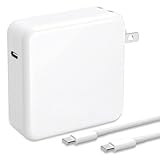
- High-Efficiency Fast Charger: This 100W USB-C charger for the MacBook Pro boasts an exceptionally high charging efficiency of up to 96%. Our charger delivers fast and stable power delivery, fully charging a 16-inch MacBook Pro in approximately 1 hour and 30 minutes. It can also charge most smartphones from 0% to 80% in just 20 minutes.
- Wide Compatibility: This powerful power adapter is fully compatible with the MacBook Pro (16-inch, 15-inch, 14-inch, and 13-inch models from 2023, 2022, 2021, 2020, 2019, 2018, 2017, and 2016), MacBook Air, Dell, Lenovo, HP, iPad, and all devices, laptops, and smartphones with USB-C ports. It automatically detects and adjusts the charging power.
- Advanced Charging Technology: PD 3.0 charging technology, which outperforms other replacement MacBook chargers such as 96W, 87W, 70W, 61W, 67W, 30W, and 29W USB-C MacBook chargers. Input: AC 100–240V, 1.5A, 50–60Hz. Output: 20.5V/4.7A, 15V/3A, 12V/3A, 9V/3A, 5.2V/3A (automatically detects the device and provides the fastest, most efficient output current)
- Multi-layered Safety Protection: Our smart chip technology provides comprehensive protection for your device, including protection against overcurrent, short circuits, overheating, and overvoltage. The charger is also equipped with flame-retardant casing, lightning protection, anti-interference features, and ESD protection.
- After-Sales Service: We are committed to providing high-quality products at unbeatable prices. If you have any questions about our products, please feel free to contact our customer service team at any time. We will respond within 24 hours and strive to ensure you have a pleasant shopping experience.
Why one universal wattage is a bad shortcut
MacBook charging requirements span Apple-listed examples from 20W for MacBook Neo to 140W for certain MacBook Pro models. The connector shape does not tell you how much power the computer is designed to receive. Two Macs can both have USB-C ports yet have very different recommended adapters.
Apple says a compatible Mac can charge from an adapter with higher or lower wattage than the recommended adapter. For the best charging experience, Apple recommends at least the minimum wattage listed for the exact Mac. Lower power generally means slower charging, especially while the computer is busy.
Match the adapter wattage to your Mac
Use the following as a starting map of Apple’s published guidance. These are model and generation examples, not a replacement for checking your exact configuration on Apple’s current support page.
Do these 3 things before closing this tab:
1Fix the driver behind crashes, sound loss and screen glitches2Clear out junk files and repair common Windows errors3Scan for outdated or missing drivers - takes under a minute| MacBook family and generation | Apple-listed adapter guidance | What to buy |
|---|---|---|
| MacBook Neo | 20W USB-C adapter | A USB-C PD adapter rated for at least 20W |
| MacBook Air introduced in 2022 or later, 13-inch configurations | 30W; Apple also lists 35W dual-port, 67W and 70W options depending on model | At least the minimum shown for your configuration; choose a higher listed option when you need faster charging or extra device capacity |
| MacBook Air introduced from 2018 through 2021 | 30W adapter | A USB-C PD adapter rated for at least 30W, with a compatible USB-C charge cable |
| 13-inch MacBook Pro introduced in 2016 or later | 61W | A USB-C PD adapter rated for at least 61W |
| 15-inch MacBook Pro introduced in 2016 or later | 87W | A USB-C PD adapter rated for at least 87W |
| 16-inch MacBook Pro introduced in 2019 | 96W | A USB-C PD adapter rated for at least 96W |
| 14-inch MacBook Pro introduced in 2021 or later | Multiple adapter choices depending on configuration | Check Apple’s table for the exact chip and configuration before buying |
| 16-inch MacBook Pro introduced in 2021 or later | 140W | A 140W USB-C PD adapter when you need the specified fast-charge setup |
The wattage printed on a charger is its maximum supported output under the stated conditions, not power that it continuously pushes into the Mac. The Mac negotiates an appropriate level through USB PD. A 100W or 140W adapter therefore does not make a Mac that needs 30W draw 140W continuously.
What “at least the minimum wattage” means
If Apple lists 61W for your 13-inch MacBook Pro, a 61W, 67W, 96W or 140W USB-C PD adapter can meet the wattage requirement, provided the adapter is compatible and compliant with applicable safety standards. A 30W adapter may still charge the Mac when it is asleep or lightly loaded, but it does not meet Apple’s recommended minimum and can be reported as slow.
Confirm USB Power Delivery support
USB-C describes the connector. USB Power Delivery describes the negotiated charging system. Apple states that a Mac that charges over USB-C can use any USB-C power adapter or display that supports USB PD. Do not assume that every product with a USB-C socket is a suitable MacBook charger.
Rank #2

- High-efficiency Fast Charger: Sunveza 118W USB C macbook pro charger has a high charging efficiency of up to 96%, our charger can provide fast and stable energy inflow, the charger can fully charge the macbook pro 16inch in about 1H 25mins. It can charges most of the mobile phones from 0% to 80% in 20 minutes
- Wide Compatibility: Our charger Compatible with USB-C port MacBook: Pro 16(M4'24,M3'23,M2'22,M1'21,2019), 15(2019-16), 14(M4'24,M3'23,M2'22,M1'21), 13(M2'22,M1'20,2020-16); Air 15(M4'25,M3'24,M2'23), 13(M4'25,M3'24,M2'22,M1'20); also M5; iPad Pro & Air 12.9/11/10.9", all USB-C devices, laptops, smartphones, Surface (USB-C), Dell, Lenovo, HP, M4/M2/M1 iPad Pro 13/12.9/11", iPad 10, M4/M2/M1 iPad Air 5/4, iPad Mini 6 A17 Pro, iPhone 17/16/15, etc. Works with USB-C 29W, 30W, 61W, 67W, 70W, 87W, 96W PD models. Automatic identification and conversion of charging power
- Multiple Security Protection: Our 118W macbook laptop charger adopts the most advanced technology and is made of the highest quality materials. Smart chip is installed inside, include multiple smart features safeguarding against over-current, over-voltage, overload, temperature protection, short-circuit protection, and auto recovery, fast charging speed and long service life
- Advanced Charging Technology: PD 3.0 charging technology, the performance is higher than other replacement macbook charger like 96W, 87W, 70W, 61W, 67W, 30W, 29W USB C macbook charger. Input: AC 100-240V, 1.5A, 50-60Hz. Output: 20.5V/4.7A, 15V/3A, 12V/3A, 9V/3A, 5.2V/3A( Identify your devices automatically and provide the fastest and most efficient output current )
- After Sell Service: We have always been committed to provide products of superior quality at unbeatable prices, if you have any questions about the items, please contact our customer service team, we will reply you within 24 hours
Checklist for a third-party adapter
- Look for explicit USB Power Delivery or USB PD support in the specifications.
- Confirm that the adapter’s available wattage meets or exceeds Apple’s recommendation for your exact Mac.
- Check the certification label for the adapter’s rated output; Apple says the wattage is printed there.
- Use a product that complies with applicable international and regional regulations and safety standards.
- If the adapter has several ports, read how its total output is shared when more than one device is connected.
A multi-port adapter may advertise a high total wattage but reserve less power for the Mac when another phone, tablet or accessory is plugged in. Check the per-port output and the simultaneous-use table, not only the largest number on the box.
Recommended Free Tools
Choose the right cable and charging path
There are two distinct charging paths on supported Macs: USB-C charging and MagSafe 3 charging. Select the cable that matches the path you intend to use and the ports on your Mac.
USB-C to USB-C
A USB-C charge cable connects a USB-C PD adapter directly to a Mac USB-C port. This is the straightforward choice for MacBook Air models that support USB-C charging and for MacBook Pro models with USB-C charging ports. The cable must be suitable for the power level you plan to use; a cable intended only for low-power accessories may limit charging even when the adapter is powerful enough.
USB-C to MagSafe 3
A USB-C to MagSafe 3 cable connects a USB-C adapter to the MagSafe 3 port on compatible MacBook Air and MacBook Pro models. It leaves the Mac’s USB-C ports available for displays, storage or other accessories and uses the magnetic connector designed for MagSafe 3. MagSafe 3 and USB-C are separate charging inputs even when they are present on the same Mac.
Do you need a 240W cable?
Not every MacBook needs a 240W cable. Apple’s fast-charge guidance specifies a 140W USB-C Power Adapter with a USB-C to MagSafe 3 cable for 16-inch MacBook Pro models introduced in 2021 or later. For models introduced in November 2023 or later, Apple also lists a 240W USB-C Charge Cable with that 140W adapter. That 240W cable is relevant to the specified combination; it is not a requirement for every MacBook or every USB-C charging setup.
Apple describes compatible fast charging as reaching up to 50 percent in around 30 minutes. The result is approximate and depends on the Mac model, settings and environmental factors. Use the exact adapter-and-cable combination Apple lists for your model rather than assuming that a high-wattage cable alone creates fast charging.
Rank #3

- Product information:If you have purchased our product you will receive 1 AC Adapter and 1 Power Cord ;Input:100-240V;Output:20V 4.7A;DC interface:Type-C ;Don't miss out on our AC adapter and power cord kit - it's a worthwhile purchas
- Wide Compatibility with MacBook Pro & Air: Specifically engineered for high-performance laptops, this 100W charger works flawlessly with MacBook Pro 16, 15, 14, 13 inch (2016-2024) and MacBook Air 15, 13 inch (2018-2025). It provides full-speed charging support for all M1, M2, M3, M4, and M5 chip models
- Universal Support for USB-C Devices: Beyond the specified series, our 100W Type-C charger is a versatile replacement for various laptops and smartphones. It intelligently identifies and charges devices like Mac Charger, MacBook Pro Charger, MacBook Air Charger, iPad Pro Charger, iPad Air Charger
- Safe and Reliable: Equipped with a built-in cooling system, the charger prevents overheating even at full power output. The built-in IC chip technology provides protection against overload, short circuit, and overheating, ensuring the safety of your devices. With a maximum power output of 100W and support for 5A, our USB C charger delivers faster charging speeds and allows for data syncing at an impressive 480Mbps
- WHAT YOU GET:1 Pack 100 Watt Wall Charger; 6.6ft Fast Charging Cord; 1 x Instruction for USB C Charger.Enjoy a worry-free purchase with our 60-day support. If you encounter any issues more than 60 days , our friendly support team is available 24/7 via email. Simply click "ASK A QUESTION" and contact us for assistance
When a higher-wattage charger is useful
A higher-wattage USB-C PD adapter is useful when you want one charger for several Macs, when you run demanding workloads while plugged in, or when you want to preserve headroom for a second device. Apple permits a compatible Mac to use an adapter with more wattage than its recommended adapter.
Will a higher-wattage USB-C charger hurt a MacBook?
No, not when it is a compliant USB-C PD adapter. USB PD lets the Mac and adapter negotiate the power level. The important checks are USB PD support, an adequate cable and compliance with relevant safety requirements. Higher wattage does not override the Mac’s charging controls.
When higher wattage does not solve the problem
A larger number on the adapter cannot compensate for a missing USB PD profile, an unsuitable cable, a damaged connector or a multi-port power-sharing limit. If the Mac still charges slowly, inspect the actual negotiated charger information in macOS instead of replacing the adapter blindly.
Windows Errors? Fix Them Before They Spread
Repair common Windows errors and clear accumulated junk for a smoother, more stable PC - no reinstall needed.Free scan · no reinstallOutdated Drivers Are Slowing You Down
One free scan finds every outdated or missing driver and matches the right update for your exact hardware.Free scan · exact hardware matchCan you use a USB-C phone charger?
You can use a phone charger only if it is a USB-C power adapter that supports USB PD and provides enough wattage for your Mac’s recommended minimum. Many phone chargers are lower power than a MacBook requires. A low-wattage phone adapter may charge a sleeping or lightly used Mac slowly, but it is not the best choice for normal work on a Mac that calls for substantially more power.
Check the phone charger’s certification label and specifications. If USB PD is not listed, or if its maximum output is below the Mac’s recommended wattage, choose another adapter. The USB-C plug by itself is not evidence of compatibility.
Plan the charger around your use case
Basic home charging
For a single Mac used near a desk, buy a USB-C PD adapter at or above Apple’s recommended minimum and the shortest compatible cable that reaches comfortably. Meeting the minimum keeps the choice simple and avoids paying for capacity you will not use.
Rank #4

- Super Fast Charging: Our USB C macbook charge fully charges the Mac Book Pro 16 inch in just 1h 35mins, fast charge Mac Book Pro 14 inch to 50% in only 30 mins. 96W USB C Mac book charger has a high charging efficiency of up to 98% with higher charging performance than 87W, 67W, 61W, and 30W USB C chargers.
- Wide Compatibility: Strong power support the high-speed processing capacity of M1, M2 chip, work flawlessly compatible with Mac Book Pro 16 15 14 13-inch 2023, 2022 2021 2020 2019 2018 2017 2016, Mac Book Air, Dell, Lenovo, HP, iPad and all USB - C port devices, laptops and smartphones. Automatic identification and conversion of charging power.
- Multiple Security Protection: Our 96W macbook laptop charger Built-in smart chip with multiple smart functions such as over-current, over-voltage, overload, temperature protection, short-circuit protection, and auto recovery, fast charging speed and long service life.
- Compact Size: The tearplex macbook pro charger made of top-quality thick copper wire coated with premium soft-touch TPE, tested with over 20000+ times bend to provide 4 times longer lifespan, protects the charging ports of your expensive devices from damages; Extra-long cable let you charge and have fun anywhere, support 480Mbps data syncing between your phone and laptop.
- What You Get: 96W USB C power adapter x1, USB-C to USB-C cable length 6.6ft/2m x1, and enjoy 12-month by refund or replacement and friendly customer service.
Travel with several devices
A multi-port USB-C PD adapter can charge a Mac and smaller devices from one outlet. Compare its output with one port occupied and with several ports occupied. If the Mac’s port drops below its recommended minimum when another device is connected, the Mac may charge slowly or show a slow-charger warning.
Free tools Windows power users keep installed
One-click scans. No signup required.
Desk setup with a display
Apple says a display that supports USB PD can charge a Mac over its USB-C connection. Verify the display’s delivered wattage, not merely that it has USB-C video. A display that supplies less than the Mac’s recommended minimum may charge slowly, particularly during intensive work.
High-performance MacBook Pro work
For a 14-inch or 16-inch MacBook Pro, select the exact adapter listed for your configuration when sustained performance and quick battery recovery matter. For the 16-inch models introduced in 2021 or later, Apple’s specified fast-charge setup uses a 140W adapter and the applicable MagSafe 3 cable; later models may also use the listed 240W USB-C Charge Cable.
Verify what your Mac is actually receiving
When the battery percentage rises more slowly than expected, verify the setup before changing hardware.
- Read the wattage and output information on the adapter’s certification label.
- Connect the adapter and cable directly to the Mac, bypassing a hub or dock for the test.
- Open the Apple menu and choose About This Mac, then open System Report or System Information.
- Select Power in the hardware section and inspect AC Charger Information.
- Compare the reported charger wattage with Apple’s recommended minimum for your model.
On macOS Tahoe 26.4 or later, macOS can display Slow Charger when the connected charging setup provides too little power. Treat that message as a prompt to check the adapter, cable, port and any multi-port power sharing.
What’s actually slowing this PC down?
Pick the symptom - the matching free tool is one click away.
Troubleshoot slow or failed charging
The Mac charges, but slowly
- Compare the adapter’s labeled wattage with the Mac’s recommended minimum.
- Confirm that the adapter supports USB PD.
- Disconnect other devices from a multi-port adapter and check whether the Mac’s available output changes.
- Try a known-compatible USB-C cable or the correct USB-C to MagSafe 3 cable.
- Check AC Charger Information in System Information and look for the Slow Charger message in macOS Tahoe 26.4 or later.
The Mac does not charge over USB-C
- Make sure the adapter is connected to mains power and that its output is intended for USB PD charging.
- Try another USB-C port on the Mac if the model has more than one charging-capable port.
- Remove hubs, docks and displays temporarily to isolate the direct adapter-and-cable connection.
- Inspect the cable and connectors for damage and test with a compatible replacement.
- Use MagSafe 3 instead, if your Mac supports it, to determine whether the issue is limited to the USB-C path.
Charging becomes slower under heavy use
A charger below the Mac’s recommended wattage may be able to increase the battery percentage while the Mac is idle but lose ground when the processor, display or connected accessories demand more power. Replace it with an adapter that meets Apple’s minimum for the model and verify the negotiated output.
Best Value

- Fast Charging: ELECBRAIN 100W USB-C Power Adapter will smart identify your devices automatically. its Charging power Up to 96W, 90W, 87W, 67W, 65W, 61W, 45W, 30W, 29W, 25W, 20W,18W ; PD 20V=5A; 18V=5A; 15V = 5A; 10V=5A; 9V=3A; 5V=3A. It supports USB-C PD 3.0 Charging protocol. Quick charge for your USB-C devices
- Safety and Wide Compatibility: Super safety with fivefold protections:over-current protection, over-voltage protection, over-heating protection, short-circuiting protection,over-charge protection. Wide Compatibility, it can automatically recognize your device and provide the fastest and most efficient output current
- Widely Compatibility: ELECBRAIN 100W USB-C Power Adapter Charger specially designed for charging your USB C device, 100W USB C Charger with 4.9ft USB-C Cable, Which with E-mark Chip, Compatible with Lenovo, Acer, Dell, Asus, and all USB-C charger devices, laptops and android phones. It can automatically recognize your device and provide the fastest and most efficient output current
- Full Safety Protection: In order to let you use our USB C charger with confidence, each of our chargers has undergone professional technical inspections before shipment to ensure excellent performance and safety. ELECBRAIN charger has a built-in heat dissipation system to prevent the charger from overheating at full power output. The built-in IC chip technology provides overload short-circuit /overheat protection, so there’s no worries about damaging functional devices
- Safety Certification: The 100W USB C fast charger have passed the US charger was certificated with safety certification standards.Intelligent output and protection, avoid sparks, overheat,overcurrent.USB C Cable supports safe speed charging and fast data transfer to ensure safety for you and your device
Understand simultaneous charging
Macs with MagSafe 3 may also have USB-C charging ports, but connecting more than one charging source does not make the Mac charge faster. Apple says the Mac charges through only one port at a time, using the source that provides the most power. Plugging in both MagSafe 3 and USB-C is therefore not a way to add their wattages together.
For troubleshooting, disconnect all but the intended source. This removes ambiguity about which adapter macOS selected and makes the AC Charger Information reading easier to interpret.
A practical buying checklist
- Record the exact MacBook name, screen size and introduction year.
- Look up Apple’s recommended adapter wattage for that configuration.
- Choose a USB-C adapter with USB Power Delivery and at least that minimum wattage.
- Decide whether you will charge through USB-C or MagSafe 3.
- Buy a cable rated and intended for the chosen charging path and power level.
- For fast charging, follow Apple’s model-specific adapter-and-cable combination rather than relying on wattage alone.
- If buying a multi-port adapter, verify its output when all intended devices are connected.
- After purchase, confirm the result in System Information under Power and AC Charger Information.
Frequently asked questions
Can a MacBook charge from a USB-C monitor?
Yes, if the monitor supports USB Power Delivery and provides enough wattage for the Mac. A USB-C video connection without USB PD does not by itself provide MacBook charging.
Does connecting two chargers make a MacBook charge twice as fast?
No. Apple says the Mac uses only one charging port at a time and selects the source that provides the most power.
Is Apple’s recommended wattage a maximum?
No. It is the recommended minimum for the best charging experience. A compatible USB-C PD adapter with higher wattage can be used.
Frequently Asked Questions
Can a MacBook charge from a USB-C monitor?
Yes, when the monitor supports USB Power Delivery and provides sufficient wattage for the exact MacBook model.
Does connecting two chargers make a MacBook charge twice as fast?
No. The Mac uses one charging source at a time and selects the source that provides the most power.
Is Apple’s recommended adapter wattage a maximum?
No. It is the recommended minimum; a compatible higher-wattage USB-C PD adapter is allowed.
The Bottom Line
Identify the exact MacBook first, then choose a safety-compliant USB-C Power Delivery adapter that meets Apple’s recommended minimum wattage. Match the cable to USB-C or MagSafe 3, and use Apple’s specified 140W and cable combination only when your model’s fast-charge guidance calls for it.
Quick Recap
Product prices and availability are accurate as of the date/time indicated and are subject to change. Any price and availability information displayed on Amazon at the time of purchase will apply.

