The right handheld magnifier depends on what you need to see and how you can use the device—not simply on the largest magnification number. For a conventional optical magnifier, compare lens power, viewing area, working distance, lighting, weight, and whether you can hold it steady enough to keep the image in focus. If you need adjustable contrast, image capture, or text read aloud, consider a handheld electronic video magnifier instead; it uses a camera and screen, not a magnifying-glass lens.
What makes a handheld magnifier a good choice?
A handheld optical magnifier places a lens between your eye and the object. Its practical magnification depends on how the lens, object, and eye are positioned. The American Academy of Ophthalmology (AAO) explains that a handheld magnifier reaches maximum magnification when the object is near the lens’s focal distance. Moving it away from that useful position can make the image harder to focus.
As an Amazon Associate I earn from qualifying purchases.
Higher power is not automatically better. A stronger lens can make details appear larger, but the visible area may be smaller and the working distance shorter. Holding the lens at the useful distance and keeping it steady also takes coordination. Those trade-offs matter for both spot-reading print and close inspection.
Recommended Free Tools
For low vision, the AAO recommends considering the person’s needs and goals, clinical characteristics, handling ability, weight, cost, and timing—not choosing by magnification alone. A vision-rehabilitation professional or eye-care professional can help match an aid to the user and task (AAO: Low-Vision Aids).
#1 Best Overall
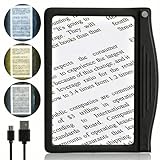
- ★ Eye Comfort with Anti-Glare: Designed for seniors and those with low vision, our page magnifier offers enhanced reading through 24 SMD LED lights coupled with an anti-glare lens, ensuring optimal lighting without straining your eyes.
- ★ Broad & Clear Magnification: Experience a wide viewing with our 4.5"x 7" optical-grade Acrylic lens, which magnifies up to 500% for hassle-free reading without constant hand movement.
- ★ Durable & Efficient SMD LEDs: Our state-of-the-art SMD LEDs ensure a brighter viewing area and consume less power, extending battery life. Designed to impressively last over 100,000 hours.
- ★ Ultra-Light with Ergonomic Grip: Weighing just 4 ounces, our magnifier is lightweight for extended use. Its ergonomic grip design suits most hands, ensuring prolonged reading without arm fatigue.
- ★ 3 Customizable Lighting Modes: Featuring the latest one-button/touch technology, switch effortlessly among cool white, warm, and combo lighting modes to match your reading conditions.
Which features should you compare?
Lens power and viewing area
Compare both the lens power and the area visible through it. A large viewing area can make it easier to scan a word, label, or small object; a higher-power lens may show a smaller portion at a time. WHO procurement specifications describe magnifier categories and lens characteristics, but their ranges are not a universal prescription or a ranking of consumer products.
WHO’s assistive-product specifications give +4D to +56D as the power range for illuminated handheld magnifiers and specify minimum lens diameters across power bands. These are category-level technical specifications, not a recommendation that every reader needs one of those powers (WHO: Assistive product specifications).
Working distance and focus
Working distance is the space between the lens and the object when the image is in focus. A shorter distance can be awkward for some tasks or users. If you cannot comfortably position the lens, object, and eye, a nominally stronger magnifier may be less useful than one you can keep in focus.
Rank #2
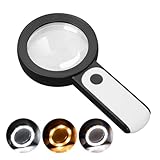
- HIGH POWER MAGNIFICATION: This magnifying glass provide Optical high magnification, allowing users with low vision to read text, no matter the size.
- ULTRA BRIGHT 18 LED WITH 3 MODES: The built-in energy-saving 18 LED lights provides extra luminance to ensure an overall better reading experience even at night or dark places. The stepless dimmable 3 lighting modes (cold, warm and mixed) can be switched based on different light condition, which can reduces visual fatigue, which is very useful for people with macular degeneration or far-sightedness/feyopia.
- EASY TO USE: Comes completely assembled, just requires 3x AAA batteries (not included). Easy to operate with a simple ON / OFF button switch, making it perfect for the elderly or those requiring an intuitive magnification system.
- LARGE LENS(Diameter 3.15"): Magnifies without optical distortion. Optimal to enhance reading and viewing very fine details in books, newspapers, magazines, photographs, maps, electronics, miniatures, jewelry, pill bottles, medications, hobbies, models, and crafts of all kinds.
- PERFECT GIFT FOR THE ELDERLY: Great magnifier for seniors, Most elderly have difficulty reading the small print on coupons, prescription,medical bottle.clear magnifier with light also a great choice for those who have low or impaired vision of most types.
WHO’s procurement guidance describes non-illuminated handheld magnifiers as useful for spot reading and discusses lens-to-target distance. It also identifies lightweight plastic and aspheric lenses as preferred characteristics in that specification; these are procurement criteria, not proof that every product using those features will suit every reader (WHO: Assistive product specification for procurement: magnifiers).
Lighting
Built-in illumination can help when the target needs more light, but it is optional rather than universally beneficial. Lighting needs and sensitivity differ from person to person. WHO’s guidance lists LED, SMD LED, and incandescent illumination options for illuminated magnifiers; it does not establish that one type will be most comfortable for every user (WHO: Assistive product specifications).
Weight, grip, and steadiness
Consider whether you can hold the magnifier without tiring and keep it at a consistent distance. Grip shape and weight are practical factors, especially if your hand strength or steadiness is limited. The AAO notes that handheld magnifiers have a limited field of view and require hands-on steadiness.
Rank #3

- Rectangular Full Page Design: Page-style magnification area in line with natural reading design. The magnification area is 5" X 7", covering a large viewing area without the need to keep adjusting the position of your hand, making reading easier.
- Lightweight: Our handheld magnifier is lighter compared to other similar products, only 3.8 ounces, designed for the elderly with weak hands. You won't feel tired even holding the magnifier for a long time to read, bringing you a good reading experience.
- 5X Clear Magnification: The book magnifier is made of advanced anti-glare Fresnel lenses, which are lighter than glass lenses, and can also clearly magnify small print by 500% without optical distortion, making it suitable for seniors to use for reading small prints, checking items, and more.
- Multi-Functional Handle: Our magnifying glass handle is ergonomically designed and upgraded to allow for a fully gripable handle on both sides, ensuring a comfortable feel for continued use. Our magnifiers can also be used alternately with the left and right hand and can be used vertically or horizontally depending on individual habits, and are equipped with a non-slip wrist strap for an easy grip that won't fall off easily.
- Best Reading Magnification Tool: Our handheld magnifying glass is the best reading tool for seniors, reading enthusiasts, and people with low vision, and we are committed to creating a great reading experience for those in need. Also, our magnifier comes with a nice storage bag and cleaning cloth for easy use.
What magnification do I need?
There is no single magnification figure that answers this for everyone. Start with the task—such as reading a short label, checking fine print, or inspecting a small part—and consider how much of the target you need to see at once. Then factor in your usable working distance, ability to hold the device, and lighting preferences. For low-vision use, ask an eye-care or vision-rehabilitation professional to help assess the device against your visual needs and handling ability.
Do these 3 things before closing this tab:
1Clear out junk files and repair common Windows errors2Scan for outdated or missing drivers - takes under a minute3Repair Windows errors before they cause bigger problemsShould you choose an optical or electronic handheld magnifier?
An optical handheld magnifier enlarges the object through a lens. A handheld video magnifier uses a camera to show the object on a screen. These are different kinds of aids, so their magnification figures should not be compared as if they describe identical viewing systems. Electronic features such as contrast modes, image storage, optical character recognition (OCR), and speech may be useful when a lens alone does not meet the task.
| Example | Type and screen | Published features |
|---|---|---|
| Video Mag HD | Handheld video magnifier; 4.3-inch screen | APH lists 2x–13x magnification and storage for approximately 80 images on its product page. Features may change (APH: Video Mag HD). |
| Juno | Handheld touchscreen video magnifier; 7-inch screen | APH lists 2x–30x magnification, 24 high-contrast color modes, OCR, and text-to-speech on its product page. Features may change (APH: Juno). |
APH’s comparison chart uses screen size, magnification, color modes, speech, and storage as comparison categories across its electronic magnifiers. The chart is from 2021, so treat it as a guide to comparison criteria rather than a guarantee of current specifications (APH: Magnifier Comparison Chart).
Rank #4

- 5X MAGNIFICATION & LARGE 100MM LENS: The 100mm (4 in.) lens offers a wide viewing area, making it easier for seniors to read books, newspapers, labels, and fine print
- REAL GLASS LENS, NOT ACRYLIC: Made from real glass and precision-ground for clear, distortion-free images and excellent clarity
- ERGONOMIC SOFT-GRIP HANDLE: The soft rubberized handle provides a comfortable, non-slip grip for easy handling during extended use
- PROTECTIVE LENS HOUSING: The lens is securely encased to help prevent damage from accidental drops and everyday use
- AVAILABLE SINCE 2019: This magnifier has been offered since 2019 and is suitable for reading, books, newspapers, hobbies, insect observation, classroom science, crafts, and inspection.
APH’s product-update page says that, on March 25, 2026, Jupiter 2.0 replaced version 1.0 and added Plug&Play use with phones and tablets. That is a dated update; check the current product information for availability and details (APH: Product Updates and Upgrades).
When might another kind of magnifier work better?
If holding a lens steady is difficult because of tremor, arthritis, or another handling limitation, a stand magnifier or an electronic magnifier may be worth discussing. These are alternatives, not handheld glass models. The AAO describes stand and electronic magnifiers as other low-vision aid categories (AAO: Low Vision Assistive Devices).
For low-vision needs, the most useful choice is the aid you can use for your real tasks and goals. A professional can help assess fit rather than relying on a magnification number by itself.
Quick Recap
Product prices and availability are accurate as of the date/time indicated and are subject to change. Any price and availability information displayed on Amazon at the time of purchase will apply.

