Leaving Fitbit does not necessarily mean using a tracker with no account. It usually means replacing a Fitbit login with a Garmin, Samsung, Apple, or other platform account. If you want to avoid every vendor, phone-platform, and companion-app account, the current evidence does not identify a mainstream tracker that can be fully activated, synchronized, and used with its useful history entirely account-free.
Start by deciding which problem you are solving: escaping Fitbit specifically, avoiding recurring subscription fees, or avoiding account registration altogether. Those are different requirements, and a tracker can satisfy one while failing the others.
As an Amazon Associate I earn from qualifying purchases.
First decide what “without a Fitbit account” means
“No Fitbit account” can describe three different goals. Write down the one that matters before comparing devices.
Free tools Windows power users keep installed
One-click scans. No signup required.
Leaving the Fitbit ecosystem
If you simply want a different manufacturer, a Garmin or Samsung tracker may meet the goal. You would no longer use a Fitbit login, but you may still need the new manufacturer’s account and companion app. Garmin’s documentation explicitly says a Garmin Connect account is required for Garmin Connect and many device features.
#1 Best Overall

- Easy-to-use, comfortable smart fitness tracker, once setup through the Garmin Connect app, has a touchscreen and button interface plus a brighter, bigger display than vívosmart 4 for larger text.Supported Application:Heart Rate Monitor,Sleep Monitor,GPS,Fitness Tracker,Contacts,Messages,Calendar. Connectivity technology:Bluetooth.
- Get an uninterrupted picture of your health with up to 7 days of battery life in smartwatch mode; safe for swimming and showering, too
- Understand your body by monitoring your respiration, Pulse Ox (Pulse Ox not available in all countries; it is not a medical device), Body Battery energy levels, women’s health, hydration, stress and heart rate (This device is intended to give an estimate of your activity and metrics) with low and high heart rate alerts once set up through the Garmin Connect app
- Get a score for your sleep quality, plus get further insights on how to improve your sleep via the Garmin Connect app
- Reach your fitness goals through fitness age, step tracking, calories burned, intensity minutes and more
Avoiding a paid subscription
An account and a subscription are separate. Registration may be required to activate a device or synchronize history even when the core analysis has no recurring fee. A 2025 TechRadar comparison described core Apple Health/Fitness analysis and on-device features as subscription-free, but that does not establish account requirements for every Apple product or service. Treat “free” as a statement about payment, not proof of account-free setup.
Avoiding every account
This is the strictest interpretation. The available official setup material does not establish a current mainstream tracker that can be set up, sync routinely, retain useful history, and provide its intended features without any vendor, phone-platform, or companion-app account. Samsung’s Galaxy Fit3 instructions say to sign in to Google only if prompted during one specific setup path; that wording is not a universal no-account guarantee.
What to check before buying
Use the following checklist against the exact model, phone, country, and functions you need. A product page for a similar-looking band is not enough.
Quick wins for a faster PC:
Fix the driver behind crashes, sound loss and screen glitchesFind Drivers →Clear out junk files and repair common Windows errorsFree Scan →- Account boundary: Identify whether activation requires a vendor account, a phone-platform account, or both. Check whether the requirement applies only to cloud sync or also to basic recording.
- Companion app: Find the official Android or iOS app and read its current requirements. Determine whether pairing must happen inside that app.
- Initial activation: Confirm whether network access and sign-in are required on the first day, even if later viewing is possible offline.
- Everyday sync: Ask where data goes: only on the tracker, on the phone, in a vendor cloud, or in more than one place.
- History and export: Check whether old data can be exported, deleted, or viewed if you stop using the service.
- Phone and region: Verify supported operating-system versions, phone brands, and country-specific functions for your handset.
- Feature match: Separate onboard GPS from phone-connected GPS. Confirm sleep, heart-rate, workout, notification, and alarm support for the precise SKU.
- Cost: List the device price, any optional plan, and which features are behind a paywall. Do not infer account requirements from subscription marketing.
- Privacy: Read the current privacy notice and account controls before creating a profile.
- Physical fit: Compare band width, screen size, charging routine, and comfort. A tracker that meets the account requirement but is unpleasant to wear will not collect useful data.
Two realistic alternatives in the available evidence
The following products illustrate the trade-offs rather than proving that either one is account-free. Both need model-specific checks before purchase.
| Model | Account and setup evidence | GPS evidence | What is established about cost | What still needs checking |
|---|---|---|---|---|
| Garmin vívosmart 5 | Garmin says a Garmin Connect account is required for Garmin Connect and many device features. Garmin’s pairing instructions direct the user to pair through Garmin Connect, not through the phone’s ordinary Bluetooth settings. | Tom’s Guide identifies the vívosmart 5 as a close Charge 6 alternative and says it lacks onboard GPS. | No recurring-cost figure is established here. An account requirement is documented; subscription status must be checked separately. | Supported phone and operating-system versions, regional availability, functions that require sync, and whether phone-connected GPS meets your needs. |
| Samsung Galaxy Fit3 | A Samsung US support flow covers Galaxy Fit3 paired with a Galaxy S25 through Galaxy Wearable. It asks for Google sign-in only if prompted in that flow. | The cited instructions do not establish onboard GPS or phone-connected GPS behavior for every market. | TechRadar included Galaxy Fit 3 among subscription-free picks in a 2025 comparison. That does not prove account-free setup. | Compatibility with your exact phone, country-specific availability, account prompts, activation requirements, and which data remains accessible without cloud sync. |
Garmin vívosmart 5: a Fitbit replacement, not an account-free tracker
Why it appears in comparisons
Tom’s Guide names the vívosmart 5 as a close physical and functional alternative to the Fitbit Charge 6. That makes it a sensible search term for someone who wants a slim band rather than a large smartwatch.
The account trade-off
Garmin’s own documentation is unambiguous about the important limitation: a Garmin Connect account is required for Garmin Connect and many device features. Choosing this model removes the Fitbit account, not account registration as a concept. Before buying, list which features you expect to use and confirm which ones depend on Garmin Connect.
GPS qualification
The vívosmart 5 lacks onboard GPS according to Tom’s Guide. That means it should not be treated as equivalent to a tracker that calculates location itself. If you want route data for a walk or run, determine whether the model can use your phone’s location through the companion app and whether carrying the phone is acceptable.
Pairing correctly
Garmin’s pairing guidance tells users to pair through Garmin Connect rather than the phone’s Bluetooth settings. Manually connecting in system Bluetooth first can leave the app unable to complete setup. Install the current app, sign in when required, and follow its add-device flow.
Rank #2
- Easy-to-use, comfortable smart fitness tracker, once setup through the Garmin Connect app, has a touchscreen and button interface plus a brighter, bigger display than vívosmart 4 for larger text.Supported Application:Sleep Monitor,Heart Rate Monitor,GPS,Fitness Tracker,Contacts,Messages,Calendar. Connectivity technology:Bluetooth.
- Get an uninterrupted picture of your health with up to 7 days of battery life in smartwatch mode; safe for swimming and showering, too
- Understand your body by monitoring your respiration, Pulse Ox (Pulse Ox not available in all countries; it is not a medical device), Body Battery energy levels, women’s health, hydration, stress and heart rate (This device is intended to give an estimate of your activity and metrics) with low and high heart rate alerts once set up through the Garmin Connect app
- Get a score for your sleep quality, plus get further insights on how to improve your sleep via the Garmin Connect app
- Reach your fitness goals through fitness age, step tracking, calories burned, intensity minutes and more
Samsung Galaxy Fit3: narrow setup evidence, so verify your phone
What the cited instructions actually cover
Samsung’s US support article documents Galaxy Fit3 paired with a Galaxy S25 through Galaxy Wearable. In that procedure, Google sign-in is requested only if prompted. That is useful evidence for that phone-and-region combination, but it is not a statement that every Android phone follows the same path.
What you must not assume
The cited setup page does not establish that Fit3 works with every Android handset, works with iPhone, or remains fully usable without a Samsung, Google, or other account. It also does not establish that all features are available in every country. Open the support page and the app listing for your own phone before ordering.
Subscription versus registration
TechRadar listed Galaxy Fit 3 among subscription-free choices in a 2025 article. That indicates the comparison did not identify a required paid plan for its core use; it does not answer whether activation or synchronization requires an account. Check those questions separately.
GPS, sleep, notifications, and size: compare the functions you will actually use
A replacement search often starts with a feature bundle: built-in GPS, sleep tracking, notifications, and a small wrist profile. Treat each item as a separate test.
GPS
“GPS” can mean a receiver inside the tracker or location supplied by a paired phone. Onboard GPS can record a route without carrying the phone, subject to the device’s own limitations. Phone-connected GPS depends on the handset, permissions, Bluetooth connection, and the companion app. The vívosmart 5 example demonstrates why this distinction matters: it is described as lacking onboard GPS.
Sleep and heart rate
Do not infer sleep or heart-rate behavior from a product family or a retailer’s generic title. Confirm the exact model’s sensors, supported sleep views, measurement schedules, and whether detailed history is available only after account sign-in.
Notifications
Notification mirroring usually depends on phone permissions and a companion app. Check which phone operating systems are supported and whether notifications continue when the app is not running. A tracker can record steps locally yet still require the app for notification configuration.
Recommended Free Tools
Size and comfort
A band’s case dimensions, strap adjustment, screen presence, and charging frequency determine whether you will wear it overnight. The cited material provides no complete, current specification table for dimensions or battery life, so obtain those figures from the manufacturer for your region rather than relying on a similarly named model.
Rank #3
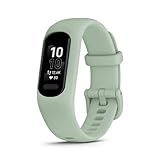
- Easy-to-use, comfortable smart fitness tracker, once setup through the Garmin Connect app, has a touchscreen and button interface plus a brighter, bigger display than vívosmart 4 for larger text.Supported Application:Heart Rate Monitor,Sleep Monitor,GPS,Fitness Tracker,Contacts,Messages,Calendar. Connectivity technology:Bluetooth.
- Get an uninterrupted picture of your health with up to 7 days of battery life in smartwatch mode; safe for swimming and showering, too
- Understand your body by monitoring your respiration, Pulse Ox (Pulse Ox not available in all countries; it is not a medical device), Body Battery energy levels, women’s health, hydration, stress and heart rate (This device is intended to give an estimate of your activity and metrics) with low and high heart rate alerts once set up through the Garmin Connect app
- Get a score for your sleep quality, plus get further insights on how to improve your sleep via the Garmin Connect app
- Reach your fitness goals through fitness age, step tracking, calories burned, intensity minutes and more
A practical account-requirement test
Run these checks before opening the box if possible. Save screenshots of the relevant support pages because requirements can change.
- Find the official setup guide. Search the manufacturer’s support site for the exact model number and your country. Reject a generic family page if it does not identify your phone and operating system.
- Read the first-boot steps. Mark every point that asks for an email address, vendor profile, Google or Apple sign-in, network access, or acceptance of cloud terms.
- Inspect the companion-app listing. Record the minimum Android or iOS version, required permissions, and whether the listing says an account is needed.
- Ask support one precise question. “Can I activate this exact model, record data, view history, export it, and receive notifications without creating any vendor or platform account?” Request a written answer.
- Separate four stages. Verify initial activation, everyday sync, viewing stored data, and retaining or exporting history. A device may pass one stage and fail another.
- Check the return window. If the answer is unclear, buy only where you can return the tracker after testing setup on your own phone.
How to test a tracker after purchase
Before pairing
- Update the phone and install only the official companion app.
- Photograph the box label and exact model number.
- Read the privacy and account-deletion pages before entering health information.
During activation
- Note whether the app blocks setup until you create an account.
- Record whether a phone-platform login appears and whether it is optional or mandatory.
- Do not pair in the phone’s Bluetooth menu first when the manufacturer instructs you to use the companion app, as Garmin’s instructions do.
During the first day
- Wear the tracker long enough to generate a sample of steps, heart-rate readings, sleep, or a workout.
- Turn Bluetooth off briefly and see what the tracker retains locally. Reconnect and observe what synchronizes.
- Test notification permissions, incoming calls or messages, and any GPS mode you intend to use.
Before the return period ends
- Try viewing history after signing out or disconnecting the network, where the app permits it.
- Locate export and deletion controls.
- Confirm that the features you cared about do not require a paid upgrade or a different phone.
Privacy and data-retention questions
Account avoidance is often a privacy concern rather than an aversion to passwords. A peer-reviewed 2025 analysis compared data policies of leading wearables, but it does not establish the current setup flow for any particular model. Use it as context, then read the vendor’s current policy.
Ask these questions:
- Which health and location fields are collected?
- Which fields are uploaded automatically, and can automatic sharing be disabled?
- Can you export data in a usable format before deleting the account?
- What happens to historical data if you stop paying, stop syncing, or the service closes?
- Can support staff or third-party services access identifiable data?
Market size does not answer these questions. The 2025 systematic analysis reported 543 million wearable-device shipments worldwide in 2024, but that figure says nothing about how many trackers support account-free use.
Do these 3 things before closing this tab:
1Scan for outdated or missing drivers - takes under a minute2Clear out junk files and repair common Windows errors3Fix the driver behind crashes, sound loss and screen glitchesCommon mistakes and how to recover
Mistake: treating “subscription-free” as “account-free”
Fix: Ask separately whether registration is required, whether a paid plan is optional, and which features are included without payment.
Mistake: pairing from the phone’s Bluetooth page
Fix: Remove the partial pairing, restart Bluetooth, and follow the manufacturer’s in-app add-device procedure. Garmin specifically directs pairing through Garmin Connect.
Mistake: buying based on another country’s support page
Fix: Use the support site and app store listing for your country. Features, account prompts, and phone support can vary by region.
Mistake: assuming every Android phone is equivalent
Fix: Check the exact handset and operating-system version. The cited Galaxy Fit3 procedure is for a Galaxy S25, not every Android device.
The Tool Desk
Outbyte PC Repair FREEClear out junk files and repair common Windows errorsFree Scan →Outbyte Driver Updater FREEFix the driver behind crashes, sound loss and screen glitchesFind Drivers →Mistake: confusing onboard GPS with phone GPS
Fix: Look for the words “built-in” or “onboard.” If the specification says connected or assisted GPS, plan to carry the phone and keep the required permissions enabled.
Rank #4

- Easy-to-use, comfortable smart fitness tracker, once setup through the Garmin Connect app, has a touchscreen and button interface plus a brighter, bigger display than vívosmart 4 for larger text.Supported Application:Sleep Monitor,Heart Rate Monitor,GPS,Fitness Tracker,Contacts,Messages,Calendar. Connectivity technology:Bluetooth.
- Get an uninterrupted picture of your health with up to 7 days of battery life in smartwatch mode; safe for swimming and showering, too
- Understand your body by monitoring your respiration, Pulse Ox (Pulse Ox not available in all countries; it is not a medical device), Body Battery energy levels, women’s health, hydration, stress and heart rate (This device is intended to give an estimate of your activity and metrics) with low and high heart rate alerts once set up through the Garmin Connect app
- Get a score for your sleep quality, plus get further insights on how to improve your sleep via the Garmin Connect app
- Reach your fitness goals through fitness age, step tracking, calories burned, intensity minutes and more
Mistake: forgetting the data after cancellation
Fix: Test export and deletion before committing to a platform. Keep a personal copy of data you may need for long-term trend tracking.
A decision framework for different priorities
If your priority is leaving Fitbit
Choose the model whose features and phone compatibility fit you, then accept that another account may be part of the trade. The vívosmart 5 is an example of this path: it is positioned as a close alternative, but Garmin Connect requires an account for many functions.
If your priority is avoiding monthly fees
Look for a current comparison that identifies core features as subscription-free, then verify activation and sync separately. The 2025 TechRadar comparison is evidence about its publication-time subscription positioning, not a permanent guarantee.
If your priority is minimizing accounts
Prefer a setup that clearly documents optional sign-in, but demand confirmation for your exact phone and region. The Galaxy Fit3 instructions’ “if prompted” wording is a clue to check the flow, not permission to assume no account is needed.
If your priority is maximum privacy
Evaluate cloud storage, export, deletion, and sharing controls before comparing sensors. A tracker with fewer features but clearer local-data behavior may better match this goal; the available evidence does not identify a universally account-free winner.
If your priority is built-in GPS in a slim band
Filter the list by onboard GPS first. Exclude the vívosmart 5 if onboard GPS is non-negotiable, since Tom’s Guide says it lacks that hardware. Then verify the remaining model’s dimensions and phone requirements from current manufacturer specifications.
Bottom line
There is no evidence here for a mainstream fitness tracker that is guaranteed to be fully useful without every kind of account. A Garmin can replace a Fitbit login while requiring Garmin Connect; a Galaxy Fit3 setup may show only a conditional Google prompt in one Galaxy S25 procedure, but that does not establish universal account-free operation. Choose by testing four separate stages—activation, sync, data access, and history retention—and verify GPS type, phone compatibility, region, privacy controls, and subscription status for the exact model you plan to wear.
Quick Recap
Product prices and availability are accurate as of the date/time indicated and are subject to change. Any price and availability information displayed on Amazon at the time of purchase will apply.

